Pal IVs
Autor:ThisIsZacLast updated:18/02/2025 11:39:44182.9K16KB


Mod Introduction
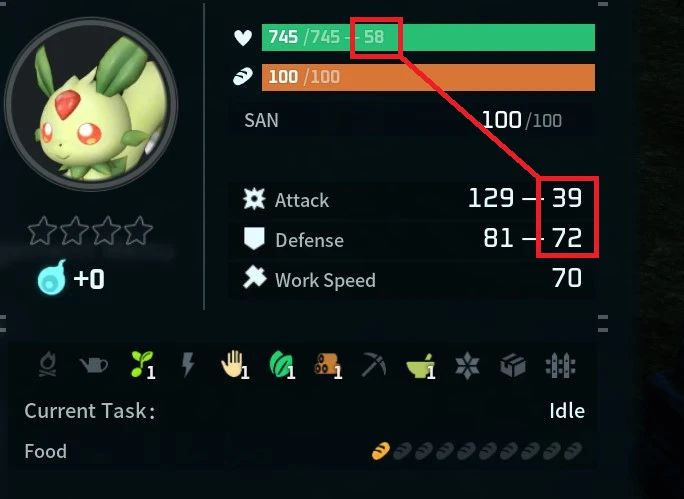
Pal IVs aims to display the IVs of pals next to their stats in various game menus.
Please Read
Please read the full installation instructions for your platform as well as the Troubleshooting article before seeking additional help. If you're still having trouble find me in Discord.
Thank you for the support!
What are IVs?
IVs are a Pals Individual Value. Think of it like the Pal's natural talent so to speak, some Pals are inherently better than others. The higher the IV the higher that stat will scale as the pal levels up.
Configuration
This mod supports Mod Config Menu as of version 0.5. Using the config menu you can configure how IVs are displayed within various windows. Alternatively you may manually modify the config by editing 'PalIVs.modconfig.json' that is located in the same folder as the mod .pak (you must launch the game at least once with the mod installed for the config to be generated). Manually editing the configuration is not recommended and may lead to undesired results if you don't know what you're doing.
Installation
Automatic Installation (via Vortex Mod Manager)
Installation:
Having an Issue? Try this. Still having issues? chat with me on discord.
Please read the full installation instructions for your platform as well as the Troubleshooting article before seeking additional help. If you're still having trouble find me in Discord.
Thank you for the support!
What are IVs?
IVs are a Pals Individual Value. Think of it like the Pal's natural talent so to speak, some Pals are inherently better than others. The higher the IV the higher that stat will scale as the pal levels up.
The highest IV value a Pal can have for a given stat is 100 and the lowest is 0. At an IV of 100 the Pal gets a +30% bonus to that stat.
If you wish to know more there here is a very detailed guide on the topic (Credit to Blahable):
Pal Stat Mechanics Hidden IVs, Level Up Stats, and CalculatorIf you wish to know more there here is a very detailed guide on the topic (Credit to Blahable):
Configuration
This mod supports Mod Config Menu as of version 0.5. Using the config menu you can configure how IVs are displayed within various windows. Alternatively you may manually modify the config by editing 'PalIVs.modconfig.json' that is located in the same folder as the mod .pak (you must launch the game at least once with the mod installed for the config to be generated). Manually editing the configuration is not recommended and may lead to undesired results if you don't know what you're doing.
Installation
Automatic Installation (via Vortex Mod Manager)
Installation:
- If you don't already have UE4SS installed, please install it. See 'Installing UE4SS'
- Go to the files tab (located at the top of the mod page)
- Click 'Mod Manager Download' for the latest version of Pal IVs
- That's it! If you have issues please check herefor possible solutions. If you're still having issue find me on Discord.
- If you don't already have UE4SS installed, please install it. See 'Installing UE4SS'
- Navigate to your PalWorld game directory
Steam: Right click on game in Steam -> Manage -> Browse Local Files
Xbox App: Select Palworld, click the three dot button ( ... ) and click Manage from the dropdown. Then select the FILES tab and click BROWSE... - Navigate to the LogicMods folder in your PalWorld game directory:
- Download and extract the latest version of the mod from the files tab. Be sure to download the correct zip for your platform (Steam or Xbox App)
- Move the contents from the extracted mod folder to the LogicMods folder from above (...\Pal\Content\Paks\LogicMods\). Be sure to only copy the contents and not the entire folder.
- You're done! If you have issues please check the troubleshooting section below to see if there is a solution before reporting.
Having an Issue? Try this. Still having issues? chat with me on discord.
This tool is provided by the third party [bufftool]

Download Mods For Free
Install LagoFast, start Palworld and play with the mods you love.
We use cookies to make interactions with our websites andservices easy and meaningful. For more information aboutthe cookies we use or to find out how you can disable cookies, click here.