
No food decay
Autor:yakuzadesoLast updated:10/03/2024 22:57:15230.1K0KB
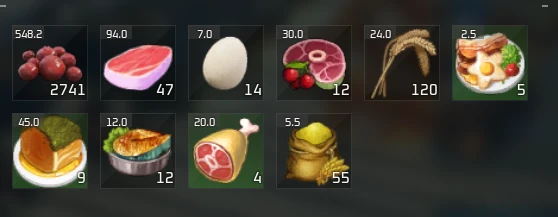

Mod Introduction
Disables food decay.
Disables food decay.
Installation
Installation for dedicated server
Notes
Tested on singleplayer and dedicated server. Works fine on both so I would assume it works fine on co op as well. Needs to be installed on both the server and the clients if you want to use this with your server.
If you want help, info on modding the game and your server you can join the Palworld modding discord server: Invite for Palworld modding discord
REUE4SS generates a log file named UE4SS.log in \Palword\Pal\Binaries\Win64\. You can open it with Notepad to see for errors.
If you installed everything correctly you should something like "Mod 'Pause' has enabled.txt, starting mod." in your log file.
If the mod isn't working for you or if you have any errors you can share the contents of your log file onPastebin.com and share the link in the bugs section of the mod.
To help with crashes open UE4SS-settings.ini in \Pal\Binaries\Win64 and set bUseUObjectArrayCache to false.
Check out my other mods
Gameplay tweaks
Fast travel from anywhere
Better building - Instant and automatic
Capturable tower bosses
No food decay
Pause - Freeze time
Disable motion blur and vignette
100 percent capture rate and custom capture rate Re-upload
Disable item durability mechanic
No item weight
Installation
- Read "Correct folder and file structure".
- Delete xinput1_3.dll in \Palword\Pal\Binaries\Win64 if you installed the xinput version of REUE4SS.
- Download REUE4SS: Releases · UE4SS-RE/RE-UE4SS (github.com). Latest version is 3, direct link to 3: Release v3.0.0 · UE4SS-RE/RE-UE4SS (github.com). File name: "UE4SS _ v3.0. 0. zip".
- Drop its files to \Palword\Pal\Binaries\Win64.
- Download the mod.
- Drop its folder in \Palword\Pal\Binaries\Win64\Mods.
- Read "Notes".
- Correct folder and file structure
- \Palword\Pal\Binaries\Win64\UE4SS.dll
- \Palword\Pal\Binaries\Win64\UE4SS-settings.ini
- \Palword\Pal\Binaries\Win64\dwmapi.dll
- \Palword\Pal\Binaries\Win64\Mods\NoFoodDecay\Scripts\main.lua
Installation for dedicated server
- Read "Correct folder and file structure".
- Download REUE4SS: Releases · UE4SS-RE/RE-UE4SS (github.com). Latest version is 3, direct link to 3: Release v3.0.0 · UE4SS-RE/RE-UE4SS (github.com). File name: "UE4SS _ v3.0. 0. zip".
- Drop its files to <wherever your server is>/Pal/Binaries/Win64.
- Download the server variant of the mod.
- Drop its folder in <wherever your server is>/Pal/Binaries/Win64/Mods.
- Correct folder and file structure
- <wherever your server is>/Pal/Binaries/Win64/UE4SS.dll
- <wherever your server is>/Pal/Binaries/Win64/UE4SS-settings.ini
- <wherever your server is>/Pal/Binaries/Win64/dwmapi.dll
- <wherever your server is>/Pal/Binaries/Win64/Mods/NoFoodDecay/Scripts/main.lua
Notes
Tested on singleplayer and dedicated server. Works fine on both so I would assume it works fine on co op as well. Needs to be installed on both the server and the clients if you want to use this with your server.
If you want help, info on modding the game and your server you can join the Palworld modding discord server: Invite for Palworld modding discord
REUE4SS generates a log file named UE4SS.log in \Palword\Pal\Binaries\Win64\. You can open it with Notepad to see for errors.
If you installed everything correctly you should something like "Mod 'Pause' has enabled.txt, starting mod." in your log file.
If the mod isn't working for you or if you have any errors you can share the contents of your log file onPastebin.com and share the link in the bugs section of the mod.
To help with crashes open UE4SS-settings.ini in \Pal\Binaries\Win64 and set bUseUObjectArrayCache to false.
Check out my other mods
Gameplay tweaks
Fast travel from anywhere
Better building - Instant and automatic
Capturable tower bosses
No food decay
Pause - Freeze time
Disable motion blur and vignette
100 percent capture rate and custom capture rate Re-upload
Disable item durability mechanic
No item weight
This tool is provided by the third party [bufftool]

Download Mods For Free
Install LagoFast, start Palworld and play with the mods you love.
We use cookies to make interactions with our websites andservices easy and meaningful. For more information aboutthe cookies we use or to find out how you can disable cookies, click here.