
Console Enabler
Autor:bitterbeerLast updated:30/11/2024 21:37:054.0K4KB



Mod Introduction
A simple BepInEx / HarmonyX plugin to enable use of the console.
This is a mod to enable the console.
This was developed using BepInEx v5.4.23.2 x64.
All code used in my mods is located on GitHub, publicly accessible, here!
This works by patching the game to believe you are in debug mode and using the Unity editor.
Along with this, I removed the arbitrary requirement of entering "EnableCheats" in the console as it seemed redundant.
This means you'll see that command in the list but it won't do anything.
* If this fails, the default keybind from the developer is CTRL + F1 (as of version 1.0.3)
Some of my favorite commands:
There are a bunch of commands available. I will list them here with their documented usage (as generated by ChatGPT), but I have not tested the vast majority. Comment your testing, if you desire, and I'll update this.
I cannot and will not guarantee the accuracy of this list!
This was developed using BepInEx v5.4.23.2 x64.
All code used in my mods is located on GitHub, publicly accessible, here!
This works by patching the game to believe you are in debug mode and using the Unity editor.
Along with this, I removed the arbitrary requirement of entering "EnableCheats" in the console as it seemed redundant.
This means you'll see that command in the list but it won't do anything.
- Install BepInEx, follow their install guide.
- Place the ConsoleEnable.dll in the BepInEx/plugins directory.
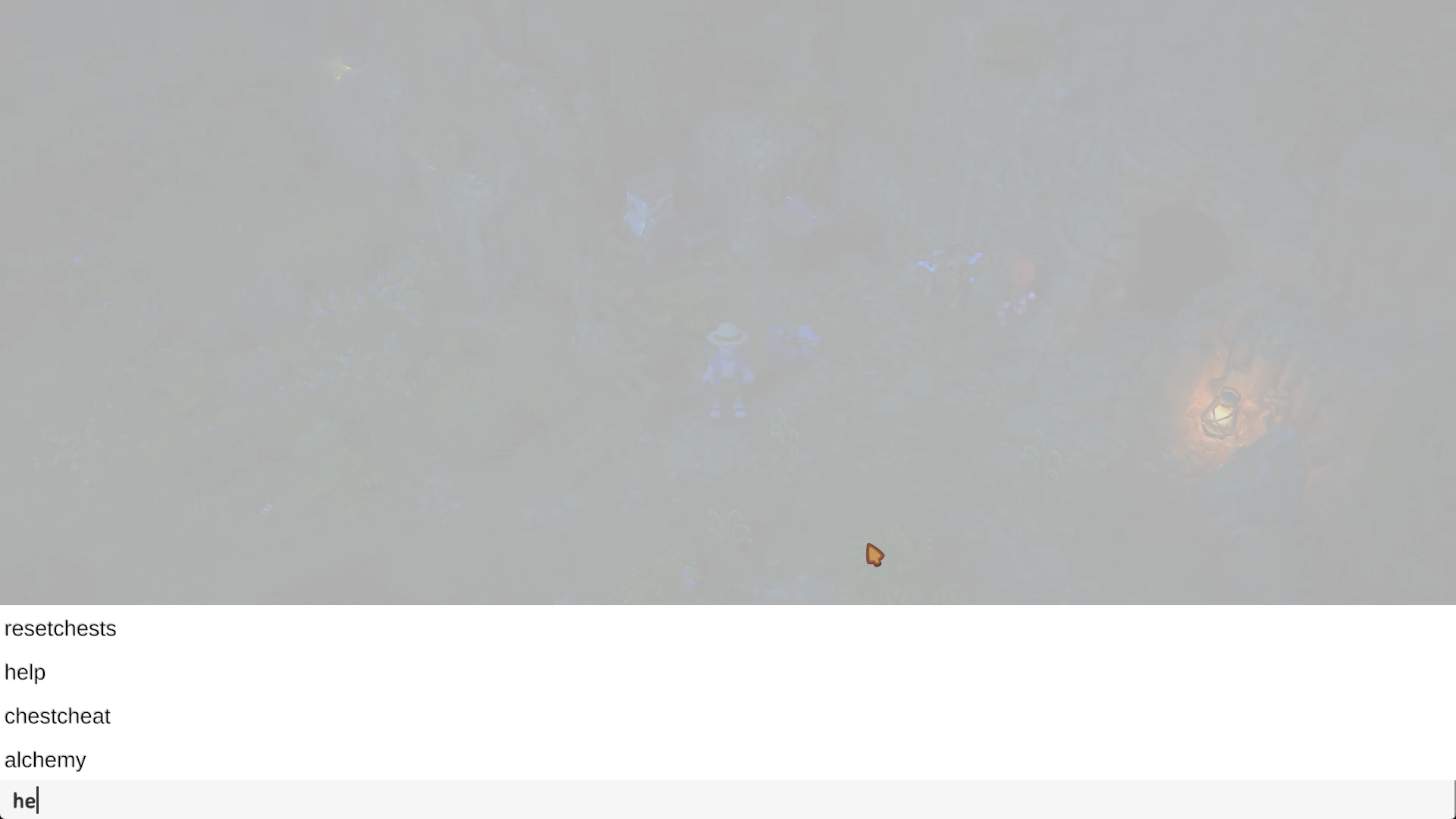
- Launch the game, load a save, then use the backquote (`) key to open the console.*
- Type help for a list of commands.
* If this fails, the default keybind from the developer is CTRL + F1 (as of version 1.0.3)
Some of my favorite commands:
- godmode - Makes the player invulnerable as well as lets you destroy resources in one hit.
- killspiders - Kills spiders that spawn in caves.
- givemoney # - Gives you money, whatever amount.
- Set Time # - Adjusts time to whatever you set. Warning: some events are triggered by time / day, so be cautious here.
There are a bunch of commands available. I will list them here with their documented usage (as generated by ChatGPT), but I have not tested the vast majority. Comment your testing, if you desire, and I'll update this.
I cannot and will not guarantee the accuracy of this list!
- help
- Displays a list of all available commands.
- `help`
- explore
- Usage:
- Description: Gives the player 100 units of various exploration-related items such as different types of wood, stone, metal bars, and other resources.
- Example: `explore`
- freestuff
- Provides the player with 100 units of assorted items including stones, woods, ores, and crafting materials.
- `freestuff`
- alchemy
- Description: Grants the player 50 units of special mushrooms used in alchemy.
- Example: alchemy
- begin
- Usage:
- Gives the player starter items, such as the "StoneMachete".
- `begin`
- tools
- Provides the player with basic tin tools, including an axe, pickaxe, hoe, watering can, fishing rod, bug net, and whip.
- Example: `tools`
- coppertools
- Usage: `coppertools`
- Description: Gives the player copper-tier tools.
- `coppertools`
- irontools
- Provides the player with iron-tier tools.
- `irontools`
- moonstonetools
- Usage: `moonstonetools`
- Description: Gives the player moonstone-tier tools.
- Example: `moonstonetools`
- volcanictools
- Provides the player with volcanic-tier tools.
- `volcanictools`
- Giveaway or gi
- Usage: ` Give items<ItemName><Amount>`
- Description: Gives the player a specified amount of the specified item.
- Example: `giveitem CopperBar 50`
- Item Names: English Localized (other languages could be added, view my GitHub)
- ti
- `ti <ItemName> <Amount>`
- Removes a specified amount of the specified item from the player's inventory.
- ` ti CopperBar 10 `
- giveallitems
- Usage: `giveallitems`
- Description: Provides the player with the maximum stack of all items, excluding blueprints.
- Example: `giveallitems`
- givemoney or gm
- `givemoney <Amount>`
- Adds the specified amount of money to the player's balance.
- `givemoney 1000`
- endday
- Usage: `endday` or `endday <seconds>`
- Description: Ends the current in-game day immediately or after the specified number of seconds.
- Example: `endday` or `endday 10`
- unlockblueprint
- `unlockblueprint <BlueprintName>`
- Unlocks the specified blueprint for the player.
- `unlockblueprint WoodenFence`
- unlockrecipe
- Usage: `unlockrecipe <RecipeName>`
- Description: Unlocks the specified recipe for the player.
- Example: `unlockrecipe HealthPotion`
- unlockall
- Unlocks all blueprints and recipes for the player.
- `unlockall`
- unlockalldrawings
- Description: Unlocks all blueprint drawings for the player.
- Example: `unlockalldrawings`
- unlockallrecipes
- Usage: `unlockallrecipes`
- Unlocks all recipes for the player.
- `unlockallrecipes`
- unlockallshops
- Unlocks all shop items for the player.
- Example: `unlockallshops`
- lockrecipe
- Usage: ` lockrecipe<RecipeName>`
- Description: Locks the specified recipe, removing it from the player's unlocked recipes.
- `lockrecipe HealthPotion`
- freeblueprints
- Unlocks a predefined set of blueprints for the player.
- `freeblueprints`
- Set time
- Usage: ` Set time<hours>` or ` set time<hh:mm:ss>`
- Description: Sets the in-game time to the specified hour or time.
- Example: 'settime 14' or 'settime 08:30:00'
- givetokens
- ` givetokens<TokenTypeName><Amount>`
- Gives the player the specified amount of tokens of the specified type.
- ` givetokens GoldToken 5 `
- startminigame
- ` startminigame<MinigameName>`
- Description: Starts the specified minigame.
- Example: ` startminigame FishingChallenge `
- growforest
- Usage:
- Regenerates the forest by spawning trees and other flora.
- `growforest`
- growgrass
- Regenerates grass in the current level.
- Example: `growgrass`
- cleargrass
- Usage: `cleargrass <CuttingRange>`
- Description: Clears grass within the specified range around the player.
- `cleargrass 10`
- flipinstances
- `flipinstances <Range>`
- Flips instances of objects (e.g., tiles) within the specified range around the player.
- `flipinstances 5`
- getlightamount
- Usage: `getlightamount`
- Description: Displays the current light amount at the player's location.
- Example: `getlightamount`
- rebakenavmesh
- Rebuilds the navigation mesh for the current level.
- ` rebakenavmesh `
- listunlockedrecipes
- Usage:
- Description: Lists all recipes currently unlocked by the player.
- Example: `listunlockedrecipes`
- clear
- Clears the console log.
- `clear`
- setrtpc
- ` setrtpc<name><value>`
- Description: Sets the value of the specified Real-Time Parameter Control (RTPC) in the audio system.
- Example: `setrtpc MusicVolume 0.5`
- setglobalstate
- Usage: ` setglobalstate<key><value>`
- Sets a global game state variable to the specified value.
- `setglobalstate WeatherState 2`
- getglobalstate
- ` getglobalstate<key>`
- Retrieves and displays the value of the specified global game state variable.
- Example: `getglobalstate WeatherState`
- setplayerstate
- Usage: `setplayerstate <key> <value>`
- Description: Sets a player-specific state variable to the specified value.
- `setplayerstate Health 100`
- getplayerstate
- `getplayerstate <key>`
- Retrieves and displays the value of the specified player state variable.
- `getplayerstate Health`
- xpbomb
- Usage: `xpbomb` or `xpbomb <amount>`
- Description: Spawns experience orbs of all types at the player's location. Optional `amount` specifies the XP value.
- Example: `xpbomb` or `xpbomb 200`
- dropxp
- ` dropxp<Amount>`
- Drops XP orbs of all types with the specified amount at the player's location.
- ` dropxp 150 `
- givexp
- `givexp <amount>`
- Description: Gives the player the specified amount of experience points.
- Example: `givexp 500`
- resetcaves
- Usage:
- Resets all caves in the game.
- `resetcaves`
- resetcave
- Resets the cave in the current level.
- Example: `resetcave`
- startdanger
- Usage: ` startdanger `
- Description: Triggers a danger event in the dungeon.
- ` startdanger `
- setsimulationspeed
- ` setsimulationspeed<speedModifier>`
- Sets the simulation speed (game time scale) to the specified value. Default is 1.0.
- ` setsimulationspeed 2.0 `
- setgamespeed
- Usage: ` setgamespeed<gameSecondsPerSecond>`
- Description: Sets the rate at which in-game time passes. Default is 60.
- Example: ` setgamespeed 120 `
- freeseeds
- Gives the player 100 units of all seed items.
- `freeseeds`
- growcrops
- Usage: `growcrops <radius>`
- Description: Instantly grows all crops within the specified radius around the player.
- Example: `growcrops 15`
- spawnasloot
- `spawnasloot <ItemName>`
- Spawns the specified item as loot at the player's location.
- `spawnasloot GoldCoin`
- moneyasloot
- `moneyasloot <Amount>`
- Description: Spawns the specified amount of money as loot at the player's location.
- Example: `moneyasloot 500`
- teleport
- Usage: `teleport <locationName>` or `teleport <x> <y> <z>`
- Teleports the player to the specified location or coordinates.
- `teleport TownSquare` or `teleport 100 50 200`
- Level Listing: Here
- startcutscene
- ` startcutscene<CutsceneName>`
- Description: Starts the specified cutscene at the player's current position.
- Example: `startcutscene IntroductionScene`
- godmode
- Usage: ` godmode `
- Enables god mode for the player, making them invincible.
- ` godmode `
- disablegodmode
- Disables god mode for the player.
- Example: ` disablegodmode `
- addtally
- Usage: ` addtally<TallyKey><Amount>`
- Description: Adds the specified amount to the given tally key.
- `addtally EnemiesDefeated 10`
- fillinventory
- `fillinventory <ItemName>`
- Fills the player's inventory with the specified item until no more space is available.
- `fillinventory HealingPotion`
- clearinventory
- Usage:
- Description: Clears all items from the player's inventory.
- Example: `clearinventory`
- startquest
- ` startquest<QuestID>`
- Activates the specified quest globally.
- `startquest FindTheArtifact`
- startquestlocal
- ` startquestlocal<QuestID>`
- Description: Activates the specified quest for the local player.
- Example: `startquestlocal FindTheArtifact`
- startallquestslocal
- Usage:
- Activates all available quests for the local player.
- ` startallquestslocal `
- forcecompletetask
- Forces completion of the next active quest task globally.
- Example: `forcecompletetask`
- forcecompletetasklocal
- Usage: `forcecompletetasklocal`
- Description: Forces completion of the next active quest task for the local player.
- `forcecompletetasklocal`
- forceskiptoendofquest
- Skips to the final task of the active quest for the local player.
- ` forceskiptoendofquest `
- forcecompletetrackedtask
- Usage: `forcecompletetrackedtask`
- Description: Forces completion of the tracked quest's current task for the local player.
- Example: `forcecompletetrackedtask`
- forceallcompletetasklocal
- Forces completion of all active quest tasks for the local player.
- `forceallcompletetasklocal`
- givealllumas
- Usage:
- Description: Gives the player all Luma eggs.
- Example: `givealllumas`
- upgradetool
- Upgrades the currently selected tool.
- `upgradetool`
- Ascending tool
- Description: Increases the experience of the currently selected tool by 10.
- Example: "Ascending Tool"
- setday
- Usage: `setday <dayNumber>`
- Sets the in-game day to the specified day number.
- `setday 5`
- hide
- Hides the root layer UI.
- Example: `hide`
- show
- Usage: `show`
- Description: Shows the root layer UI.
- `show`
- Ingemme
- Hides the game layer UI.
- Hidden Games
- showgameui
- Usage:
- Description: Shows the game layer UI.
- Example: showgameui
- hideworldui
- Hides the world layer UI.
- ` hideworldui `
- showworldui
- Description: Shows the world layer UI.
- Example: `showworldui`
- Show Window
- Usage: ` showwindow<WindowId>`
- Opens the specified UI window.
- `showwindow Inventory`
- hidewindow
- `hidewindow <WindowId>`
- Closes the specified UI window.
- Example: `hidewindow Inventory`
- Coordinates
- Usage: ` coordinates `
- Description: Displays the player's current coordinates in the game world.
- ` coordinates `
- next
- Moves the player to the next temple room if applicable.
- `next`
- ignorecost
- Usage: `ignorecost`
- Description: Enables the cheat to ignore resource costs for actions.
- Example: `ignorecost`
- spider
- Spawns a spider in the cave for the local player.
- `spider`
- setprof
- Usage: ` setprof<ProfessionName>`
- Description: Adds the specified profession to the player.
- Example: `setprof Alchemist`
- allprofs
- Adds all professions to the player.
- "allprofs"
- chestcheat
- Description: Activates a cheat related to treasure chests.
- Example: `chestcheat`
- resetchests
- Usage: `resetchests`
- Resets all treasure chests to an unopened state.
- `resetchests`
- setcraftingspeed
- `setcraftingspeed <craftingSpeed>`
- Sets the crafting speed to the specified value. Default is 1.
- Example: `setcraftingspeed 2`
- setcropspeed
- Usage: `setcropspeed <cropGrowthSpeed>`
- Description: Sets the crop growth speed to the specified value. Default is 1.
- `setcropspeed 1.5`
- spawnspider
- Spawns a spider at the player's location after a 2-second delay.
- `spawnspider`
- spawnbee
- Usage:
- Description: Spawns a bee at the player's current location.
- Example: `spawnbee`
- killspiders
- Removes all spiders from the game world.
- `killspiders`
- killbear
- Description: Removes the first bear found in the game world.
- Example: ` killbear `
- Spawnhost
- Usage:
- Spawns a ghost for the local player.
- ` spawnhost `
- spawnblueprint
- `spawnblueprint <BlueprintName>`
- Begins placement of the specified blueprint if the player has it unlocked.
- Example: `spawnblueprint WoodenHouse`
- unstuck
- Usage: `unstuck`
- Description: Executes the player's unstuck logic to free them from obstacles.
- `unstuck`
- teleporttotile
- ` teleporttotile<x><y>`
- Teleports the player to the specified tile coordinates.
- ` teleporttotile 100 200 `
- bait
- Usage: ` bait `
- Description: Gives the player 999 units of all bait items.
- Example: ` bait `
- printwindowstate
- Prints the current UI window state to the console.
- ` printwindowstate `
- enablewindowlog
- Usage:
- Description: Enables logging of UI window events.
- Example: `enablewindowlog`
- disablewindowlog
- Disables logging of UI window events.
- `disablewindowlog`
- nuke
- Description: Removes all objects from the current level, effectively clearing it.
- Example: nuke
- loadlevel
- Usage: `loadlevel <levelName>`
- Description: Additively loads the specified level into the game.
- Example: `loadlevel DungeonLevel1`
This tool is provided by the third party [bufftool]

Download Mods For Free
Install LagoFast, start Luma Island and play with the mods you love.
We use cookies to make interactions with our websites andservices easy and meaningful. For more information aboutthe cookies we use or to find out how you can disable cookies, click here.