ShowDamage HealthBar
Autor:XiaoHaiNBLast updated:27/09/2025 21:47:27109.3K231KB

Pre-dependencies
Mod Introduction
A mod that displays enemy health bars and damage numbers when attacking enemies in the game. All features are fully configurable to suit your preferences. 一款在游戏中攻击敌人时显示敌人生命值和伤害值的模组。所有功能均可根据您的喜好进行配置。
ShowDamage&HealthBar MOD | Damage Display & Enemy Health Bar Mod
Video Tutorial (Only Chinese)
Bilibili video tutorial: https://www.bilibili.com/video/BV1kNaizqEFD
Tutorial for version 1.0.3: https://www.bilibili.com/video/BV1PWYuzeEFh
Description | Introduction
English: A mod that displays enemy health bars and damage numbers when attacking enemies in the game. All features are fully configurable to suit your preferences.
Chinese: A module that displays a health bar and the damage dealt to an enemy after they are attacked. All features can be configured to your liking.
Features | Functions
English
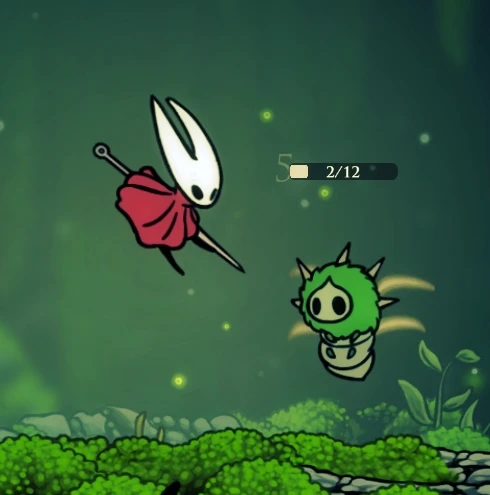
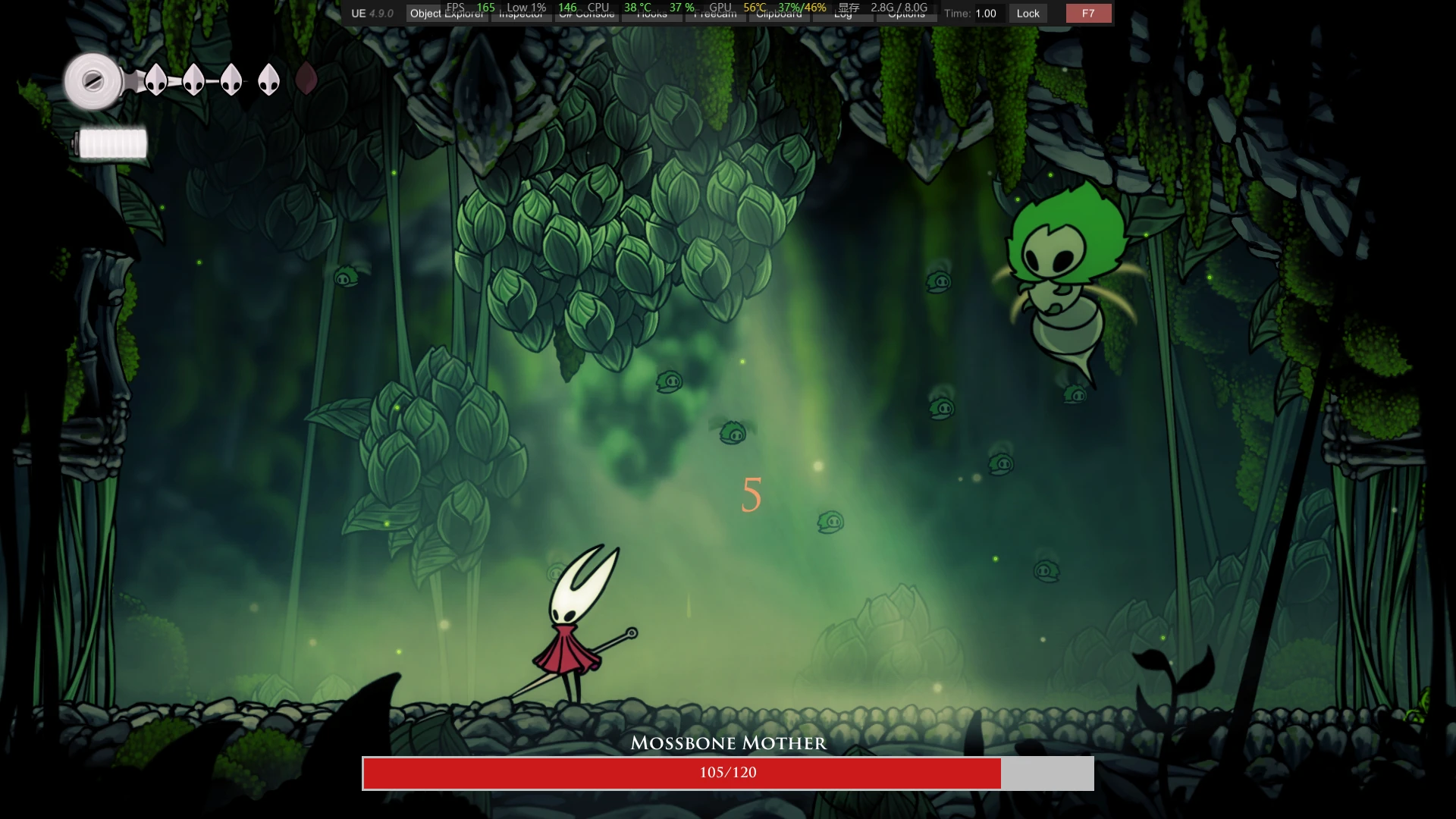
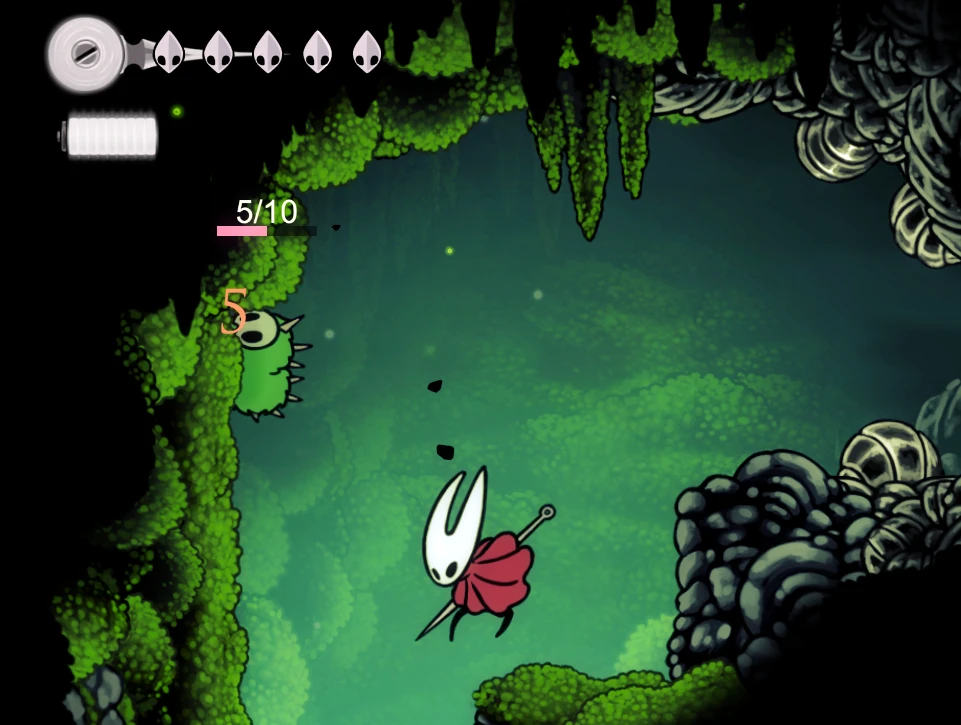
1. Enemy Health Bar: Display health bars based on enemy health percentage after attacking. Health bars maintain fixed orientation (left to right) regardless of enemy facing direction
2. Damage Text Display: Show damage numbers briefly when dealing damage to enemies
3. Health Numbers Display: Show "Current HP/Max HP" text above health bars with customizable font size and color
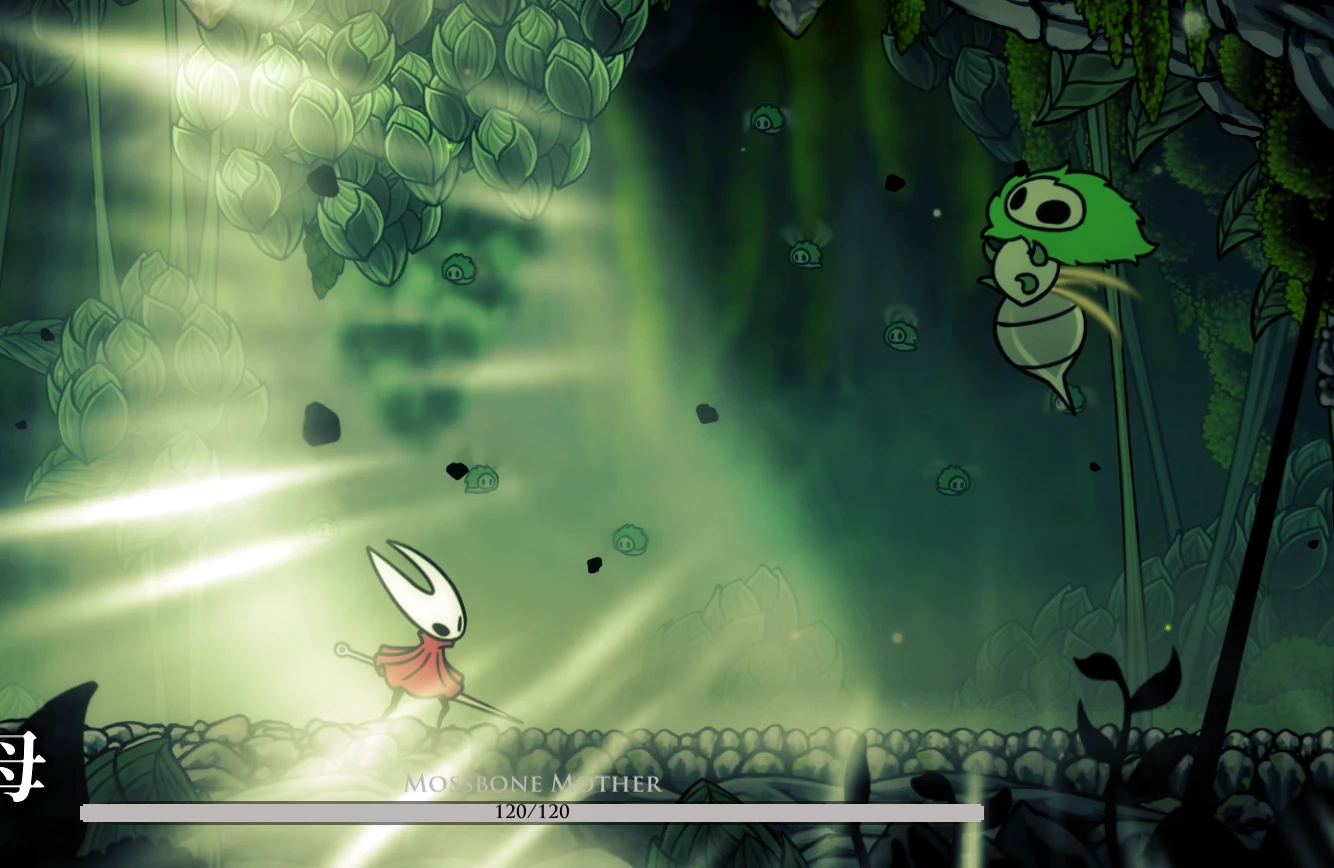
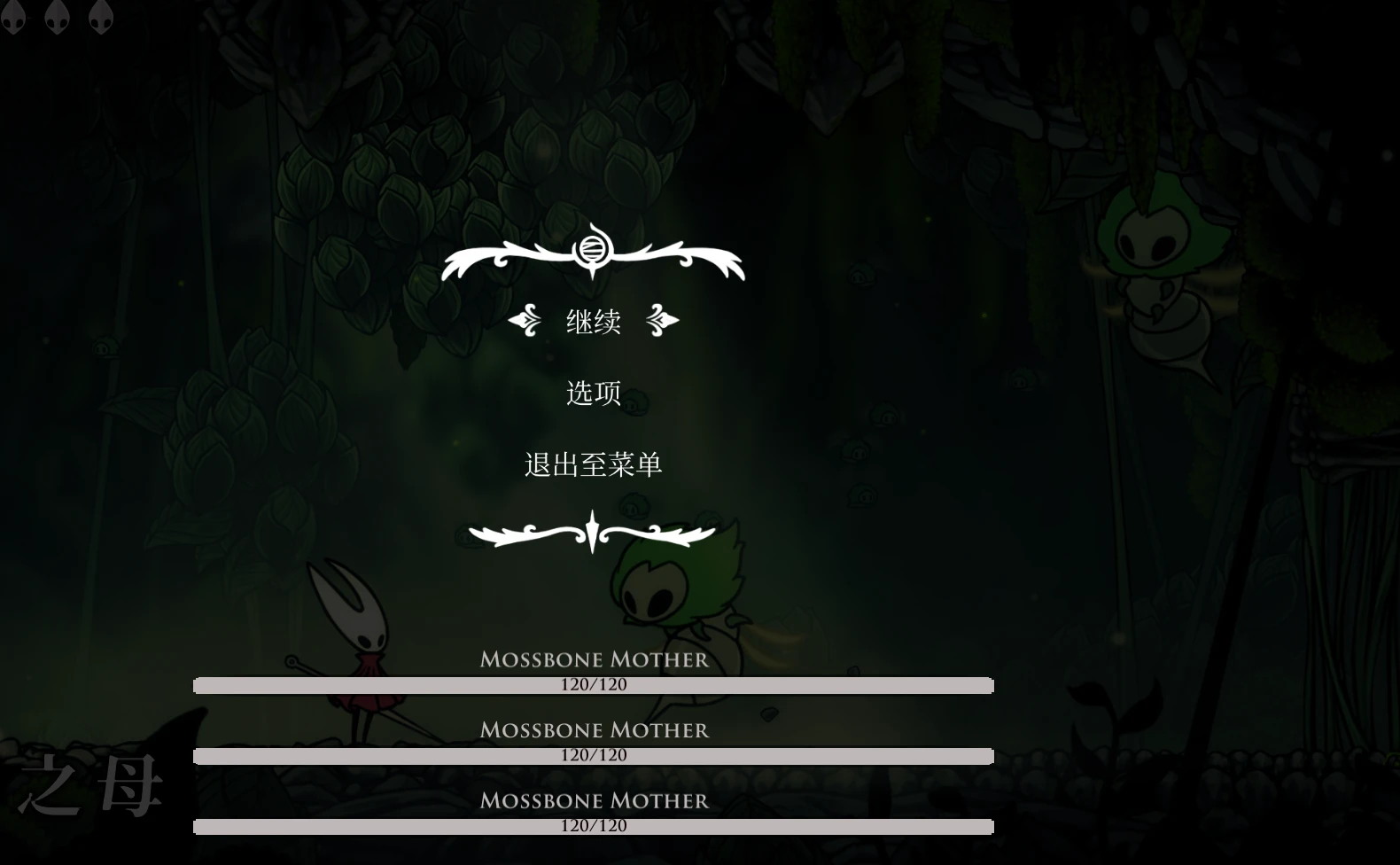
4. Boss Health Bar: Special health bar for high-health enemies with customizable threshold, colors, and positioning
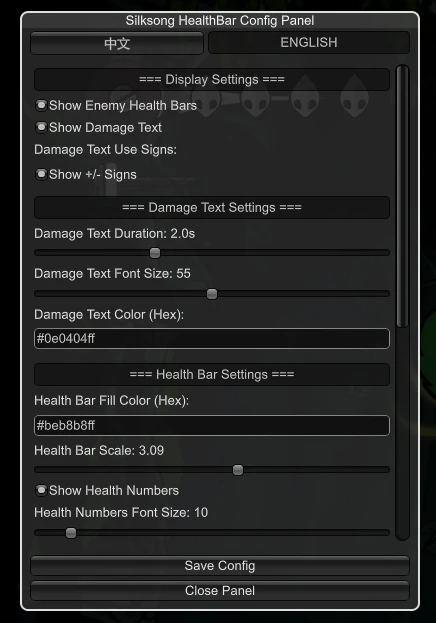
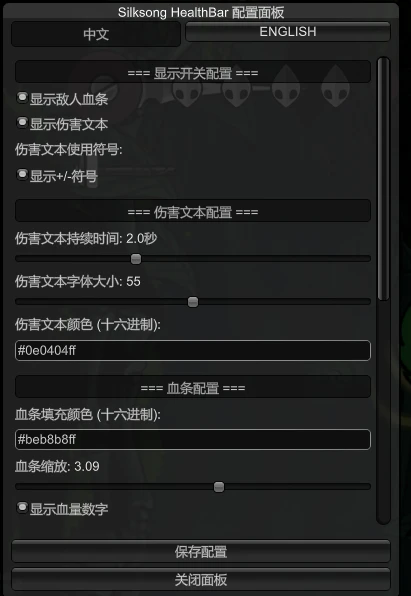
5. In-Game GUI Configuration: Press HOME to open configuration panel with real-time settings adjustment and bilingual support (Chinese/English)
6. Fully Configurable: All features can be customized through configuration files or in-game GUI
Chinese
1. Enemy Health Bar: After attacking an enemy, a health bar based on the enemy's remaining health percentage is displayed. The health bar is unaffected by the enemy's rotation direction and always maintains a fixed orientation (from left to right).
2. Damage Text Display: After attacking an enemy, briefly display the damage value as text.
3. Health Value Display: The text "Current Health / Maximum Health" can be displayed above the health bar, with customizable font size and color.
4. BOSS Health Bar: A special health bar for high-health enemies, supporting customizable thresholds, colors, and positions.
5. In-game GUI Configuration: Press HOME to open the configuration panel, which supports real-time settings adjustment and switching between Chinese and English languages.
6. Fully configurable: All functions can be customized via configuration files or the in-game GUI.
Screenshots | Screenshots

Preview of the mod in action | Mod effect preview

BOSS feature | BOSS health bar function
Configuration | Configurable Items
Display Settings
- ShowHealthBar(Boolean, Default: true): Enable/disable health bar display
- ShowDamageText(Boolean, Default: true): Enable/disable damage text display
- ConfigGUI_Hotkey(KeyCode, Default: Home): Configuration panel hotkey | Hotkey to toggle config GUI
Damage Text Settings
- DamageTextDuration(Float, Default: 2.0): Damage text display duration (seconds)
- DamageTextFontSize(Integer, Default: 55): Damage text font size
- DamageTextColor(String, Default: "#DC143CFF"): Damage text color (hex format)
- DamageTextUseSign(Boolean, Default: true): Whether to display signs (+/-) in damage text.
Health Bar Settings
- HealthBarFillColor(String, Default: "#beb8b8ff"): Health bar fill color (hex format)
- HealthBarWidth(Float, Default: 165): Health bar width (pixels)
- HealthBarHeight(Float, Default: 25): Health bar height (pixels)
- ShowHealthBarNumbers(Boolean, Default: true): Whether to display health numbers (current HP / max HP)
- HealthBarNumbersFontSize(Integer, Default: 20): Health numbers text font size
- HealthBarNumbersColor(String, Default: "#000000FF"): Health numbers text color (hex format)
- HealthBarHideDelay(Float, Default: 1.5): Auto-hide delay after no changes (seconds)
- HealthBarNumbersVerticalOffset(Float, Default: 0.25): Vertical offset of health numbers text.
- HealthBarNumbersInsideBar(Boolean, Default: true): Whether to display health numbers inside the health bar.
- HealthBarNumbersAutoWhiteOnLowHealth(Boolean, Default: true): Automatically turn text white when health is low.
- HealthBarShape(Integer, Default: 2): Health bar shape (1=Rectangle, 2=Rounded)
- HealthBarCornerRadius(Integer, Default: 5): Health bar corner radius (pixels)
Boss Health Bar Settings | BOSS Health Bar Settings
- BossHealthThreshold(Integer, Default: 105): Boss health threshold (displays the boss's health bar when HP exceeds this value)
- BossHealthBarFillColor(String, Default: "#beb8b8ff"): Boss health bar fill color (hex format)
- BossHealthBarWidth(Float, Default: 910): Boss health bar width (pixels)
- BossHealthBarHeight(Float, Default: 25): Boss health bar height (pixels)
- BossHealthBarBottomPosition(Boolean, Default: true): Boss health bar position (true=bottom, false=top)
- BossHealthBarNameColor(String, Default: "#beb8b8ff"): Boss name text color (hexadecimal format)
- BossMaxHealth(Float, Default: 3000): Boss maximum health limit (prevents abnormal display)
- BossHealthBarNumbersColor(String, Default: "#000000FF"): Boss health numbers text color (hex format)
- BossHealthBarShape(Integer, Default: 2): Boss health bar shape (1=Rectangle, 2=Rounded)
- BossHealthBarCornerRadius(Integer, Default: 15): Boss health bar corner radius (pixels)
Don't know what color hexadecimal codes are?
Configuration File Location
Path
The configuration file will be automatically generated after the first run. You can modify the settings and restart the game to apply changes.
The configuration file will be automatically generated upon first run. You can modify the settings and restart the game to apply the changes.
You can now press the Home button to open the GUI menu and dynamically configure these settings in-game!
You can now press the HOME button to bring up the menu at any time to configure these settings! Dynamic loading is supported in-game!
Installation | Installation Method
English
1. Install BepInEx if you haven't already
2. Download the latest release from Thunderstore
3. Extract the mod files to your
4. Launch the game and enjoy!
Chinese
1. If BepInEx is not already installed, please install it first.
2. Download the latest version from Thunderstore.
3. Extract the module files to...
4. Launch the game and enjoy!
Author
Name: Xiaohai
Email | Mailbox[email protected]
Bilibili | Bilibili: https://space.bilibili.com/2055787437
Changelog
Version 1.0.6
- Major Fix: Added monster health threshold protection to prevent abnormal display |Major repairsAdded a threshold check for maximum monster health to prevent abnormal display.
- New Feature: Added customizable health bar width and height settings |New FeaturesAdded two new customizable health bar width and height settings.
- New Feature: Added health bar rounded corner display toggle |New FeaturesAdded a function to switch the display of rounded corners for health bars.
- New Feature: Added low health automatic white text color setting |New FeaturesAdded a setting to toggle the color of the low health text.
- New Feature: Added "Reset to Defaults" button in configuration panel |New FeaturesA "Restore Defaults" button has been added to the configuration panel.
Version 1.0.5
- Major Fix: Fixed multiple BOSS health bars overlapping issue with intelligent position management |Major repairsFixed the issue of overlapping health bars for multiple bosses; added an intelligent location management system.
- Enhancement: Implemented BOSS health bar manager for automatic position calculation |improveImplement a BOSS health bar manager that automatically calculates and arranges its positions.
- New Feature: Added in-game GUI configuration panel (Press HOME to open) |New FeaturesAdded in-game GUI configuration panel (press HOME to open)
- New Feature: Real-time settings adjustment with instant health bar recreation |New FeaturesReal-time settings adjustments and instant health bar reconstruction.
- New Feature: Bilingual support (Chinese/English) in configuration panel |New FeaturesThe configuration panel supports bilingual switching (Chinese and English).
- Enhancement: All configuration options now available through intuitive GUI interface |improveAll configuration options are now accessible through an intuitive GUI interface.
Version 1.0.4
- Major Fix: Fixed health bar remnant issues with triple protection mechanism |Major repairsFixed the issue of residual health bars and added a triple protection mechanism.
- New Feature: Added BOSS health bar with customizable threshold, colors, and positioning |New FeaturesAdded a BOSS health bar, supporting customizable threshold, color, and position.
- New Feature: Added NumbersInsideBar and NumbersVerticalOffset configuration options |New FeaturesAdded NumbersInsideBar and NumbersVerticalOffset configuration items.
- Enhancement: Improved default configuration to better match game aesthetics |improveImproved default configuration to better match game style.
Version 1.0.3
- New Feature: Fixed health bar direction and added health numbers display |New FeaturesFixed the direction of the health bar and added a display of health values.
- Enhancement: Dynamic Canvas sizing and real-time health updates |improveDynamic Canvas resizing and real-time health updates
Version 1.0.2
- New Feature: Added damage text display and improved health bar positioning |New FeaturesAdded damage text display and improved health bar positioning.
- Enhancement: Better visual feedback and screen resolution compatibility |improveBetter visual feedback and screen resolution compatibility
Version 1.0.1
- Initial Release: Basic health bar and damage text display |Initial versionBasic health bar and damage text display
- Bug Fix: Fixed Canvas size limitation for font display |repairFixed font display issues caused by Canvas size limitations.
Future Plans | Update Plans
English
Currently, only core functionality has been implemented. Future updates will include UI styling and beautification to better match the game's aesthetic.
Chinese
For now, only the core functionality has been implemented. In the future, the UI will be stylized and beautified to better match the game's style.
I just want to say | I have something to say
This will likely be the last update for this mod in the near future(v1.0.6). Several major bugs have been fixed, and most styles now support customization — except for UI elements that rely on external resources. I’ve basically done everything possible with pure code.
Next, I’ll be moving on to developing other mods and finally taking the time to actually play the game properly. I’ve barely had time to enjoy it lately.
Thanks everyone for your support~
Good luck and happy gaming! 🎮
This should be the last update (v1.0.6) to my mod recently, and several major bugs have been fixed. Most styles support customization—except for UI elements that reference external resources, I've basically done everything possible with pure code. Next, I'll be developing other mods and seriously experiencing the game. I haven't played it much lately. Thanks for your support! Best of luck!
License | License Agreement
This mod is released under the Creative Commons Attribution 4.0 International License (CC BY 4.0).
You are free to:
- Share — This work may be reproduced or distributed in any medium or in any form.
- Derivation — Modification, transformation, or creation based on this work, including commercial use.
However, the following conditions must be observed:
- Bysignment — You must provide an appropriate bysignment (@小海 Xiaohai).
The following actions must include author attribution:
- Introduce and promote on video platforms
- References from other module platforms
- To further develop and reference the MOD
- Any commercial use or modification
The main purpose of this notice is to warn certain platforms to stop stealing my mods and claiming them as their own! This will only dampen the enthusiasm of mod developers!
Tip


Video Tutorial (Only Chinese)
Bilibili video tutorial: https://www.bilibili.com/video/BV1kNaizqEFD
Tutorial for version 1.0.3: https://www.bilibili.com/video/BV1PWYuzeEFh
Description | Introduction
English: A mod that displays enemy health bars and damage numbers when attacking enemies in the game. All features are fully configurable to suit your preferences.
Chinese: A module that displays a health bar and the damage dealt to an enemy after they are attacked. All features can be configured to your liking.
Features | Functions
English
1. Enemy Health Bar: Display health bars based on enemy health percentage after attacking. Health bars maintain fixed orientation (left to right) regardless of enemy facing direction
2. Damage Text Display: Show damage numbers briefly when dealing damage to enemies
3. Health Numbers Display: Show "Current HP/Max HP" text above health bars with customizable font size and color
4. Boss Health Bar: Special health bar for high-health enemies with customizable threshold, colors, and positioning
5. In-Game GUI Configuration: Press HOME to open configuration panel with real-time settings adjustment and bilingual support (Chinese/English)
6. Fully Configurable: All features can be customized through configuration files or in-game GUI
Chinese
1. Enemy Health Bar: After attacking an enemy, a health bar based on the enemy's remaining health percentage is displayed. The health bar is unaffected by the enemy's rotation direction and always maintains a fixed orientation (from left to right).
2. Damage Text Display: After attacking an enemy, briefly display the damage value as text.
3. Health Value Display: The text "Current Health / Maximum Health" can be displayed above the health bar, with customizable font size and color.
4. BOSS Health Bar: A special health bar for high-health enemies, supporting customizable thresholds, colors, and positions.
5. In-game GUI Configuration: Press HOME to open the configuration panel, which supports real-time settings adjustment and switching between Chinese and English languages.
6. Fully configurable: All functions can be customized via configuration files or the in-game GUI.
Screenshots | Screenshots
Preview of the mod in action | Mod effect preview
BOSS feature | BOSS health bar function
Configuration | Configurable Items
Display Settings
- ShowHealthBar(Boolean, Default: true): Enable/disable health bar display
- ShowDamageText(Boolean, Default: true): Enable/disable damage text display
- ConfigGUI_Hotkey(KeyCode, Default: Home): Configuration panel hotkey | Hotkey to toggle config GUI
Damage Text Settings
- DamageTextDuration(Float, Default: 2.0): Damage text display duration (seconds)
- DamageTextFontSize(Integer, Default: 55): Damage text font size
- DamageTextColor(String, Default: "#DC143CFF"): Damage text color (hex format)
- DamageTextUseSign(Boolean, Default: true): Whether to display signs (+/-) in damage text.
Health Bar Settings
- HealthBarFillColor(String, Default: "#beb8b8ff"): Health bar fill color (hex format)
- HealthBarWidth(Float, Default: 165): Health bar width (pixels)
- HealthBarHeight(Float, Default: 25): Health bar height (pixels)
- ShowHealthBarNumbers(Boolean, Default: true): Whether to display health numbers (current HP / max HP)
- HealthBarNumbersFontSize(Integer, Default: 20): Health numbers text font size
- HealthBarNumbersColor(String, Default: "#000000FF"): Health numbers text color (hex format)
- HealthBarHideDelay(Float, Default: 1.5): Auto-hide delay after no changes (seconds)
- HealthBarNumbersVerticalOffset(Float, Default: 0.25): Vertical offset of health numbers text.
- HealthBarNumbersInsideBar(Boolean, Default: true): Whether to display health numbers inside the health bar.
- HealthBarNumbersAutoWhiteOnLowHealth(Boolean, Default: true): Automatically turn text white when health is low.
- HealthBarShape(Integer, Default: 2): Health bar shape (1=Rectangle, 2=Rounded)
- HealthBarCornerRadius(Integer, Default: 5): Health bar corner radius (pixels)
Boss Health Bar Settings | BOSS Health Bar Settings
- BossHealthThreshold(Integer, Default: 105): Boss health threshold (displays the boss's health bar when HP exceeds this value)
- BossHealthBarFillColor(String, Default: "#beb8b8ff"): Boss health bar fill color (hex format)
- BossHealthBarWidth(Float, Default: 910): Boss health bar width (pixels)
- BossHealthBarHeight(Float, Default: 25): Boss health bar height (pixels)
- BossHealthBarBottomPosition(Boolean, Default: true): Boss health bar position (true=bottom, false=top)
- BossHealthBarNameColor(String, Default: "#beb8b8ff"): Boss name text color (hexadecimal format)
- BossMaxHealth(Float, Default: 3000): Boss maximum health limit (prevents abnormal display)
- BossHealthBarNumbersColor(String, Default: "#000000FF"): Boss health numbers text color (hex format)
- BossHealthBarShape(Integer, Default: 2): Boss health bar shape (1=Rectangle, 2=Rounded)
- BossHealthBarCornerRadius(Integer, Default: 15): Boss health bar corner radius (pixels)
Don't know what color hexadecimal codes are?
Configuration File Location
Path
BepInEx/config/Xiaohai.Silksong_HealthBar.cfgThe configuration file will be automatically generated after the first run. You can modify the settings and restart the game to apply changes.
The configuration file will be automatically generated upon first run. You can modify the settings and restart the game to apply the changes.
You can now press the Home button to open the GUI menu and dynamically configure these settings in-game!
You can now press the HOME button to bring up the menu at any time to configure these settings! Dynamic loading is supported in-game!
Installation | Installation Method
English
1. Install BepInEx if you haven't already
2. Download the latest release from Thunderstore
3. Extract the mod files to your
BepInEx/pluginsfolder4. Launch the game and enjoy!
Chinese
1. If BepInEx is not already installed, please install it first.
2. Download the latest version from Thunderstore.
3. Extract the module files to...
BepInEx/plugins
Folder4. Launch the game and enjoy!
Author
Name: Xiaohai
Email | Mailbox[email protected]
Bilibili | Bilibili: https://space.bilibili.com/2055787437
Changelog
Version 1.0.6
- Major Fix: Added monster health threshold protection to prevent abnormal display |Major repairsAdded a threshold check for maximum monster health to prevent abnormal display.
- New Feature: Added customizable health bar width and height settings |New FeaturesAdded two new customizable health bar width and height settings.
- New Feature: Added health bar rounded corner display toggle |New FeaturesAdded a function to switch the display of rounded corners for health bars.
- New Feature: Added low health automatic white text color setting |New FeaturesAdded a setting to toggle the color of the low health text.
- New Feature: Added "Reset to Defaults" button in configuration panel |New FeaturesA "Restore Defaults" button has been added to the configuration panel.
Version 1.0.5
- Major Fix: Fixed multiple BOSS health bars overlapping issue with intelligent position management |Major repairsFixed the issue of overlapping health bars for multiple bosses; added an intelligent location management system.
- Enhancement: Implemented BOSS health bar manager for automatic position calculation |improveImplement a BOSS health bar manager that automatically calculates and arranges its positions.
- New Feature: Added in-game GUI configuration panel (Press HOME to open) |New FeaturesAdded in-game GUI configuration panel (press HOME to open)
- New Feature: Real-time settings adjustment with instant health bar recreation |New FeaturesReal-time settings adjustments and instant health bar reconstruction.
- New Feature: Bilingual support (Chinese/English) in configuration panel |New FeaturesThe configuration panel supports bilingual switching (Chinese and English).
- Enhancement: All configuration options now available through intuitive GUI interface |improveAll configuration options are now accessible through an intuitive GUI interface.
Version 1.0.4
- Major Fix: Fixed health bar remnant issues with triple protection mechanism |Major repairsFixed the issue of residual health bars and added a triple protection mechanism.
- New Feature: Added BOSS health bar with customizable threshold, colors, and positioning |New FeaturesAdded a BOSS health bar, supporting customizable threshold, color, and position.
- New Feature: Added NumbersInsideBar and NumbersVerticalOffset configuration options |New FeaturesAdded NumbersInsideBar and NumbersVerticalOffset configuration items.
- Enhancement: Improved default configuration to better match game aesthetics |improveImproved default configuration to better match game style.
Version 1.0.3
- New Feature: Fixed health bar direction and added health numbers display |New FeaturesFixed the direction of the health bar and added a display of health values.
- Enhancement: Dynamic Canvas sizing and real-time health updates |improveDynamic Canvas resizing and real-time health updates
Version 1.0.2
- New Feature: Added damage text display and improved health bar positioning |New FeaturesAdded damage text display and improved health bar positioning.
- Enhancement: Better visual feedback and screen resolution compatibility |improveBetter visual feedback and screen resolution compatibility
Version 1.0.1
- Initial Release: Basic health bar and damage text display |Initial versionBasic health bar and damage text display
- Bug Fix: Fixed Canvas size limitation for font display |repairFixed font display issues caused by Canvas size limitations.
Future Plans | Update Plans
English
Currently, only core functionality has been implemented. Future updates will include UI styling and beautification to better match the game's aesthetic.
Chinese
For now, only the core functionality has been implemented. In the future, the UI will be stylized and beautified to better match the game's style.
I just want to say | I have something to say
This will likely be the last update for this mod in the near future(v1.0.6). Several major bugs have been fixed, and most styles now support customization — except for UI elements that rely on external resources. I’ve basically done everything possible with pure code.
Next, I’ll be moving on to developing other mods and finally taking the time to actually play the game properly. I’ve barely had time to enjoy it lately.
Thanks everyone for your support~
Good luck and happy gaming! 🎮
This should be the last update (v1.0.6) to my mod recently, and several major bugs have been fixed. Most styles support customization—except for UI elements that reference external resources, I've basically done everything possible with pure code. Next, I'll be developing other mods and seriously experiencing the game. I haven't played it much lately. Thanks for your support! Best of luck!
License | License Agreement
This mod is released under the Creative Commons Attribution 4.0 International License (CC BY 4.0).
You are free to:
- Share — This work may be reproduced or distributed in any medium or in any form.
- Derivation — Modification, transformation, or creation based on this work, including commercial use.
However, the following conditions must be observed:
- Bysignment — You must provide an appropriate bysignment (@小海 Xiaohai).
The following actions must include author attribution:
- Introduce and promote on video platforms
- References from other module platforms
- To further develop and reference the MOD
- Any commercial use or modification
The main purpose of this notice is to warn certain platforms to stop stealing my mods and claiming them as their own! This will only dampen the enthusiasm of mod developers!
Tip
This tool is provided by the third party [bufftool]

Download Mods For Free
Install LagoFast, start Hollow Knight: Silksong and play with the mods you love.
We use cookies to make interactions with our websites andservices easy and meaningful. For more information aboutthe cookies we use or to find out how you can disable cookies, click here.