
Hogwarts Mod Merger
Autor:IridiumIOLast updated:23/02/2025 09:55:52305.4K86.2MB


Mod Introduction
Standalone Utility to combine and edit mods, enabling previously incompatible mods to work together.Currently able to merge mods that use PhoenixShipData.sqlite and English localization strings.
Merge multiple mod files together, allowing conflicting mods to work together
Currently only works for mods that ModifyPhoenixShipData.sqlite and Main-enUS.bin
Note: Every Game Update that modifies the PhoenixShipData.sqlite file will render all mods that modify this file out of date!
Mod authors will need to update/re-create their mods to incorporate these changes.
***NEW*** version 0.14 and 0.15
Some mods that can be merged with this tool (Many many more can also be merged):
Instructions:
Planned Features (In progress):
For Mod Makers:
If bundling more than PhoenixShipData.sqlite and localization files, please consider splitting these two into a separate pak from the rest of your mod to make it easier for merging :) e.g. Multimod_Mergable.pak and Multimod_NotMergeable.pak to allow merging of parts of the mod that can be merged without breaking the rest.
Merge multiple mod files together, allowing conflicting mods to work together
Currently only works for mods that ModifyPhoenixShipData.sqlite and Main-enUS.bin
More options including .ini merging is coming soon
Note: Every Game Update that modifies the PhoenixShipData.sqlite file will render all mods that modify this file out of date!
Mod authors will need to update/re-create their mods to incorporate these changes.
- If you want a shortcut, you can run your mod through the merger by itself to semi-intelligently patch it to make them compatible again.
***NEW*** version 0.14 and 0.15
- Supports Hogwarts Legacy January 2025 Update
- Rewrote the Mod Patcher logic to be smarter and simpler; all outdated mods (including those built against the original Feb 2023 game version) should now be mergeable without breaking anything majorly. From 0.15 - this also works for English localization files too
- Added Game Version selector: You can now choose which game version you want to merge mods for! You can technically use this feature to merge features from new mods into older versions of the game, but you're on your own if you try this. The main reason for adding this ability is a lot of people are downgrading their games to avoid the latest patch which broke a lot of third party mods.
Some mods that can be merged with this tool (Many many more can also be merged):
- Avada Kedavra Faster Cast
- Alohomora Mod
- Vivarium Upgrado (Rescue all Animals)
- Conjure Anything
- Consistent Basic Cast
- No Cooldowns
Instructions:
- Download Hogwarts Mod Merger.zip and extract to a folder of your preference
- Run Hogwarts Mod Merger
- Choose a Game Version - if your exact version cannot be found, choose the version closest to yours that is OLDER. e.g. if your game is version 1145800, choose version 1130773 in the list.
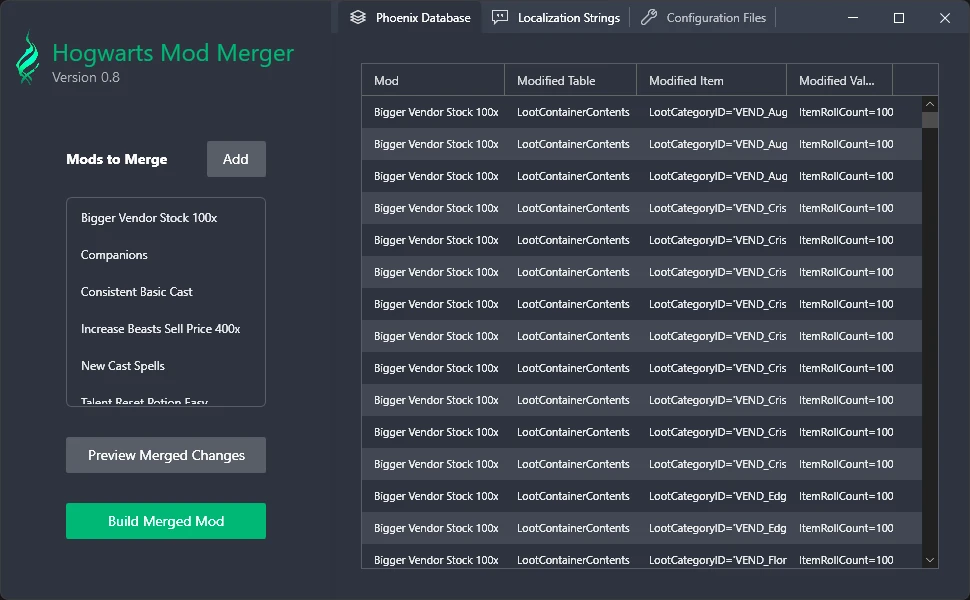
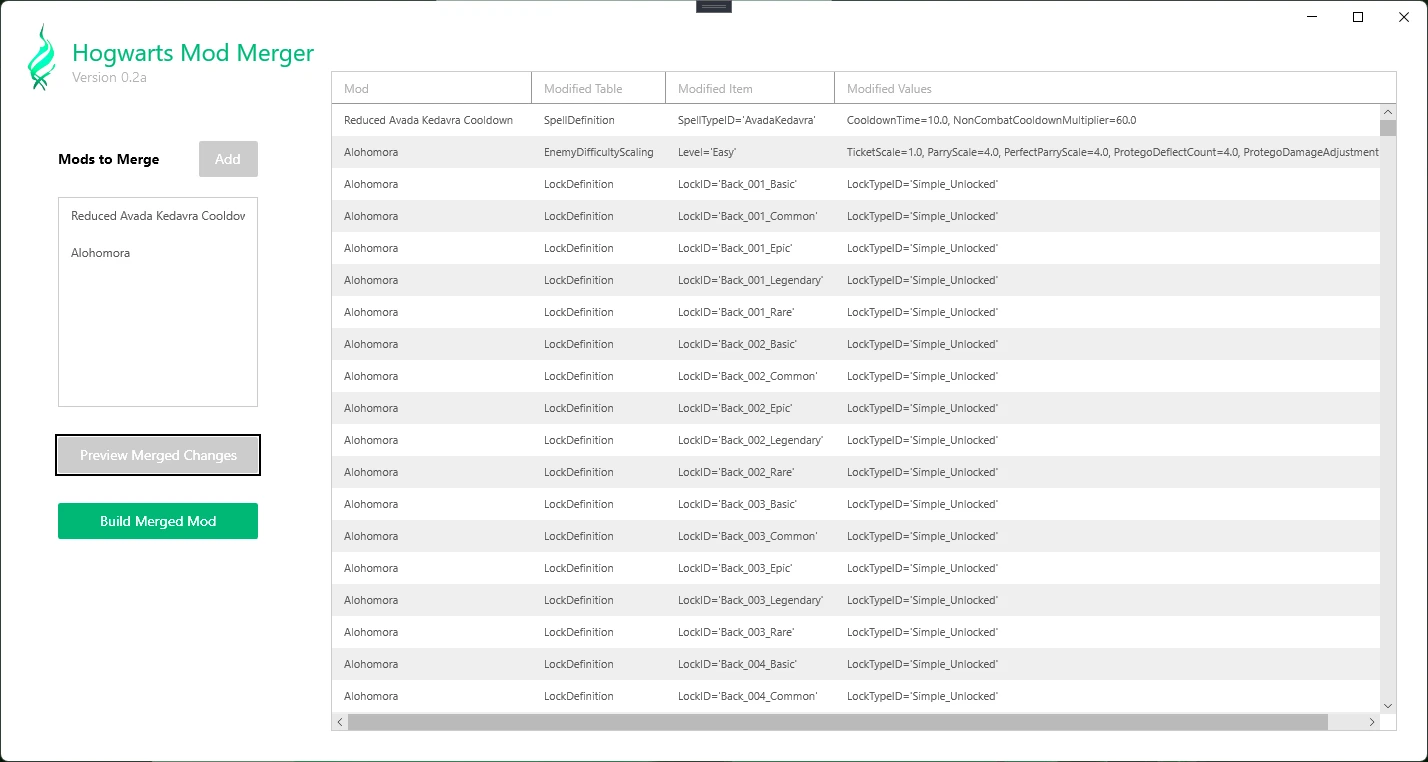
- Click "Add" and find the .pak file/s for the mods you want to add.
Note: Not all mods can be merged in this way; the tool will notify you if this is the case. - A preview of the changes will show up in the table on the right, under the respective tab. Most mods will only modify the Phoenix Database, some will modify both Phoenix and Localization strings.
- Repeat Step 3 for any other mods you want to add. Mods higher on the list will override lower mods if there are conflicts, so the order you add them matters! You can right-click to promote or demote a mod to change its priority.
- Optional: Select each mod in the left list in turn, and right-click to edit or delete the entry. For Localization strings, you instead double-click the value box to edit
- Click "Preview Merged Changes": This will show all the game changes that will be written to a new mod file on the right. This will remove any duplicate entries by default if two mods make the exact same change. Lines can be edited/deleted from this preview as in Step 6.
- Click "Build Merged Mod".
- The output folder will open. Copy the created "Zmergedmods _ p.pak" file to your ~ mods folder (Should be in HogwartsLegacy/Phoenix/Content/Paks/~mods). You can rename the mod whatever you want. It should also be at the bottom of your mod list! Add as many "z"s to the start of the mod name to ensure this.
- Variable: You should be able to delete the individual mods and only keep the merged one - however, if a mod changes more than just the PhoenixShipData.sqlite or language files, this will break them - in this case, keep both the merged mod and the original mod. You will have to play around with the mod order to make sure they work properly
Planned Features (In progress):
- For mods that clash with each other (for example, two mods that both want to change the cooldown of Avada Kedavra), allow you to choose which mod has priority and/or manually edit the selected change to whatever you want.
- Allow merging mods that change control schemes and keybindings, or any ".ini" changes in general.
- Easily make your own mods that modify the database (contains many variables in the game, including cooldowns, unlocked waypoints, challenges, inventory slots, money, health, magic, duelling combos, etc.). I'll release this as a separate tool to avoid bogging this one down too much
For Mod Makers:
If bundling more than PhoenixShipData.sqlite and localization files, please consider splitting these two into a separate pak from the rest of your mod to make it easier for merging :) e.g. Multimod_Mergable.pak and Multimod_NotMergeable.pak to allow merging of parts of the mod that can be merged without breaking the rest.
This tool is provided by the third party [bufftool]

Download Mods For Free
Install LagoFast, start Hogwarts Legacy and play with the mods you love.
We use cookies to make interactions with our websites andservices easy and meaningful. For more information aboutthe cookies we use or to find out how you can disable cookies, click here.