
NightReign Save Transfer
Autor:EonaCatNLLast updated:20/06/2025 15:16:3719.1K503KB

Mod Introduction
# EonaCat Elden Ring Nightreign Save Transfer
# EonaCat Elden Ring Nightreign Save Transfer
NOTE: Steam Cloud may overwrite your modified save file.
If this happens:
Release EonaCat Elden Ring NightReign Save Transfer · EonaCat/NightReign
- Download the program (see Releases).
- Unzip the downloaded ZIP file.
- Run the executable. (Note: .NET 8.0 Runtime is required.)
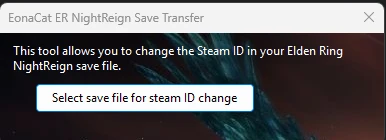
- Select the save file to which you want to transfer your Steam ID.
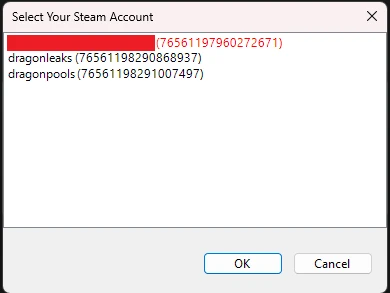
- Select a steam account for the Steam Id extraction)
OR cancel the dialog and: - Enter your Steam ID in the popup window (you need the SteamID64 of your Steam profile).
Example:76561197960272671 - Choose the location where the modified save file should be saved.
(The default save location should already point to the Elden Ring NightReign save directory.)
NOTE: Steam Cloud may overwrite your modified save file.
If this happens:
- Disable Steam Cloud for Elden Ring NightReign.
- Copy the modified save file to the save directory.
- Start the game.
- If it works, you can re-enable Steam Cloud.
Release EonaCat Elden Ring NightReign Save Transfer · EonaCat/NightReign
This tool is provided by the third party [bufftool]

Download Mods For Free
Install LagoFast, start ELDEN RING NIGHTREIGN and play with the mods you love.
We use cookies to make interactions with our websites andservices easy and meaningful. For more information aboutthe cookies we use or to find out how you can disable cookies, click here.