
Input Loader
Autor:jackhumbertLast updated:19/07/2025 23:37:093.8M451KB

Pre-dependencies
Mod Introduction
This plugin looks for all r6/input/*.xml files and merges them with the appropriate input config file from r6/config/ and saves results to r6/cache/. A configuration file is written to engine/config/platform/pc/input_loader.ini, which tells
Cyberpunk 2077 Input Loader
Github page
This plugin looks for all `r6/input/*.xml` files and merges them with the appropriate input config file from `r6/config/` and saves results to `r6/cache/`. A configuration file is written to `engine/config/platform/pc/input_loader.ini`, which tells the game to load the merged .xml files.
Usage for users
1. Install [RED4ext](https://github.com/WopsS/RED4ext)
2. Extract the contents of input_loader.zip to your game's installation directory
A log file will be written to `red4ext/logs/input_loader.log` every start-up, if you're having problems.
Node type
Only children of `<bindings>` are supported currently, but they can all be in the same .xml file (to encourage a mod to have a single .xml file). Depending on the node type, the block will be added to the new `inputContexts.xml` or `inputUserMappings.xml` automatically:
inputUserMappings.xml:
* mapping
* buttonGroup
* pairedAxes
* preset
inputContexts.xml:
* blend
* context
* hold
* multitap
* repeat
* toggle
* acceptedEvents
Node attributes
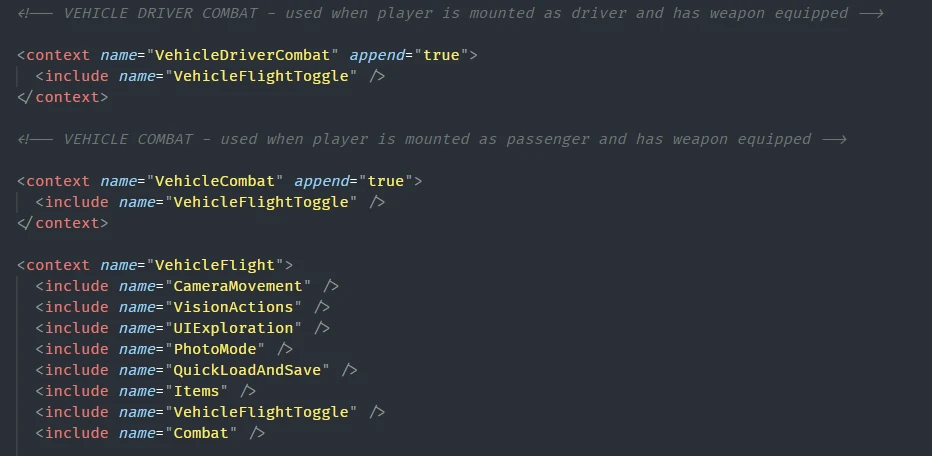
You can add `append="true"` to a node to avoid overwriting. This is the recommended method for adding functionality, as multiple mods will be able to do this without conflicts. See below for an example.
Example .xml file
Uninstallation
Delete these folders/files:
* red4ext/input_loader/
* r6/cache/inputContexts.xml
* r6/cache/inputUserMappings.xml
* engine/config/platform/pc/input_loader.ini
Github page
This plugin looks for all `r6/input/*.xml` files and merges them with the appropriate input config file from `r6/config/` and saves results to `r6/cache/`. A configuration file is written to `engine/config/platform/pc/input_loader.ini`, which tells the game to load the merged .xml files.
Usage for users
1. Install [RED4ext](https://github.com/WopsS/RED4ext)
2. Extract the contents of input_loader.zip to your game's installation directory
A log file will be written to `red4ext/logs/input_loader.log` every start-up, if you're having problems.
Node type
Only children of `<bindings>` are supported currently, but they can all be in the same .xml file (to encourage a mod to have a single .xml file). Depending on the node type, the block will be added to the new `inputContexts.xml` or `inputUserMappings.xml` automatically:
inputUserMappings.xml:
* mapping
* buttonGroup
* pairedAxes
* preset
inputContexts.xml:
* blend
* context
* hold
* multitap
* repeat
* toggle
* acceptedEvents
Node attributes
You can add `append="true"` to a node to avoid overwriting. This is the recommended method for adding functionality, as multiple mods will be able to do this without conflicts. See below for an example.
Example .xml file
<?xml version="1.0"?>
<bindings>
 <!-- Defines a custom context with a custom Action, mapped to UseConsumable_Button -->
 <context name="MyCustomContext" >
  <action name="ShakeAroundABit" map="UseConsumable_Button" />
 </context>
 <!-- Adds the custom context to VehicleDrive without overwriting existing definitions -->
 <context name="VehicleDrive" append="true">
  <include name="MyCustomContext" />
 </context>
</bindings>
Uninstallation
Delete these folders/files:
* red4ext/input_loader/
* r6/cache/inputContexts.xml
* r6/cache/inputUserMappings.xml
* engine/config/platform/pc/input_loader.ini
This tool is provided by the third party [bufftool]

Download Mods For Free
Install LagoFast, start Cyberpunk 2077 and play with the mods you love.
We use cookies to make interactions with our websites andservices easy and meaningful. For more information aboutthe cookies we use or to find out how you can disable cookies, click here.