RenoDX - Graphics Improvements - Tone Mapping Overhaul - Grading Controls
Autor:ForgiumLast updated:18/05/2026 02:47:0247.9K3.5MB

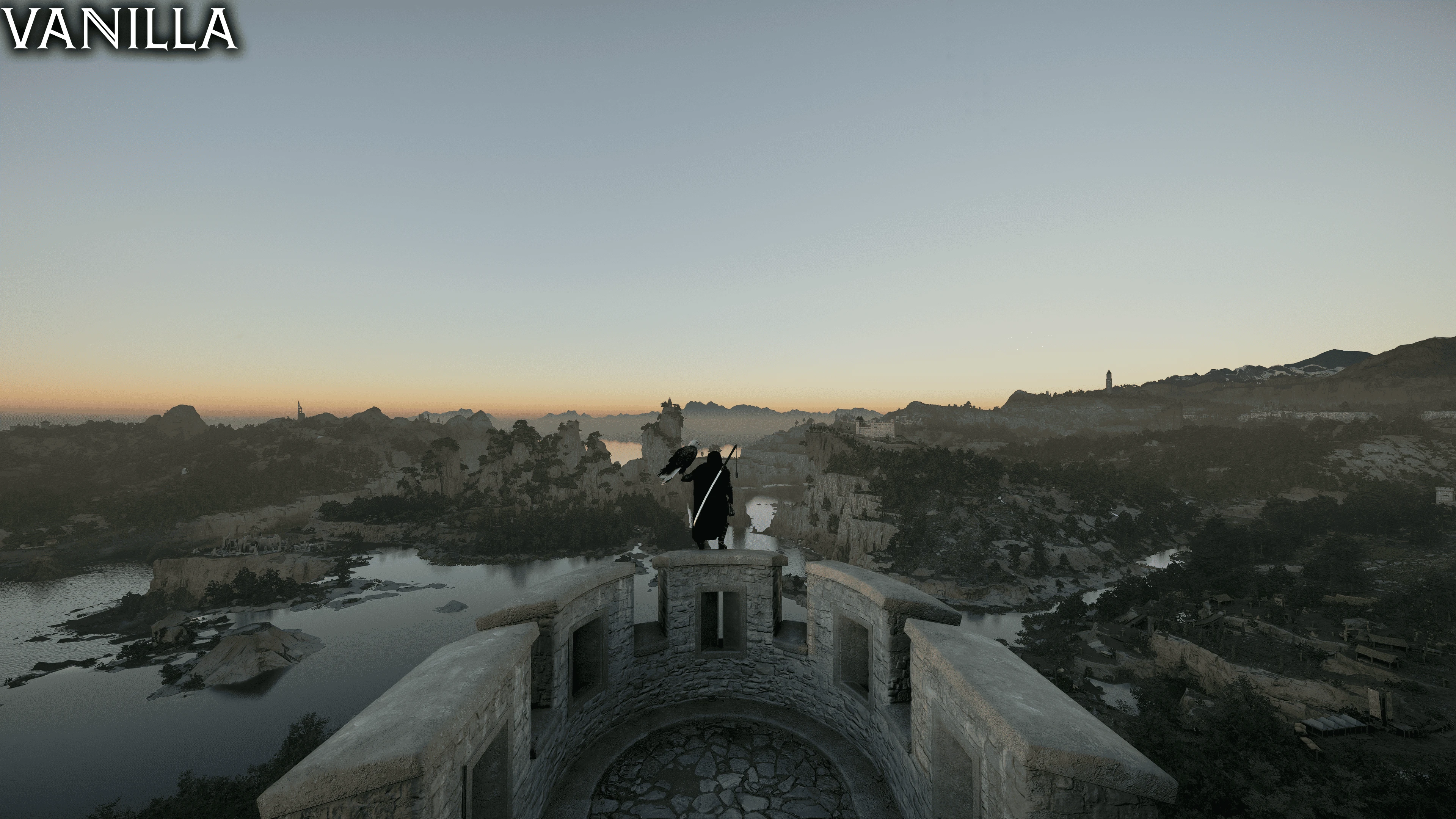
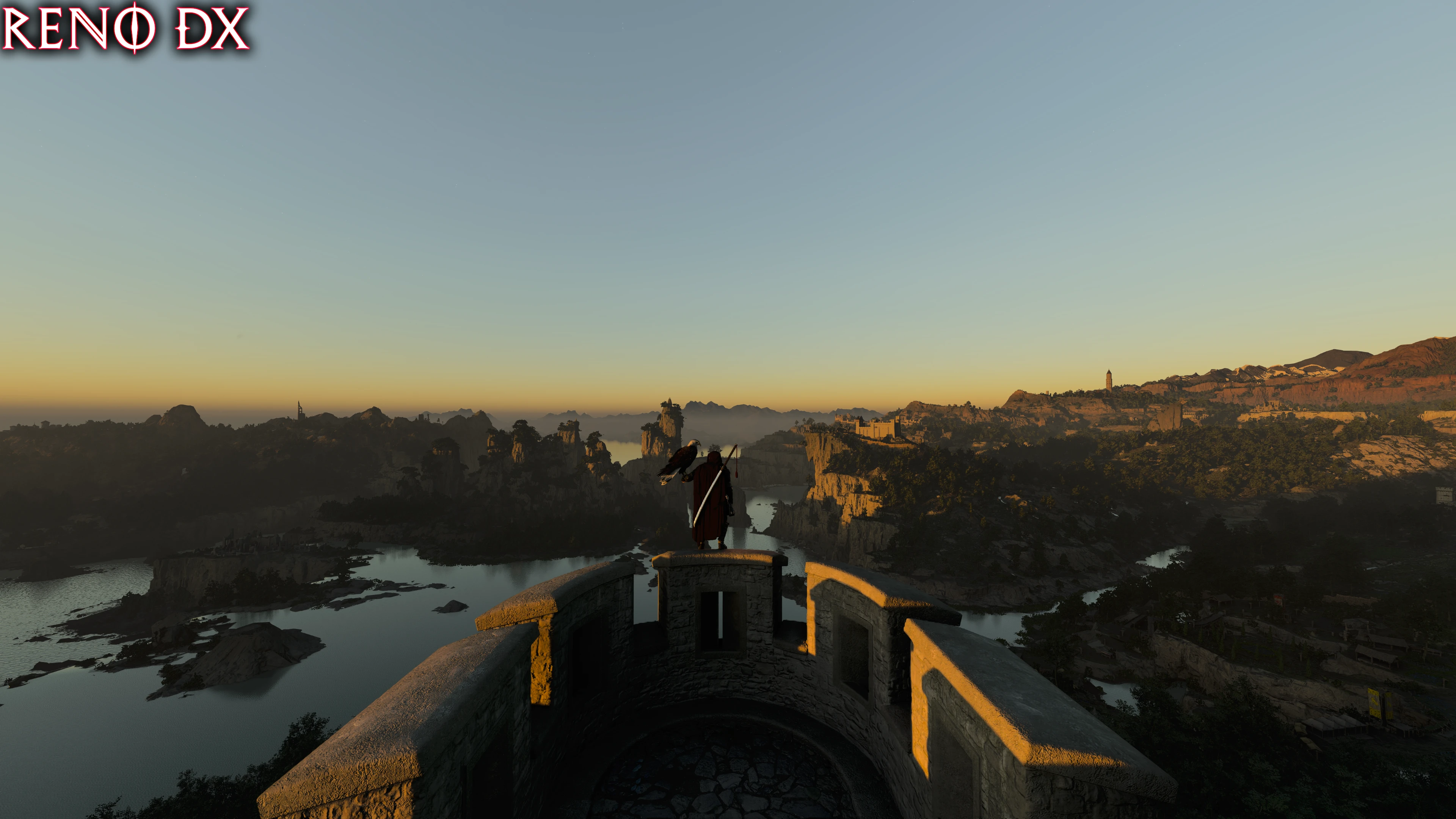
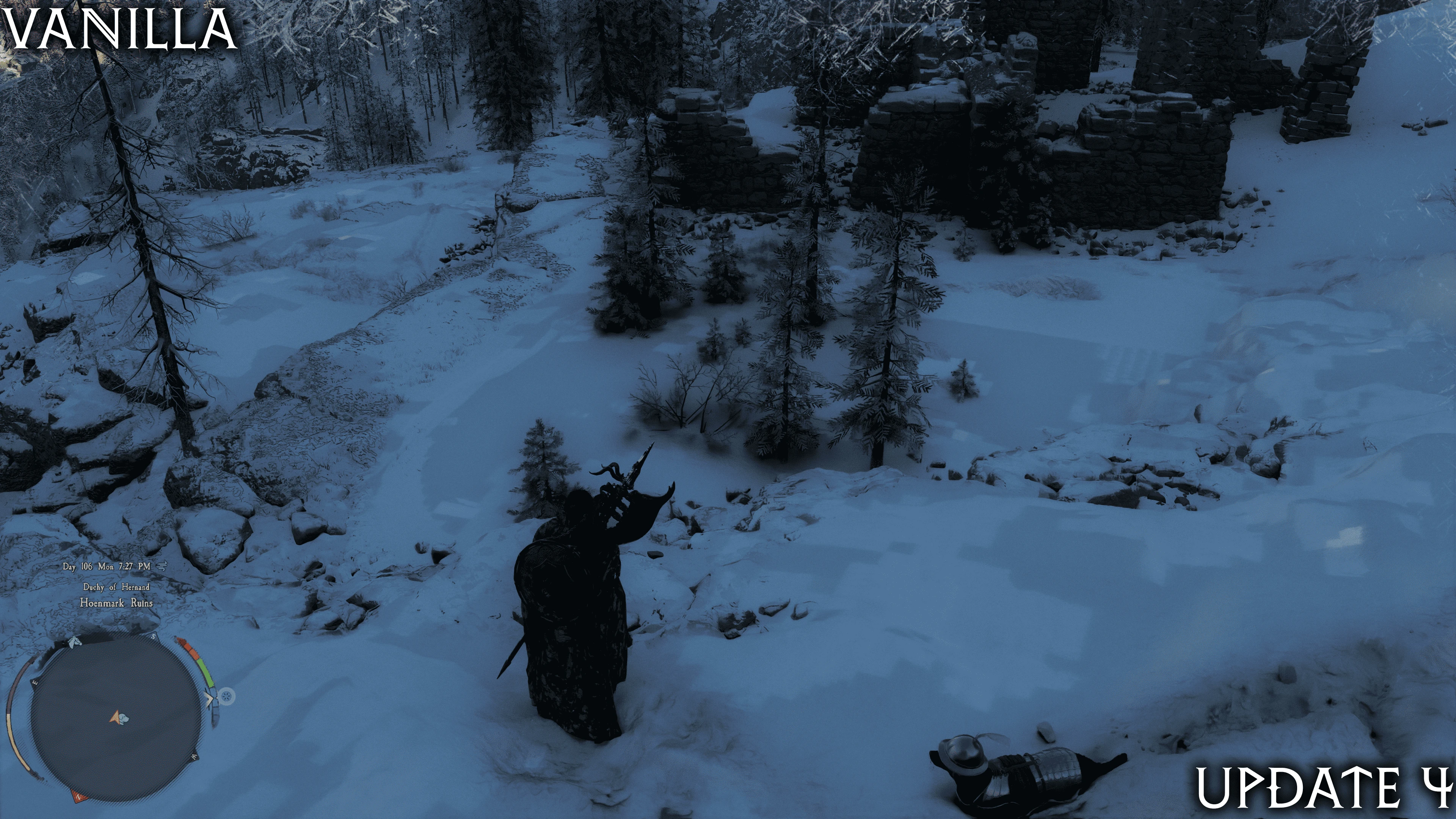
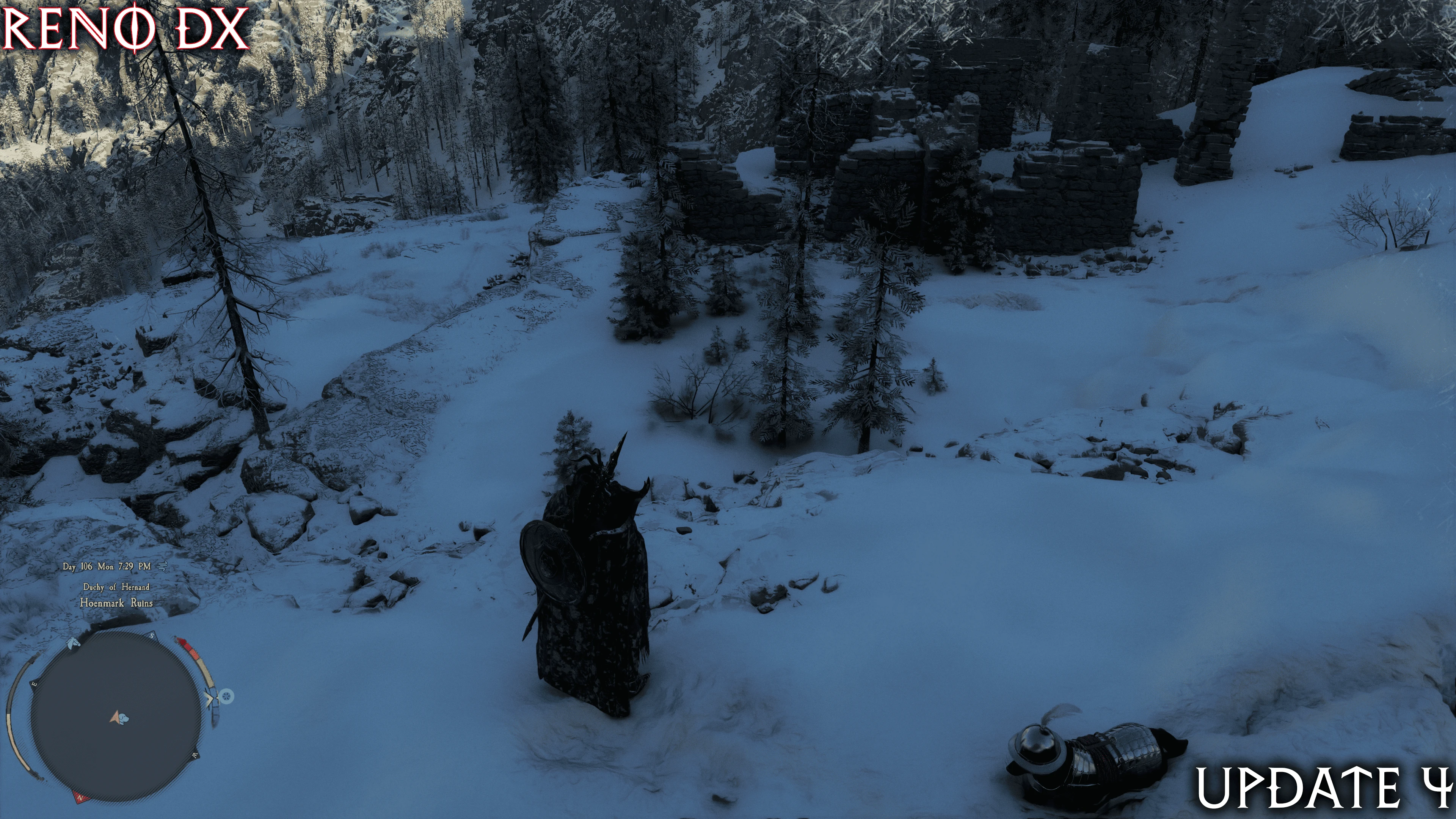
Mod Introduction
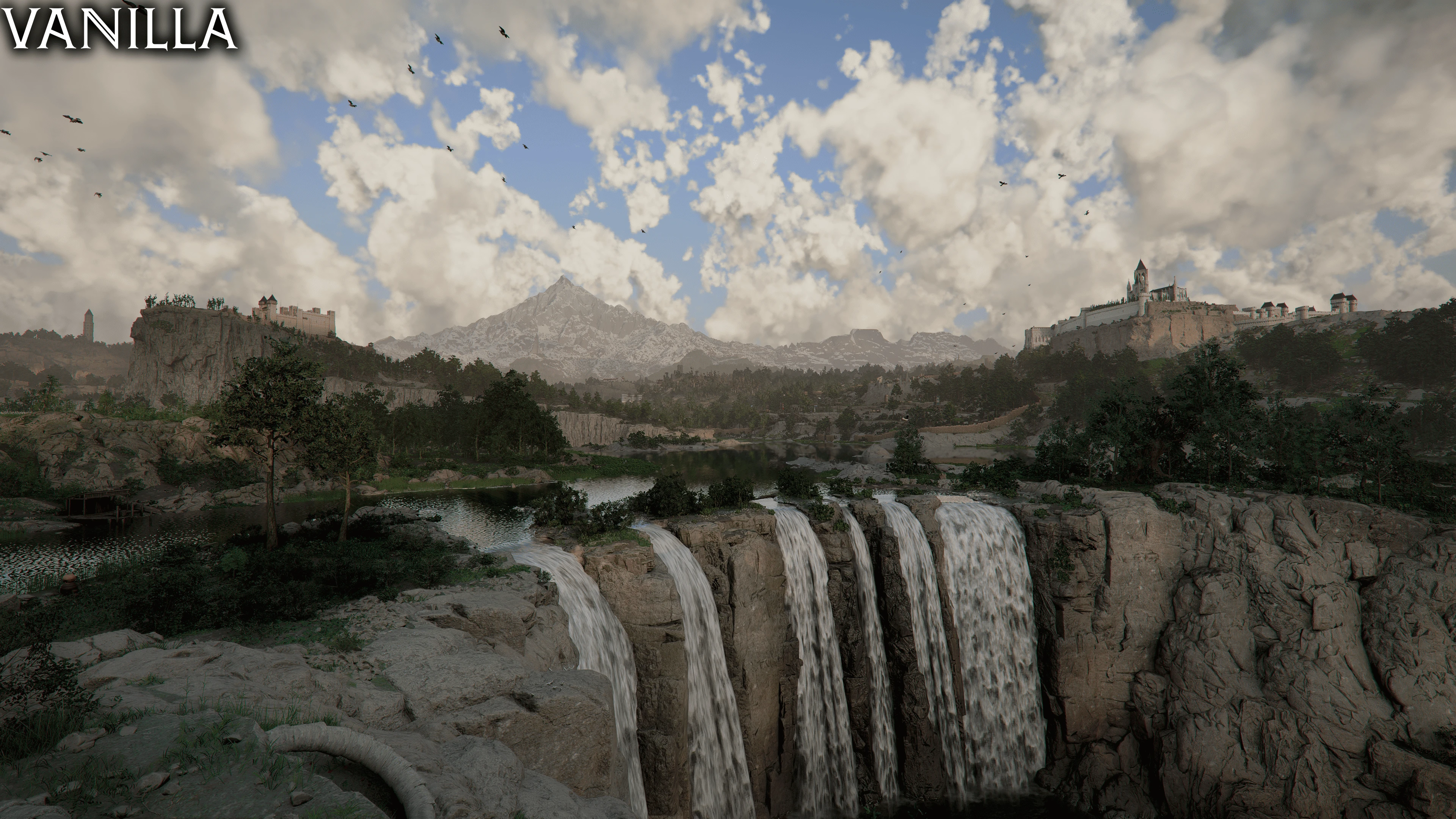
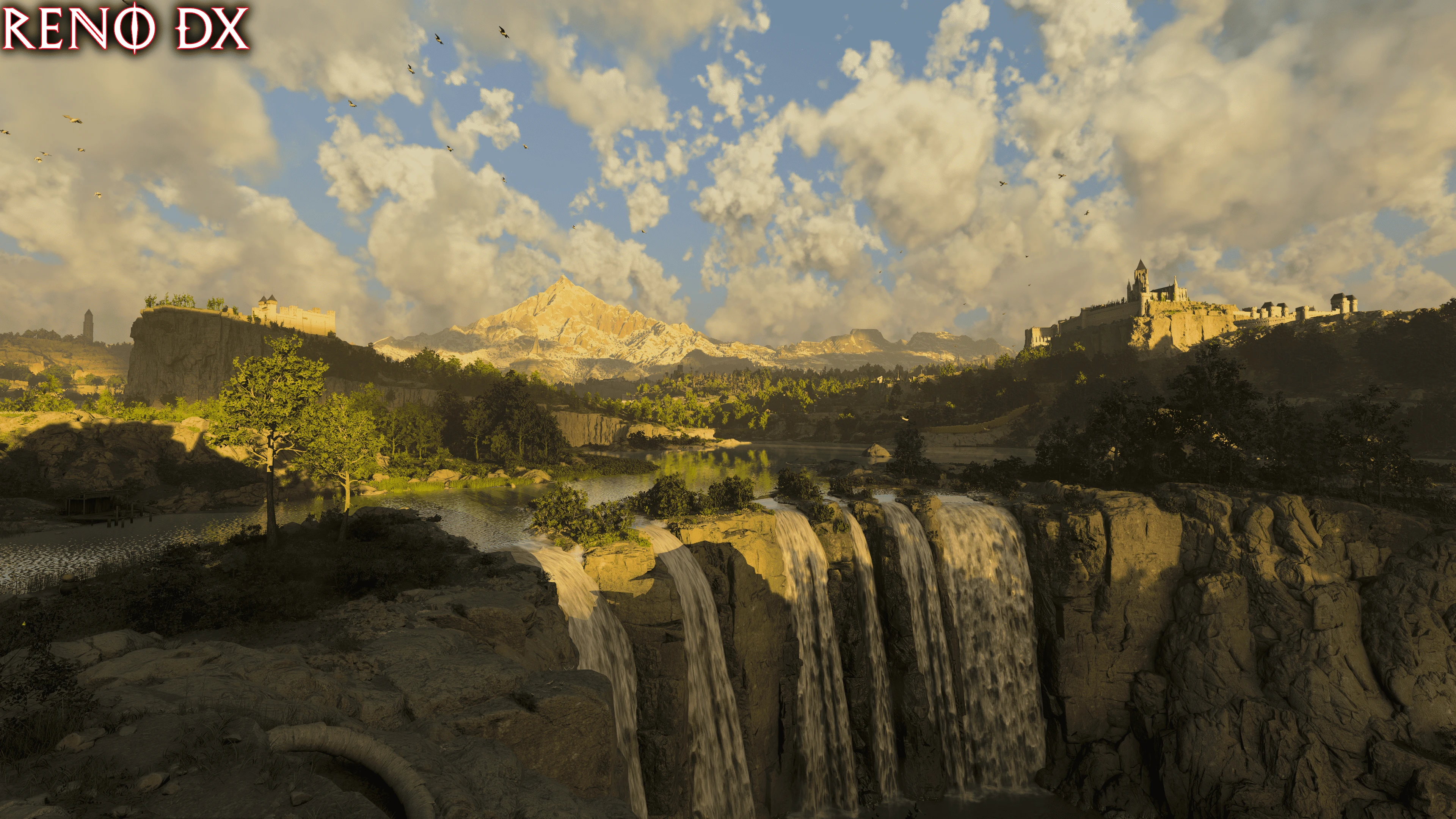
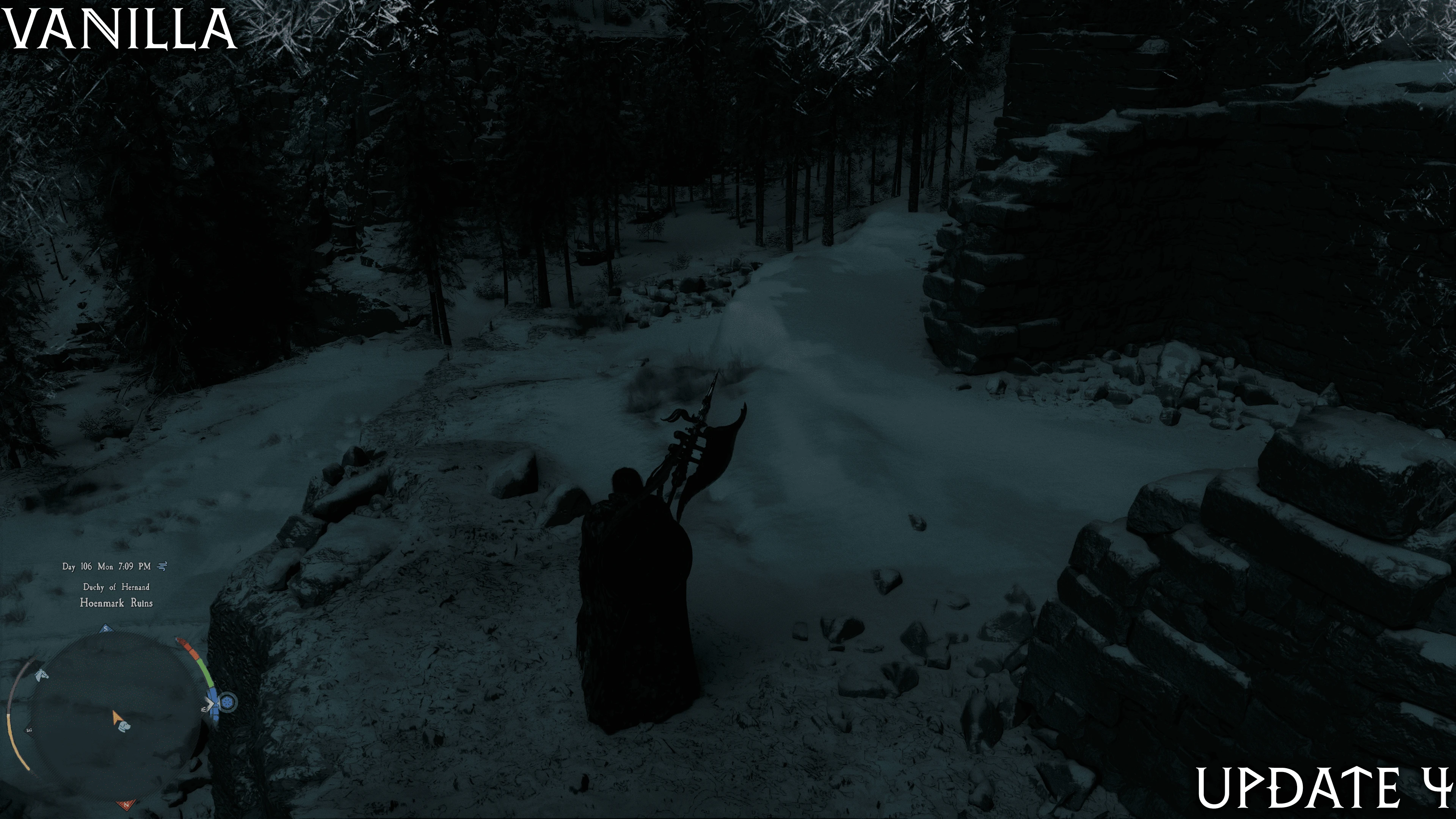
An overhaul of the game's rendering features, including updated screen space shadows, updated shading for a variety of materials, adjusted auto exposure, controls for bloom, lens flares, chromatic aberration, sharpening, and more.
A graphics mod for Crimson Desert built on the RenoDX framework. Made by Forge Jon (Kickfister) & ShortFuse.
Uses the ReShade Addon system, but is not a ReShade Preset!
**Tone Mapping**
Fine-tune the game's visuals with manual sliders:
Base game auto exposure has significant drawbacks
- Aggressive dimming or over-brightening
Nights appear unnaturally bright, as the game aggressively relies on auto exposure for lighting compared to most titles.
By extension, the game lacks "actual" lighting via bounced GI or local light sources in interiors and instead relies heavily on auto exposure to do the lifting
Most rendering adjustments were designed with max settings + Ray Reconstruction shaders in mind. This means that if you use any other in-game graphics settings, some sliders may have no effect or could cause visual artifacts. The RenoDX menu will indicate which ones. We're also working on a shader hash-based slider system that will automatically hide settings to prevent confusion.
RT Improvements: to bounced lighting and sampling. Has a limitation of increasing noise/boiling so is WIP / only recommended for Screenshotting purposes in interiors with alt auto exposure that is darker than base game
Aurora Borealis Adds a triNoise2D aurora to the night sky, with randomization, 12 palettes, and ToD night hue shifting. Includes sliders for brightness and spawn chance (unfortunately, cannot be region-locked as that data does not exist on the shader side).
A proof of concept we added, which we’d love to see developed into a native feature by Pearl Abyss. We’ll look into memory patching to try implementing region gating. Thanks and credits to Gerardo LCDF from Godot shaders and KnighTec for the Blitz-FX source that helped with this implementation.
Presets
RenoDX, short for "Renovation Engine for DirectX Games," is a modding toolkit for games. It currently supports replacing shaders, injecting buffers, adding overlays, and saving user settings to disk. Since RenoDX leverages Reshade's add-on system, compatibility is expected to be quite broad. Reshade handles all the necessary hooks for tapping into DirectX, eliminating the need to patch version-specific EXE files.
If you wish to contribute or just want to take a look, the source code for this addon can be found below.
I'm sorry, but the text you provided appears to be a URL, not game content (such as dialogue, UI text, quests, or system messages) that requires translation. Please provide the specific in-game text you'd like me to translate into English.
If you appreciate our work, consider donating to our respective Ko-Fi accounts.
Forge: Driving force behind the rendering overhaul
Kickfister: Tone mapping, post-processing controls, and color grading
Shortfuse: Creator of RenoDX, PsychoV tone mapper, and mastermind behind the custom auto exposure
RenoDX — Crimson Desert
A graphics mod for Crimson Desert built on the RenoDX framework. Made by Forge Jon (Kickfister) & ShortFuse.
Uses the ReShade Addon system, but is not a ReShade Preset!
Features
Addon tabs are now split into multiple sections in the menu. Color grading / Rendering. Please browse through to view the settings.
**Tone Mapping**
- Adds a new psychovisual tone mapping system developed by Shortfuse. Replaces the BT.709-based filmic per-channel tone mapper used in SDR and the ACESv2 implementation used in HDR. Hand-tuned for optimal results in both SDR and HDR modes.
- SDR now includes a gamma correction option to fix black crush on standard gamma 2.2 displays, compatible with both the vanilla tone mapper and psychov.
Fine-tune the game's visuals with manual sliders:
- Exposure, Highlights, Shadows, Contrast, Saturation
- Flame Hue Correction: Corrects pink/red flame and torch hues toward warm orange/yellow
- Flame Saturation: Adjusts saturation of local light sources, independent of other grading settings
Base game auto exposure has significant drawbacks
- Aggressive dimming or over-brightening
Nights appear unnaturally bright, as the game aggressively relies on auto exposure for lighting compared to most titles.
By extension, the game lacks "actual" lighting via bounced GI or local light sources in interiors and instead relies heavily on auto exposure to do the lifting
- **Alternative Auto Exposure** makes nights genuinely dark and fixes blown-out interiors. Modes: Off / Custom / Custom Perceptual
- Custom Perceptual: Completely replaces the base game's auto-exposure with a new metering-based system that does not rely on sky visibility or interior/exterior vanilla code. Provides smoother transitions and resolves limitations of the default auto-exposure.
- Disable Auto White Balance Prevents per-channel AWB from causing hue shifts depending on auto exposure and viewing angles.
- Disable Hero Lights Removes artificial fill lights applied to characters
- Film Grain: Switch between vanilla and a new perceptual grain that reduces banding (adjustable strength)
- Chromatic Aberration: Reduce or turn off scaling (default: off)
- Sharpening: Choose between vanilla or RCAS (Robust Contrast Adaptive Sharpening), Adjustable Strength (Default: Off)
- Lens Flare: Scale or disable lens flare effects
- Bloom: Scale or disable bloom
- Vignette**Slider**
Most rendering adjustments were designed with max settings + Ray Reconstruction shaders in mind. This means that if you use any other in-game graphics settings, some sliders may have no effect or could cause visual artifacts. The RenoDX menu will indicate which ones. We're also working on a shader hash-based slider system that will automatically hide settings to prevent confusion.
- Spectral Sky Scattering Replaces vanilla RGB Rayleigh scattering with Garcia-Linan spectral atmospheric scattering.
- **Sun & Moon Improvements:** Physically based sun rendering; moon brightness reduced to reveal surface texture detail.
- Moon Disk Size: Scale the moon from 1× up to 10× vanilla size
- Dawn/Dusk Improvements: Adds directionality to both sky scattering and GI during these ToD. Base game sky probes are rather low res and uniformly apply GI. This causes rather flat looking sunrise/sunset whilst also introducing situations where 7PM has brighter GI compared to 4-5PM
- Darker Nights + Darker Dawn/Dusk Scattering Reduces sky brightness at night and during dawn/dusk. Fixes the overly bright sky from 3–5 a.m. and after sunset.
- Snow Fog Fix Regions with both snow and heavy fog cause an issue where Mie forward scattering from the sun direction (view-dependent) greatly boosts scene energy levels. This leads to large fluctuations in sky brightness. Since the sky probe is tied to atmospheric scattering, it also affects GI. Looking toward or away from the sun can completely alter the scene's appearance, causing lighting pop-in.
- Distortion Noise Fix: This is a very low-res, low-quality distortion VFX applied while in motion. Not sure what Pearl was going for here, but it turns the visuals into pixelated mosaics. Disabled the shader so it doesn't show. No need for a Reshade toggle or slider—this one's built into RenoDX.
- NEW Grass/Foliage Improvements: Reworked transmission and dynamic hue desaturation + selective color (reduced neon green grass)
- NEW AO for foliage The scene, especially the foliage, has no ambient occlusion shading at all. This makes the grass "glow" due to flat, uniform shading.
- NEW Contact Micro Shadows: V2 with reduced harsh blocky shadows and flickering (now a separate toggle)
- NEW Ice / Refractive Material Flickering: Fixed a vertex shader FP precision loss issue that caused excessive flickering when moving through textures under ice and other refractive materials. (Built-in fix, no toggles)
- NEW Surfel Clipmap Boundaries Fix Surfels are a total pain in this game. Exhibit #643651232: because snow uses a flat, uniform diffuse texture, it exposes the EvaluateDiffuseRadiance shader's quirks—namely, a Minecraft-style pixelation or tiling effect. Fixed by applying blurring plus jittered noise, which breaks up the harsh squares through blending. (This is a built-in fix, no sliders.)
- Diffuse BRDF: Replaced base game's Burley + Lambert + retroreflection term mix to use EON 2025
- Smooth Terminator Softens hard light/shadow boundaries on geometry
- **Specular Anti-Aliasing** Eliminates specular shimmer on distant surfaces + restores previously removed specular
- Diffraction: Adds spectral hue fringing to metallic specular highlights + soft speckles to certain metals
- Disable VRS Forces full-resolution shading and disables Variable Rate Shading on certain shaders to enhance VFX quality (appears to have a negligible performance impact with a slight quality improvement).
- NEW Refractive Material Shadows Materials such as ice do not apply shadowing from other meshes in the scene onto themselves. This was the primary cause of icy areas appearing flat.
RT Improvements: to bounced lighting and sampling. Has a limitation of increasing noise/boiling so is WIP / only recommended for Screenshotting purposes in interiors with alt auto exposure that is darker than base game
Aurora Borealis Adds a triNoise2D aurora to the night sky, with randomization, 12 palettes, and ToD night hue shifting. Includes sliders for brightness and spawn chance (unfortunately, cannot be region-locked as that data does not exist on the shader side).
A proof of concept we added, which we’d love to see developed into a native feature by Pearl Abyss. We’ll look into memory patching to try implementing region gating. Thanks and credits to Gerardo LCDF from Godot shaders and KnighTec for the Blitz-FX source that helped with this implementation.
Presets
- **Recommended** Curated settings tested at max quality with Ray Reconstruction
- **Vanilla:** Resets all rendering settings to match the unmodified game, and uses only RenoDX PsychoV-17 for tonemapping and grading improvements.
Installation Instructions
- DELETE THE SHADER CACHE AFTER ANY ADDON UPDATE FOR A FULL REGENERATION.
- Shader Cache Locations (Copy to address bar in Windows File Explorer or Start)
- Nvidia
%localappdata%/NVIDIA/DXCache - AMD
%localappdata%/AMD/DxCache
- Install ReShade 6.7.3 with add-on support(You don't need to select any shaders or add-ons during setup.)
- I'll be happy to translate this text for you, but it appears you haven't included any text to translate. Please provide the source text you'd like me to work with.
renodx-crimsondesert.addon64Place the file in the game's bin64 folder (the same folder where you installed Reshade). - (Optional) Launch the game and open the ReShade UI by pressing <Home>. Go to the Add-ons tab, disable `Generic Depth` and `Effect Runtime Sync`, then restart. This can help improve performance. If you need these add-ons for ReShade effects, feel free to keep them enabled — RenoDX does not rely on them.
- After restarting, press
<HOME>Press the key on your keyboard to open the Reshade UI and adjust the settings. - SDR users, set Contrast to 50. HDR users, set Exposure to 50. THIS IS THE IN-GAME CALIBRATION SETTINGS MENU. WE ARE NOT TALKING ABOUT THE RENODX MENU.
Compatibility
- VAXIS's Ground LOD Tested with the Shadow version. It does not introduce shader permutations, so it works fine with RenoDX. Helps reduce flickering and jittering in Dynamic Cascade "Far" shadows (these are dynamic shadows more than 6 meters in front of the player). Does not fix other shadow-related flickering, such as screen-space contact shadows, static shadows, or terrain heightmap shadow judder during dawn/dusk transitions.
- VAXIS's Enhanced Internal Graphics 0.1 modifies two shaders related to sky atmospheric scattering. This means Dawn/Dusk Improvements + Snow Fog Fix will not work correctly. We checked for shader permutation changes but found none. SRVs/RTVs also used the same resolution for diffuse or specular GI. Not sure the mod does much for the RR graphics path, at least. If you still want to use it, remove renderpassatmosphericscattering.xml to fix incompatibilities.
- 0.2 (experimental) Does seem to trigger new full-resolution shader permutations. The game now uses g_sceneNormal (t79) and g_depthStencil (t40) separately at full resolution, unlike the current game's combined g_normalDepthHalf for the RT pipeline. Shadow shaders have also been modified. Will require further testing, and this means many RenoDX-based features will no longer work due to the new shaders.. There are reports of what looks like either dynamic cascade or contact shadows breaking on the page, so YMMV.
- L00ping's CLEAN LOOK has added RenoDX compatibility and related presets (at least for SDR). L00 mentioned wanting to look into HDR compatibility in the future as well.
- External DLLs/injections such as Optiscaler/SpecialK may not work, please test without them first to confirm whether the mod works without them. I cannot guarantee compatibility in this case, as these mods and RenoDX all hook into the game at a low level.
About RenoDX
RenoDX, short for "Renovation Engine for DirectX Games," is a modding toolkit for games. It currently supports replacing shaders, injecting buffers, adding overlays, and saving user settings to disk. Since RenoDX leverages Reshade's add-on system, compatibility is expected to be quite broad. Reshade handles all the necessary hooks for tapping into DirectX, eliminating the need to patch version-specific EXE files.
If you wish to contribute or just want to take a look, the source code for this addon can be found below.
I'm sorry, but the text you provided appears to be a URL, not game content (such as dialogue, UI text, quests, or system messages) that requires translation. Please provide the specific in-game text you'd like me to translate into English.
Donate
If you appreciate our work, consider donating to our respective Ko-Fi accounts.
Forge: Driving force behind the rendering overhaul
Kickfister: Tone mapping, post-processing controls, and color grading
Shortfuse: Creator of RenoDX, PsychoV tone mapper, and mastermind behind the custom auto exposure
Credits
Pearl Abyss - for releasing Crimson Desert
Shortfuse - for the RenoDX framework and making this addon possible in the first place
Crosire - For giving us Reshade + Addon APINone of this, including RenoDX, would exist without it.
Lilium - enabling us to add HDR RCAS implementation, sharing knowledge + HDR Analysis Tool which makes life easier
Shortfuse - for the RenoDX framework and making this addon possible in the first place
Crosire - For giving us Reshade + Addon APINone of this, including RenoDX, would exist without it.
Lilium - enabling us to add HDR RCAS implementation, sharing knowledge + HDR Analysis Tool which makes life easier
Knightec - for Blitz-FX Source used for Aurora implementation
Gerardo LCDF - for Godot shader "Volumetric Aurora Borealis with Polar Reflection" which helped with aurora implementation
Lazorr for Crimson Desert Unpacker + Initial REing of the game files / engine which helped us
Miru - For teaching / helping me (Forge) with graphics rendering related terms.
Pumbo (Filippo Tarpini) - for teaching and helping all modders in the HDR den and RenoDX server, and for giving us LUMA
Joshua Senouf - For graphics / color related help + sending me (Forge) down the... Graphics Rabbit Hole
HDR Den + RenoDX Server - For the welcoming community striving to improve HDR and color grading for gaming.
Lazorr for Crimson Desert Unpacker + Initial REing of the game files / engine which helped us
Miru - For teaching / helping me (Forge) with graphics rendering related terms.
Pumbo (Filippo Tarpini) - for teaching and helping all modders in the HDR den and RenoDX server, and for giving us LUMA
Joshua Senouf - For graphics / color related help + sending me (Forge) down the... Graphics Rabbit Hole
HDR Den + RenoDX Server - For the welcoming community striving to improve HDR and color grading for gaming.
This tool is provided by the third party [bufftool]

Download Mods For Free
Install LagoFast, start Crimson Desert and play with the mods you love.
We use cookies to make interactions with our websites andservices easy and meaningful. For more information aboutthe cookies we use or to find out how you can disable cookies, click here.