UE4SS for Abiotic Factor
Autor:igromanruLast updated:04/10/2025 15:20:1752.1K8.7MB


Mod Introduction
Working UE4SS for Abiotic Factor
Description
UE4SS(Unreal Engine 4/5 Scripting System) bundle with the necessary configurations to make it work with the latest Abiotic Factor version.
I give each bundle a separate version from the current UE4SS version to better track changes and signal updates.
Manual Installation
As for now Vortex doesn't support the game, so you have to install everything manually.
1. Download the latest bundle fromFilespage
2. Extract/unzip the zip file
3. Move and overwrite thedwmapi.dlland the wholeue4ssfolder to the directory:(game root directory)\AbioticFactor\Binaries\Win64\for Steam
OR(game root directory)\AbioticFactor\Binaries\WinGDKfor GamePass/Microsoft Store version.
For Steam users, it's usually:C:\Program Files (x86)\Steam\steamapps\common\AbioticFactor\Binaries\Win64\
For MS/Xbox, something like:C:\XboxGames\Abiotic Factor\Content\AbioticFactor\Binaries\WinGDK\
orC:\Program Files\WindowsApps\PlayStack.AbioticFactor_1.0.20061.0_x64__3wcqaesafpzfy\AbioticFactor\Binaries\WinGDK
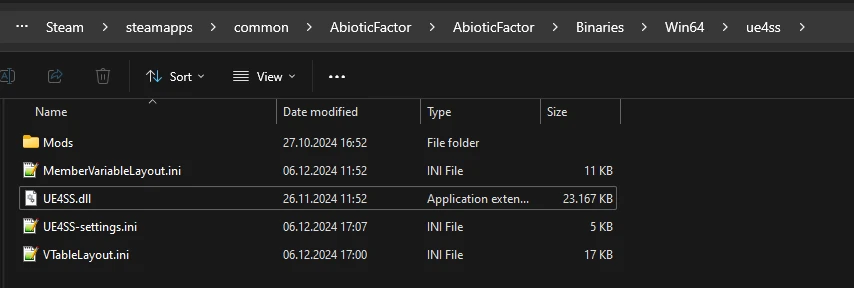
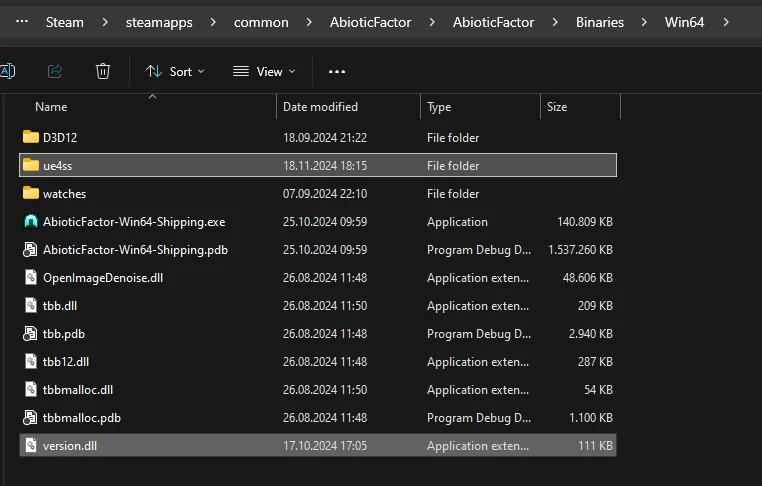
4. Verify that thedwmapi.dllandue4ssfolder are in the same directory as theAbioticFactor-Win64-Shipping.exe
SeeScreenshot.
5. Done, you can download and install mods now.
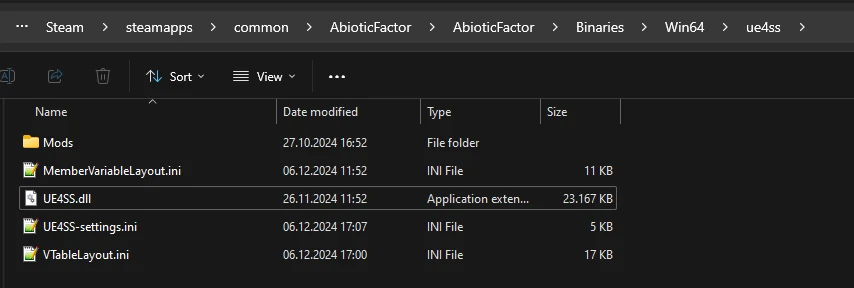
This is how ue4ss directory should look like:Screenshot
Directories
All UE4SS relevant files are now in theue4ssdirectory!
Steam:
Mods: (game root directory)\AbioticFactor\Binaries\Win64\ue4ss\Mods\
mods.txt: (game root directory)\AbioticFactor\Binaries\Win64\ue4ss\Mods\mods.txt
Settings: (game root directory)\AbioticFactor\Binaries\Win64\ue4ss\UE4SS-settings.ini
Log file: (game root directory)\AbioticFactor\Binaries\Win64\ue4ss\UE4SS.log
GamePass/XboxGames:
Mods: (game root directory)\Abiotic Factor\Content\AbioticFactor\Binaries\WinGDK\ue4ss\Mods\
mods.txt: (game root directory)\Abiotic Factor\Content\AbioticFactor\Binaries\WinGDK\ue4ss\Mods\mods.txt
Settings: (game root directory)\Abiotic Factor\Content\AbioticFactor\Binaries\WinGDK\ue4ss\UE4SS-settings.ini
Log file: (game root directory)\Abiotic Factor\Content\AbioticFactor\Binaries\WinGDK\ue4ss\UE4SS.log
Not all mod descriptions might be up-to-date! You have to put all UE4SS mods into the\Win64\ue4ss\Mods\directory, even if the mod says\Win64\Mods\.
Dedicated Server Support
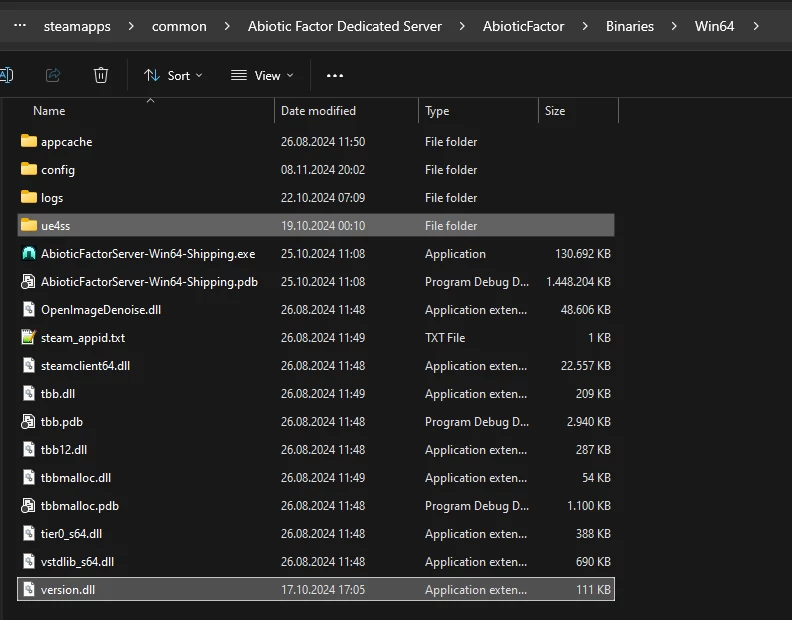
For UE4SS to work in a Dedicated Server, you have to replace the loader,dwmapi.dllwithversion.dllfromOptional Filesin Files tab.
On Linux UE4SS needs Windows environment to run, you need either Proton or at least Wine.
And to add the following command as launch option:
Delete crash dumps sometimes
Sadly, the know crashes (see Known Issues below) probably won't be fixed anytime soon. Therefore, I recommend deleting game's crash dumps once in a while to free space.
1. Navigate intoC:\Users\(your windows username here)\AppData\Local\AbioticFactor\Saved\
Copy and paste into explorer:%userprofile%\AppData\Local\AbioticFactor\Saved\
2. Delete the wholeCrashesfolder.
3. Done.You can do it like once a month, they don't take much space.
Known Issues
Bug Report
If you experience crashes or other UE4SS related issues, please provide a brief description and the content of theUE4SS.log.
The log file is located in theue4ssdirectory.
Path:(game root directory)\AbioticFactor\Binaries\Win64\ue4ss
The easiest way to share the content of the log file is to upload it to a site like:pastebin.com
Credits
GitHub Page
Highest form of appreciation
If you like my work and feel generous, you can support me.


UE4SS(Unreal Engine 4/5 Scripting System) bundle with the necessary configurations to make it work with the latest Abiotic Factor version.
I give each bundle a separate version from the current UE4SS version to better track changes and signal updates.
Manual Installation
As for now Vortex doesn't support the game, so you have to install everything manually.
1. Download the latest bundle fromFilespage
2. Extract/unzip the zip file
3. Move and overwrite thedwmapi.dlland the wholeue4ssfolder to the directory:(game root directory)\AbioticFactor\Binaries\Win64\for Steam
OR(game root directory)\AbioticFactor\Binaries\WinGDKfor GamePass/Microsoft Store version.
For Steam users, it's usually:C:\Program Files (x86)\Steam\steamapps\common\AbioticFactor\Binaries\Win64\
For MS/Xbox, something like:C:\XboxGames\Abiotic Factor\Content\AbioticFactor\Binaries\WinGDK\
orC:\Program Files\WindowsApps\PlayStack.AbioticFactor_1.0.20061.0_x64__3wcqaesafpzfy\AbioticFactor\Binaries\WinGDK
4. Verify that thedwmapi.dllandue4ssfolder are in the same directory as theAbioticFactor-Win64-Shipping.exe
SeeScreenshot.
5. Done, you can download and install mods now.
This is how ue4ss directory should look like:Screenshot
Directories
All UE4SS relevant files are now in theue4ssdirectory!
Steam:
Mods: (game root directory)\AbioticFactor\Binaries\Win64\ue4ss\Mods\
mods.txt: (game root directory)\AbioticFactor\Binaries\Win64\ue4ss\Mods\mods.txt
Settings: (game root directory)\AbioticFactor\Binaries\Win64\ue4ss\UE4SS-settings.ini
Log file: (game root directory)\AbioticFactor\Binaries\Win64\ue4ss\UE4SS.log
GamePass/XboxGames:
Mods: (game root directory)\Abiotic Factor\Content\AbioticFactor\Binaries\WinGDK\ue4ss\Mods\
mods.txt: (game root directory)\Abiotic Factor\Content\AbioticFactor\Binaries\WinGDK\ue4ss\Mods\mods.txt
Settings: (game root directory)\Abiotic Factor\Content\AbioticFactor\Binaries\WinGDK\ue4ss\UE4SS-settings.ini
Log file: (game root directory)\Abiotic Factor\Content\AbioticFactor\Binaries\WinGDK\ue4ss\UE4SS.log
Not all mod descriptions might be up-to-date! You have to put all UE4SS mods into the\Win64\ue4ss\Mods\directory, even if the mod says\Win64\Mods\.
Dedicated Server Support
For UE4SS to work in a Dedicated Server, you have to replace the loader,dwmapi.dllwithversion.dllfromOptional Filesin Files tab.
On Linux UE4SS needs Windows environment to run, you need either Proton or at least Wine.
And to add the following command as launch option:
WINEDLLOVERRIDES="version.dll=n,b" %command%
Delete crash dumps sometimes
Sadly, the know crashes (see Known Issues below) probably won't be fixed anytime soon. Therefore, I recommend deleting game's crash dumps once in a while to free space.
1. Navigate intoC:\Users\(your windows username here)\AppData\Local\AbioticFactor\Saved\
Copy and paste into explorer:%userprofile%\AppData\Local\AbioticFactor\Saved\
2. Delete the wholeCrashesfolder.
3. Done.You can do it like once a month, they don't take much space.
Known Issues
- Random game crashes when loading into game, leaving to main menu or closing the game. (It's annoying but shouldn't impact the game play)
- Sometimes a registered hotkey from any mod can cause a crash. Usually if you press the hotkey without issues it stays this way until the next game start.
Bug Report
If you experience crashes or other UE4SS related issues, please provide a brief description and the content of theUE4SS.log.
The log file is located in theue4ssdirectory.
Path:(game root directory)\AbioticFactor\Binaries\Win64\ue4ss
The easiest way to share the content of the log file is to upload it to a site like:pastebin.com
Credits
- RE-UE4SS Contributorsfor making it possible
- game genre(myself) signatures and configurations for best possible UE4SS performance
GitHub Page
Highest form of appreciation
If you like my work and feel generous, you can support me.
This tool is provided by the third party [bufftool]

Download Mods For Free
Install LagoFast, start Abiotic Factor and play with the mods you love.
We use cookies to make interactions with our websites andservices easy and meaningful. For more information aboutthe cookies we use or to find out how you can disable cookies, click here.