The Best Solution to The Day Before Lag
A Brief Introduction of The Day Before
In 2021, The Day Before was initially made public with a "gameplay" clip that demonstrated the fundamental gameplay elements. Due to a planned conversion from Unreal Engine 4 to Unreal Engine 5, the game's June 2022 release date was pushed back to March 1, 2023. The Day Before's Steam page was removed in January 2023. On January 25, Fntastic announced that the game's title had caused trademark problems and that as a result, The Day Before release date had been further postponed to November 10, 2023.
The studio's founders, however, later revealed to IGN that the postponement was prearranged and would be revealed through a brand-new ten-minute gameplay teaser, even before they were made aware of the trademark conflicts. Additionally, they refuted accusations that the game was a "scam" by saying that Mytona was supporting them, that they were routinely assessed for their progress, and that "we didn't take a penny from people: no crowdfunding, no pre-orders, no donations".
Why The Day Before Lag Happened
The Day Before Lag can occur due to various factors. The most common reasons for lag include:
- Internet Connection: A slow or unstable internet connection can lead to lag. High latency and packet loss can result in delays in gameplay.
- Server Performance: The server's performance and its capacity to handle a large number of players can impact The Day Before lagging Overloaded servers can lead to delays and rubber-banding.
- Hardware Limitations: Your computer's hardware, including CPU, GPU, and RAM, may not meet the game's requirements. Inadequate hardware can result in lag.
- Background Applications: Running resource-intensive background applications while playing can consume system resources and lead to lag. Close unnecessary applications to free up resources.
- Network Congestion: Internet traffic and congestion can affect your connection's stability. Playing during peak hours or on a crowded network may lead to lag.
- Geographical Distance: If you're connecting to a server that is far away from your location, it can increase latency and result in lag.
- Server Location: The location of the game server can also impact lag. If the server is geographically distant from your region, it can lead to The Day Before server lag.
- Software Conflicts: Conflicts with other software or drivers on your computer can cause The Day Before lag. Ensure that your drivers are up to date and that your system is free from conflicts.
- Graphics Settings: Running the game with high graphics settings on hardware that cannot handle them can lead to The Day Before lag spikes. Adjust graphics settings to match your system's capabilities.
- Network Quality: The quality of your internet service can impact lag. A stable and fast connection is crucial for minimizing The Day Before lag.
How To Use LagoFast To Fix The Day Before Lag
For players grappling with the frustrating issue of lag in The Day Before, LagoFast emerges as a formidable ally in the quest for a smoother and more immersive gaming experience. LagoFast's real-time server evaluation ensures optimal server selection, reducing latency and disruptions. With automatic optimization of CPU, GPU, and PC settings, it fine-tunes your system for peak performance. The game mode activation and the ability to overclock AMD and NVIDIA graphics cards further elevate your gameplay. Moreover, LagoFast's compatibility with popular gaming consoles like PlayStation, Xbox, and Nintendo Switch ensures that console gamers can also enjoy lag-free gameplay when connected to the same network.
Say goodbye to lag-induced frustrations and embrace a post-apocalyptic world in "The Day Before" with unprecedented fluidity and precision by harnessing the power of LagoFast.
Benefits:
- Multi-Server Optimization
- Reduced Lag easily
- Real-Time Server Evaluation
- FPS Optimization
- Game Mode Activation
- Graphics Card Overclocking
- Console Optimization
There is a guide to teach you to fix The Day Before Lag with LagoFast.
Step 1: Click the free trial to install LagoFast.
Step 2: Search The Day Before in the search box and select it in the search result.
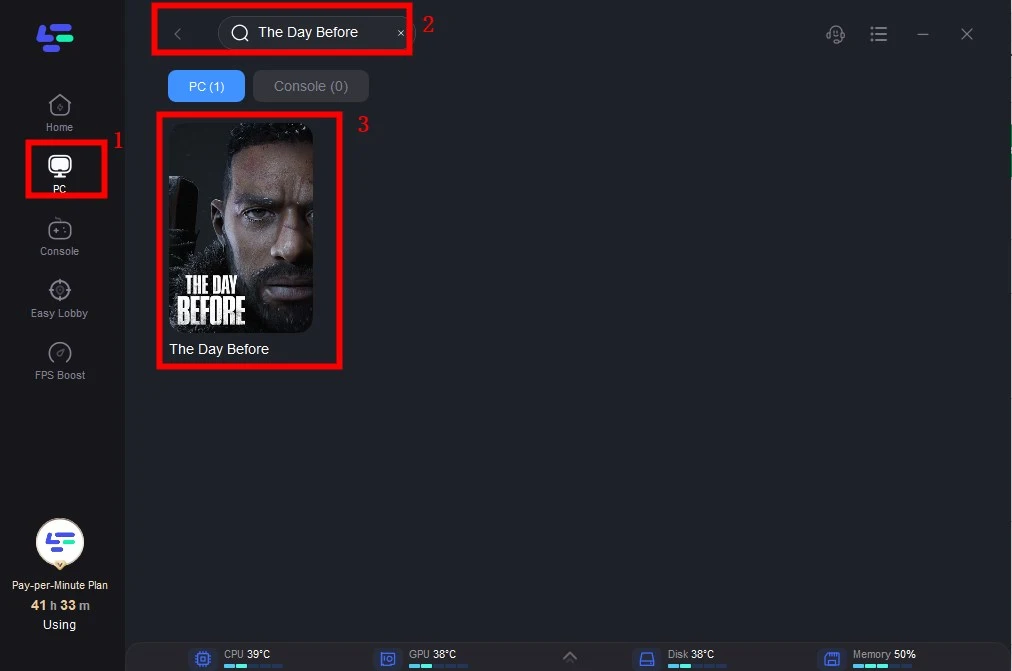
Step 3: Choose the server you need.
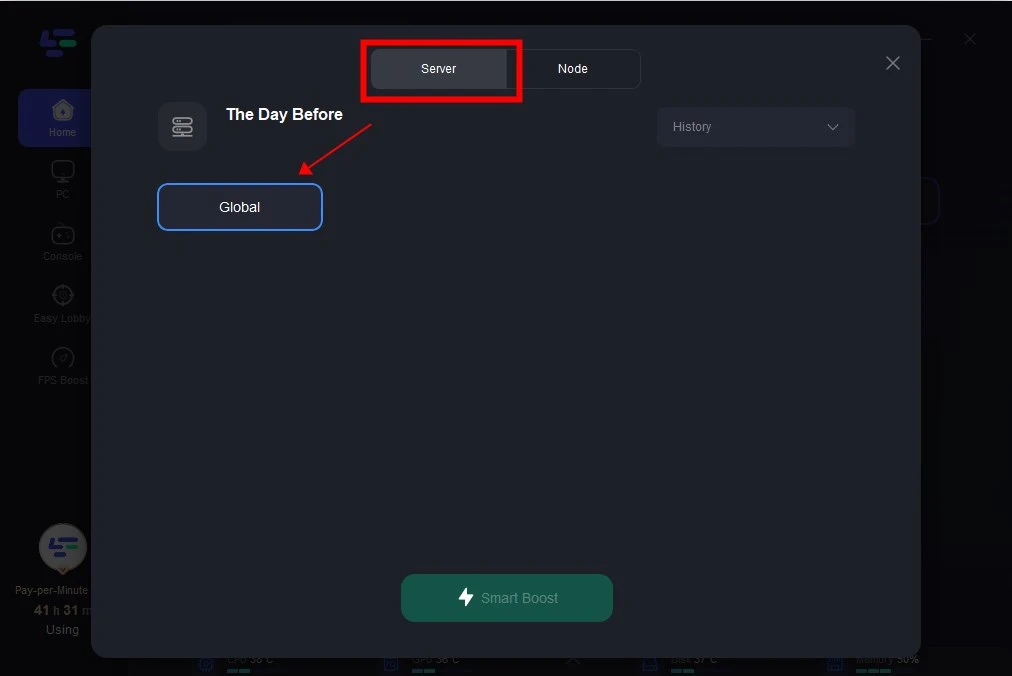
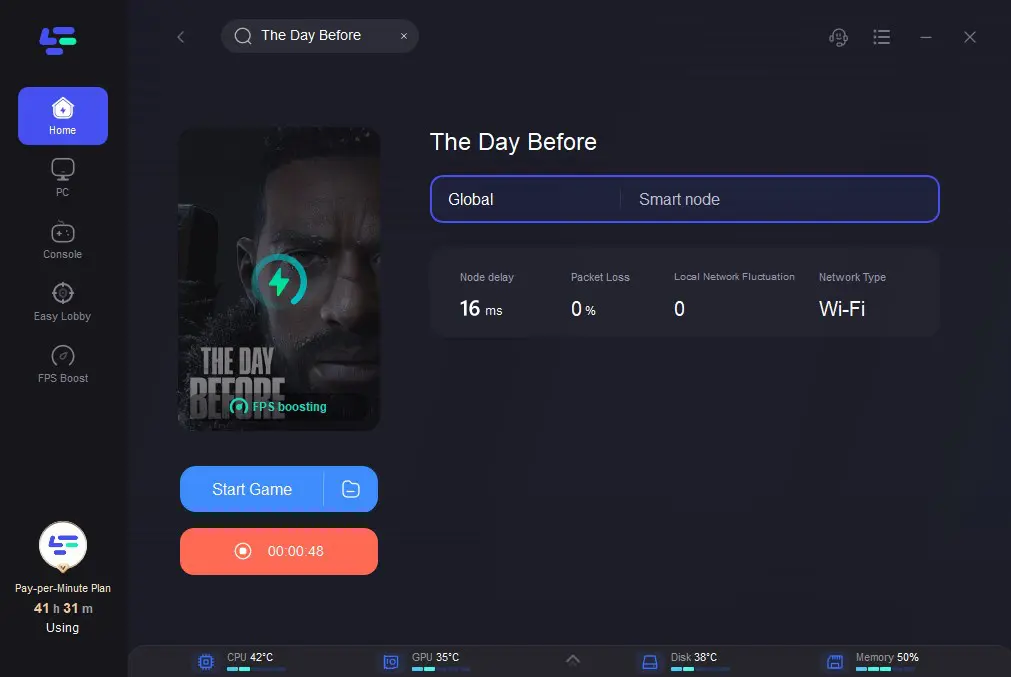
Step 4: Click on the Boost button and start boosting. Here, you can see your real-time ping & packet loss rate.
Video of How To Use LagoFast

