Off The Grid Lag Reducer & FPS Booster

Off The Grid Overview
Off The Grid, a dystopian cyberpunk battle royale developed by Gunzilla Games, offers players an immersive experience set in a future where advanced technology and survival combine. In this intense game, up to 150 players fight for survival on Teardrop Island. Early access for Off The Grid is now available on PS5, Xbox Series X|S, and PC through the Epic Games Store. Although the official release is yet to come, early access allows fans to experience PvP matches in squads of three, with objectives such as being the last squad standing. Despite its thrilling gameplay and narrative elements, early access players report issues with lag and performance.
The game’s massive scale, unique cyberlimbs for character customization, and high-quality visuals make it a standout, but also present challenges in maintaining optimal performance across all platforms. Lag, low FPS, and other technical issues are commonly reported, especially given that the game is still under development. As players dive into this cybernetic world, finding ways to reduce lag and enhance FPS becomes essential.
Why is Off The Grid So Laggy?
The lag experienced in Off The Grid can stem from several factors. First, the game’s detailed cyberpunk environment and intense graphics demand high processing power, which may be too much for some systems, especially if not optimized for a large player count and vast open world. Additionally, server stability during early access can fluctuate, as developers test server loads and optimize game performance.
For some players, connection issues like high latency and packet loss can contribute to lag, particularly if they’re far from the game servers or experiencing network interference. Meanwhile, hardware limitations such as outdated graphics cards, insufficient RAM, or lack of storage space can also cause low FPS. Players need to ensure they’re equipped with powerful systems or use specific techniques to reduce lag and improve performance, especially if the game’s full release adds even more features and detail.
Why Do You Need an Off The Grid Lag Reducer?
With Off The Grid’s rich, resource-intensive design, achieving a smooth gameplay experience is challenging for many. Lag reducers and game boosters are invaluable in helping players optimize their systems, reduce latency, and increase FPS. A reliable lag reducer can address connectivity problems, server distance issues, and device compatibility, ensuring that the game runs smoothly.
Using a lag reducer for Off The Grid allows players to enjoy a more seamless experience without the frustration of delays and glitches. By minimizing interruptions, players can fully immerse themselves in the gameplay, utilizing their custom cyberlimbs and weapon configurations to their advantage. This is especially important for players using mobile devices or consoles, where manual adjustments are limited. With a lag reducer, players of all platforms can focus on strategy and survival instead of troubleshooting connection issues mid-game.
The Best Off The Grid Lag Reducer
One of the most effective lag reducers for Off The Grid is LagoFast. LagoFast is a game booster that offers solutions across multiple platforms, including PC, consoles, and mobile devices. Designed to optimize network stability, it significantly reduces latency, thereby enhancing the gaming experience. LagoFast is easy to use and automatically detects the best settings for each user, targeting the root causes of lag and FPS drops with an adaptive optimization approach. Players on any platform can enjoy an immediate improvement in performance, even in highly populated battle royale matches.
Another advantage of LagoFast is its cross-platform compatibility. Whether you’re gaming on a PC, PS5, Xbox Series X|S, or even a mobile device, LagoFast adjusts to your platform and system requirements. It improves data transfer speed, reduces ping, and prevents network interruptions. Using LagoFast, players get a responsive, lag-free experience in Off The Grid’s dynamic environment, allowing them to focus on gameplay without the distraction of technical issues.
Tutorial to use LagoFast Box to enhance your console gaming experience:
Step 1: Download the LagoFast Console App on your phone to control the LagoFast Box.

Step 2: Establish a connection between your LagoFast Box, router, and console, choosing between a wired or wireless connection.

Step 3: Launch the LagoFast Console App and boost Off The Grid. Once you have completed the binding process with the LagoFast Box, proceed to boost this game within the LagoFast Console App.

Tutorial to use LagoFast to elevate your Off The Grid gaming experience on PC:
Step 1: Click the Free Trial button to download and install LagoFast.
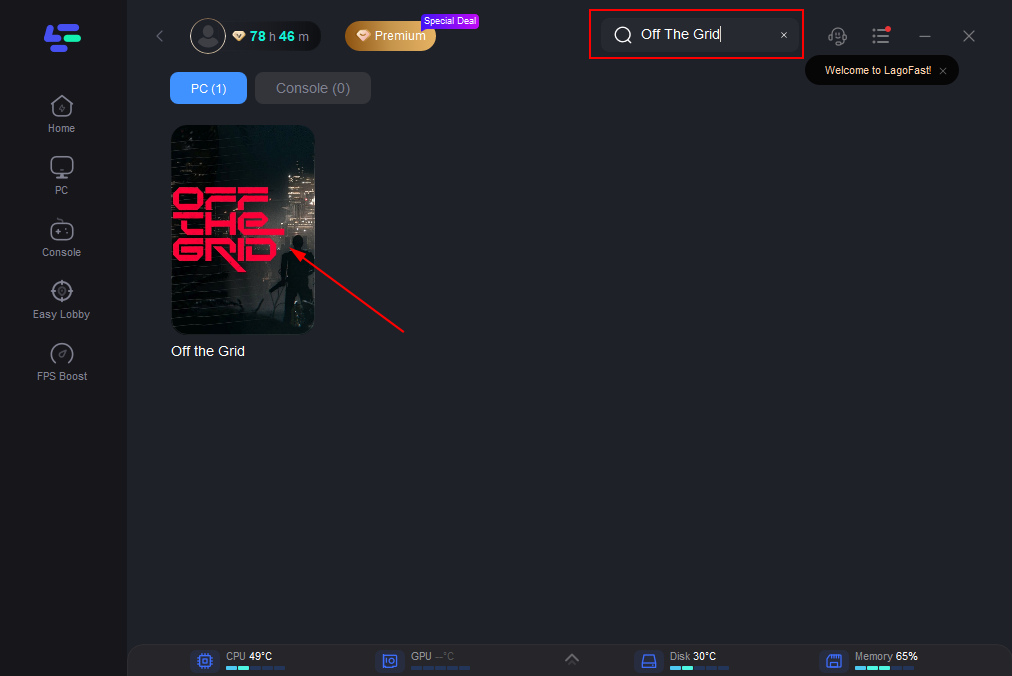
Step 2: Open LagoFast then click the PC button on the left and search Off The Grid in the search bar, click it after appearing.
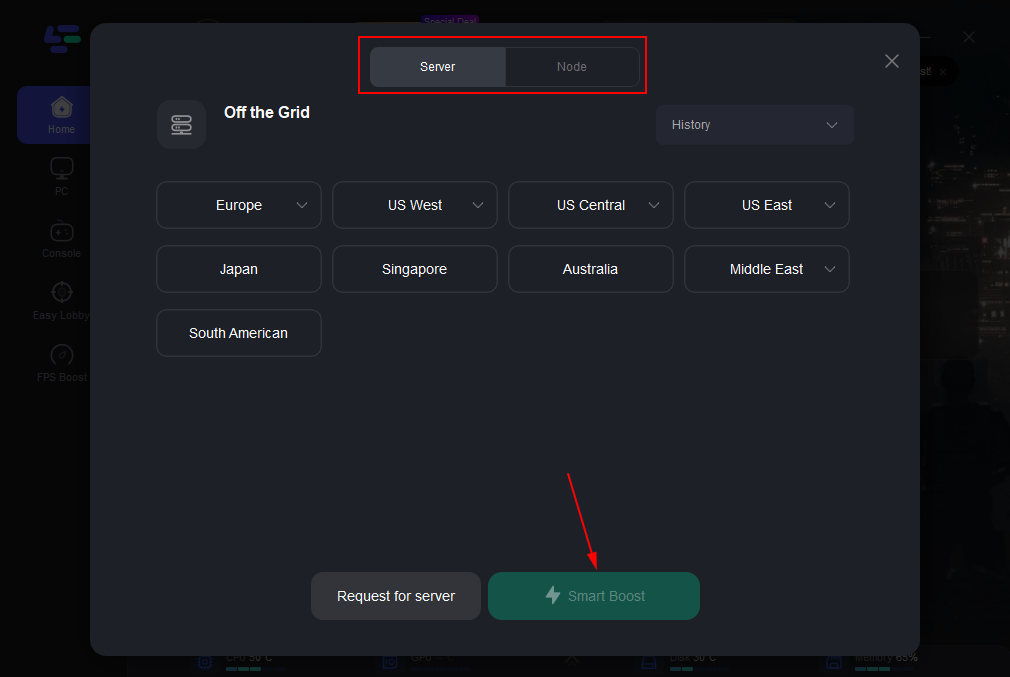
Step 3: Click on “Server” to change to a better server that ensures the gaming experience, then click on “Smart Boost”.
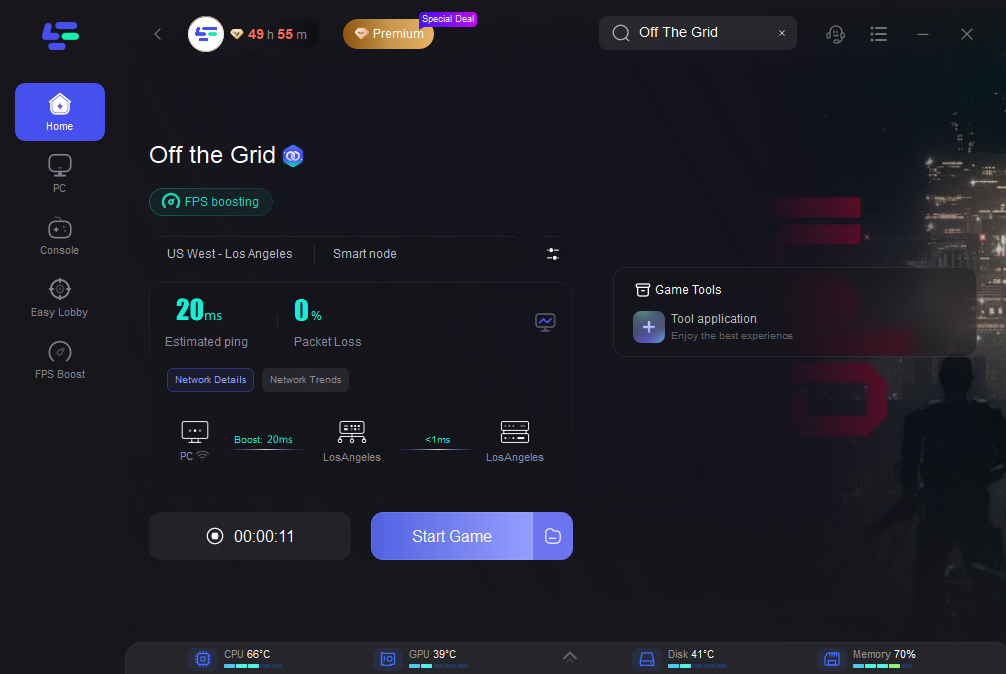
Step 4: Check the specific game ping, packet loss, and multiple path connection on the right side. Finally, click the “Start Game” to play the game.