
WUCHANG: Fallen Feathers, the highly anticipated Souls-like RPG set in the late Ming dynasty, has been turning heads with its stunning visuals and challenging combat. However, since its July 24, 2025 release, many players have reported frustrating issues like WUCHANG: Fallen Feathers low FPS, stuttering and low fps, and FPS drops, especially on PC. These problems can ruin the immersive experience, but don’t worry—we’ve got you covered. In this guide, we’ll break down the causes and share proven solutions.
Part 1. Understanding the Problem: Why WUCHANG: Fallen Feathers Struggles with FPS
Part 2. How to Fix WUCHANG: Fallen Feathers Low FPS
Part 1. Understanding the Problem: Why WUCHANG: Fallen Feathers FPS Drops
Before diving into fixes, it’s crucial to understand why these issues occur. WUCHANG: Fallen Feathers runs on Unreal Engine 5, which demands significant hardware resources. The game’s detailed environments, complex particle effects, and dynamic combat put a heavy load on your CPU, GPU, and RAM. Even players with mid-to-high-end setups have faced FPS drops during boss fights or dense areas. Additionally, background processes, outdated drivers, and suboptimal in-game settings can further bottleneck performance.
Part 2. How to Fix WUCHANG: Fallen Feathers Low FPS
1. LagoFast Game Booster: The Ultimate Solution for FPS Boost
LagoFast Game Booster is hands down the most effective tool to tackle WUCHANG: Fallen Feathers' low FPS and stuttering. If you want to further enhance your gaming experience, you can also explore game mods through LagoFast, which features a wide range of mod-supported games ready to play and customize. This software optimizes your PC’s resources in real-time, ensuring the game runs smoothly without sacrificing visual quality. Here’s how it works:
- RAM Cleanup: Frees up memory used by background apps like browsers or Discord, redirecting it to the game.
- CPU/GPU Optimization: Prioritizes WUCHANG: Fallen Feathers, reducing lag and improving frame rates.
- Driver Updates: Automatically installs the latest GPU drivers, which often include game-specific optimizations.
- Network Boost: Lowers ping and stabilizes connections for online features (though Wuchang is single-player, this helps overall system responsiveness).
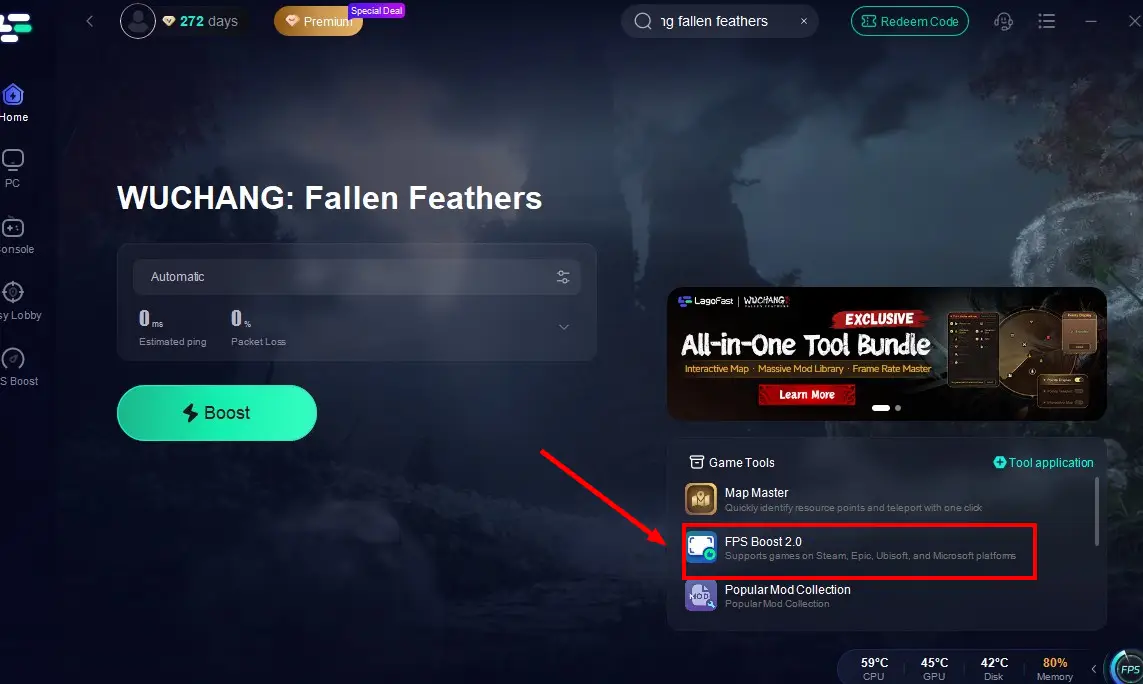
Based on this features, LagoFast provides the FPS Boost 2.0 tool to help players enjoy the highest-quality and smoothest gameplay screen. This tool optimizes performance by intelligently detecting and enhancing in-game conditions, effectively increasing FPS for Wuchang: Fallen Feathers.
How to use:
Step 1: Click the Free Trial button to download and install LagoFast.
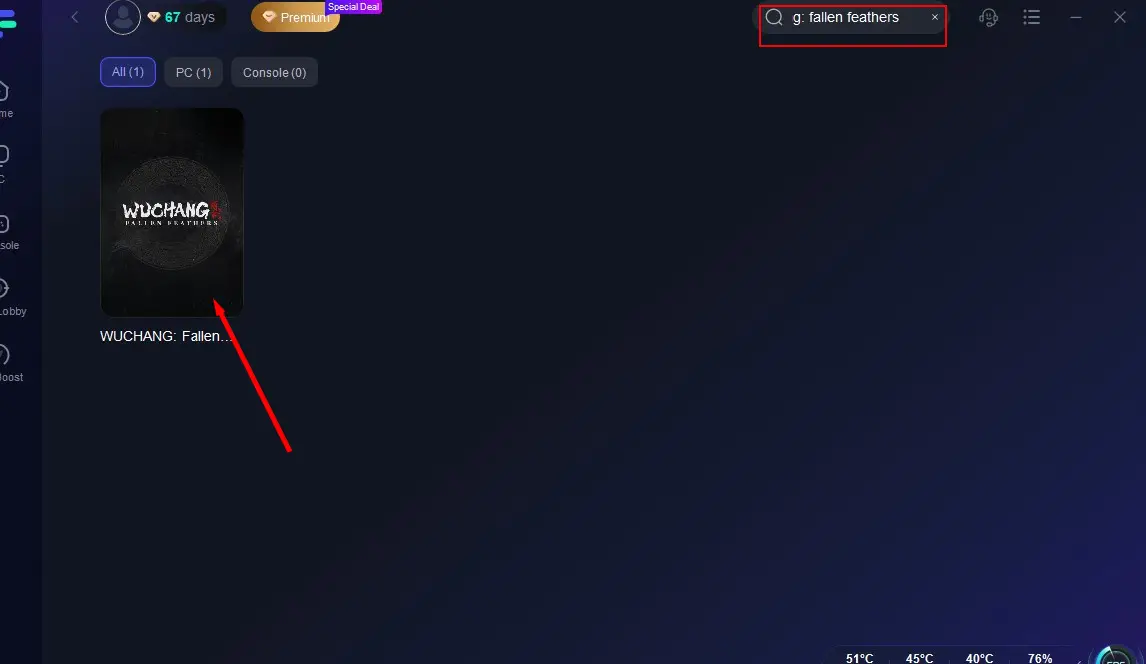
Step 2: Open LagoFast, then click the PC button on the left and search WUCHANG: Fallen Feathers in the search bar, click it after it appears.
Step 3: Click the FPS Boost 2.0 tool in the bottom-right corner.
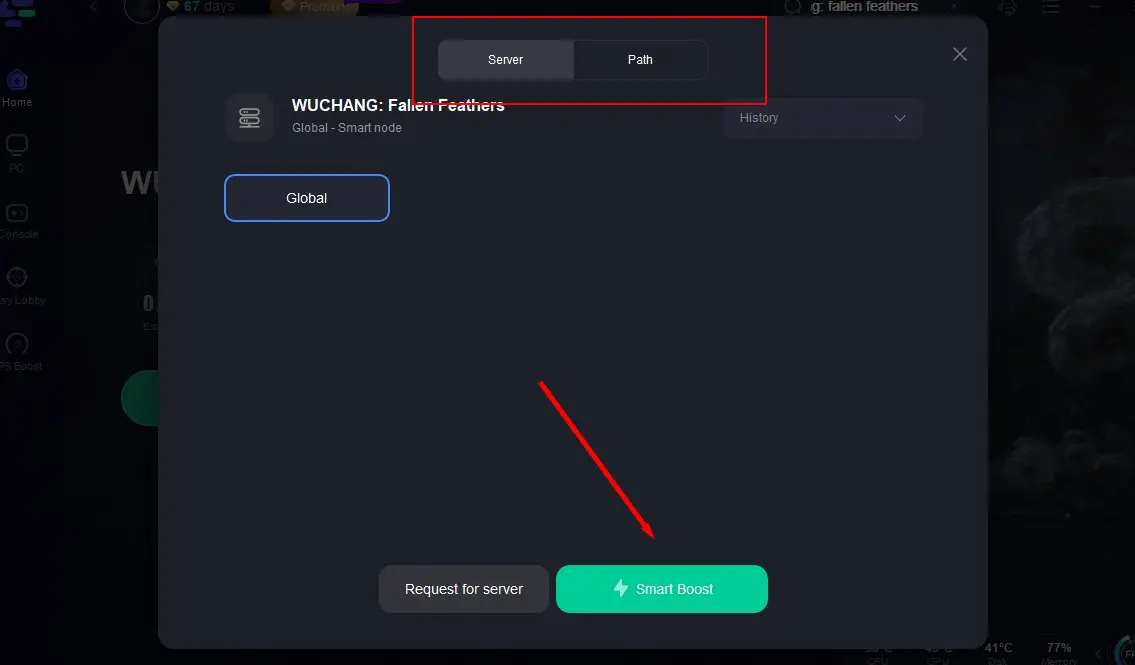
Step 4: To help further boost WUCHANG: Fallen Feathers FPS, you can also activate LagoFast's real-time optimization feature. Click on “Server” to change to a better server that fixes lag and ensures the gaming experience, then click on “Smart Boost”.
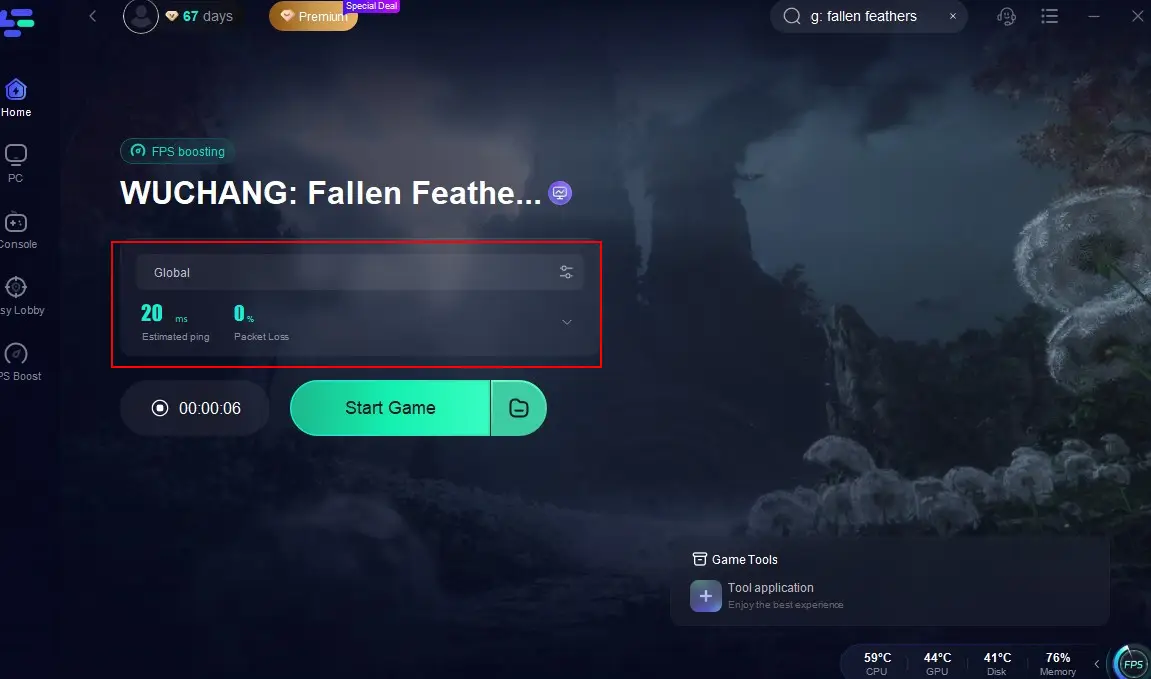
Step 5: Check the specific game ping, packet loss, and multiple path connection on the right side. Finally, click the “Start Game” to play the game.
LagoFast is trusted by millions of gamers and has been praised for its ability to fix FPS issues in demanding titles like Fortnite and Elden Ring . Give it a try—it’s free to download and offers instant results.
2. Adjust In-Game Settings for Better Performance
If LagoFast alone doesn’t solve the problem, tweaking your in-game settings can make a huge difference. Here’s what to do:
- Lower Graphics Presets: Navigate to Settings > Video and reduce settings like Shadow Quality, Texture Resolution, and Post-Processing Effects. These options eat up GPU resources .
- Disable Anti-Aliasing: While AA improves visuals, it’s notorious for causing FPS drops. Try switching to Temporal Anti-Aliasing (TAA) or turning it off entirely.
- Limit FPS: Enable the FPS cap (e.g., 60 FPS) to prevent your GPU from overworking. This can reduce stuttering, especially on mid-range hardware.
- Disable V-Sync: While V-Sync prevents screen tearing, it can introduce input lag. Test both enabled and disabled to see what works best for you.
3. Update Drivers and Close Background Processes
Outdated drivers are a common culprit behind WUCHANG: Fallen Feathers FPS drops. Here’s how to fix it:
- GPU Drivers: Visit NVIDIA or AMD’s website to download the latest drivers. These updates often include performance patches for new games like WUCHANG: Fallen Feathers .
- Windows Updates: Ensure your OS is up-to-date, as Microsoft frequently releases optimizations for DirectX and system stability.
- Close Background Apps: Press Ctrl + Shift + Esc to open Task Manager. End non-essential processes like streaming software, cloud sync tools (e.g., OneDrive), or resource-heavy apps like Chrome.
4. Optimize Your PC for Gaming
Beyond LagoFast, here are some general tips to boost FPS:
- Defragment Your HDD/SSD: Use Windows’ built-in Disk Defragmenter to optimize storage speed.
- Power Mode: Set your PC to High Performance in Windows Settings for maximum hardware output.
- RAM Upgrade: If you’re below the 16 GB RAM minimum requirement, upgrading to 32 GB can drastically improve performance .
5. Hardware Upgrades for Ultimate Performance
If you’re still struggling with WUCHANG: Fallen Feathers low FPS after software fixes, consider upgrading your hardware. The game’s recommended specs (RTX 3070/AMD RX 6750 XT) are no joke . Even a mid-range GPU like the RTX 4060 or RX 7700 XT can deliver solid 1080p/1440p performance. For budget-conscious players, a CPU upgrade to an Intel i5-12600K or AMD Ryzen 5 7600X can reduce bottlenecks.
6. FPS Unlocker: Push Frame Rates Beyond Limits
For advanced users, an FPS Unlocker can bypass the game’s default frame cap. Tools like WUCHANG: Fallen Feathers FPS Unlocker allow you to set custom FPS limits. However, use this cautiously, as uncapped FPS can cause instability on older hardware. Always back up your game files before using third-party tools.
Conclusion
WUCHANG: Fallen Feathers is a masterpiece, but its technical issues can be frustrating. By combining LagoFast Game Booster with in-game tweaks and driver updates, you can eliminate WUCHANG: Fallen Feathers low FPS, stuttering, and drops. For those willing to invest, hardware upgrades or an FPS Unlocker will take your experience to the next level. Remember, patience is key—keep testing different solutions until you find what works best for your setup.
Boost Your Game with LagoFast for Epic Speed
Play harder, faster. LagoFast game booster eliminates stutter and lags on PC, mobile, or Mac—win every match!
Quickly Reduce Game Lag and Ping!
Boost FPS for Smoother Gameplay!