

Blue Archive has gained a massive following worldwide, but many Russian-speaking players are wondering: Will the game ever support Russian language? As the game currently offers text in English, Korean, Traditional Chinese, and Thai, with voice acting in Korean and Japanese, Russian remains absent from the official language options. This article delves into the current language support in Blue Archive, the reasons behind the lack of a Russian version, and what Russian-speaking players can do to enjoy the game in the meantime. Additionally, we explore the potential for future localization and offer tips for improving gameplay with tools like LagoFast.

- What Languages Does Blue Archive Support?
- Will Blue Archive Be Available in Russian?
- How Russian-Speaking Players Currently Play Blue Archive
- Is There a Way to Play Blue Archive in Russian?
- Future Outlook: Will Russian Be Added?
- Boost Your Gameplay with LagoFast — Translation Tool & FPS Boost Features
1. What Languages Does Blue Archive Support?
As of now, Blue Archive supports a limited number of languages, focusing primarily on East and Southeast Asian markets along with English-speaking players. Here’s a breakdown of current in-game language support:
|
Category |
Supported Languages |
|---|---|
|
Text |
English, Korean, Traditional Chinese, Thai |
|
Voice |
Korean, Japanese |
The game does not currently support Russian, either for text or voice.
2. Will Blue Archive Be Available in Russian?
There has been no official announcement from Nexon or the Blue Archive development team regarding Russian language support. Given the current localization strategy, which prioritizes Asian markets and global English players, Russian does not appear to be on the roadmap—at least not in the near term.
However, the demand for a Russian version has been noticeable within the community, particularly on fan forums and Reddit. Players have been requesting Russian localization to make the game more accessible to the large and active Russian-speaking player base.
Why Isn’t Russian Supported Yet?
Several factors might explain the lack of Russian localization in Blue Archive:
- Market Prioritization: Nexon has historically focused on East Asia, North America, and select Southeast Asian countries.
- Translation Complexity: Blue Archive has a story-rich structure with large volumes of dialogue, which can make localization time-consuming and expensive.
- Voice Acting Constraints: Even if text translation were added, Russian voiceovers would likely be a low priority due to cost and market size.
- Political & Regulatory Factors: Some South Korean companies have limited expansion in Russia due to regulatory uncertainty and geopolitical concerns.
3. How Russian-Speaking Players Currently Play Blue Archive
Many Russian players still enjoy the game by using English or Traditional Chinese as a bridge language. Some also use community-created unofficial translations or guides available on Discord servers and fan sites.
Here are some common strategies:
- Use the English version and community-translated story summaries
- Follow Russian-speaking YouTubers and streamers who explain the storyline
- Participate in Russian-language forums or Telegram groups for help
4. Is There a Way to Play Blue Archive in Russian?
Officially, no. But unofficial workarounds include:
- Fan Translations: Some players create mods or overlays to display Russian text, though these are not supported or endorsed by the developers.
- Translation Tools: Tools like Google Translate’s screen reader or OCR-based translators can help interpret the English/Korean text, though with limited accuracy.
5. Future Outlook: Will Russian Be Added?
While nothing is confirmed, future updates may include Russian if the player base grows or if Nexon expands its focus. Factors that could accelerate this include:
- An influx of Russian players
- A fan campaign that gains developer attention
- Third-party publishing partnerships in Russian-speaking regions
For now, though, players should not expect an official Russian version anytime soon.
6. Boost Your Gameplay with LagoFast — Translation Tool & FPS Boost Features
Whether you’re diving into intense battles or simply navigating the main menu, LagoFast ensures a more enjoyable Blue Archive experience—tailored to your needs, no matter where you play or what language you speak.
Why Use LagoFast for Blue Archive?
- Stabilizes your ping during real-time battles
- Reduces packet loss and lag spikes
- Supports mobile and emulator platforms
- Optimizes game connection routing automatically
With LagoFast’s built-in translation tool, you can fully enjoy Blue Archive in the language you’re most comfortable with, even if the game doesn’t officially offer that localization.
How to Use the Translation Tool for Blue Archive
Step 1: Click "Free Trial" to download and install LagoFast.
Step 2: Search for "Blue Archive" in LagoFast's search bar.
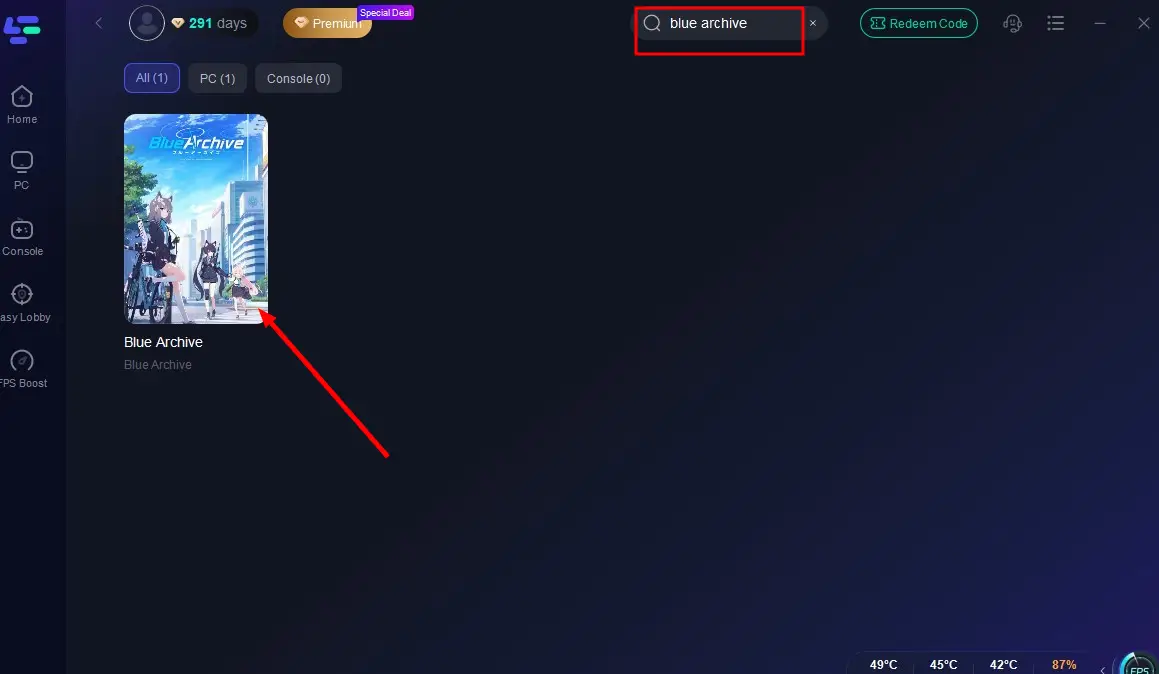
Select the One-Click Translation Tool on the right panel. The translation tool will automatically detect in-game text and prompts in Blue Archive, translating them in real time. This helps you easily understand the registration process, menus, and gameplay, even if the game doesn’t support your language.
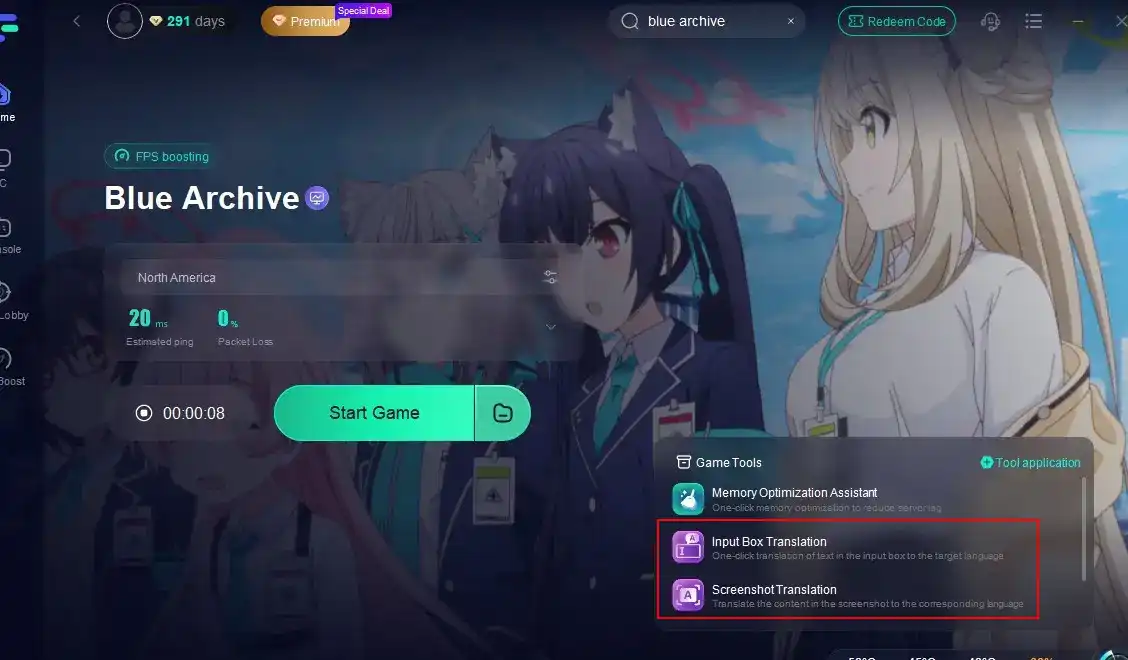
Click to start translation > Choose your preferred language > Click Apply. Once the translation is complete, close the window, click Boost, and launch the game. Here’s an example of what the translated interface looks like—no more language barriers in Blue Archive!
While you wait for Russian language support, make sure your game runs as smoothly as possible. If you’re experiencing lag or ping spikes in Blue Archive, especially on non-native servers, LagoFast can help.
How to Use LagoFast:
Step 1: Click "Free Trial" to download and install LagoFast.
Step 2: Search for "Blue Archive" in LagoFast's search bar.
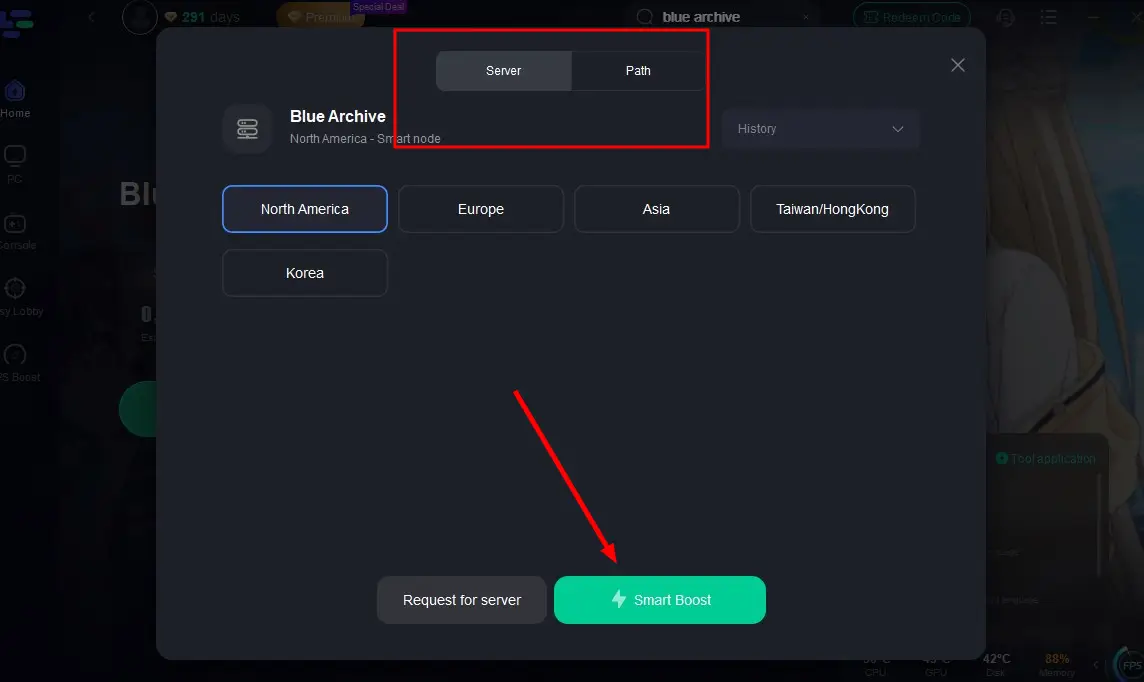
Step 3: Click "Select Server" to choose the nearest node, then activate "Smart Boost".
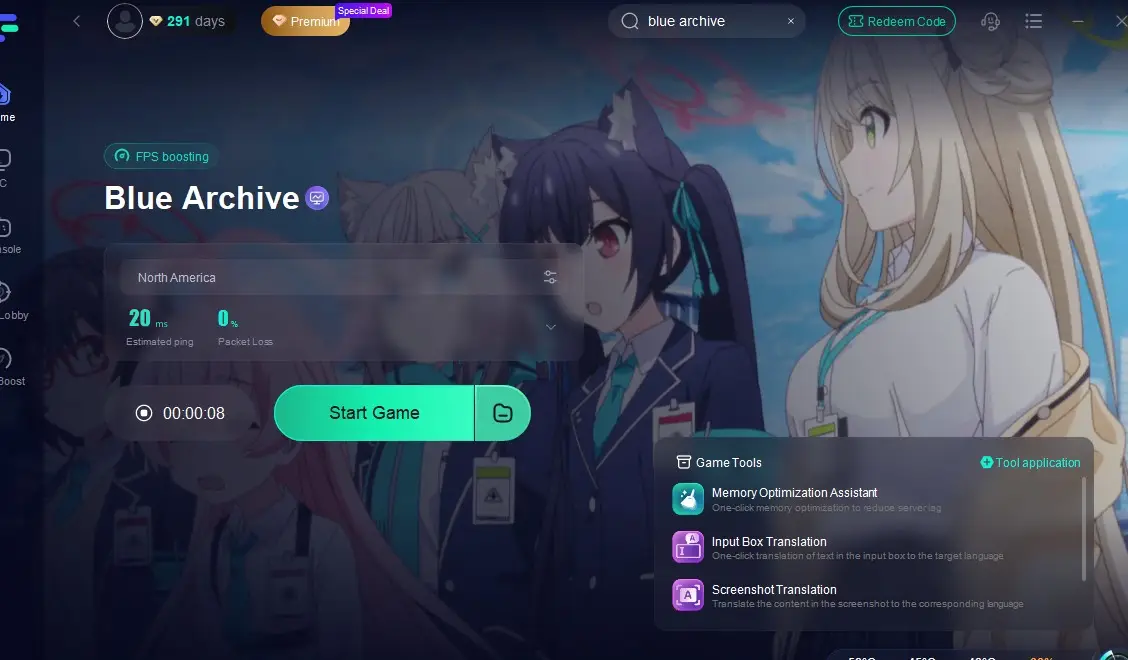
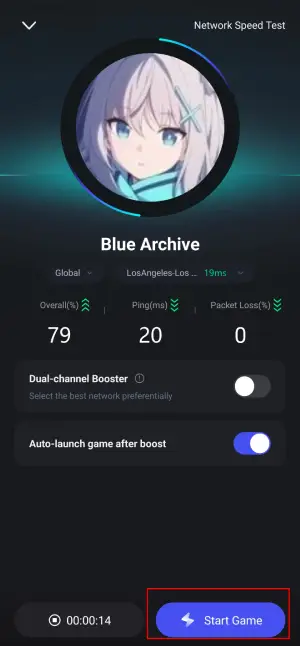
Step 4: After acceleration starts, click "Start Game" to enjoy lag-free, high-FPS gameplay in Blue Archive.
How to use LagoFast Game Booster on Mobile
Step 1: Visit the official website of LagoFast, download the LagoFast Mobile APK file, and follow the prompts to complete the installation.

Step 2: Search Blue Archive and click the result.
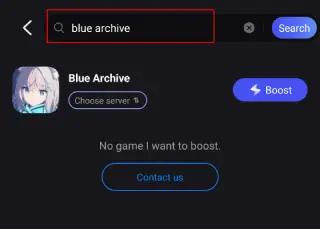
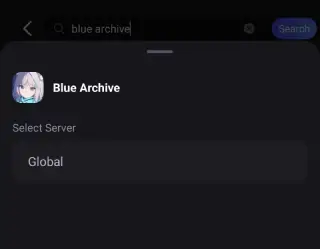
Step 3: Choose the Server you like, then click the Boost button.
Step 4: Use LagoFast's optimization features to enhance network stability and reduce lag during gameplay.
With LagoFast, even without official Russian text support in Blue Archive, your gameplay stays smooth, immersive, and frustration-free. Many Russian-speaking players struggle not only with language barriers but also with unstable connections when accessing servers outside their region. That’s where LagoFast comes in.
Conclusion
While Blue Archive currently supports English, Korean, Traditional Chinese, and Thai, it does not support Russian. There’s no official roadmap for Russian localization, but growing demand may influence future decisions. In the meantime, Russian-speaking players can still enjoy the game using English and third-party tools—and boost their gameplay experience with tools like LagoFast.

Boost Your Game with LagoFast for Epic Speed
Play harder, faster. LagoFast game booster eliminates stutter and lags on PC, mobile, or Mac—win every match!
Quickly Reduce Game Lag and Ping!
Boost FPS for Smoother Gameplay!