
If you’ve ever loaded up NBA 2K26 on your PS5 only to deal with lag, input delays, or stuttering gameplay, you’re not alone. Many players ask: “Why is my 2K26 lagging on my PS5?” The answer usually comes down to either network problems or console performance settings. In this guide, we’ll break down the common causes of lag in NBA 2K26 on PS5 and provide practical solutions to get you back on the court with smooth, responsive gameplay.

- Why NBA 2K26 Lags on PS5
- Common Reasons for NBA 2K26 Lagging on PS5
- How to Fix NBA 2K26 Lagging on PS5
- Fix 2K26 Lag on PS5 with LagoFast
1. Why NBA 2K26 Lags on PS5
There are two main categories of lag in NBA 2K26:
Network Lag (Online Play)
High ping, packet loss, or unstable servers cause delays when playing MyCAREER, The City, or online head-to-head matches.
Performance Lag (Console or Game Settings)
Frame drops, stutters, or delayed inputs can occur if your PS5 or the game isn’t optimized correctly.
2. Common Reasons for NBA 2K26 Lagging on PS5
1. Weak or Unstable Internet Connection
Lag in online modes often comes from poor Wi-Fi signals or network congestion.
2. NBA 2K26 Server Issues
Sometimes the problem isn’t you—2K26’s servers may be overloaded or under maintenance.
3. Packet Loss
If data packets don’t reach the server smoothly, you’ll notice rubber-banding, delayed passes, or random disconnections.
4. Using Wi-Fi Instead of Ethernet
Wireless connections are prone to interference, leading to spikes in latency.
5. Background Downloads or Streaming
Other devices on your home network may be using up bandwidth, slowing down your game.
6. Outdated Game or Console Firmware
If you haven’t updated NBA 2K26 or your PS5 system software, compatibility issues can cause performance problems.
7. Display or Performance Mode Settings
Running the game in the wrong display mode may cause frame drops or stuttering.
3. How to Fix NBA 2K26 Lagging on PS5
1. Switch to a Wired Connection
Use an Ethernet cable instead of Wi-Fi to stabilize your connection.
2. Test Your Internet Speed
Aim for at least 25 Mbps download and 5 Mbps upload. If speeds are low, restart your router or contact your ISP.
3. Restart Console and Router
A simple restart can clear cached issues and refresh your connection.
4. Close Background Apps and Downloads
Make sure your PS5 isn’t downloading updates or running apps in the background while gaming.
5. Adjust Game Settings
- Enable Performance Mode in PS5 settings for smoother frame rates.
- Lower resolution if you prioritize speed over visuals.
6. Update Everything
Keep NBA 2K26 and your PS5 firmware updated to avoid compatibility lag.
7. Check NBA 2K26 Server Status
If servers are down, you’ll need to wait. Check NBA 2K26 Server Status or @2K26Support on X (Twitter).
8. Reduce Packet Loss with LagoFast
If you still experience lag despite a stable connection, use a game booster like LagoFast. It optimizes your routing path, connects you to the most stable servers, and reduces both ping and packet loss.
4. Fix 2K26 Lag on PS5 with LagoFast
If your NBA 2K sessions on PS5 are constantly interrupted by lag, high ping, or unstable servers, LagoFast offers a quick and effective solution. Instead of relying solely on your ISP’s routing, LagoFast ensures your console connects through the most optimized and stable path, reducing both latency and packet loss.
Benefits of LagoFast
- Reduce lag and input delays
- Stable connections across global servers
- Smoother gameplay in The City, MyTEAM, and Pro-Am
- Real-time stats to track your network performance
By adding LagoFast to your setup, you’ll eliminate the frustration of unstable matches and enjoy a smooth, responsive NBA 2K experience on your PS5.
How to Use LagoFast on PC
Step 1: Download LagoFast by clicking the Download button below and activate the free trial.
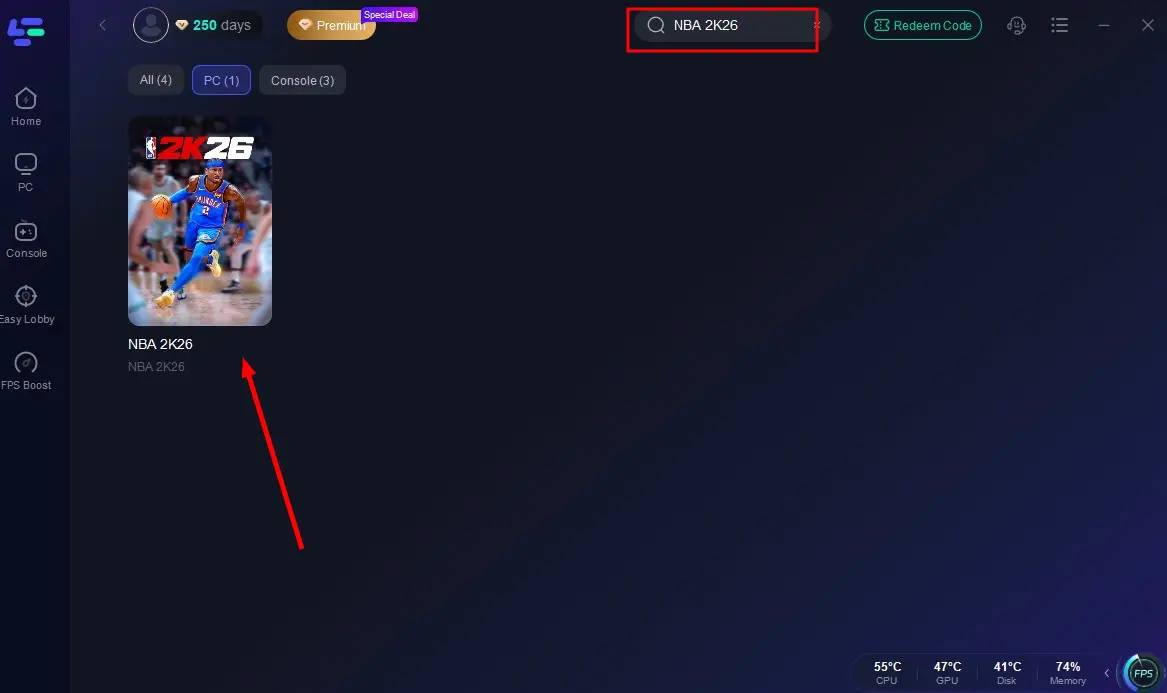
Step 2: Launch LagoFast and search for NBA 2K26 in the search bar.
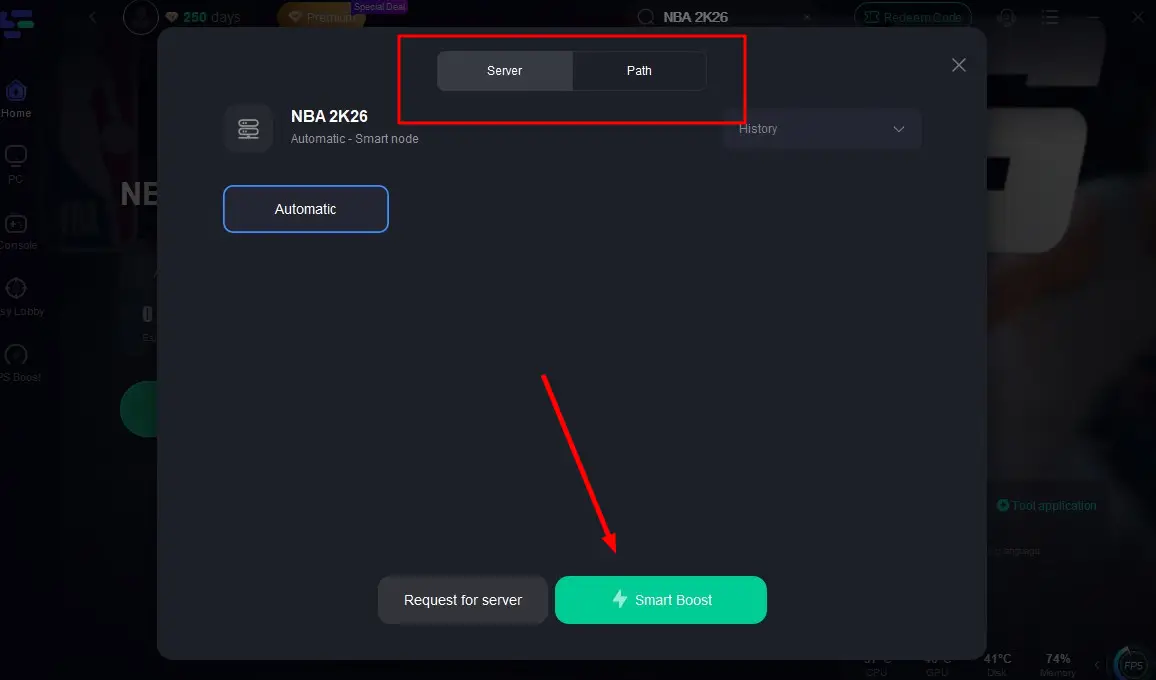
Step 3: Select the server with the best connection and choose the optimal Node. Click "Smart Boost" to start optimizing your connection.
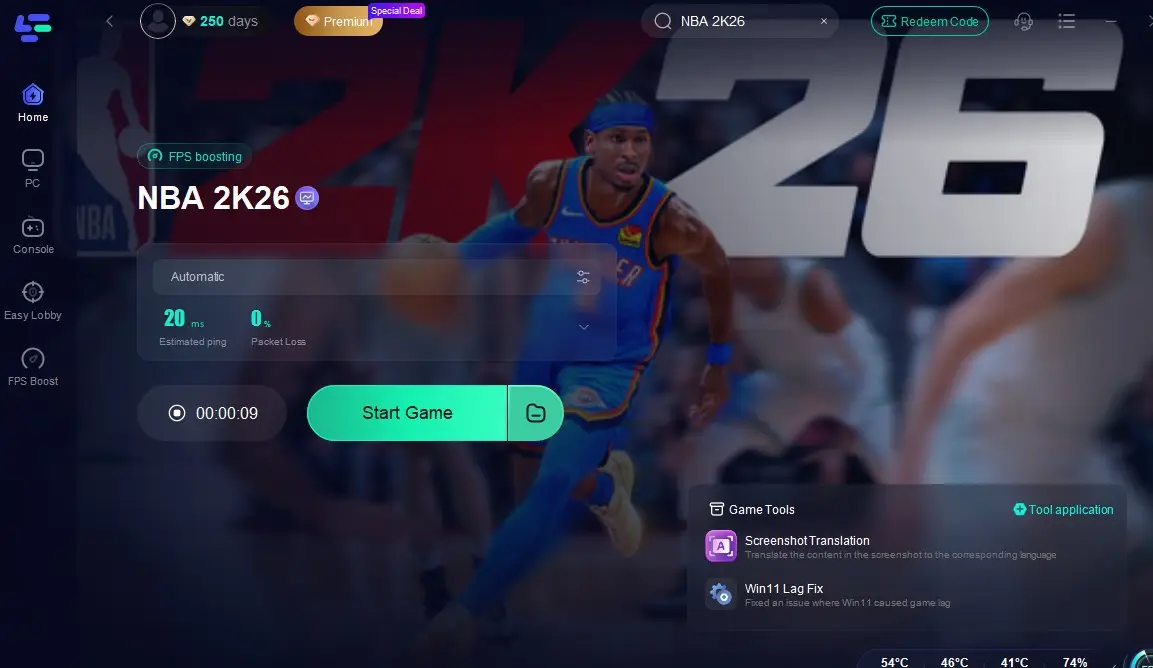
Step 4: Check real-time stats such as ping, packet loss, and network performance, then click the "Start Game" to play NBA 2K26 without any lag!
LagoFast Box: Optimize Console Gaming Performance
For console gamers, nothing is more frustrating than lag and unstable connections during crucial moments. The LagoFast Box is a dedicated hardware solution designed to optimize your console’s internet connection, reducing latency and packet loss for a smoother, more responsive gaming experience. Controlled entirely through a smartphone app, it makes network optimization simple and effective.
How to Set Up the LagoFast Box
Step 1: Download the LagoFast Console App on your phone to control the LagoFast Box.
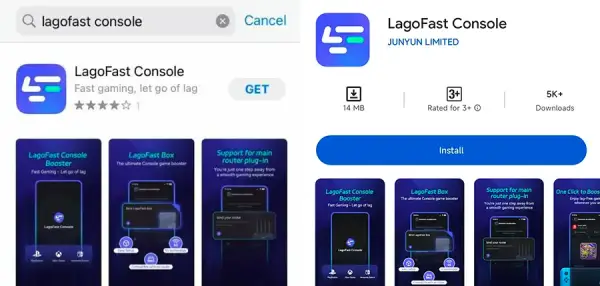
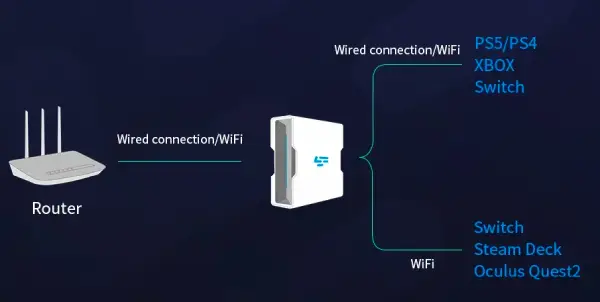
Step 2: Establish a connection between your LagoFast Box, router, and console, choosing between a wired or wireless connection.
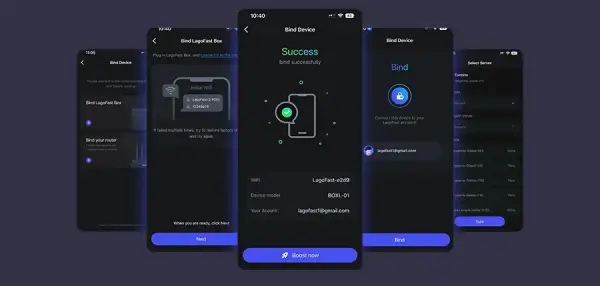
Step 3: Launch the LagoFast Console App and boost NBA 2K26. Once you have completed the binding process with the LagoFast Box, proceed to boost this game within the LagoFast Console App.
The LagoFast Box is built to deliver superior gaming performance, whether you’re competing in Pro-Am, exploring The City, or enjoying casual matches with friends. With a quick setup and powerful optimization features, it ensures your console performs at its peak—every time you play.
Conclusion
If you’ve been asking, “Why is my 2K26 lagging on my PS5?” the culprit is usually either your internet connection or server-related issues. By switching to a wired connection, optimizing settings, and keeping everything updated, you can often solve the problem. For players who want the most reliable fix, using LagoFast ensures a stable connection, reduced packet loss, and smooth gameplay in every match.

Boost Your Game with LagoFast for Epic Speed
Play harder, faster. LagoFast game booster eliminates stutter and lags on PC, mobile, or Mac—win every match!
Quickly Reduce Game Lag and Ping!
Boost FPS for Smoother Gameplay!