

If you’re diving into Where Winds Meet, you may soon realize how massive and rich its world is—and how easy it is to get lost. That’s where a good map comes in. In particular, having a Where Winds Meet interactive map for PC and Mobile can make a huge difference when exploring, tracking quests, or collecting rare items. In this article, we’ll walk through what the game offers, why the built-in map has limitations, and how using an enhanced tool can elevate your experience.

Part 1. Where Winds Meet Gameplay Overview
Part 2. Does Where Winds Meet Have a Map?
Part 3. Best Where Winds Meet Interactive Map – LagoFast Tool
Part 1: Where Winds Meet Gameplay Overview
Where Winds Meet is an open-world action-adventure RPG set in ancient China with strong Wuxia themes. Players take on the role of a wandering swordsman, explore vast regions, fight powerful enemies, complete quests, and discover hidden secrets scattered across mountains, cities, rivers, and remote villages.
The game’s world is divided into multiple regions, each offering unique landscapes and activities like fast-travel points, dungeons, puzzles, mini-games, and collectibles. Because the world is huge and full of vertical exploration, players often rely on the map to navigate efficiently. This is why many newcomers search for tips like where winds meet how to unlock map and look for more detailed map tools to support their adventure.
Part 2: Does Where Winds Meet Have a Map?
Yes—Where Winds Meet includes an in-game Where Winds Meet Map, but it only covers a limited selection of elements. Some features like fast-travel points (boundary stones), certain NPCs, and basic region markers are visible by default. The game also allows you to toggle filters for gathering materials, animals, enemies, and some activities.
However, the built-in map does not clearly show many important items or activities, such as
- Hidden side-quests
- Chest locations
- Mini-games like archery, fishing, board games, disguise challenges
- Collectibles and oddities
- Detailed NPC positions
- Boss spawn points
- Special exploration events
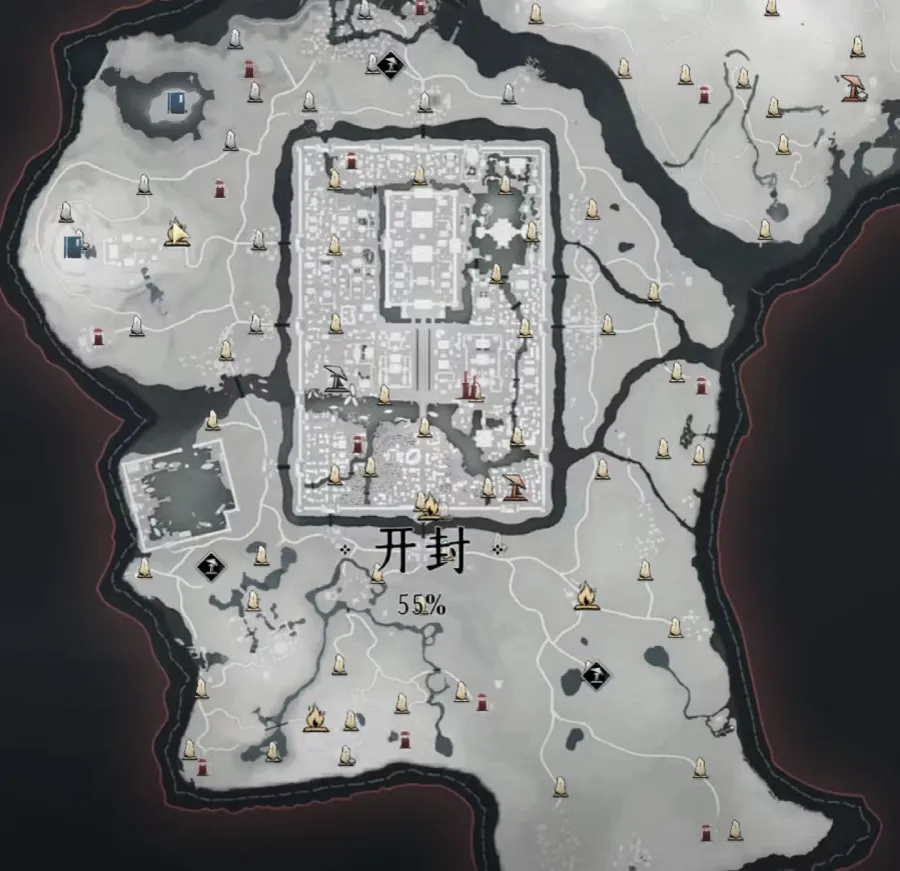
Because many of these things are essential for progression, completion, or exploration, players often find the official map insufficient. That’s where external tools like an enhanced Where Winds Meet Interactive Map become useful.
Part 3: Best Where Winds Meet Interactive Map – LagoFast Tool
What Is the LagoFast Interactive Map?
LagoFast Game Booster is widely used to reduce lag and stabilize connections in online games on PC and Mobile, but it also offers an interactive map overlay for certain titles, including Where Winds Meet. This tool helps fill the gaps left by the in-game map and improves navigation in real time.
With the LagoFast interactive map overlay, you can view:
- Real-time quest markers
- Waypoints and detailed fast-travel spots
- Hidden chests and rare collectibles
- Mini-game locations like archery, fishing, puzzle events, musical challenges
- Boss locations and elite enemy areas
- Resource nodes such as herbs, ores, and crafting materials
- NPCs and special interaction points
- Event spots, puzzles, and timed activities
Unlike a browser-based map, this overlay appears directly on your screen while you play, so you don’t need to tab out constantly. It makes exploration smoother and helps you avoid missing valuable objectives scattered across the open world. Additionally, it’s worth mentioning that the interactive map tool supports Russian, Brazilian Portuguese, English, Turkish, and Vietnamese, making it easy for players to view all map information in their preferred language.
Step-by-Step Guide to Play Where Winds Meet in Any Language on PC:
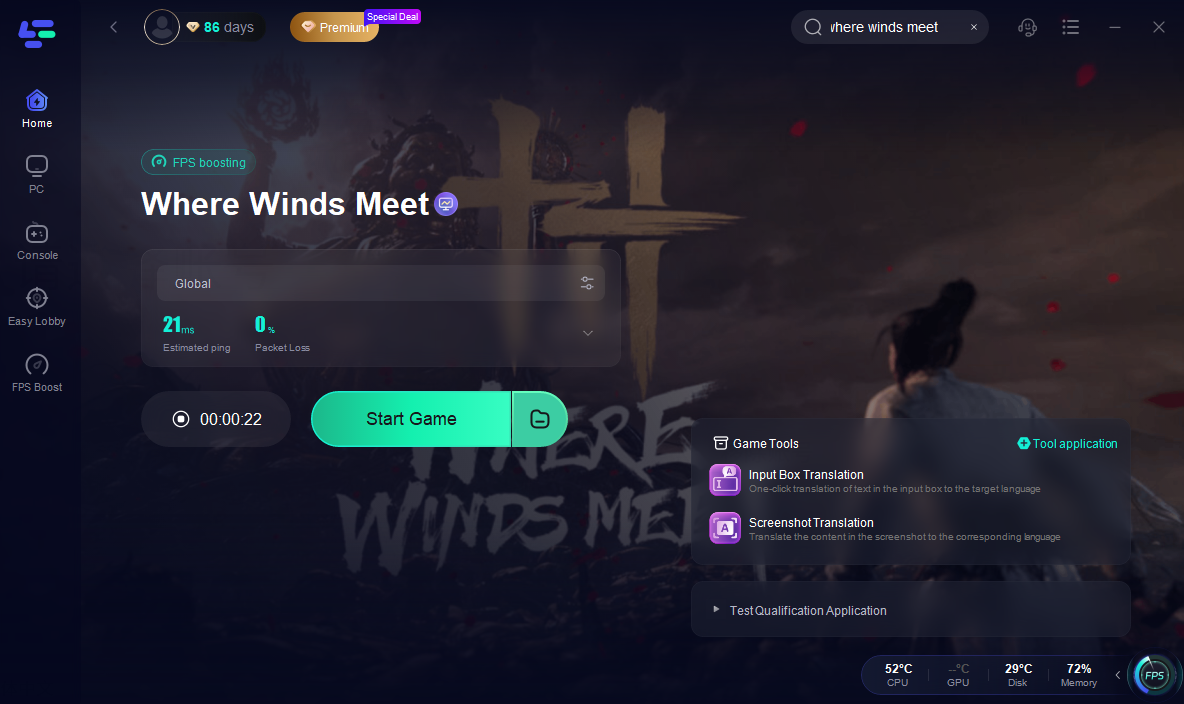
Step 1: Download and Install LagoFast
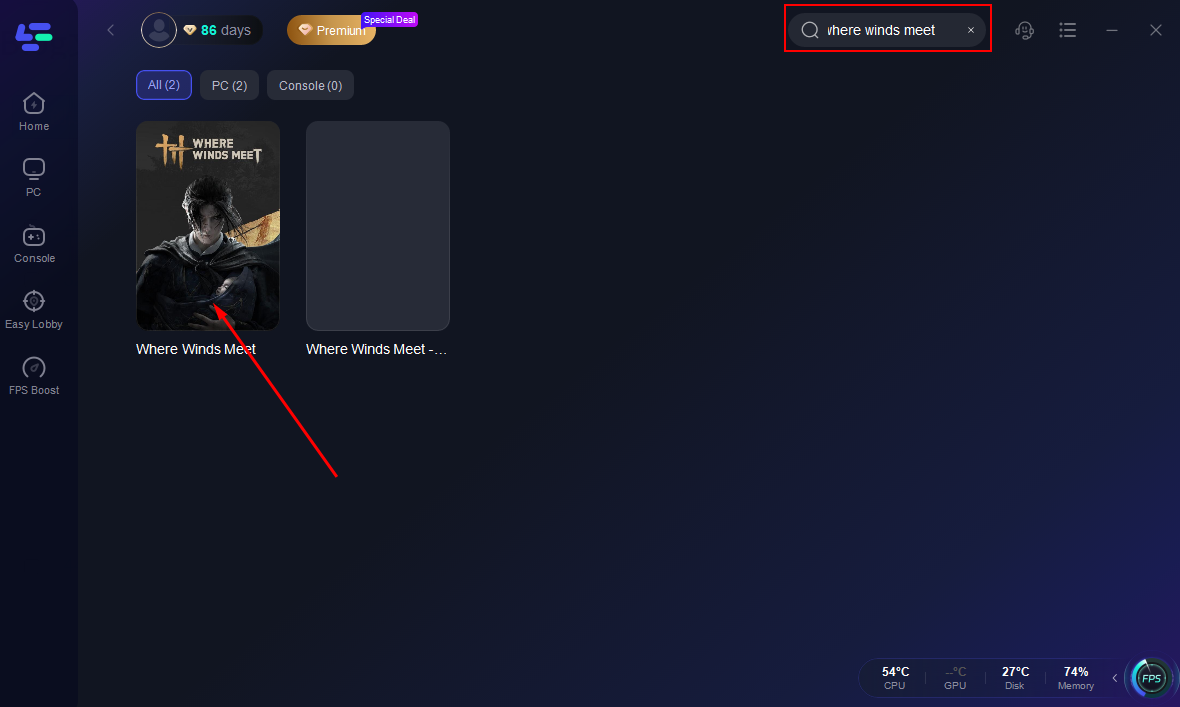
Step 2. Search Where Winds Meet and click the first result.
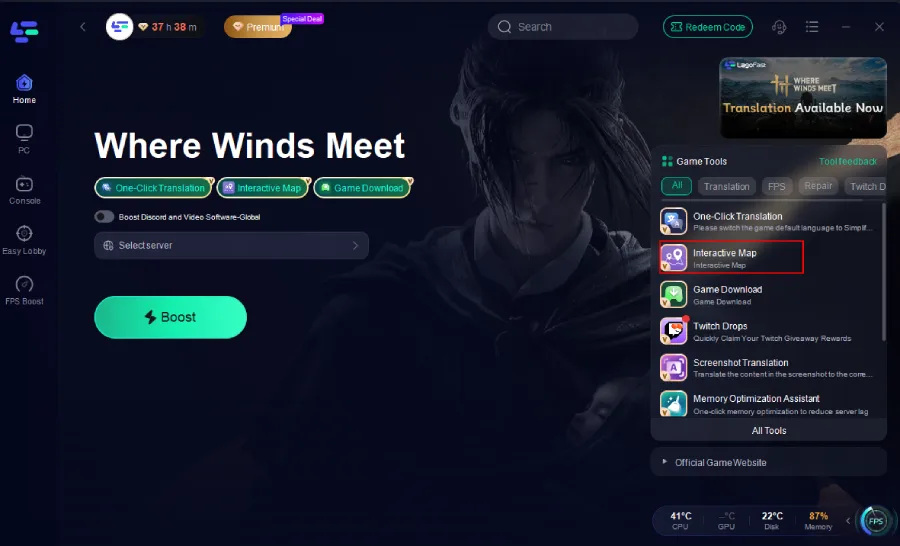
Step 3. Click the Interactive Map tool at the bottom right corner.
Step 4. Choose the best server.
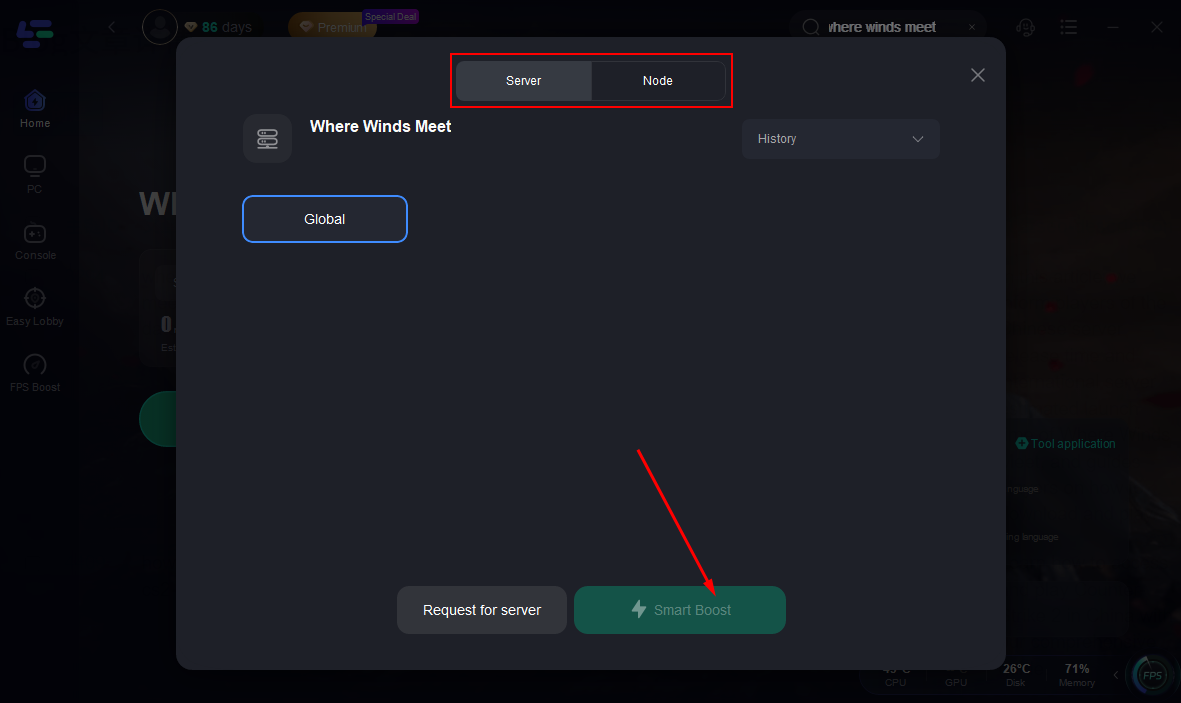
Step 5. Activate Smart Boost and you will see the ping rate and packet loss rate.
Map preview:
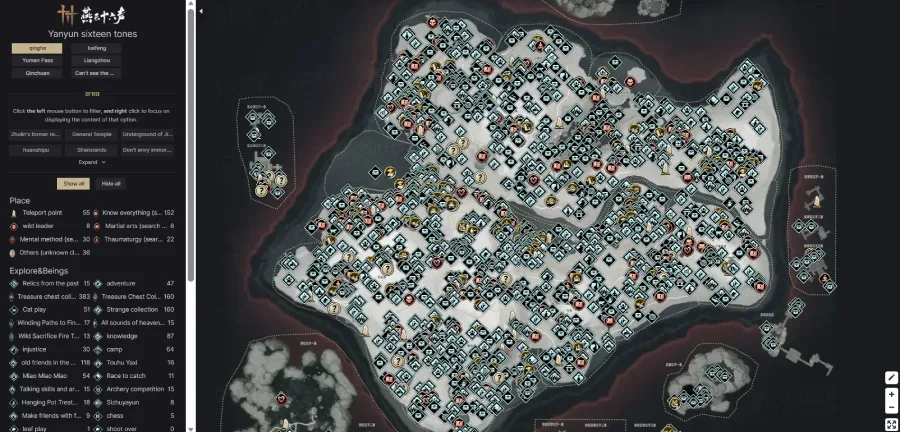
You can choose to display the information you need.
Step-by-Step Guide to Play Where Winds Meet in Any Language on Mobile:
Step 1: Download and install LagoFast Mobile.

Step 2: Open LagoFast Mobile, search for Where Winds Meet, and select the game.
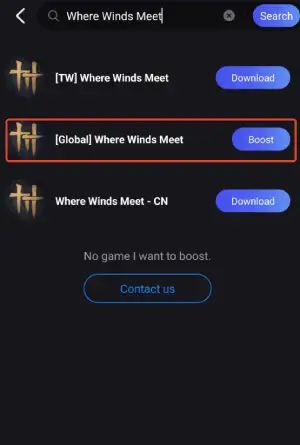
Step 3: Click the Interactive Map Tool at the bottom.
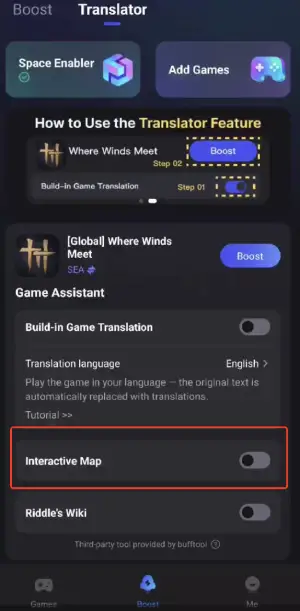
Step 4: Select your preferred language. You can now use the map overlay directly in the game.
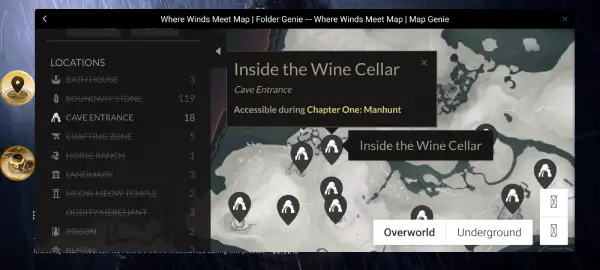
Step 5: Choose the best server and enable Smart Boost for lower ping and smoother connection.

Step 6: Click Start Game to launch the game with the interactive map and optional translation overlay.

Other Benefits of LagoFast
LagoFast does more than just provide an interactive map. When paired with Where Winds Meet, it also delivers:
Lag and Ping Optimization
Many players outside the main server regions experience unstable latency. LagoFast routes your game traffic through optimized nodes to reduce ping and improve overall responsiveness.
Real-Time Translation Overlay
If your preferred language isn’t fully supported by the game, LagoFast can overlay translated text directly onto the screen, helping you understand quests and dialogues without modifying the game client.
Automatic Network Routing and Stability Tools
You can monitor packet loss, real-time ping, and route quality, ensuring a smoother and more stable gameplay experience.
Progress Tracking Tools
LagoFast’s map allows you to mark completed or pending objectives, chest locations, or collectible progress, functioning as a personal tracker.
Part 4: FAQs
Q1: Does Where Winds Meet officially offer an interactive map?
A1: The in-game map offers basic markers and filters, but a full interactive map with detailed points of interest is not provided officially.
Q2: Is the full Where Winds Meet Map fully unlockable in the game?
A2: You can uncover the map by exploring and activating boundary stones, but many advanced markers like chests or hidden mini-games do not appear even after unlocking the regions.
Q3: Do I need LagoFast to enjoy the map?
A3: You don’t need it to play, but the LagoFast interactive map overlay provides much more detailed navigation support than the in-game map.
Q4: Is the overlay safe to use?
A4: LagoFast’s overlay is designed to be a helper tool, not a cheat, and generally does not interfere with gameplay systems.
Q5: How do I enable the LagoFast interactive map?
A5: Simply launch the game through LagoFast, enable the interactive map feature in the tool's settings, and the overlay will appear during gameplay.
Conclusion
Exploring the vast world of Where Winds Meet is an exciting journey, but the in-game map alone doesn’t always provide enough detail to guide you through every quest, mini-game, collectible, and hidden location. Using a Where Winds Meet Interactive Map through tools like LagoFast allows you to navigate more efficiently and avoid missing valuable content.
Whether you’re searching for where winds meet how to unlock map information or simply want a more convenient and detailed way to explore the world, LagoFast’s interactive map and performance tools can significantly enhance your experience.

Boost Your Game with LagoFast for Epic Speed
Play harder, faster. LagoFast game booster eliminates stutter and lags on PC, mobile, or Mac—win every match!
Quickly Reduce Game Lag and Ping!
Boost FPS for Smoother Gameplay!