

Your journey in Where Winds Meet has finally begun, and the long-anticipated wuxia world is now open for exploration. Yet many players quickly discover that instead of gliding effortlessly across ancient China, they are met with high ping, lag spikes, packet loss, rubber-banding, or even sudden disconnections. These problems disrupt immersion, interrupt combat flow, and can make even basic exploration frustrating.
This guide explains the most common connection issues, shows you how to fix them step-by-step, and demonstrates how tools like LagoFast Game Booster can stabilize your connection and deliver smoother gameplay—so you can focus on mastering martial arts rather than fighting network problems.

- ✅Less ping and crashes.
- ✅ Higher FPS and better PC performance.
- ✅ Support for 2000+ games.
- ✅ Stable connection and region switching.
Part 1: Common Connection Issues in Where Winds Meet
Part 2: How to Fix Connection Issues With LagoFast Game Booster
Part 3: Other Ways to Solve Connection Issues in Where Winds Meet
Part 1: Common Connection Issues in Where Winds Meet
High Ping and Latency
High ping is the most reported problem among global players. Because many servers are located in Asia, users in Europe, North America, or regions farther away often see ping above 80 ms. This results in sluggish movement, delayed skill responses, and a general feeling that your character reacts slower than intended.
Packet Loss and Rubber-Banding
Packet loss is another widespread issue. When game data fails to reach the server properly, your character may teleport randomly, skills may not activate, and fights become unpredictable. Some players describe this as “significant delays when performing martial arts moves,” especially during PvP.
Unstable or Dropped Connections
Even with stable home internet, server overload or poor routing can cause sudden disconnections. This is common during peak hours or when multiple devices in your household are consuming bandwidth.
Regional Server Mismatch
If you are assigned to or accidentally choose a server far from your region, latency naturally increases. Discussions on the Steam forum show that many EU or NA players still experience high ping due to routing inefficiencies or heavily populated server clusters.
These issues arise from a mix of server location, routing inefficiency, network congestion, and ISP behavior—not just your PC or router.
Related Article: Where Winds Meet Game Translation Tool
Part 2: How to Fix Connection Issues With LagoFast Game Booster
While basic troubleshooting can help, LagoFast Game Booster is designed as the fastest way to resolve connection problems in Where Winds Meet. It provides optimized routing, global server nodes, and real-time monitoring, addressing latency, packet loss, and instability.
Benefits of LagoFast
- Global Node Coverage: Connect through the node closest to your location or the game server for faster, more efficient routing.
- Real-Time Monitoring: Live tracking of ping, packet loss, and connection quality to identify and prevent disruptions.
- Stabilized Gameplay: Reduces jitter, latency spikes, and rubber-banding for smoother combat and exploration.
How to Use LagoFast
Step 1: Download LagoFast Start by visiting the LagoFast website and clicking the “Free Trial” button.
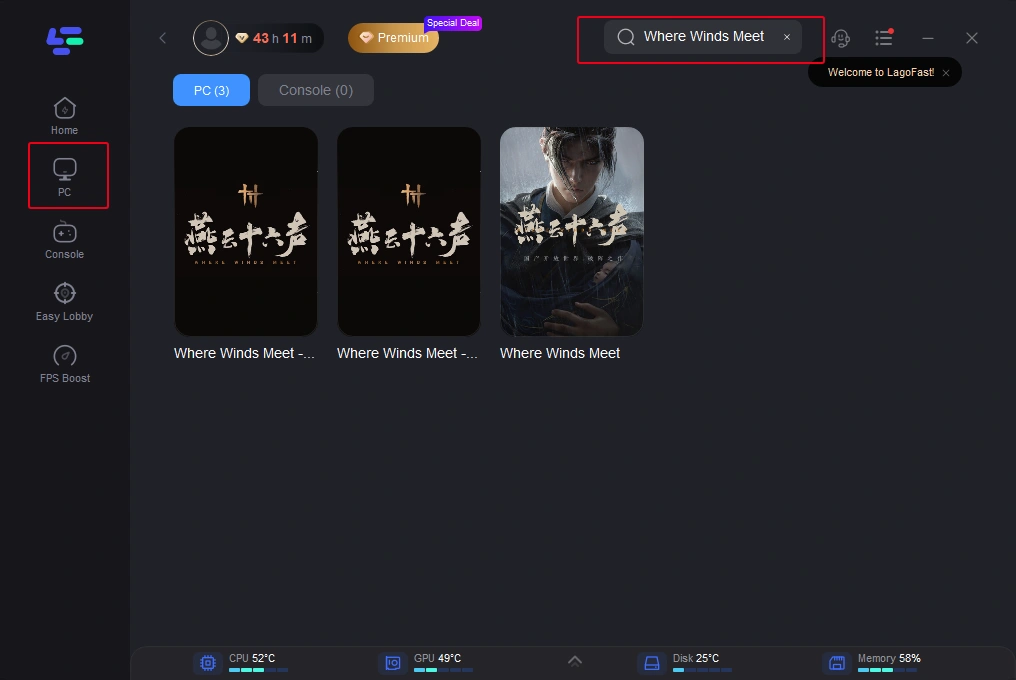
Step 2: Integrate Your Game Open LagoFast and use the search function to find your specific game. This should be done before launching the game to ensure it can be optimized.
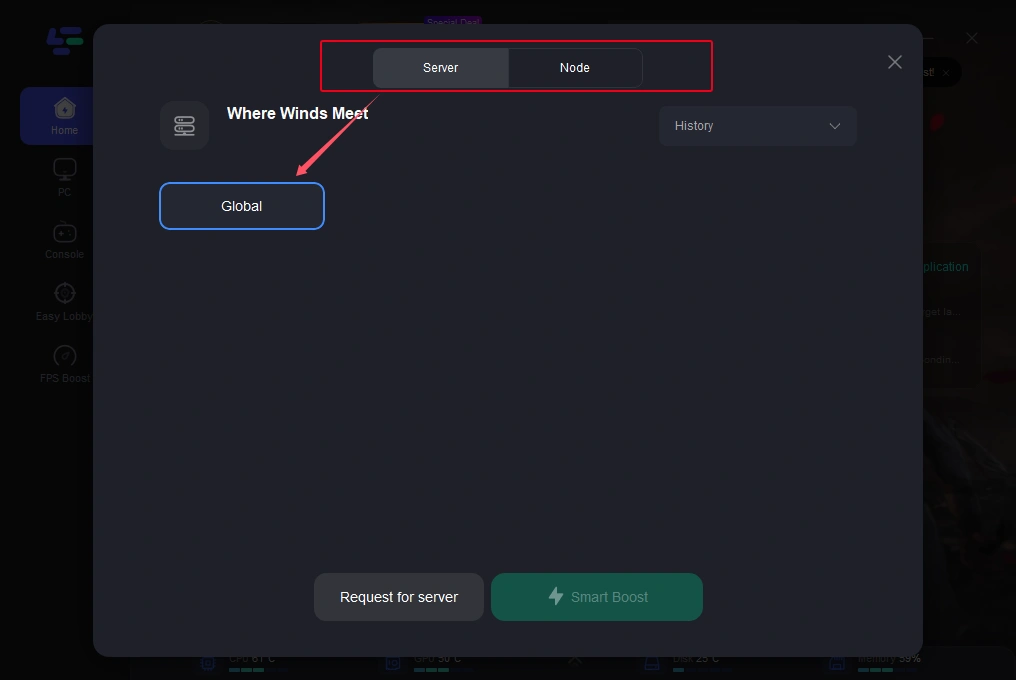
Step 3: Server Selection Navigate to “Select Server” within LagoFast. Then select the most efficient Node displayed on the right side to connect.
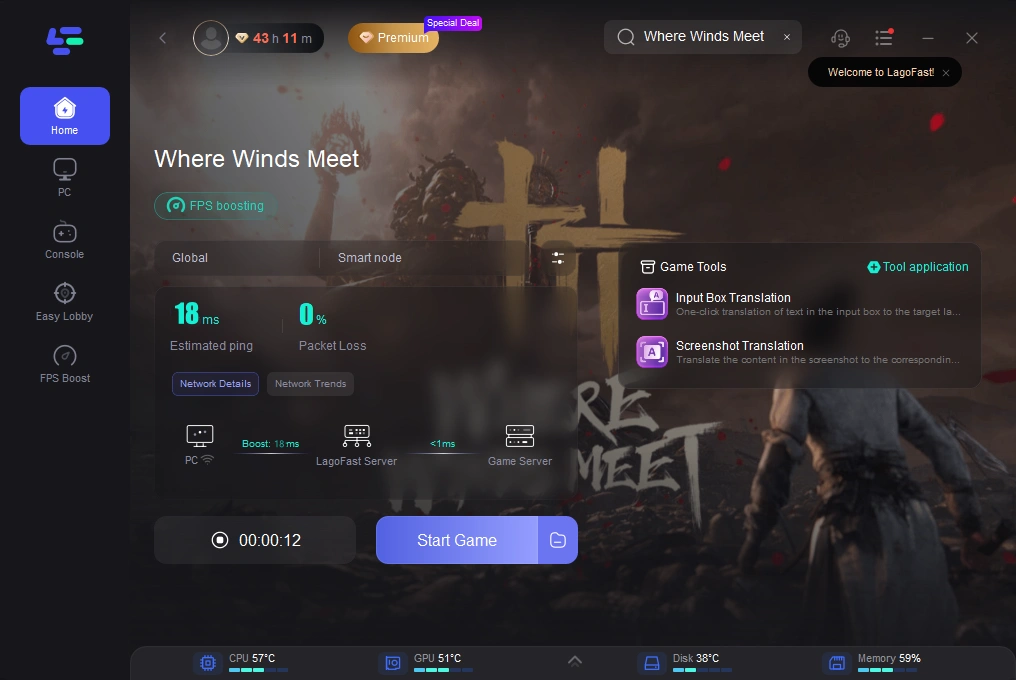
Step 4: Activate Smart Boost Click the “Smart Boost” button to start optimizing your game connection. LagoFast will then display real-time stats such as game ping, packet loss, and network type.
Using LagoFast as the first line of defense allows you to bypass inefficient routing and network congestion before trying manual optimizations.
Part 3: Other Ways to Solve Connection Issues in Where Winds Meet
While LagoFast offers the fastest improvements, combining it with traditional troubleshooting ensures the most stable experience.
Step 1: Check Your Internet and Local Network
- Use wired Ethernet instead of WiFi to avoid interference and variable latency.
- Restart your modem and router, waiting 30 seconds before reconnecting.
- Run a speed and packet-loss test to confirm network quality.
- Pause or close other devices or applications consuming bandwidth.
Step 2: Choose the Right Server or Region
- Pick the server with the lowest ping.
- Avoid overcrowded servers to reduce latency.
- Consider switching to neighboring regions if routing is more stable, even if ping is slightly higher.
Step 3: Change DNS and Optimize Routing
- Windows → Control Panel → Network and Internet → Network and Sharing Center → Change adapter settings → Properties → IPv4 → Set DNS to 8.8.8.8 / 8.8.4.4 (Google DNS).
- Custom DNS may improve speed when your ISP’s routing is inefficient.
Step 4: Close Background Applications
- Open Task Manager (Ctrl + Shift + Esc).
- Sort by CPU, memory, and network usage.
- Close unnecessary apps such as browsers, streaming platforms, software updaters, or torrent clients.
Step 5: Verify Game Client and Server Status
- Ensure your game is fully updated with the latest patches.
- Check official channels for server maintenance or outages.
Step 6: Update Drivers and System Software
- Update network adapter drivers, GPU drivers, and Windows updates.
- Outdated drivers can increase errors and cause instability.
By combining these steps with LagoFast, players can address both server-side and local network factors that affect gameplay.
Part 4: FAQs
Q1: Why do I still have high ping even though my internet speed is good?
Bandwidth (download/upload speed) does not determine latency. Ping is influenced by routing efficiency, server proximity, ISP peering, and overall traffic conditions.
Q2: Does WiFi cause higher ping than wired Ethernet?
Yes. WiFi suffers from interference, distance limitations, and inconsistent signal quality. A wired Ethernet connection is almost always more stable and significantly better for gaming.
Q3: Can Where Winds Meet be played with high ping?
It is playable for exploration or casual content, but high ping severely affects real-time combat, PvP, and time-sensitive interactions.
Q4: What is an acceptable ping for Where Winds Meet?
While there is no official value, staying below 80 ms is generally recommended for a smooth and responsive experience.
Conclusion
Connection problems in Where Winds Meet—such as high ping, packet loss, and unstable routing—can break immersion and disrupt combat. Fortunately, these issues are fixable. By optimizing your local network, selecting the correct server node, closing background tasks, updating drivers, and using a professional routing optimizer like LagoFast Game Booster, you can transform lag-ridden gameplay into a fluid and immersive wuxia experience.
Take control of your network, optimize proactively, and enjoy the full beauty of ancient China without interruptions.

Boost Your Game with LagoFast for Epic Speed
Play harder, faster. LagoFast game booster eliminates stutter and lags on PC, mobile, or Mac—win every match!
Quickly Reduce Game Lag and Ping!
Boost FPS for Smoother Gameplay!