

Gaming is no longer just a casual hobby, it’s a full-blown passion, competitive sport, and lifestyle for millions around the globe. Whether you’re a pro aiming for high ranks in games like Valorant, Call of Duty, or League of Legends, or just someone who loves exploring open worlds on mobile, performance matters. One of the biggest frustrations for any gamer is lag, frame drops, and slow performance, especially during critical moments. That’s where game boosters come into play.
If you've ever wondered, “What is a game booster?”, you're not alone. As games become more demanding, the need for software that can optimize performance has grown immensely. In this article, we'll explain in depth what game boosters are, how they work, and why they're essential for serious and even casual gamers. We’ll also introduce LagoFast, one of the most reliable and versatile game boosters available across PC, Android, and iOS.

Part 1: What Is a Game Booster?
Part 2: Why Do You Need a Game Booster?
Part 3: How Does a Game Booster Work?
Part 4: Best Game Booster for PC, Android, and iOS: LagoFast
Part 1: What Is a Game Booster?
At its core, a game booster is a type of software designed to optimize your device’s performance when you're playing games. This optimization process involves allocating system resources, like CPU and RAM, more efficiently, shutting down unnecessary background tasks, improving network connectivity, and enhancing FPS.
Think of it as a performance enhancer that knows exactly what your game needs and clears the path for it to run smoothly.
Game boosters are not just for PC. Today, many mobile gamers use boosters on Android and iOS to ensure a seamless gameplay experience without overheating, crashing, or battery drain issues. A good game booster doesn’t just improve speed; it gives your device the breathing room it needs to run games the way they were meant to be played.
Part 2: Why Do You Need a Game Booster?
Now that you know what a game booster is, the next question is: Why do you need one?
Here are several key reasons:
1. Reduces Lag and Latency
Nothing kills a competitive match faster than lag. Whether it's packet loss or high ping, delays can throw off your timing and reflexes. Game boosters, especially ones like LagoFast, are built to stabilize network connections and reduce latency, even in fast-paced online multiplayer games.
2. Boosts FPS
Lower FPS can make games stutter and feel unresponsive. Game boosters adjust your system settings, reduce background processing, and dedicate more resources to the game to increase FPS.

3. Close Unnecessary Background Tasks
Most users have dozens of apps and processes running in the background that they don’t even notice. Game boosters intelligently identify and disable those tasks, freeing up memory and CPU for better game performance.
4. Prevents Device Overheating (Especially for Mobile Devices)
On smartphones, running a heavy game like PUBG Mobile or Genshin Impact can cause overheating. Game boosters optimize performance to prevent overheating, reduce power consumption, and extend battery life.
5. Creates a Distraction-Free Environment
Notifications, pop-ups, or random system updates can ruin immersion. Many game boosters offer "Do Not Disturb" or gaming modes that mute notifications and block interruptions while you’re gaming.
6. Improves Load Times
Faster data access means quicker game launches and shorter loading screens, especially useful for open-world games like GTA V or Elden Ring.
Part 3: How Does a Game Booster Work?
Let’s get a bit technical, but not too much. A game booster functions by optimizing both system performance and network connection. Here’s a breakdown of how it typically works:
1. System Resource Allocation
Game boosters prioritize game-related processes over others. This means allocating more RAM and CPU cycles to your game while limiting other applications that aren't essential at the time.
2. Memory Cleaning
Game boosters clean your device’s memory in real time by removing junk files, temporary caches, and unwanted system data that may slow down your device. It’s like giving your system a quick refresh before a heavy game session.
3. Network Route Optimization
One of the standout features of advanced game boosters like LagoFast is the ability to optimize network routing. It connects you through the fastest and most stable server path, reducing ping and avoiding congestion that leads to lag.
4. FPS Stabilization and GPU Optimization
On supported devices, game boosters can also tweak GPU settings to maximize performance, ensuring smoother visuals and reduced screen tearing or stutter. This is particularly beneficial for games with intensive graphics.
5. App Blocking and Do Not Disturb Modes
The software automatically disables auto-sync features, background app refreshes, and even mutes notifications during gameplay. This ensures that your game isn’t disturbed by random pings or messages.
Part 4: Best Game Booster for PC, Android, and iOS: LagoFast

While there are dozens of game booster options available, LagoFast stands out as one of the most trusted and reliable names in the industry. It’s an all-in-one game booster that offers features across PC, Android, and iOS platforms, and it’s especially known for reducing lag and boosting FPS in real time.
Benefits of Lagofast:
- Reduces Lag & Ping: Optimizes network routes for smoother online play.
- Boosts FPS: Enhances GPU and CPU performance for higher frame rates.
- Works on PC, Android & iOS: A versatile solution for all devices.
- Easy to Use: One-click optimization with no complex settings.
- Wide Compatibility: Supports hundreds of games, including Fortnite, Warzone, Valorant, League of Legends, Apex Legends, Mobile Legends, and more.

LagoFast Tutorial:
Step 1: Click the Free Trial button to download and install LagoFast.
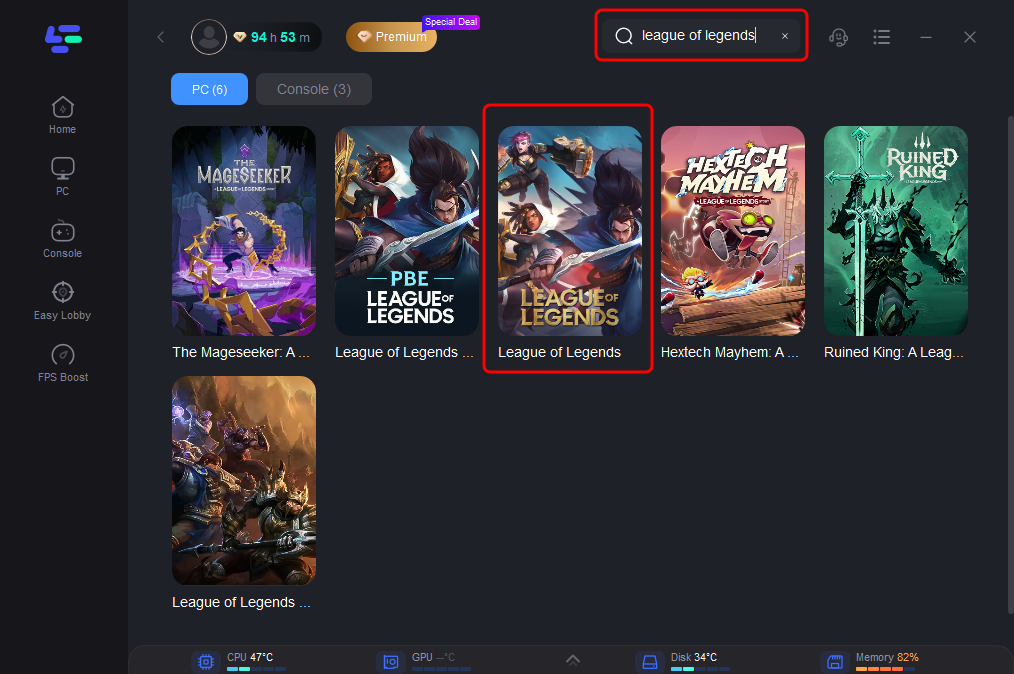
Step 2: Open LagoFast, then click the PC button on the left and search for the game you played, like League of Legends, in the search bar, and click it after it appears.
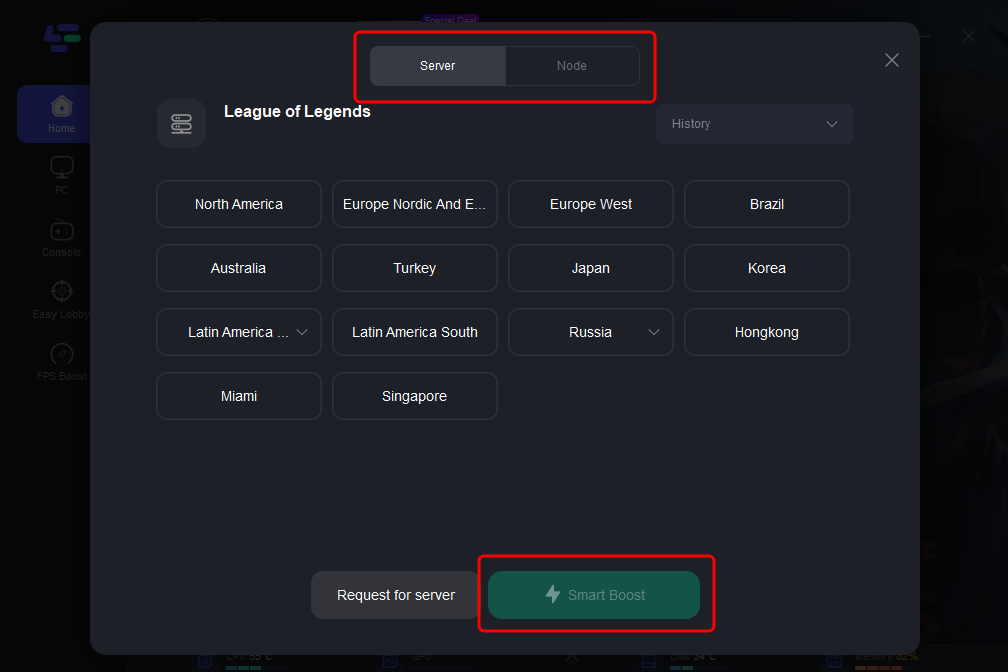
Step 3: Click on “Server” to change to a stable server that can fix lag and ensure a smooth gaming experience, then click on “Smart Boost”.
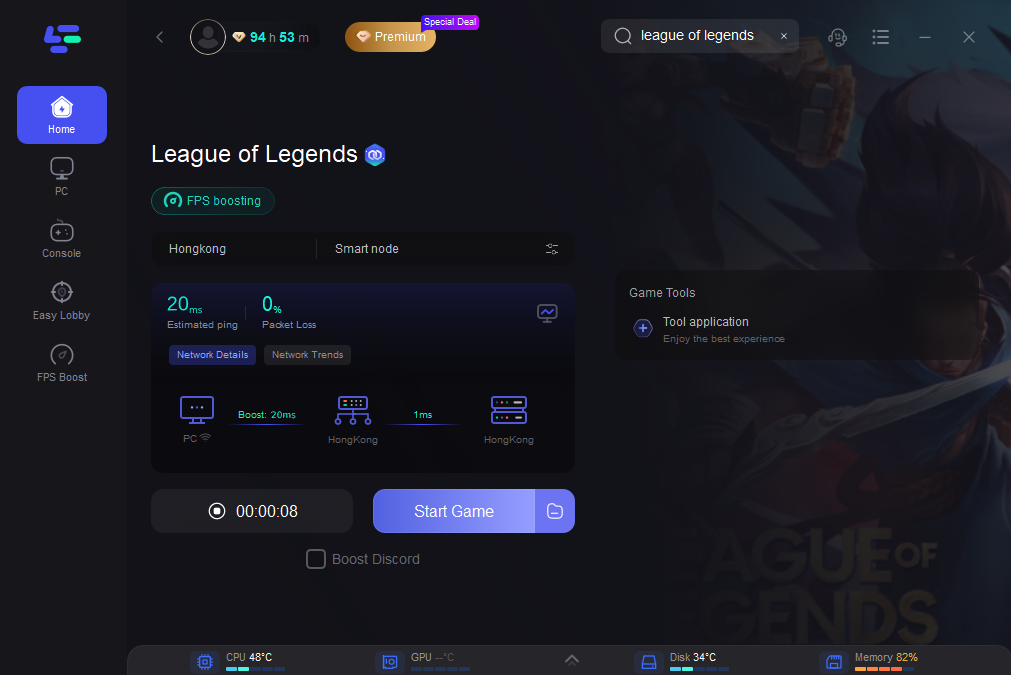
Step 4: Check the specific game ping, packet loss, and multiple path connection on the right side. Finally, click the “Start Game” to play the game.
Part 5: FAQs
Is a Game Booster Good for Gaming?
Yes! A game booster improves performance by optimizing system resources, reducing lag, and increasing FPS. It’s especially useful for low-to-mid-range devices.
Does a Game Booster Reduce Lag?
Absolutely. By closing background tasks and optimizing network settings, game boosters like Lagofast significantly reduce lag in online games.
Does Lagofast Game Booster Increase FPS?
Yes. Lagofast enhances CPU and GPU allocation, leading to higher FPS in most games.
Are Game Boosters Safe?
Reputable boosters like Lagofast, Razer Cortex, and Wise Game Booster are safe. Avoid unknown software that may contain malware.
Can I Use LagoFast on Mobile?
Yes, LagoFast has versions for both Android and iOS. It’s designed to reduce lag, prevent overheating, and maximize battery performance on mobile gaming devices. Whether you’re playing Call of Duty: Mobile or Mobile Legends, LagoFast ensures smooth gameplay.

Boost Your Game with LagoFast for Epic Speed
Play harder, faster. LagoFast game booster eliminates stutter and lags on PC, mobile, or Mac—win every match!
Quickly Reduce Game Lag and Ping!
Boost FPS for Smoother Gameplay!