

Valorant, Riot Games' tactical hero shooter, is known for its polished gameplay and constant updates. But before any new feature, Agent, or map hits the live servers, it first passes through a special testing ground: the Valorant Public Beta Environment, or PBE. This platform offers dedicated players a chance to preview, test, and help refine upcoming changes in advance. Whether you're a passionate bug finder or just excited to get your hands on new content early, accessing the PBE is a valuable opportunity.
This article walks you through everything you need to know, from eligibility and step-by-step installation to gameplay tips and optimizing your experience. If you're ready to dive into the test server and influence the future of Valorant, read on.

Part 2: Who Can Join the Valorant Test Server?
Part 3: How to Get Valorant PBE Access?
Part 4: How to Play on the Valorant PBE Server?
Part 5: Optimize Valorant PBE Gaming Experience with LagoFast
Part 1: What is Valorant PBE?
The Public Beta Environment is a dedicated test server separate from the main Valorant servers. It hosts early versions of upcoming patches, which include:
- New Agent kits and ability adjustments
- Game balance changes
- Unreleased or experimental maps
- Cosmetic items like skins and sprays
- New UI/UX design elements
- Gameplay engine tweaks and bug fixes
Testing takes place a few days or weekends ahead of major patch releases. Changes in this environment aren’t always guaranteed to make it into the final game, some are scrapped or reworked based on community feedback gathered during testing.
By participating, players contribute to a smoother live rollout and can get hands-on experience with content that hasn’t been widely released yet.
Part 2: Who Can Join the Valorant Test Server?
As exciting as the PBE sounds, not every player can dive in right away. Riot has established several eligibility requirements to maintain server stability and ensure efficient feedback collection.
Requirements to Participate:
- Location restriction: Only players based in North America can apply.
- Account standing: You must have no bans or current penalties.
- Active player status: Riot prefers accounts that have shown consistent activity over time.
The biggest hurdle for international fans is the NA-only rule. Riot justifies this decision by pointing out that their development team is primarily located in North America. Testing within this region ensures fast turnaround on bug fixes and improves data collection accuracy. Opening the PBE globally could create latency problems and distort feedback due to inconsistent server performance.
Part 3: How to Get Valorant PBE Access

Joining the PBE involves an application process through Riot’s official site. If you qualify, you’ll be invited to download a separate client and start testing.
Step 1: Log in to Your NA Riot Account
Ensure your Riot account is registered in North America. Visit the official Riot Games website and sign in.
Step 2: Visit the PBE Application Page
Go to the designated PBE sign-up page. This page will guide you through verifying your account status and eligibility.
Step 3: Submit Your Application
Once your region and account are confirmed, click the application button to request access. Riot reviews applications based on account activity, region, and server availability.
Step 4: Wait for Email Confirmation
If accepted, you’ll receive an email inviting you to download the PBE client. Access is granted in waves and not all applicants are accepted immediately.
Step 5: Install the PBE Client
Follow the link provided in the invitation email to download the PBE installer. This is a separate client and won’t interfere with your existing live Valorant setup.
Step 6: Launch the PBE
Once installed, log in with your Riot credentials and explore upcoming features before anyone else.
Part 4: How to Play on the Valorant PBE Server?

Once you’ve got the PBE installed, getting into a match isn’t always instant. There are some additional details to keep in mind to ensure smooth testing.
Step 1: Confirm Server Availability
The PBE is not always online. Riot typically activates it on weekends leading up to a patch release. Watch for notification emails or check community forums like the Valorant subreddit.
Step 2: Login and Patch
When the PBE is live, open the client and patch it to the latest version if needed. Login using the same credentials as your main Riot account.
Step 3: Check for Updates
Most PBE builds include a few patch notes detailing what’s new. Review these notes to understand what Riot is focusing on during the test phase, this might be a new Agent, weapon balancing, or map reworks.
Step 4: Play and Explore
Try out new content across available game modes. Some modes may be limited, typically, Competitive is the default queue for testing due to matchmaking data reliability.
Step 5: Submit Feedback
If you discover bugs or gameplay issues, report them on the official PBE subreddit. Your feedback can make a direct impact on the live game.
Part 5: Optimize Your PBE Experience with LagoFast
Testing in Valorant’s PBE can be exciting, but if your connection isn’t stable, the experience quickly becomes frustrating. This is especially true since all PBE servers are located in North America, which can result in high ping or lag if you're testing from overseas.
LagoFast is a premium game booster and latency optimizer specifically designed to enhance your network performance for competitive games like Valorant. It's ideal for players outside NA who want smoother gameplay on the PBE.
Key Features of LagoFast:
- Dedicated routes for Riot Games servers to lower latency.
- Smart lag reduction technology that dynamically adjusts routing for optimal speed.
- 1-click optimization for easy setup and instant performance boost.
- Support for over 1000+ games, not just Valorant.
- Real-time ping monitoring and FPS stabilization.
Whether you're testing Agent updates or trying to verify a new patch’s stability, using LagoFast helps ensure the best possible experience with fewer disconnections and input delays.
Tutorial to use LagoFast to optimize your Valorant gaming experience on PC:
Step 1: Click the Free Trial button to download and install LagoFast.
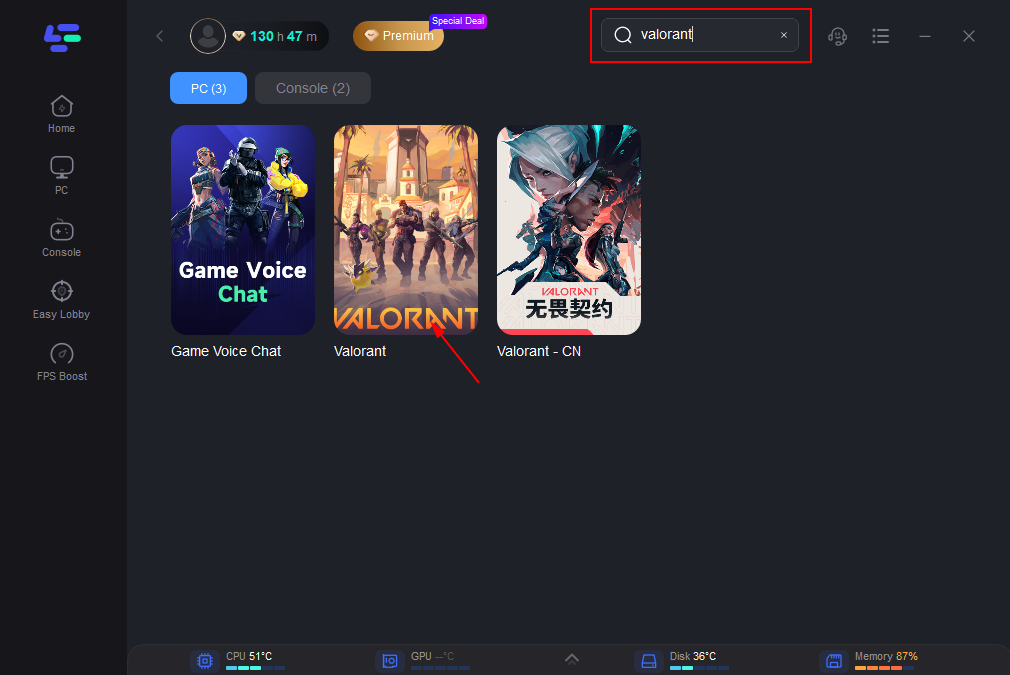
Step 2: Open LagoFast, then click the PC button on the left and search for Valorant in the search bar, and click it after it appears.
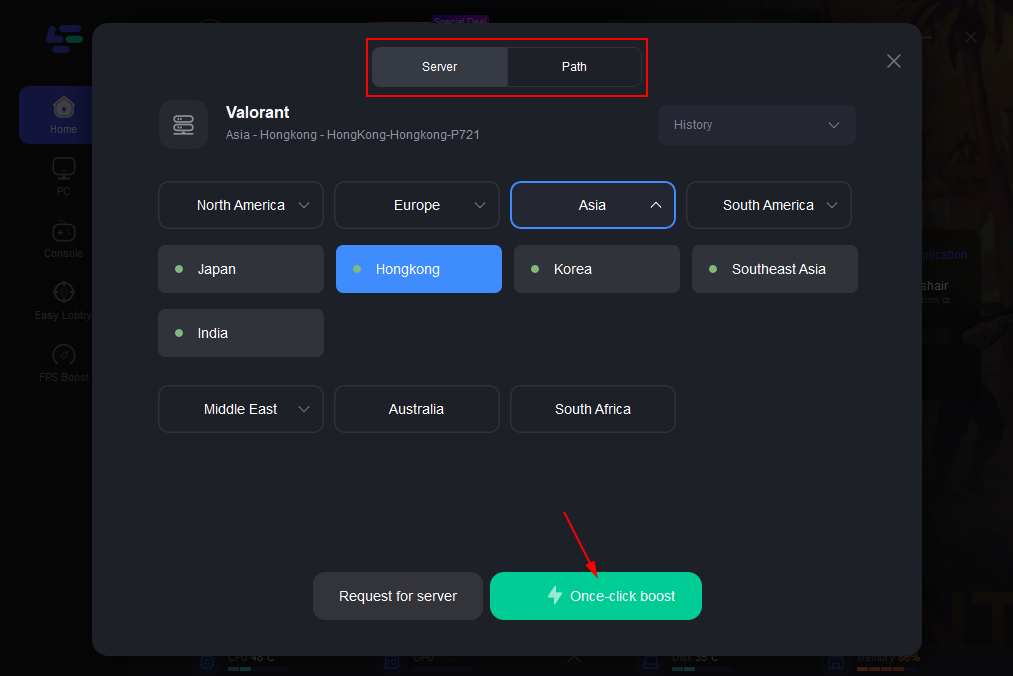
Step 3: Click on “Server” to change to a better server that ensures the gaming experience, then click on “Smart Boost”.
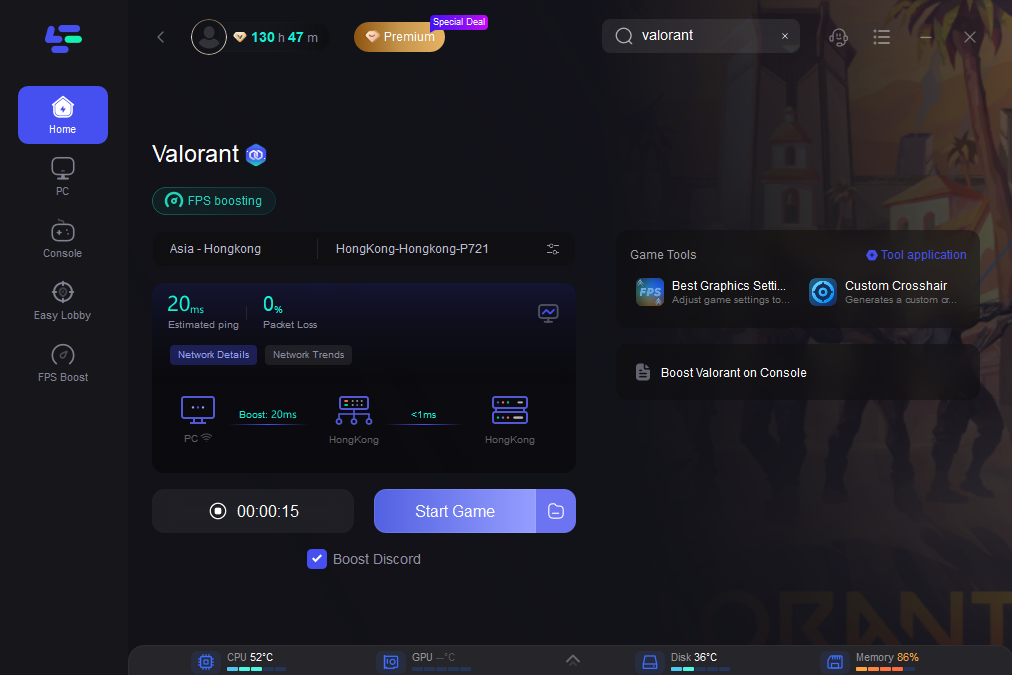
Step 4: Check the specific game ping, packet loss, and multiple path connections on the right side. Finally, click the “Start Game” to play the game.
Conclusion
The Valorant PBE offers a valuable opportunity for players to experience upcoming content early and contribute to the game’s development by testing new features, reporting bugs, and providing feedback. While access is currently limited to eligible North American accounts, those who qualify can follow a simple application process to join. From exploring new Agents and maps to checking balance changes, the PBE provides a first-hand look at what’s next for Valorant. Tools like LagoFast can also help optimize the experience, especially for players outside of NA facing high ping or lag. Whether you're a competitive player or a curious fan, joining the PBE allows you to help shape the future of Valorant.

Boost Your Game with LagoFast for Epic Speed
Play harder, faster. LagoFast game booster eliminates stutter and lags on PC, mobile, or Mac—win every match!
Quickly Reduce Game Lag and Ping!
Boost FPS for Smoother Gameplay!