
Are you stuck with Valorant not downloading on your PC? Whether the Riot Client freezes, download speed is painfully slow, or it simply won’t start, you’re not alone. This guide covers all the common reasons Valorant won’t download—and how to fix them so you can jump into the game faster.

- Common Reasons Why Valorant Won’t Download
- Quick Fixes for Valorant Not Downloading
- Advanced Solutions for Persistent Download Problems
- Speed Up the Download with LagoFast
- Frequently Asked Questions
1. Common Reasons Why Valorant Won’t Download
Before troubleshooting, it helps to understand the possible causes. Here are the most frequent issues:
- Internet connection problems
- Riot Client glitches or bugs
- Antivirus/firewall blocking the download
- Lack of admin permissions
- Corrupted cached files
- Insufficient disk space
2. Quick Fixes for Valorant Not Downloading
1. Check Your Internet Connection
A slow or unstable network is the most common reason for Valorant download getting stuck.
Solutions:
- Restart your router/modem
- Switch to a wired Ethernet connection if possible
- Run a speed test to ensure stable download speed
2. Restart the Riot Client
If the download freezes or fails to start:
- Close the Riot Client completely using Task Manager
- Relaunch it as Administrator (right-click > Run as administrator)
- Try downloading again
3. Disable Antivirus or Firewall Temporarily
Security software can interfere with Riot’s servers or block the game installer.
Try this:
- Add Valorant and Riot Client to your antivirus/firewall exception list
- Temporarily disable them and retry the download
- Turn them back on once the installation begins successfully
3. Advanced Solutions for Persistent Download Problems
4. Clear Riot Client Cache
Corrupted cache data may prevent new downloads from initiating properly.
Steps:
- Close the Riot Client
- Navigate to C:\Riot Games\Riot Client
- Delete the “Data” and “Logs” folders
- Relaunch the Riot Client and start downloading again
5. Free Up Disk Space
Valorant requires at least 30GB of free space. If your drive is nearly full, clear unnecessary files or move data to another drive.
6. Use a Different Installation Folder
Sometimes, the Riot Client has trouble writing to certain directories.
Fix:
- During installation, choose a different folder or drive
- Make sure the folder is not read-only and has proper write permissions
4. Speed Up the Download with LagoFast
If your Valorant download is slow or unstable, a game booster like LagoFast can help by stabilizing your network and speeding up data transfer from Riot’s servers. With LagoFast, you can bypass the usual network slowdowns and enjoy a faster, smoother download process—no complicated setup required. Its intelligent routing system identifies the fastest and most stable path to Riot’s servers, ensuring your files are downloaded without interruption.
How LagoFast Helps:
- Smart routing to avoid congested nodes
- Real-time ping and packet loss monitoring
- Boosts both download speed and game performance
Steps:
Step 1: Download LagoFast and register.
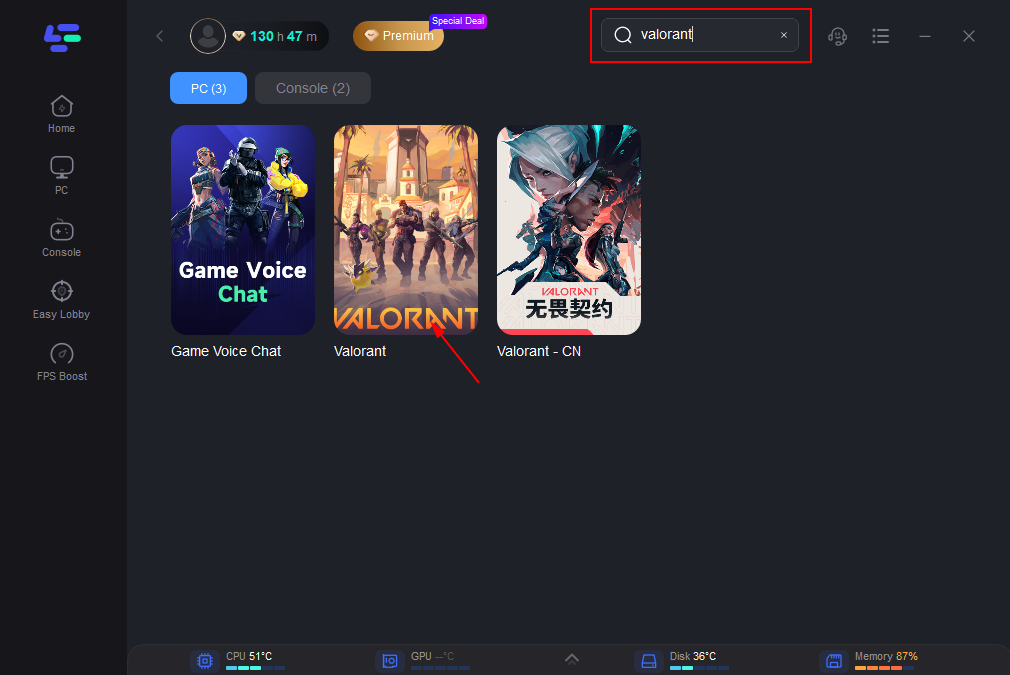
Step 2: Type Valorant in the Search box and click on it.
Step 3: Choose your needed server.
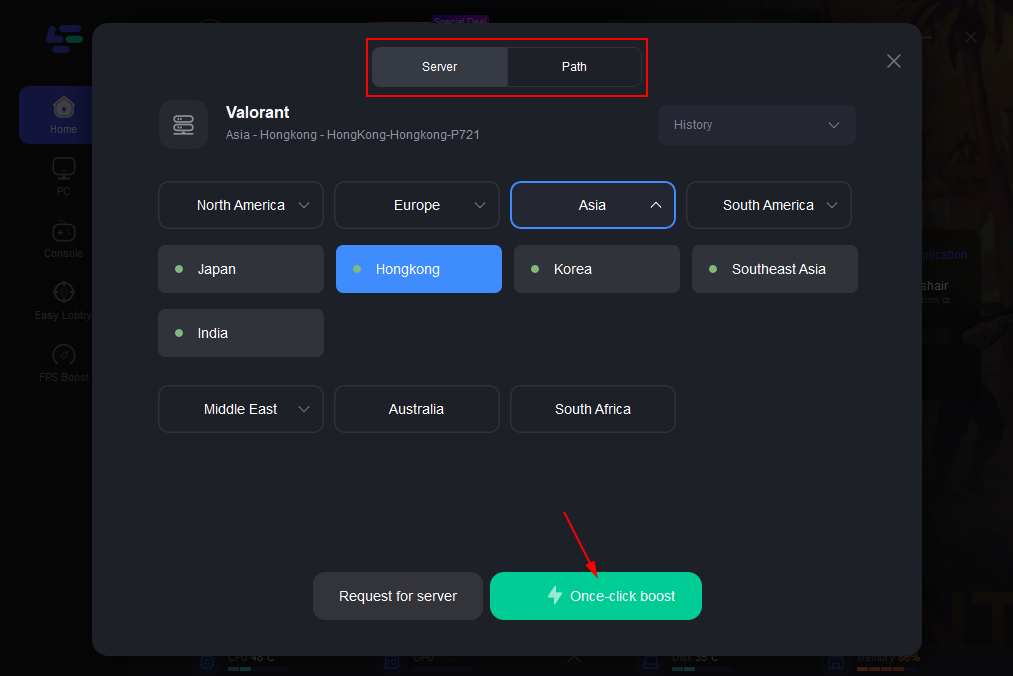
Step 4: Click on the Boost button and then enjoy Valorant!
You can have a direct look at your real-time ping and packet loss rate which are closely connected to your FPS performance in Valorant.
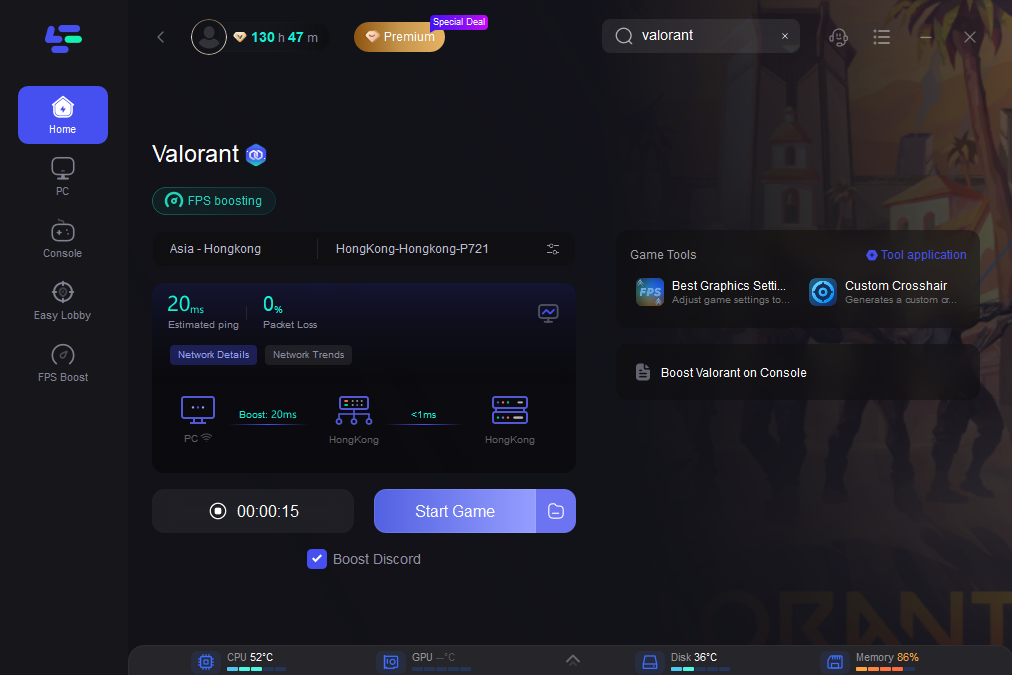
Begin the download via the Riot Client.
This is especially helpful if you’re facing region-specific bandwidth limits, sudden drops in speed, or stuck at “0% downloading.” Unlike generic VPNs or system tweaks, LagoFast is tailored for games like Valorant, meaning it won’t just get you past the install screen—it also prepares your connection for optimal gameplay afterward. It’s an easy win for anyone stuck waiting hours—or worse, endlessly restarting the download.
5. Frequently Asked Questions
Why is my Valorant stuck on “Initializing”?
This typically means the Riot Client is unable to start the download. Try restarting it as administrator, clearing the cache, or using LagoFast to stabilize your connection.
Can I download Valorant without the Riot Client?
No. The Riot Client is required to download, install, and update Valorant. Make sure it’s fully installed and updated.
Does Valorant need VPN for better download speed?
Not necessarily. VPNs may help in some regions, but tools like LagoFast are designed specifically for games and often perform better without violating any TOS.
Conclusion
When Valorant is not downloading, it can be incredibly frustrating—but most of the time, the fix is simple. Whether it’s your network, system permissions, or a Riot Client glitch, the step-by-step solutions above should help you resolve the issue. And if you want a faster, more reliable way to handle future downloads and gameplay, consider using LagoFast to keep things running smoothly from the start.
Boost Your Game with LagoFast for Epic Speed
Play harder, faster. LagoFast game booster eliminates stutter and lags on PC, mobile, or Mac—win every match!
Quickly Reduce Game Lag and Ping!
Boost FPS for Smoother Gameplay!