

If you’re a dedicated League of Legends (LoL) player, you may have come across the dreaded "Unknown Player" error. This issue can be frustrating, especially when you just want to hop into a game and start playing. The message typically appears when you try to log into the game, and it’s associated with one of the most severe penalties Riot Games can impose: a permanent ban.
In this article, we’ll dive deep into the "Unknown Player" error in League of Legends, what it means, how to check if your account is banned, and possible ways to fix or avoid the issue. Let’s get started!
Vietnamese version: Cách sửa lỗi League of Legends Unknown Player

Part 1: What’s the "Unknown Player" Error in League of Legends?
Part 2: Why Is My League of Legends Not Letting Me Play?
Part 3: How to Check If a LoL Account Is Banned
Part 4: How to Fix the League of Legends "Unknown Player" Error
Part 5: LagoFast – A Useful Tool to Avoid Lag and Improve Your Experience
Part 1: What’s the "Unknown Player" Error in League of Legends?
The "Unknown Player" error typically appears when a player attempts to log in but is unable to access their account. It’s a clear sign that something is wrong with your account, and in many cases, it means that your account has been permanently banned by Riot Games.
What Causes the "Unknown Player" Error?
The error generally occurs when:
- Permanent Ban: Riot Games has imposed a permanent ban on your account. This could be due to violations of their terms of service, such as cheating, toxic behavior, or account boosting. If your account is flagged for these reasons, it will be locked, and you’ll see the "Unknown Player" error when you try to log in.
- HWID (Hardware ID) Ban: Riot Games may enforce a stricter ban known as a Hardware ID (HWID) ban. This type of ban links the account suspension to your hardware, meaning that even if you create a new account, you will still be blocked from playing the game on that specific machine.
- Account Suspended for Investigation: Occasionally, an account might be temporarily suspended while Riot Games investigates potential violations. In such cases, you might also encounter the "Unknown Player" error while waiting for further updates.
Part 2: Why Is My League of Legends Not Letting Me Play?
If you’re facing the "Unknown Player" error, it likely means that your account has been penalized by Riot Games. But why does Riot ban accounts in the first place?
Common Reasons for Account Bans
- Cheating: Using third-party programs or hacks to gain an unfair advantage is strictly against Riot Games' policies. If you’re caught cheating, your account may be permanently banned.
- Toxic Behavior: Players who engage in toxic behavior—such as verbal abuse, trolling, or intentionally ruining games—can be banned. Riot has a robust reporting system, and multiple reports of toxic behavior can lead to a permanent ban.
- Boosting: Account boosting, or paying someone to increase your rank, is considered a violation of the Terms of Service. Accounts involved in boosting are often permanently banned.
- Account Sharing or Selling: Sharing your account with others or attempting to sell it is another reason why your account might be banned. Riot Games enforces strict policies to protect account security and prevent fraudulent activities.
- Using Exploits or Bugs: Exploiting game bugs or taking advantage of unintended features can also result in a ban, particularly if it gives players a competitive advantage.
Part 3: How to Check If a LoL Account Is Banned
If you’re receiving the "Unknown Player" error and suspect that your account has been banned, there are a few steps you can take to confirm the situation.
Step 1: Check Your Email
Riot Games sends out emails notifying players of account bans. If your account is banned, you should receive an email detailing the reason for the ban, whether it’s permanent or temporary, and any additional information such as the duration or appeal process.
Make sure to check your spam/junk folder if you don’t see the email in your inbox.
Step 2: Attempt to Log In
Try logging into your League of Legends client again. If you’re unable to log in, you may be facing a permanent ban. You’ll likely be prompted with the "Unknown Player" error message.
Step 3: Visit Riot Games Support
If you didn’t receive an email or if you’re still unsure about the status of your account, visit the Riot Games Support page. You can submit a support ticket requesting more information about your account status. Riot Games’ support team will be able to clarify whether your account is banned and why.
Hot Related: Path of Exile 1 Twitch Drops: What to Expect on 6.5
Part 4: How to Fix the League of Legends "Unknown Player" Error
If your account has indeed been banned, there’s not much you can do to directly "fix" the error unless the ban was a mistake or if it’s a temporary suspension. However, here are some actions you can take to address the situation:
Step 1: Appeal the Ban
If you believe your account was banned unjustly, you can submit an appeal to Riot Games. This is typically done through their support page, where you can provide additional information or evidence to make your case.
However, it’s important to note that Riot Games rarely reverses permanent bans, especially if they are for serious violations such as cheating or toxic behavior. So, it’s not guaranteed that your appeal will be successful.
Step 2: Contact Riot Support
In cases where you don’t know why your account was banned, you can contact Riot Games support for further clarification. They can provide additional details about the ban and any steps you can take to remedy the situation.
Step 3: Check for Hardware ID Ban
If you suspect that your account is banned due to a HWID ban (especially if you created a new account and still cannot access the game), it’s crucial to understand that this type of ban is more difficult to bypass. Riot Games enforces these bans to ensure fairness and prevent repeat offenders from evading punishment.
Unfortunately, there is no easy way to lift a HWID ban. Your best course of action is to reach out to Riot’s support and inquire about your specific situation.
Step 4: Wait for a Temporary Suspension to End
If your account was temporarily suspended, you will need to wait for the specified time to elapse before you can log back in and resume playing. Temporary bans usually last anywhere from a few days to several weeks, depending on the severity of the violation.
Part 5: LagoFast – A Useful Tool to Avoid Lag and Improve Your Experience
While the "Unknown Player" error is often related to account bans, it’s also possible that players might encounter it due to connection or server issues. If you’re experiencing lag or delays that affect your gameplay, you might want to consider using a tool like LagoFast.
LagoFast is a powerful tool that optimizes your connection to the game server, reducing lag and improving your overall gaming experience. It’s particularly useful for players in regions with unstable internet connections or high ping.
While LagoFast won’t fix the "Unknown Player" error itself, it can help improve your general performance, ensuring that you experience fewer technical issues while playing League of Legends.
How to Use LagoFast to Boost League of Legends on PC:
Step 1: Download LagoFast Start by visiting the LagoFast website and clicking the “Free Trial” button.
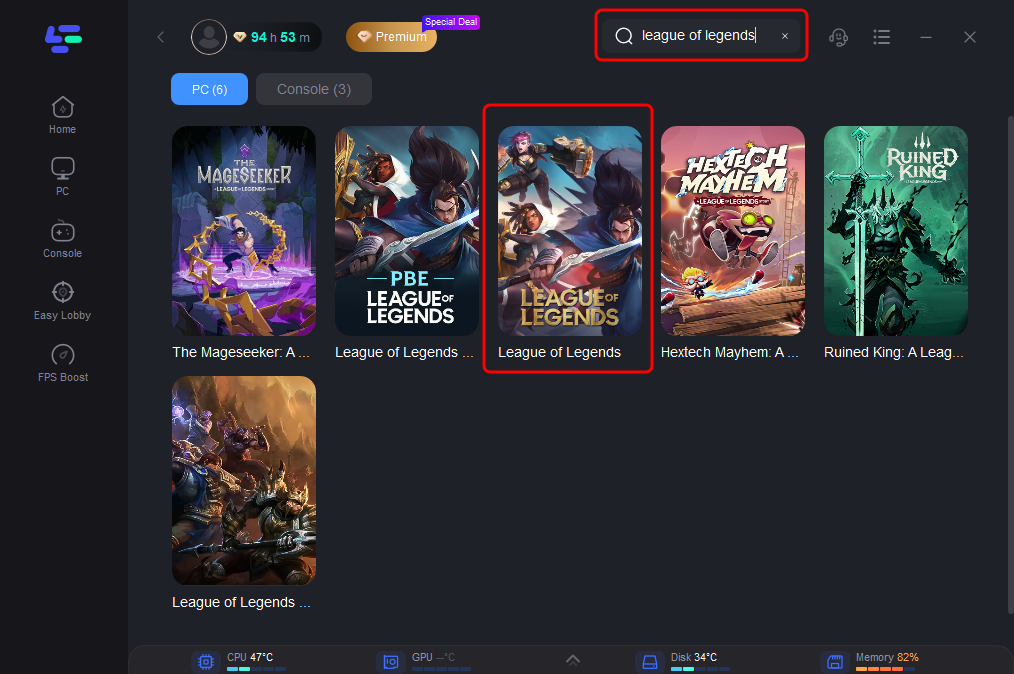
Step 2: Integrate Your Game Open LagoFast and use the search function to find your specific game. This should be done before launching the game to ensure it can be optimized.
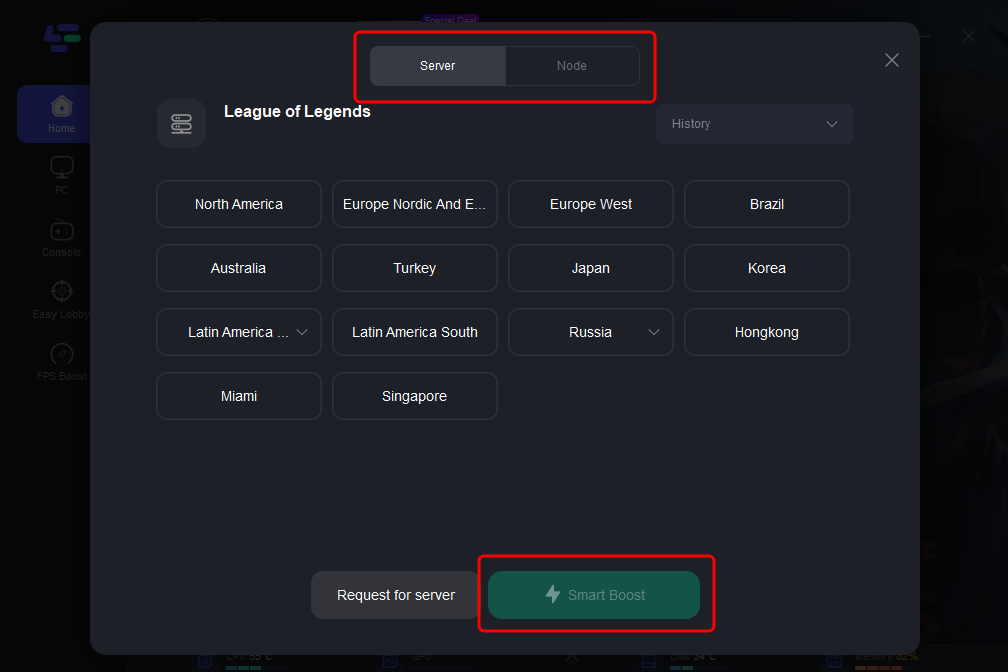
Step 3: Server Selection Navigate to “Select Server” within LagoFast. Then select the most efficient Node displayed on the right side to connect.
Step 4: Activate Smart Boost Click the “Smart Boost” button to start optimizing your game connection. LagoFast will then display real-time stats such as game ping, packet loss, and network type.
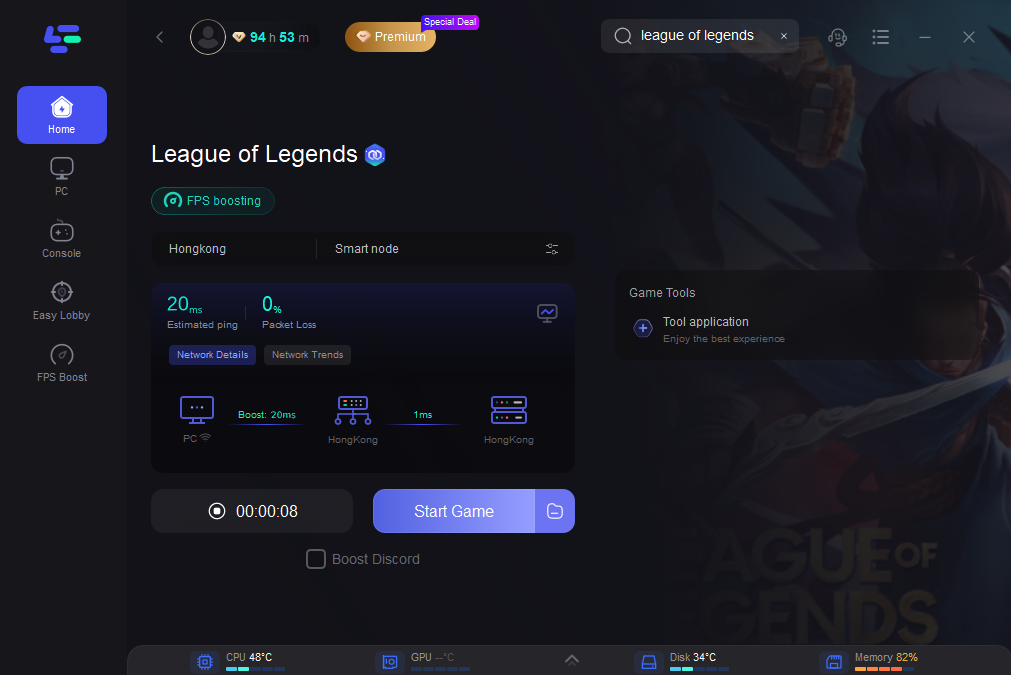
LagoFast Game Booster is an invaluable tool for enhancing your gameplay, ensuring that you can fully enjoy Sultan's Game without the hindrance of connectivity issues.
Conclusion
The "Unknown Player" error in League of Legends can be frustrating and disheartening, especially if you find out that your account has been permanently banned. While there’s no simple fix to lift a permanent ban, you can appeal the decision or check with Riot Games support for more information. Be sure to follow the terms of service to avoid penalties and ensure you continue to enjoy the game without issues.
If you’re looking to optimize your gaming experience and avoid lag or connection-related problems, consider using tools like LagoFast to improve your overall performance. Always remember to play fair and follow the rules to keep your account safe and secure!

Boost Your Game with LagoFast for Epic Speed
Play harder, faster. LagoFast game booster eliminates stutter and lags on PC, mobile, or Mac—win every match!
Quickly Reduce Game Lag and Ping!
Boost FPS for Smoother Gameplay!