

The long-awaited release of The Seven Deadly Sins: Origin has finally arrived, bringing the vibrant world of Britannia to life in a massive open-world RPG. Whether you are soaring through the skies with Tioreh or engaging in high-stakes real-time combat as Tristan, nothing ruins the immersion faster than a sudden spike in latency. Navigating a multiverse where time and space collide requires a seamless connection; otherwise, you'll find yourself falling victim to frame drops and unresponsive controls. If you are struggling with The Seven Deadly Sins: Origin lag, this guide provides the comprehensive technical solutions you need to restore order to your gameplay.

- ✅ Reduce Lag and High Ping.
✅ Boost FPS at the Same Time.
✅ Support 2000+ Popular Online Games.
✅ Change Server without Latency.
✅ Boost Game Loading Speed.
Part 1: The Causes of The Seven Deadly Sins: Origin Lag?
Part 2: How to Fix The Seven Deadly Sins: Origin Lag on PC & Mobile - 100% Work
Part 1: The Causes of The Seven Deadly Sins: Origin Lag?
Understanding why The Seven Deadly Sins: Origin is lagging is the first step toward a smoother experience. Lag generally stems from three main areas: hardware limitations, unstable network routing, or poorly optimized software settings. Because the game features a seamless open world with dynamic weather and complex particle effects, it places a heavy tax on both your local system resources and your internet bandwidth.

Common Lag Causes on PC:
- Outdated Graphics Drivers: GPU drivers that aren't optimized for 2026 releases can cause stuttering.
- Background Processes: Resource-heavy apps like Chrome or Discord overlays consuming CPU/RAM.
- Network Congestion: Standard ISP routing often takes inefficient paths to the game servers, leading to The Seven Deadly Sins: Origin high ping.
- Inadequate Hardware: Failing to meet the recommended 32GB RAM or high-end GPU requirements.
Common Lag Causes on Mobile:
- Thermal Throttling: Prolonged play on high settings causes mobile devices to overheat and slow down.
- Wi-Fi Interference: Signal fluctuations in crowded areas or distance from the router.
- Low Battery Mode: Most phones automatically limit performance when the battery drops below 20%.
- Cache Accumulation: Excess temporary files in the game’s storage directory.
Part 2: How to Fix The Seven Deadly Sins: Origin Lag?
While there are many manual tweaks you can try, most of them only offer a temporary band-aid for much deeper connectivity issues. To truly eliminate The Seven Deadly Sins: Origin network lag, you need a tool specifically designed to optimize the data path between your device and the game's servers.
The Ultimate Solution: LagoFast Game Booster
The most effective way to achieve a lag-free experience is through LagoFast. As the premier game booster in the industry, LagoFast utilizes a unique multi-path connection protocol that identifies the fastest possible route to the game server, effectively bypassing ISP throttling and congestion. It provides a specialized The Seven Deadly Sins: Origin fix for lag on PC and mobile, ensuring that your combos are perfectly timed and your exploration is uninterrupted.
Key Features of LagoFast:
- Real-Time Ping Reduction: Actively lowers latency and prevents sudden spikes.
- FPS Optimization: One-click boost to stabilize frame rates by cleaning up system resources.
- Multipath Connection: Uses secondary routes to ensure 0% packet loss.
- Cross-Platform Support: Dedicated optimization for both PC (Steam) and Mobile (iOS/Android).
- Global Server Coverage: Access any region’s server with the lowest possible latency.
Tutorial to Use LagoFast to Fix The Seven Deadly Sins: Origin Lag:
Step 1: Click the Free Trial button to download and install LagoFast.
Step 2: Open LagoFast, then click the PC button on the left and search for The Seven Deadly Sins: Origin in the search bar, and click it after it appears.

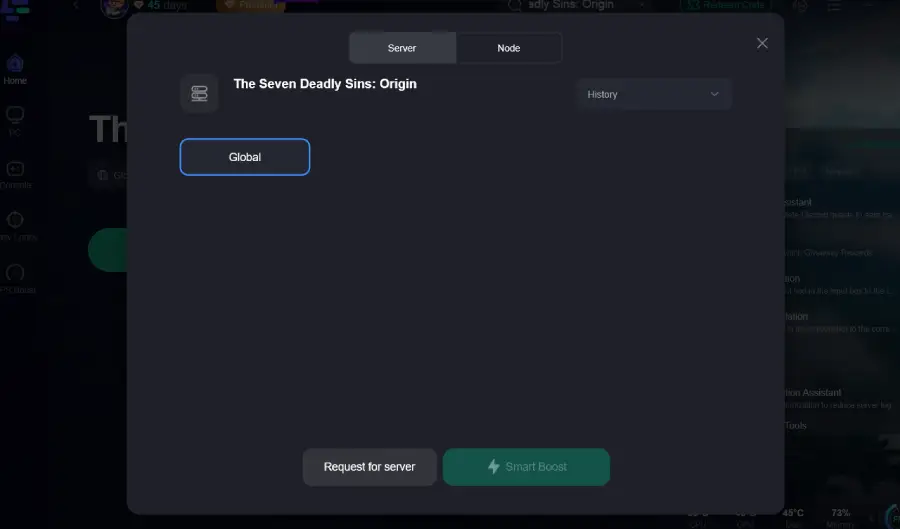
Step 3: Click on “Server” to change to a better server that ensures a better gaming experience, then click on “Smart Boost” to fix the lag issue.
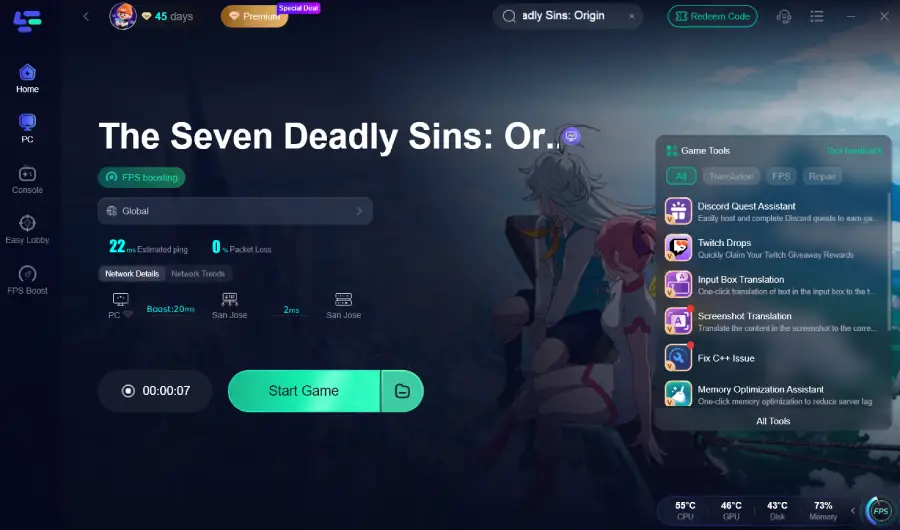
Step 4: Check the specific game ping, packet loss, and multiple path connections on the right side. Finally, click the “Start Game” to play the game.
Tutorial: Use the LagoFast Mobile to Enjoy a Smooth Mobile Gaming Experience:
Step 1: Search “LagoFast Mobile booster” in the Google App Store or Apple App Store. Alternatively, click here to download the APK File.

Step 2: Click the “Download” button, then install and launch “LagoFast Mobile Booster”.
Step 3: Start The Seven Deadly Sins: Origin, then switch to LagoFast Mobile and search for it.
Step 4. Select and click The Seven Deadly Sins: Origin in the interface.
Step 5: Enter the server selection interface, where you can change to a stable server, then click the “Boost” button to fix lag and enhance the gaming experience
Step 6: Finally, go back to The Seven Deadly Sins: Origin and start playing it without any lag.
If you aren't using LagoFast yet, you can try these manual steps, though they are significantly less efficient at solving deep-rooted network instability.
PC Solution 1. Optimize Windows Graphics Settings
Step 1: Open the Start Menu and type "Graphics Settings."
Step 2: Click Browse and locate the .exe file for The Seven Deadly Sins: Origin.
Step 3: Once added, click on the game and select Options.
Step 4: Choose High Performance to ensure your dedicated GPU is used.
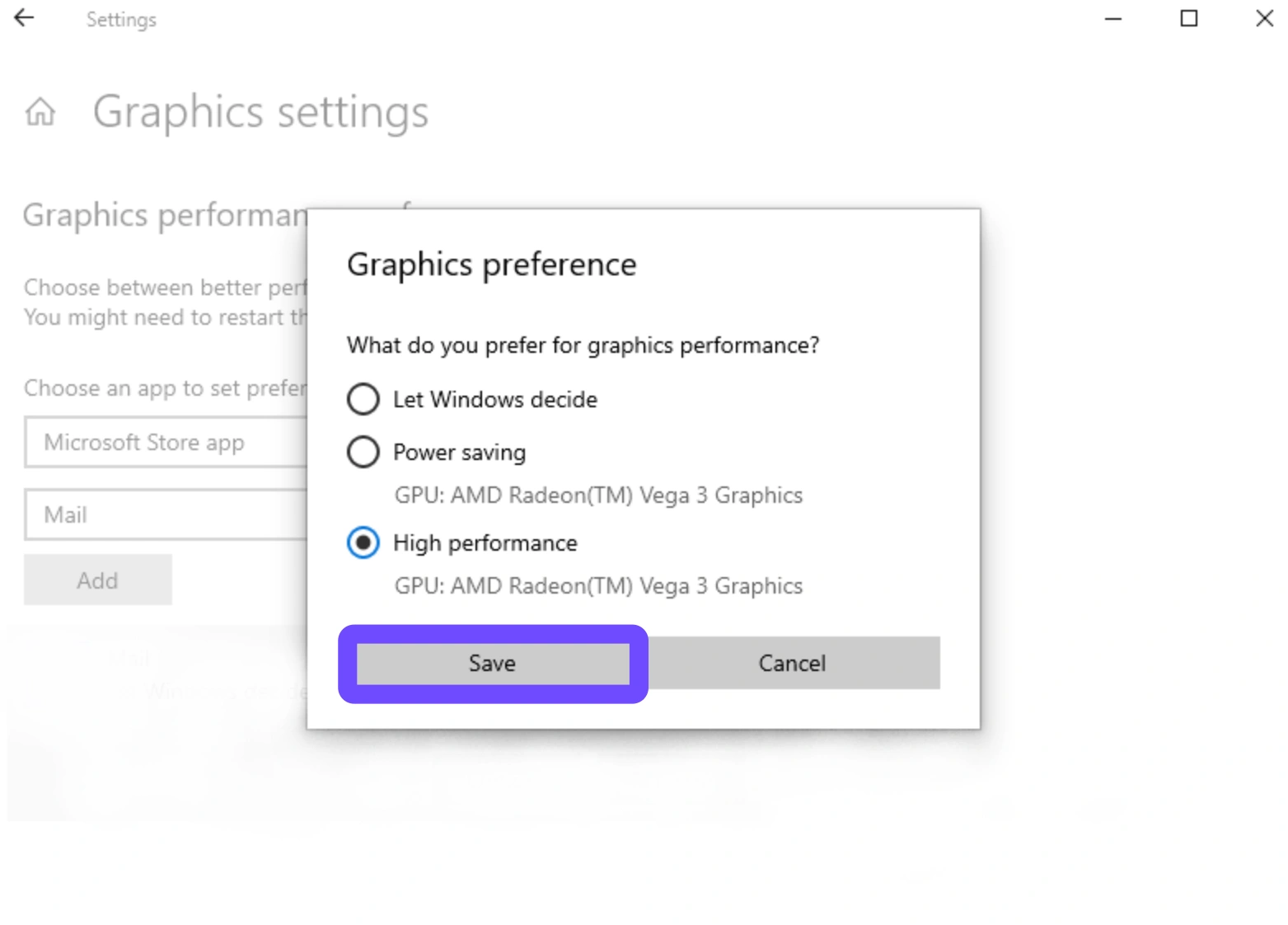
Step 5: Restart your PC and relaunch the game.
PC Solution 2: Flush Your DNS and Reset IP
Step 1: Press Windows Key + R, type cmd, and press Ctrl+Shift+Enter.
Step 2: Type ipconfig /flushdns and press Enter.
Step 3: Type ipconfig /release followed by ipconfig /renew.
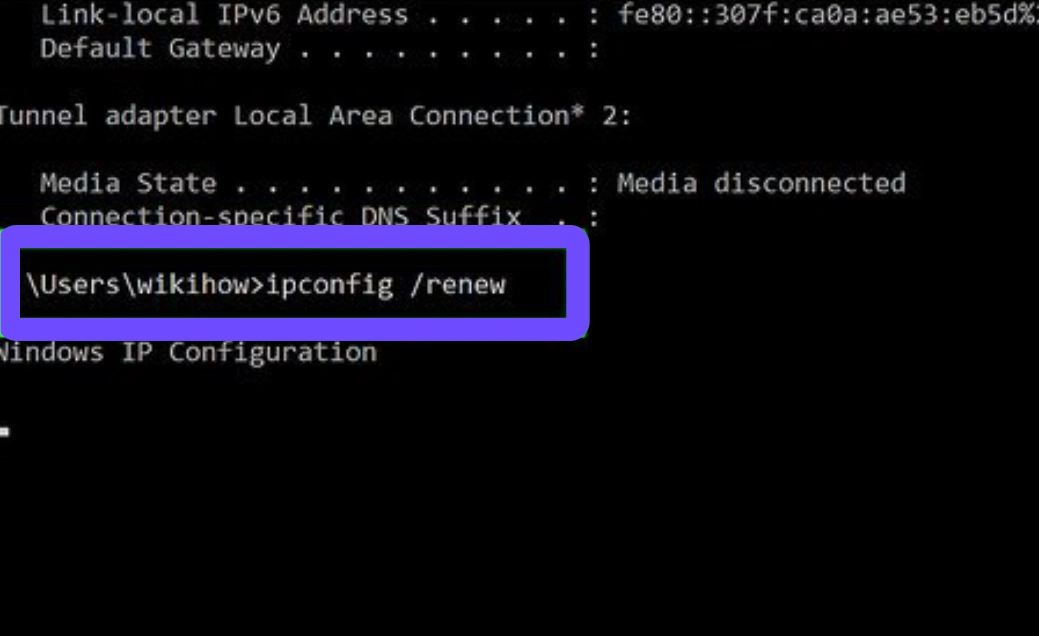
Step 4: Type netsh winsock reset and press Enter.
Step 5: Restart your computer to clear out corrupt network cache.
PC Solution 3: Adjust In-Game Display Mode
Step 1: Enter the game’s Settings menu.
Step 2: Navigate to the Graphics or Display tab.
Step 3: Change the "Window Mode" from Borderless Window to Fullscreen.
Step 4: Turn off Anti-Aliasing and V-Sync to reduce input delay.
Step 5: Apply changes and check if the stuttering persists.
Mobile Solution 1: Disable Background App Refresh
Step 1: Go to your phone's Settings.
Step 2: Search for Background App Refresh (iOS) or Data Usage (Android).
Step 3: Toggle the setting to Off or "Wi-Fi only."
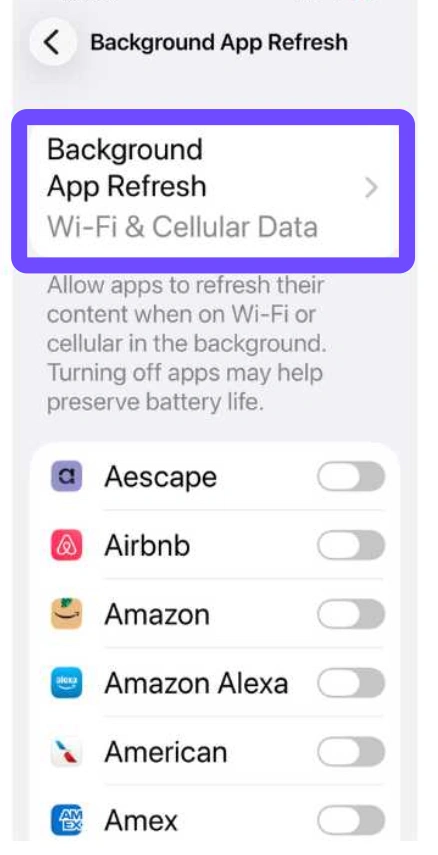
Step 4: Manually close other apps like Instagram, TikTok, or YouTube before playing.
Step 5: Launch the game to see if the network lag has decreased.
Mobile Solution 2: Switch to a 5GHz Wi-Fi Band
Step 1: Log into your router’s admin panel via a browser.
Step 2: Ensure your 2.4GHz and 5GHz bands have different names (SSIDs).
Step 3: On your mobile device, "Forget" the 2.4GHz network.
Step 4: Connect exclusively to the 5GHz network for higher data throughput.
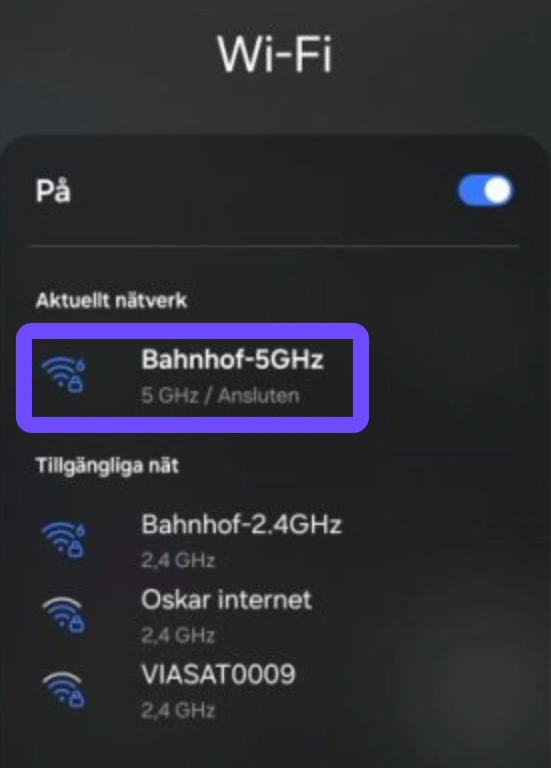
Step 5: Move within 10 feet of the router for the best signal stability.
Mobile Solution 3: Clear Game Cache and Force Stop
Step 1: Open Settings on your Android device and go to Apps.
Step 2: Find The Seven Deadly Sins: Origin in the list.
Step 3: Tap on Storage and select Clear Cache (Do NOT click Clear Data).
Step 4: Tap Force Stop to completely shut down the app processes.
Step 5: Relaunch the game to refresh the temporary memory files.
Conclusion
Lag and high ping can quickly ruin the immersive experience of exploring Britannia in The Seven Deadly Sins: Origin. Whether you are playing on PC or mobile, issues like unstable internet connections, background applications, or device limitations can all contribute to The Seven Deadly Sins Origin lagging problems. While manual fixes such as adjusting graphics settings or closing background apps may help slightly, they often fail to address the deeper network routing issues. Using a dedicated game booster like LagoFast remains the most effective and convenient way to reduce The Seven Deadly Sins Origin high ping and enjoy smoother gameplay.

Boost Your Game with LagoFast for Epic Speed
Play harder, faster. LagoFast game booster eliminates stutter and lags on PC, mobile, or Mac—win every match!
Quickly Reduce Game Lag and Ping!
Boost FPS for Smoother Gameplay!