
If you're trying to sell items in TBH Task Bar Hero but can't find a market listing option or the Trade Ship isn't working, recent trading changes are likely the reason. Many players are still unsure which items can be sold, which trading features are currently available, and whether the Steam Market is functioning as intended. This guide breaks down how trading works, why some items can't be listed, and what the current Trade Ship status means for players.

- ✅ Reduce Lag and High Ping.
✅ Boost FPS at the Same Time.
✅ Support 2000+ Popular Online Games.
✅ Change Server without Latency.
✅ Boost Game Loading Speed.
Part 1: Can You Sell TBH Items on the Steam Market?
Part 2: What Is the Trade Ship in TBH?
Part 3: Why the Trade Ship Is Disabled
Part 4: Which Items Can Be Listed on the Steam Market?
Part 5: Why Some Items Cannot Be Sold
Part 6: Steam Market Cooldowns and Listing Limits
Part 7: Why Auto Trading Can Be Risky
Part 8: How to Manage Items Safely
Part 1: Can You Sell TBH Items on the Steam Market?
Yes, but not every item in TBH Task Bar Hero can be listed on the Steam Market. While some items are tradable, others may be restricted due to item binding rules, temporary market changes, or trading features that have been disabled by the developers.
If you don't see a Market Listing option in your inventory, it usually means the item isn't currently eligible for sale rather than a problem with your account. Because trading systems and market availability have changed several times since launch, it's worth checking the current status before assuming an item can be sold.
Part 2: What Is the Trade Ship in TBH?
The Trade Ship is one of TBH Task Bar Hero's trading features, designed to help players move tradable items through the game's economy. While it's separate from the Steam Market, both systems are closely connected when it comes to item circulation and trading availability. In the past, players could use the Trade Ship to handle certain item exchanges and trading activities, but recent changes have left the feature unavailable for many players. As a result, it's common to encounter missing trade options, inactive menus, or other restrictions related to item trading.
Part 3: Why the Trade Ship Is Disabled
If the Trade Ship isn't working, it's usually related to changes on the game's backend rather than a problem with your account. Common reasons include:
- Temporary maintenance or system updates – Trading features may be disabled while developers deploy fixes or server-side changes.
- Anti-exploit measures – Trading systems are often restricted when developers investigate item duplication, abuse, or other economy-related issues.
- Market adjustments – Changes to item availability, trading rules, or Steam Market integration can temporarily affect the Trade Ship.
- Steam synchronization issues – Problems between the game and Steam services may cause trading features or market listings to become unavailable.
Because the Trade Ship and Steam Market are closely tied to the game's economy, restrictions on one system can sometimes affect the other as well.
Part 4: Which Items Can Be Listed on the Steam Market?
Not every item in TBH Task Bar Hero is eligible for Steam Market trading. In most cases, tradability depends on the item's category and current market restrictions.
|
Item Type |
Typical Steam Market Status |
|
Cosmetic skins |
Usually tradable |
|
Limited-time event items |
Varies by event |
|
Crafting materials |
Often restricted |
|
Equipment and gear |
Depends on item type |
|
Quest rewards |
Usually non-tradable |
|
Account-bound items |
Cannot be listed |
If the Market Listing option doesn't appear, the item is likely restricted or not eligible for sale.
Part 5: Why Some Items Cannot Be Sold
If you’re running into issues with tbh sell items not working, it usually comes down to a few common restrictions rather than a client-side bug:
- Account-bound items – These are permanently locked to your account and cannot be traded or listed.
- Steam Market restrictions – The market may be temporarily disabled during updates or maintenance.
- Cooldown period – Newly obtained items may need time before they become eligible for listing.
- Server sync delay – Trading status may not update immediately due to backend synchronization issues.
If you see the message “tbh items cannot be sold”, it typically reflects a backend restriction rather than an error on your end.
Part 6: Steam Market Cooldowns and Listing Limits
Even if the Steam Market is working normally, some restrictions still apply:
- 7-day trade cooldown – Items can’t be listed immediately after being received.
- Account listing limits – Steam may restrict how many items you can list at once.
- Market holds – New accounts or unusual activity can trigger temporary trading holds.
- Steam Guard verification – Missing or recent changes to authentication can block listings.
If you’ve recently moved or received items, the delay is often just a cooldown rather than a real issue with the market.
Part 7: Why Auto Trading Can Be Risky
Some players look for automation tools to speed up trading, but this often creates more problems than it solves.
Main risks include:
- Steam policy violations – Automated trading can go against Steam’s rules and lead to restrictions.
- Account penalties – Repeated or suspicious behavior may result in trade limits or bans.
- Failed transactions – Automation tools can trigger errors, stuck trades, or missing confirmations.
- Security risks – Third-party tools may expose your account to unnecessary risk.
Part 8: How to Manage Items Safely
If you’re waiting for Steam Market or Trade Ship features to stabilize, the safest approach is to focus on control and timing rather than forcing trades:
- Check item eligibility first – Not every drop can be listed, so avoid farming blindly.
- Don’t overload inventory during downtime – Stack management issues can make trading harder once systems return.
- Keep Steam Guard enabled – Required for stable market access and trade verification.
- Restart Steam after updates – Helps refresh market sync and trading status.
- Wait out cooldowns – Most “can’t sell” issues are temporary restrictions, not permanent blocks.
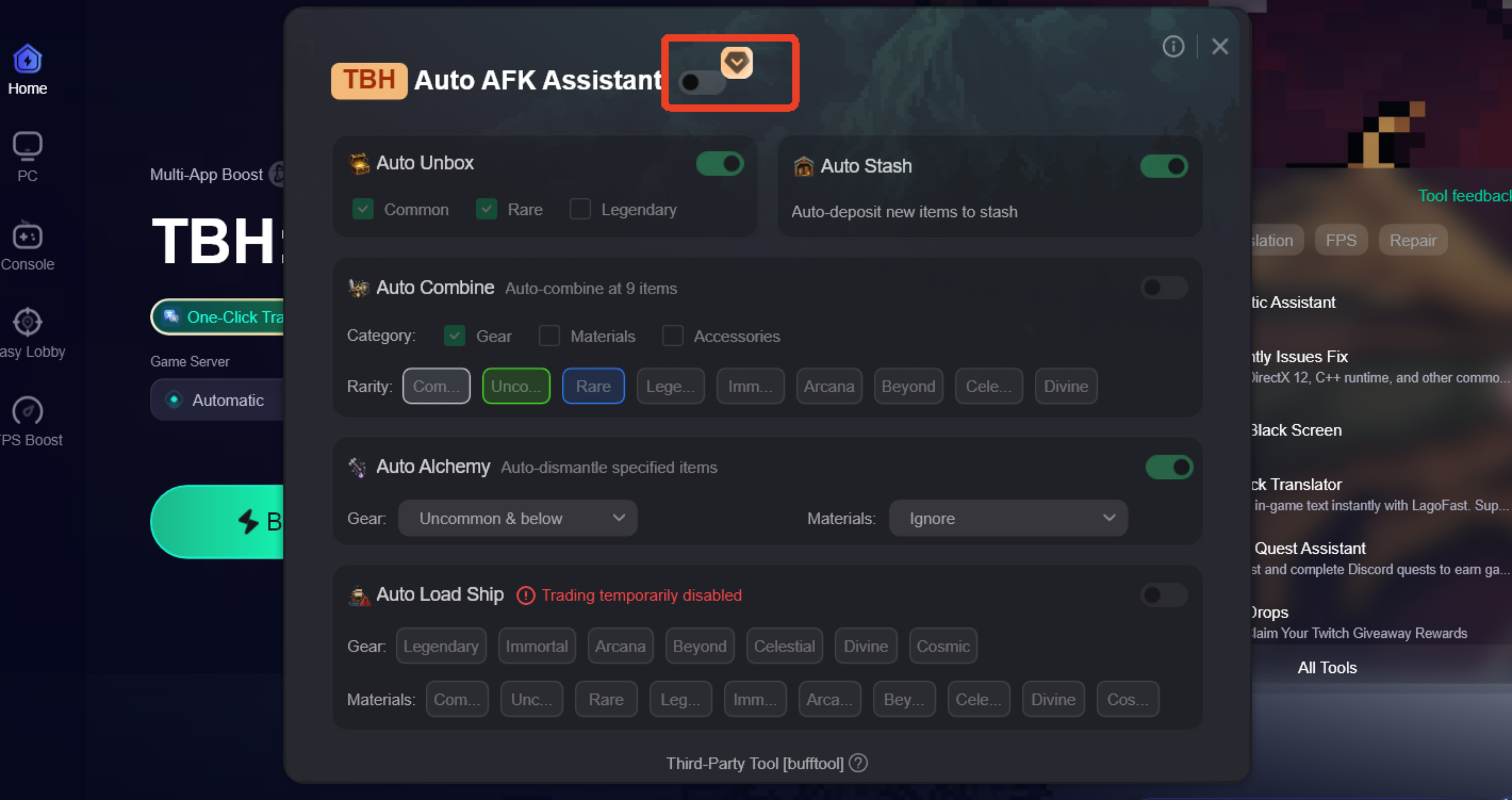
For players who want smoother item management during AFK farming, some use tools like LagoFast with its Auto AFK Assistant feature. It can help automate parts of the AFK loop, such as organizing dropped gear and preparing items for Steam Market listing, making the overall process more efficient when trading systems are stable.
In most cases, patience and proper timing still matter more than trying to rush trades during unstable periods.
How to Use LagoFast Auto AFK Assistant
Step 1: Download and install LagoFast.
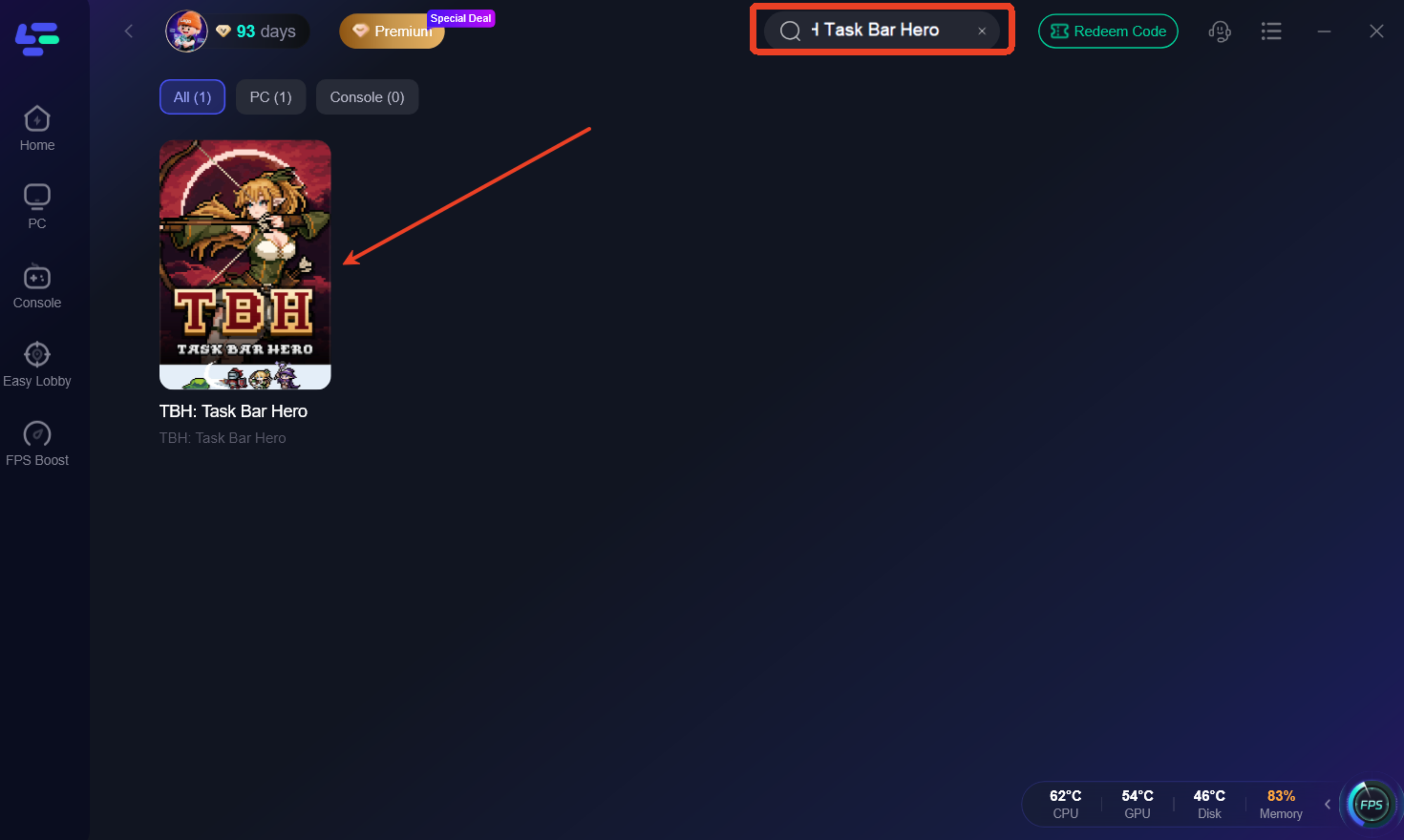
Step 2: Search for "TBH Task Bar Hero" and select the game.
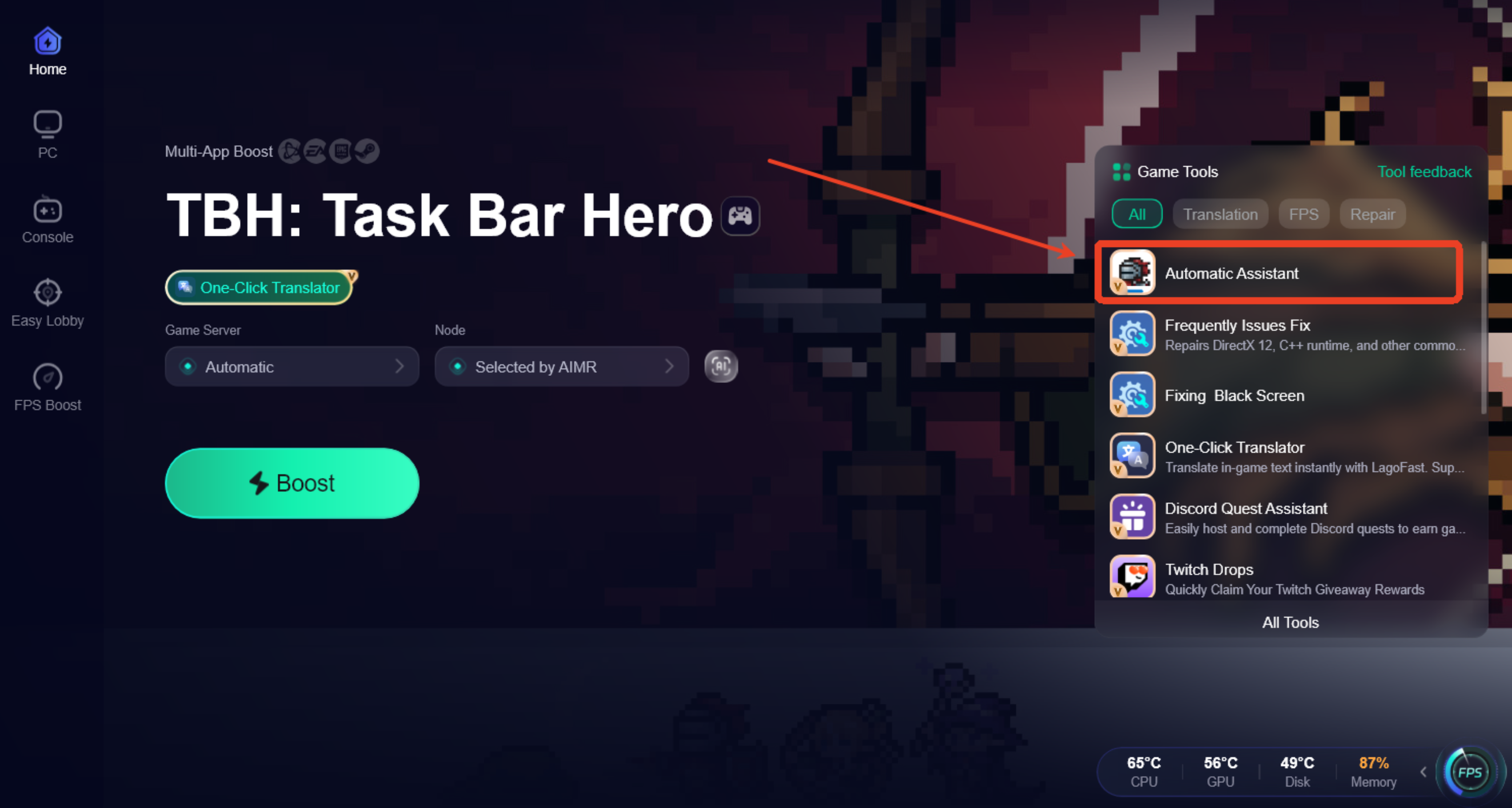
Step 3: Open the Automatic Assistant tool from the bottom-right toolbar.
Step 4: Enable Auto AFK Assistant and customize features such as Auto Chest Opening, Auto Crafting & Alchemy, Auto Storage, and Auto Trading.
Bonus tips:TBH Task Bar Hero Trade Ship Not Working: Steam Market Status Explained:
At the moment, many players are running into the same trading issues:
- Trade Ship not available or unstable
- Missing Steam Market listing options
- Items stuck in inventory with no way to sell
In most cases, these problems are tied to temporary system-side restrictions rather than permanent changes to the game’s trading features. Once backend updates are completed, trading and listing functions typically return to normal.
FAQ
Why don’t I see the Market Listing option in TBH Task Bar Hero?
In most cases, this means the item isn’t currently eligible for Steam Market trading or is temporarily restricted by the game’s trading rules.
Is the Trade Ship permanently removed?
There’s no confirmed information that it has been permanently removed. When it’s unavailable, it’s usually related to temporary system changes or ongoing updates.
Why can’t I sell items even though they look normal?
Some trading restrictions are applied on the server side, so items may still appear usable while being blocked from listing or trading.
Do Steam Market limits affect TBH trading?
Yes. Steam cooldowns, trade holds, and verification requirements can all temporarily prevent listings even if the in-game system appears to be working.
Final Thoughts
Trading in TBH Task Bar Hero isn’t broken in one single way—it’s a mix of Steam Market rules, item restrictions, and temporary system-side changes. That’s why some items can be listed while others suddenly can’t, even when everything looks normal in-game. In most cases, these issues are temporary, and understanding how cooldowns, eligibility, and Trade Ship status works will help you avoid unnecessary confusion.
Boost Your Game with LagoFast for Epic Speed
Play harder, faster. LagoFast game booster eliminates stutter and lags on PC, mobile, or Mac—win every match!
Quickly Reduce Game Lag and Ping!
Boost FPS for Smoother Gameplay!