
Counter-Strike 2 (CS2) is a fast-paced competitive shooter on Steam where stable connections are essential for every match. However, some players encounter the “Steam Rejected Your Connection to Server” error when joining matchmaking or loading into a server. This issue usually happens when Steam authentication fails, game files cannot be validated, or the client version is out of sync with the server. In this guide, we’ll explain why the “Steam Rejected Your Connection to Server CS2 Offline” error appears and how to fix it quickly.

- ✅ Reduce Lag and High Ping.
- ✅ Boost FPS at the Same Time.
- ✅ Add CS2 to Steam Library.
- ✅ Change Server Without Latency.
- ✅ End All Connection crash Issues.
- ✅ Multiplatform: PC, Mobile, Console.
Part 1: Why Does Steam Rejected Your Connection to Server CS2 Offline?
Part 2: How to Fix "Steam Rejected Your Connection" in CS2
Part 3: Manual & Alternative Ways to Fix "Steam Rejected Your Connection" in CS2
Part 1: Why Does Steam Rejected Your Connection to Server CS2 Offline?
Before fixing the issue, it helps to understand when and why this error appears. In most cases, the server refuses the connection because Steam authentication fails or the game client cannot be properly verified.
Common Situations Players Experience
Many players run into this issue while trying to join or reconnect to a match in CS2. A typical situation looks like this:
“I was in the middle of a Premier game and suddenly got disconnected while my internet connection was perfectly stable. I tried reconnecting several times, but a pop-up kept appearing saying ‘Steam rejected your connection to the server.’”
Situations like this are actually quite common. Players often report:
- Getting disconnected during a Premier or matchmaking game even though their network is stable.
- Trying to reconnect to the server, but repeatedly seeing “Steam rejected your connection to the server.”
- Receiving a connection rejected by game CS2 message while loading back into a match.
- Being unable to join a server right after accepting a match.
In most cases, this error appears when the game server cannot verify your Steam authentication, so it blocks the connection.
1. Steam Session Expired
One of the most common reasons for the CS2 Steam rejected your connection to server error is an expired Steam session. This usually happens when joining a server or trying to reconnect to a match.
Common triggers include:
- Steam temporarily going offline
- Your Steam session running too long without restarting
- Steam updating in the background
- Steam asking you to log in again
When this happens, the server cannot verify your Steam login, so it refuses the connection.
2. Steam Validation Problems
Another common cause is Steam validation failure, often appearing with messages like Steam Validation Rejected CS2.
This usually happens when the game is loading into a server or during authentication.
Typical triggers:
- Corrupted or missing CS2 game files
- VAC (Valve Anti-Cheat) verification issues
- Invalid or expired Steam authentication ticket
If Steam cannot validate the game client, the server will reject the connection.
3. Client and Server Version Mismatch
This issue often appears right after a CS2 update, especially when servers update before your client.
Common situations include:
- The game just received a new patch
- Your CS2 client hasn’t updated yet
- Steam requires a restart to apply the update
If the client version doesn’t match the server, the connection will be rejected.
4. Community or Non-Official Servers
Some players see cs2 server rejected connection errors mainly when joining community servers.
Possible reasons include:
- Custom plugins interfering with authentication
- Server configuration issues
- Servers not properly synced with Steam
In these cases, the issue is usually on the server side.
5. Network or Connection Interruptions
Sometimes the error appears because the connection drops during the authentication process.
Possible causes:
- Brief internet interruption while joining a server
- VPN or firewall blocking Steam authentication
- Router routing issues affecting Steam servers
Even a short connection interruption can cause the server to reject the connection.
Part 2: How to Fix "Steam Rejected Your Connection" in CS2
If the “Steam rejected your connection to server CS2 offline” error keeps appearing when joining or reconnecting to a match, LagoFast can help stabilize the connection to CS2 servers. LagoFast optimizes the network route between your device and the game servers, helping reduce high ping, fix packet loss, and prevent connection interruptions during server authentication. By improving routing and connection stability, it can help reduce errors like “Steam rejected your connection to the server” and other connection-related issues.
Besides network optimization, LagoFast also includes several useful tools for CS2 players:
- Add CS:GO to Steam Library—Safely add CS:GO to your Steam library without modifying any game files.
- CS2 Best Graphics Settings – Adjust recommended graphics settings to improve FPS and overall performance.
- FPS Boost 2.0 – One-click optimal game settings and frame generation to boost FPS.
- Steam Launch Booster – Disable shader pre-cache and clear cache for faster game launch.
- Game Crash Fix – Repair DirectX 12, C++ runtime, and other common game environment issues with one click.
How to Use LagoFast for CS2
Step 1: Click the Free Trial button to download and install LagoFast.
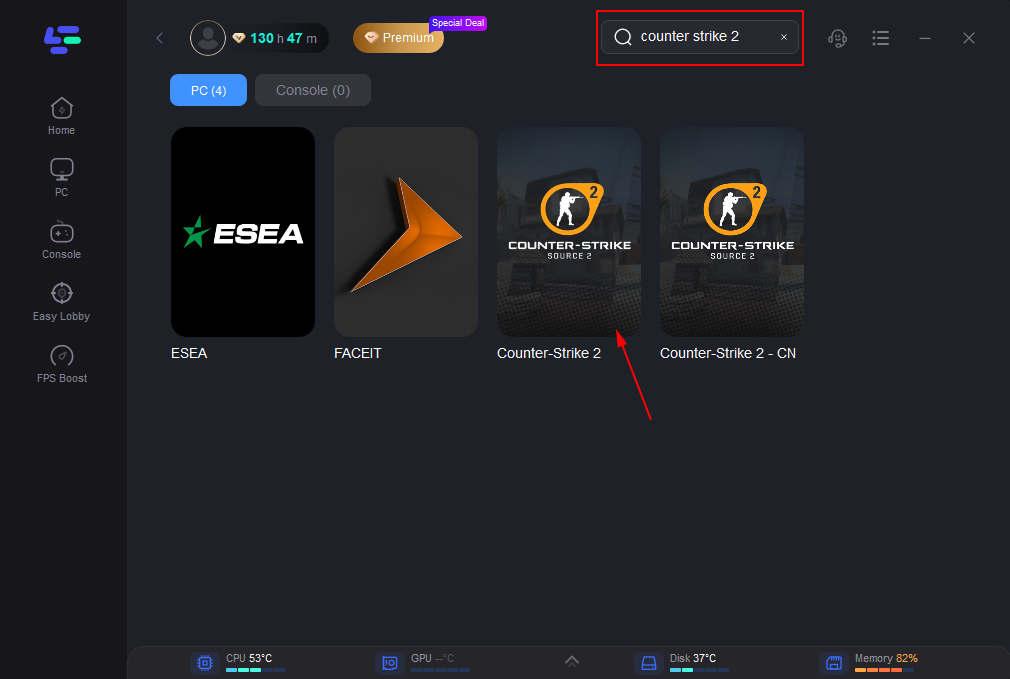
Step 2: After installation, search "Counter-Strike 2" in the search bar and select the game.
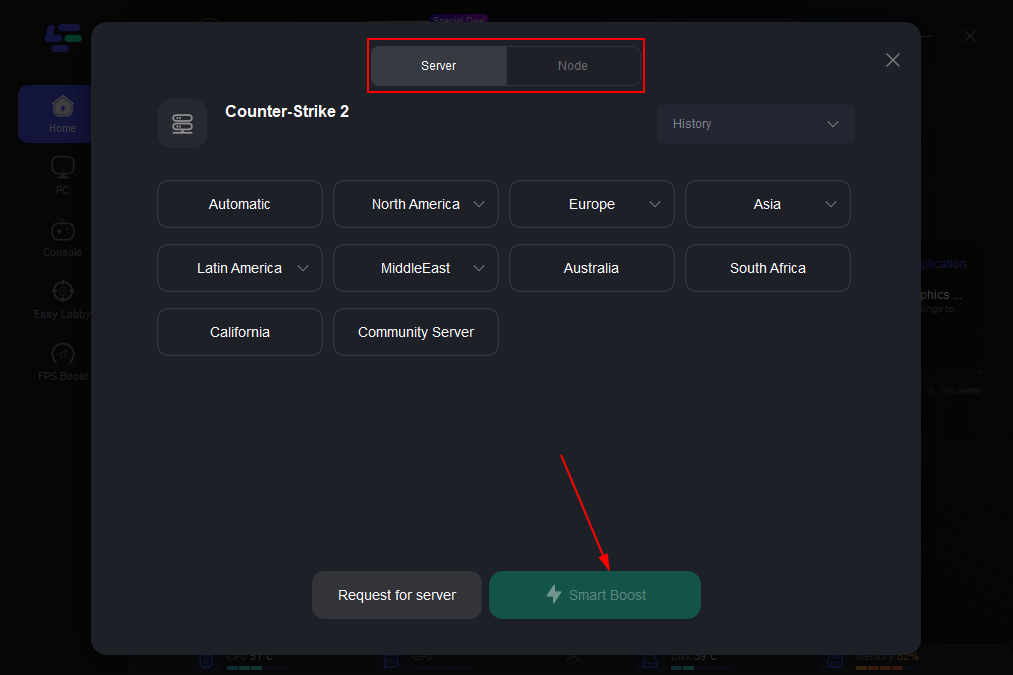
Step 3: Choose your preferred server node and click "Smart Boost" to start optimizing.
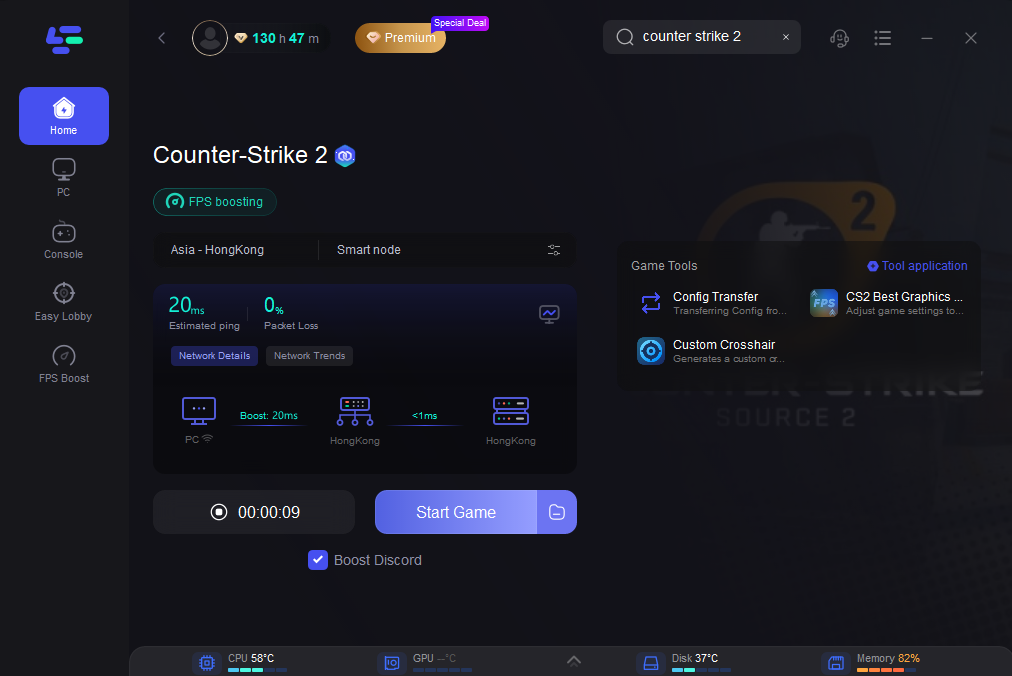
Step 4: Launch your game and enjoy smooth, optimized gameplay with lower ping and packet loss.
Part 3: Manual & Alternative Ways to Fix "Steam Rejected Your Connection" in CS2
If the error still appears after trying the main fixes, you can try a few manual solutions below. These methods target common causes behind the “Steam rejected your connection to server CS2 offline” error, such as Steam session expiration, validation failures, version mismatches, and server connection issues.
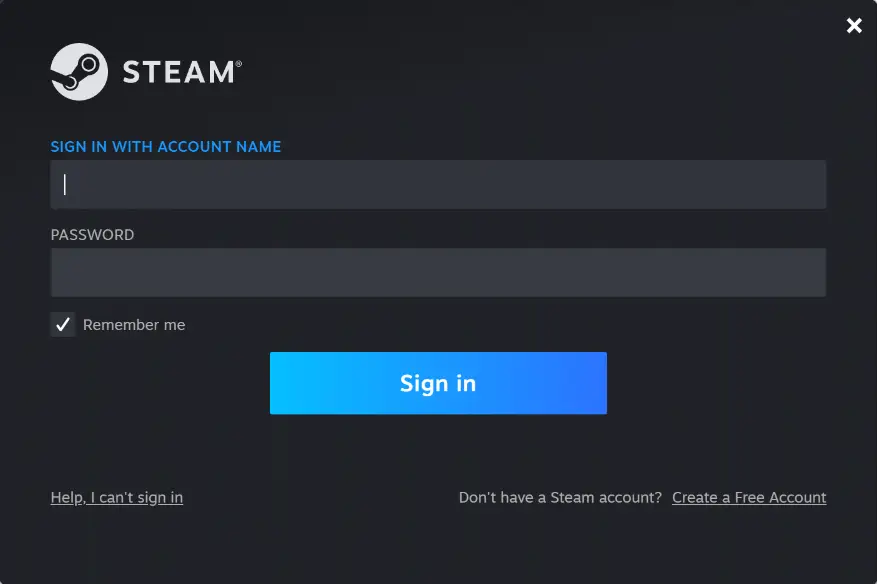
1. Re-login to Steam
If your Steam session expires, CS2 servers may fail to authenticate your account and reject the connection.
Steps:
- Fully exit Steam
- Open Steam again and log back into your account
- Launch CS2 and reconnect to the server
This refreshes your Steam authentication session, which can resolve many temporary connection rejections.
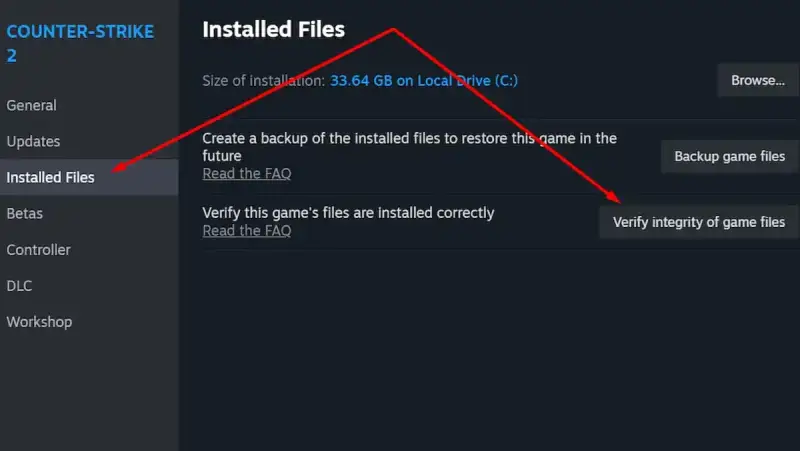
2. Verify CS2 Game Files
If game files are missing or corrupted, Steam may fail to validate your client, which can trigger Steam Validation Rejected CS2 errors.
Steps:
- Open Steam → Library
- Right-click Counter-Strike 2
- Select Properties → Installed Files
- Click Verify integrity of game files
Steam will scan and repair any damaged or missing files automatically.
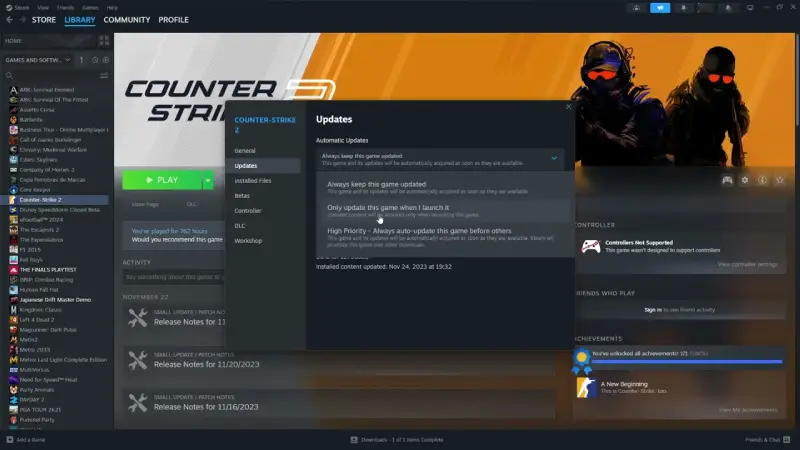
3. Restart Steam to Update CS2
This issue can also appear right after a CS2 update, especially if your client version hasn’t synced with the server yet.
Steps:
- Close CS2
- Exit Steam completely
- Restart Steam to download pending updates
- Launch CS2 again
Making sure your client is fully updated helps avoid client-server version mismatches.
4. Try Official Matchmaking Servers
If the error mainly happens when joining community servers, the problem may be related to server configuration or plugins.
You can try:
- Joining official matchmaking servers
- Switching to a different community server
- Reconnecting through the CS2 server browser
If the issue only happens on specific servers, it is likely server-side rather than a problem with your client.
5. Restart Your Network Connection
A quick network reset can sometimes resolve connection problems during the server authentication stage.
Steps:
- Turn off your router or modem
- Wait about 30 seconds
- Turn it back on and reconnect to the internet
- Launch CS2 again
This refreshes your network connection to Steam and CS2 servers, which may help reduce temporary connection issues.
Conclusion
The “Steam Rejected Your Connection to Server” error in CS2 usually happens when the game cannot verify your Steam session, validate game files, or sync with the server version. In most cases, simple steps like restarting Steam, verifying game files, or updating the client can resolve the issue quickly. If the problem is related to unstable routing or packet loss, optimizing your connection can also help improve stability. By understanding the common causes and applying the fixes above, you should be able to get back into your CS2 matches without repeated connection rejections.
Boost Your Game with LagoFast for Epic Speed
Play harder, faster. LagoFast game booster eliminates stutter and lags on PC, mobile, or Mac—win every match!
Quickly Reduce Game Lag and Ping!
Boost FPS for Smoother Gameplay!