
As global players continue exploring new RPG titles, language barriers remain one of the most common challenges—especially for region-first releases like Star Savior. Many players quickly realize that understanding quests, menus, and dialogue is essential for progression. However, official localization often lags behind international demand. This is where a reliable Star Savior game translation tool becomes essential.
This guide is written for PC and mobile gamers who want a smoother experience in Star Savior. It explains the game’s current language support, common limitations, and how tools like LagoFast can help translate content in real time while also improving network performance.

- ✅ Reduce Lag and High Ping.
- ✅ Boost FPS at the Same Time.
- ✅ Change Server Without Latency.
- ✅ End All Connection crash Issues.
- ✅ Multiplatform: PC, Mobile, Console.
Part 1. What Languages Does Star Savior Support?
Part 2. Why You Need a Star Savior Game Translation Tool
Part 3. Best Translation Tool for Star Savior—LagoFast: Translation of More Than Ten Languages
Part 4. How to Boost Star Savior with LagoFast for a Better Experience
Part 5. Bonus Tips: How To Change Language In Star Savior
Part 1. What Languages Does Star Savior Support?
One of the most frequently asked questions is, "What languages does Star Savior support?"
Based on official PC platform data, Star Savior currently provides limited language options:
- Korean (Full support: interface, audio, subtitles)
- Japanese (Full support: interface, audio, subtitles)
- English (interface, subtitles)
- Simplified Chinese (interface, subtitles)
- Traditional Chinese (interface, subtitles)
For mobile:
Only English, Japanese, and Korean.
The limited language support makes many players feel uncomfortable, and at this time, a user-friendly translation tool becomes very important.
Part 2. Why You Need a Star Savior Game Translation Tool
A Star Savior game translation tool is not just about convenience—it directly affects gameplay quality.
Core benefits:
- Real-time translation of menus, quests, and subtitles
- Better understanding of character skills and upgrades
- Improved communication in multiplayer or chat
- Reduced reliance on external apps or manual translation
Without such tools, players often need to switch between the game and translation apps, which disrupts immersion and slows progress. A built-in or overlay-based translation solution solves this problem efficiently.
Part 3. Best Translation Tool for Star Savior—LagoFast: Translation of More Than Ten Languages
When it comes to choosing the best solution, Best Translation Tool for Star Savior—LagoFast (LagoFast Game Booster—Get No Lag and Lower Ping): Translation of More Than Ten Languages stands out due to its integrated approach.
LagoFast is not just a translation tool—it combines translation with network optimization, making it particularly useful for online games.
Star Savior Translation Tool by LagoFast
LagoFast’s translation feature is seamlessly integrated into its Game Booster client, allowing you to enjoy real-time in-game translation while enhancing overall performance. Currently, LagoFast supports translations in over a dozen languages, including Russian, Turkish, Arabic, Thai, Vietnamese, Portuguese, Spanish, German, French, Italian, Filipino, and Traditional Chinese.
This is particularly beneficial because Star Savior officially offers only limited language support, whereas LagoFast significantly broadens accessibility for players around the world.
Additional Benefits of LagoFast Game Booster
LagoFast also optimizes your network connection to ensure smoother gameplay, effectively reducing latency and improving frame rates—especially helpful for players in regions with slower internet speeds. Moreover, it supports multi-platform acceleration, meaning whether you’re playing Star Savior on PC or mobile, LagoFast delivers a more stable and enhanced gaming experience.
How to Use the PC Translation Tool for Star Savior
Step 1: Click Free Trial to download LagoFast on your PC.
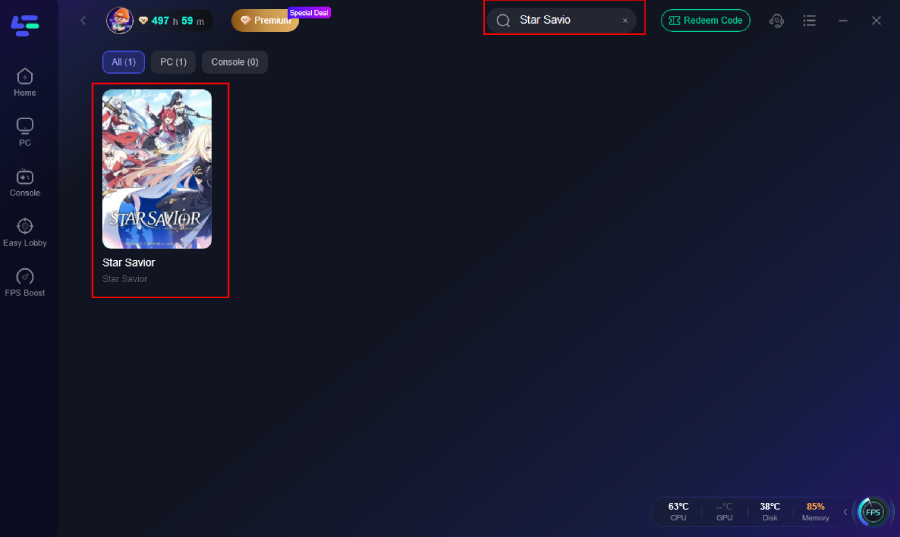
Step 2: Launch LagoFast, type “Star Savior” in the search bar, and select the game from the results.
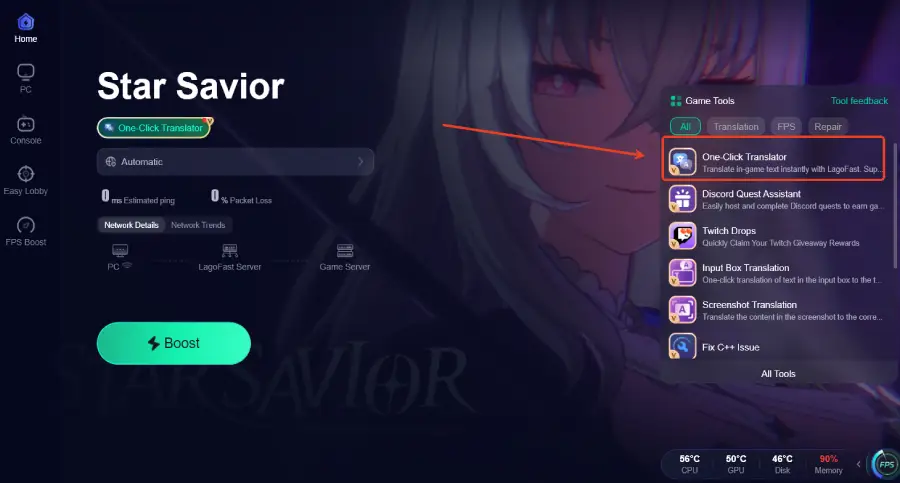
Step 3: On the right-hand panel, choose the One-Click Translator Tool.
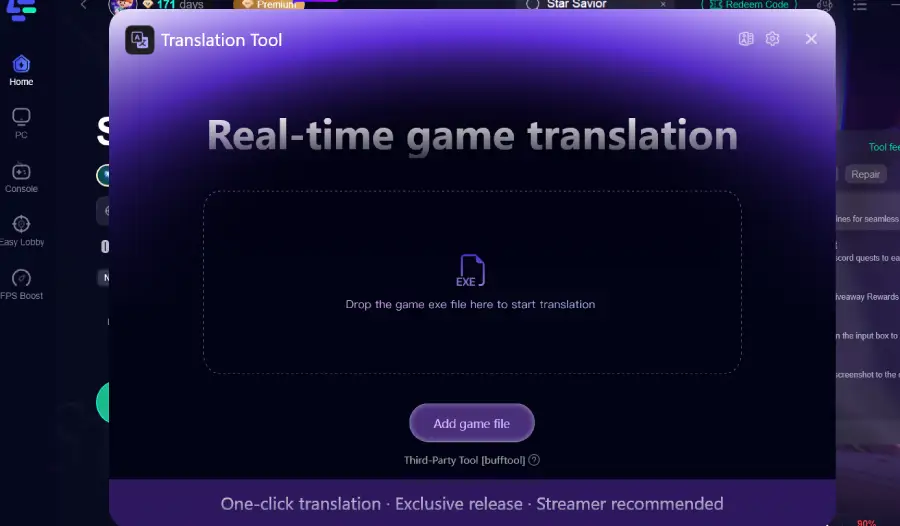
Step 4: Click Start Translation, select your preferred language, and hit Apply. Once the setup is complete, close the window, click Boost, and launch the game. No matter where you are, you can now enjoy a smooth, language barrier–free gaming experience.
Mobile OCR Translate
Mobile users can take advantage of LagoFast’s OCR Translate feature to instantly interpret in-game text:
Step 1: Download and install LagoFast Mobile from the App Store or Google Play.
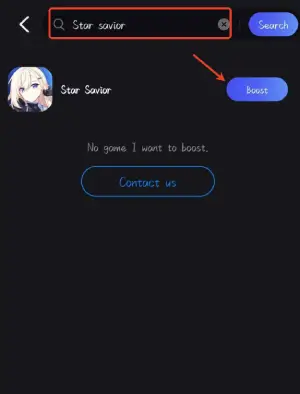
Step 2: Open the app and search for Star Savior.
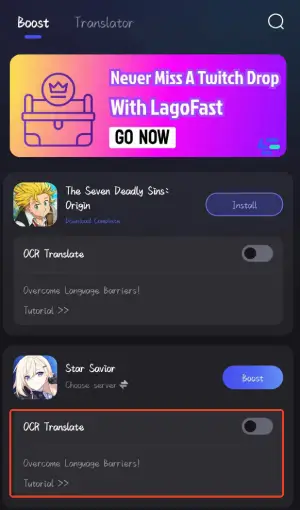
Step 3: Tap OCR Translate.
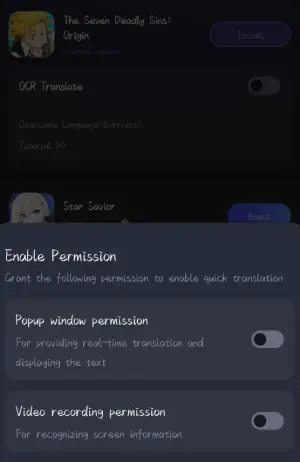
Step 4: Start the game and activate OCR Translate whenever you encounter foreign text—translations will appear immediately.
For the mobile version, Star Savior currently supports only English, Japanese, and Korean, which can limit accessibility for many players. LagoFast Mobile helps bridge this gap by offering translation support for additional languages such as Thai, Vietnamese, Portuguese (Brazil), and Arabic, making the game more accessible to a wider global audience. The game itself requires Google Play verification and must be installed through a dedicated space environment, with full access available after purchase.
Beyond translation, LagoFast Mobile also delivers powerful acceleration features designed to enhance your overall gaming experience. It optimizes network routes to reduce latency, stabilize connections, and minimize lag, ensuring smoother gameplay even when connecting to distant servers. With real-time performance monitoring and easy one-tap boosting, LagoFast provides a convenient and effective solution for mobile players looking to enjoy Star Savior without interruptions, regardless of their location.
Part 4. How to Boost Star Savior with LagoFast for a Better Experience
Since Star Savior connects players worldwide, long distances between your location and the game server can sometimes cause connection instability, login issues, or unexpected disconnections. LagoFast helps optimize your network, making it easier to access global servers and maintain a stable connection.
Step 1. Search for Star Savior in LagoFast and select it.
Step 2. Choose the most suitable server and node.
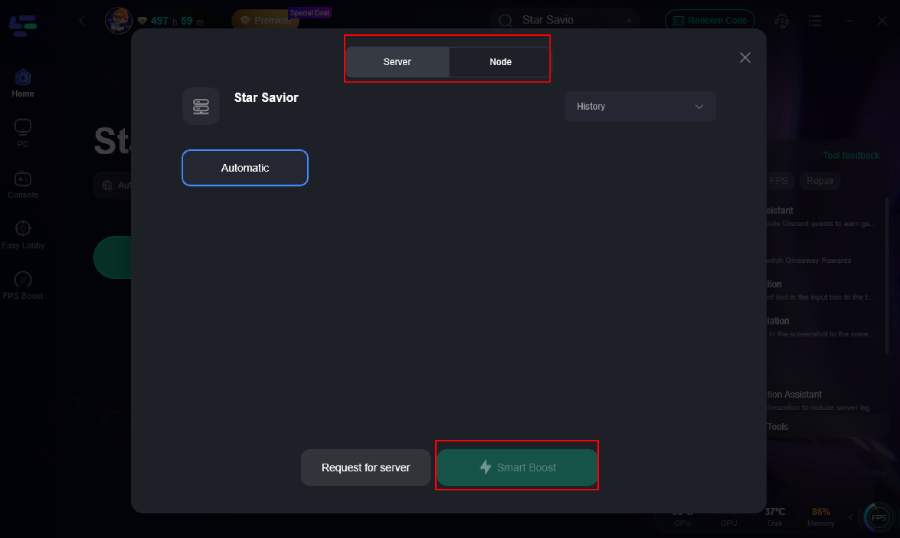
Step 3. Click Smart Boost to enjoy a smoother and more stable gameplay experience.
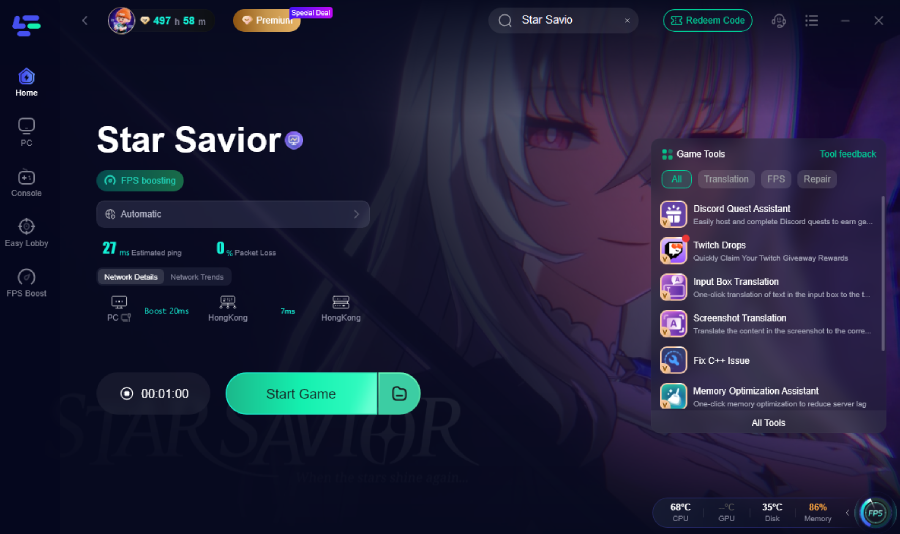
How to Use LagoFast to Boost FPS and Reduce High Ping on Mobile
Step 1: Search LagoFast Mobile booster in the App Store or Google Play, as it is globally available.
Step 2. Search for your game and select it.
Step 3. Choose the server that best fits your location and network conditions.
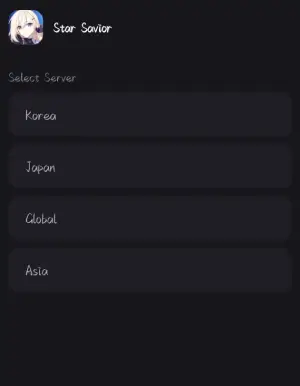
Step 4. Tap Boost—LagoFast will display real-time data such as ping and packet loss, helping you monitor your connection while enjoying improved performance.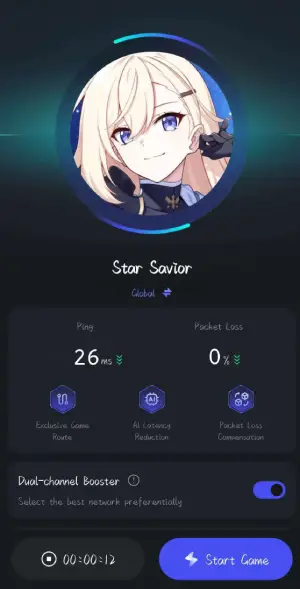
Part 5. Bonus Tips: How To Change Language In Star Savior
To change the language in Star Savior, open the main menu and click the Settings icon (gear symbol) located in the top-right corner. In the settings panel, scroll down to the bottom of the left sidebar, then find the language selection option on the right.
Choose your preferred language (for example, English), and click the highlighted orange button to restart the game. The new language setting will take effect once the game relaunches.
Part 6. FAQs
1. Is there an official English version of Star Savior?
An official English version of Star Savior is set to arrive with its global release. Developer Studiobside has announced a planned launch in March 2026 for international players, following the game’s initial debut in South Korea and Japan in late 2025.
While the early versions were limited to the Korean and Japanese regions, the upcoming global server will include support for English, Japanese, and Korean. It will also be accessible across multiple platforms, including Android, iOS, and PC.
2. What is the best Star Savior game translation tool?
LagoFast is one of the most recommended options due to its real-time translation and multi-language support.
3. Can I translate Star Savior on mobile?
Yes. LagoFast mobile includes a floating translation feature that works directly in-game.
4. Does translation affect game performance?
No. LagoFast runs translation alongside network optimization, maintaining smooth gameplay.
5. Which languages are supported by LagoFast?
It supports over 10+ languages, including Thai, Vietnamese, Arabic, and Portuguese.
Conclusion
Star Savior delivers an engaging role-playing experience, but its limited language support can pose a challenge for players around the world. A reliable translation tool like LagoFast not only helps overcome language barriers but also enhances overall performance through network optimization. Supporting more than a dozen major languages, it offers a practical solution for players who want to enjoy the game without waiting for official localization. For anyone planning to play Star Savior outside of its primary regions, combining translation with connection optimization is one of the most effective ways to improve both accessibility and gameplay quality.
Boost Your Game with LagoFast for Epic Speed
Play harder, faster. LagoFast game booster eliminates stutter and lags on PC, mobile, or Mac—win every match!
Quickly Reduce Game Lag and Ping!
Boost FPS for Smoother Gameplay!