
Soulframe, the highly anticipated fantasy MMO from Digital Extremes, is gaining momentum—not just for its immersive world and unique combat mechanics, but also for its rewarding Twitch Drops system. Whether you’re a longtime Warframe fan diving into this new adventure or a curious newcomer, Soulframe Twitch Drops offer a simple way to earn exclusive in-game items just by watching livestreams. In this guide, we’ll walk you through everything you need to know to start collecting rewards, from account linking to finding eligible streams and claiming your loot.

- What Are Soulframe Twitch Drops?
- How Twitch Drops Work for Soulframe
- What Can You Get From Soulframe Twitch Drops?
- When Are Soulframe Twitch Drops Available?
- Troubleshooting Twitch Drops
- How to Maximize Your Twitch Drop Rewards
- How to Use LagoFast for Twitch Drops
1. What Are Soulframe Twitch Drops?
Soulframe Twitch Drops are limited-time rewards that players can earn by watching Soulframe livestreams on Twitch. These drops typically include exclusive cosmetics, in-game items, or early-access bonuses that enhance your gameplay and show off your support for the game and its streamers.
2. How Twitch Drops Work for Soulframe
Twitch Drops are part of a reward system that connects your Twitch account with your game account. Once linked, you can earn rewards by simply watching participating livestreams for a specific amount of time.
Step-by-Step: How to Claim Soulframe Twitch Drops
- Create a Twitch account if you don’t already have one.
- Link your Twitch and Soulframe accounts via the official Soulframe or Digital Extremes website.
- Find eligible streams: Look for channels that have the “Drops Enabled” tag while playing Soulframe.
- Watch for the required duration (usually 30 minutes to 2 hours, depending on the drop).
- Claim the reward from the Twitch Drops inventory.
- Log into Soulframe and check your in-game mailbox or inventory to find the item.
3. What Can You Get From Soulframe Twitch Drops?
Rewards vary depending on the event but often include:
- Unique weapon skins
- Armor cosmetics
- Companion accessories
- Exclusive emotes
- Boosters or resource packs
Some Twitch Drops are time-limited and may never return, making them especially valuable for collectors and early adopters.
4. When Are Soulframe Twitch Drops Available?
Twitch Drops are typically tied to:
- Developer streams by Digital Extremes
- Special Twitch campaigns
- Game update or launch events
- Partnered streamer showcases
5. Troubleshooting Twitch Drops
If you’re having trouble receiving your rewards, check the following:
|
Issue |
Solution |
|---|---|
|
Account not linked properly |
Re-link your Twitch and Soulframe accounts via the official website |
|
Watched the wrong stream |
Only streams with “Drops Enabled” count for rewards |
|
Didn’t claim drop on Twitch |
Visit your Twitch inventory and manually claim the reward |
|
Delay in item delivery |
Wait up to 24 hours; some items take time to appear in your game inbox |
6. How to Maximize Your Twitch Drop Rewards
- Watch multiple official streams to stack rewards.
- Enable Twitch notifications so you don’t miss eligible broadcasts.
- Use Twitch on desktop for more reliable tracking.
- Check your Twitch inventory often during active drop windows.
7. How to Use LagoFast for Twitch Drops
LagoFast helps streamline the process of earning Twitch Drops by providing stable network acceleration and a built-in giveaway tool for drop campaigns. If you’re aiming to claim Soulframe Twitch Drops more smoothly, here’s how to do it using LagoFast:
Step-by-Step Guide
Step 1: Click the Free Trial button to download and install LagoFast.
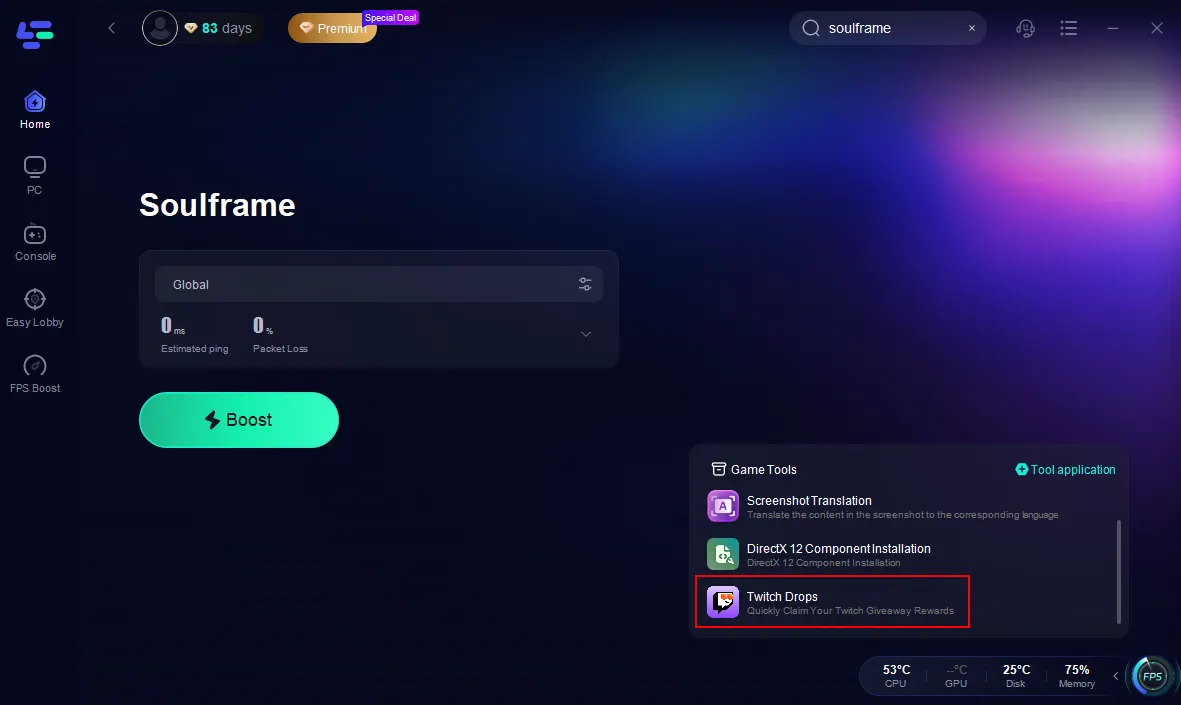
Step 2. Search Soulframe in LagoFast and click the result.

Step 3. Click the Twitch Drops tool on the right.
Step 4. Bind your Twitch account and search Soulframe. Click join.
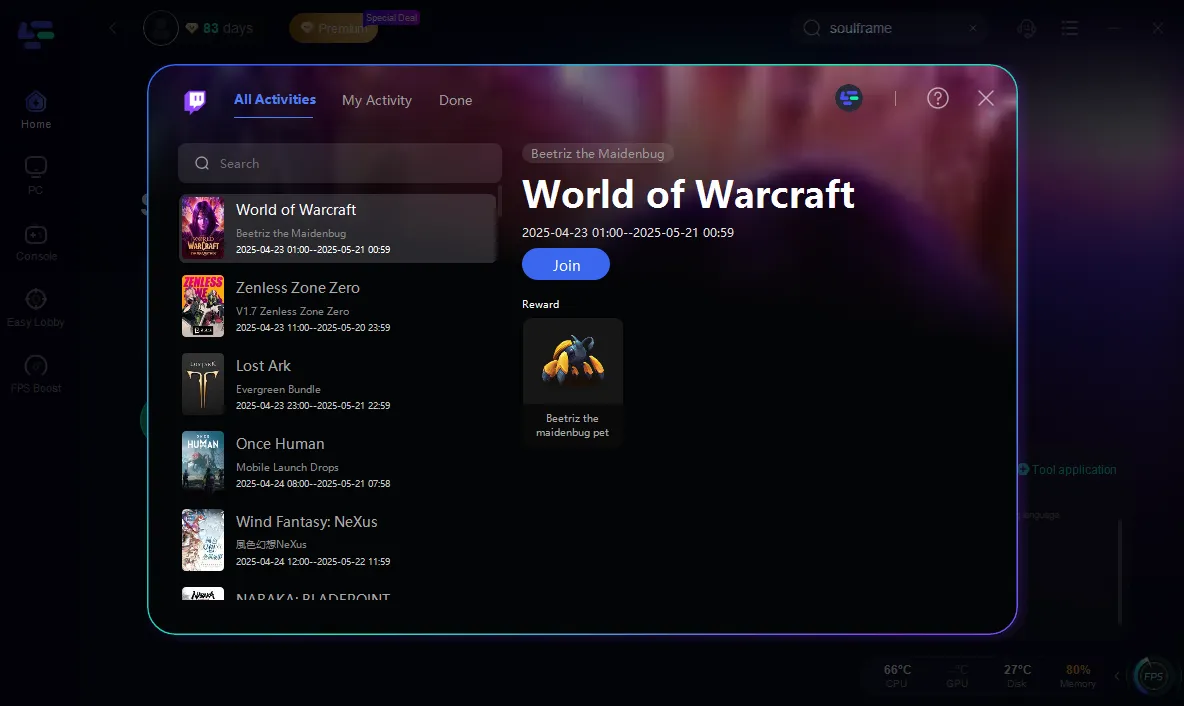
Follow the on-screen prompts to bind your Twitch account securely to the drop tool.
Once linked, you’ll be able to track your drop progress in real-time. This ensures you won’t miss any Twitch Drops rewards while enjoying a smoother viewing and claim experience.
Other Useful Tools in LagoFast
DirectX 12 Repair Tool
Essential for players that have compatibility issues with DirectX 12. This tool checks your system for DX12-related errors and automatically applies fixes, ensuring smooth performance and reducing game crashes or glitches during drop events.
One-Click Translation Tool
LagoFast includes a built-in One-Click Translation Tool, designed to help gamers instantly translate in-game text. This is especially helpful during international Twitch Drop campaigns where instructions or requirements might appear in different languages. With just one click, you can understand everything clearly—no more missing out due to language barriers.
Conclusion
Soulframe Twitch Drops are a win-win for fans who want to enhance their in-game experience while supporting their favorite streamers. With a few simple steps, you can earn exclusive rewards and become part of the growing Soulframe community. Stay alert for future Twitch Drops campaigns—some items may only appear once. Don’t miss your chance to unlock limited-time gear and show off your dedication to Soulframe.

Boost Your Game with LagoFast for Epic Speed
Play harder, faster. LagoFast game booster eliminates stutter and lags on PC, mobile, or Mac—win every match!
Quickly Reduce Game Lag and Ping!
Boost FPS for Smoother Gameplay!