
Silent Hill f marks a fresh chapter in Konami’s legendary horror franchise. Set in 1960s Japan, the game blends supernatural dread with psychological storytelling and stunning visuals. But as fans worldwide anticipate its release, many wonder: what if your version doesn’t include your native language? That’s where game translation tools come in. Whether you’re looking to understand dialogue, navigate menus, or follow intricate storylines, the right tool can make Silent Hill f more accessible and immersive.

- ✅ Reduce Lag and Boost FPS
✅ Ensure Stable Server Connection.
✅ Change Server without Latency.
✅ Fix Crashing and Stuck Errors.
✅ 0% Packet Loss Rate
✅ Boost Game Downloading Speed.
Part 1. Supported Languages in Silent Hill f
Part 2. Best Translation Tools for Silent Hill f
Part 3. How to Set Up Translation for Silent Hill f
Part 4. Why a Translation Tool Enhances the Silent Hill f Experience
Part 5. How to Use the Translation Tool for Silent Hill f (Supports Arabic, Turkish, and Thai)
Part 6. Boosting Gameplay Performance with LagoFast
Part 1. Supported Languages in Silent Hill f
Before using any translation software, it’s good to know what languages the game natively supports. According to official listings, Silent Hill f offers:
- Audio: English, Japanese
- Subtitles/Text: English, French, Italian, German, Spanish, Portuguese (Brazil), Russian, Korean, Simplified Chinese, Traditional Chinese If your preferred language isn’t listed, or you want localized slang and nuance, that’s where fan-made or AI-powered translation tools become useful.
Part 2. Best Translation Tools for Silent Hill f
Here are some reliable methods to translate Silent Hill f’s dialogue and on-screen text in real time:
Google Translate App (Camera Mode)
- Use your phone’s camera to scan subtitles or in-game menus.
- Works great for languages like Japanese, Chinese, or Russian.
- Tip: Keep your phone mounted near the screen for live translation while playing.
DeepL Translator
- Known for its accuracy in context-heavy text like dialogues or notes found in Silent Hill f.
- You can take screenshots of in-game text and upload them for instant, high-quality translation.
Crowdsourced Fan Translation Mods
- Community-based projects often release patches translating in-game text, notes, and UI.
- These can be installed on the PC version through mod managers.
- Note: Always verify the source before installing to avoid malware.
AI Subtitling Overlays
- Tools like GameTranslator or LiveSub can generate subtitles dynamically while you play.
- Great for capturing spoken Japanese dialogue into English or other languages.
Part 3. How to Set Up Translation for Silent Hill f
If you’re playing the game and want to enable translation support, follow these quick steps:
- Check the in-game language options under Settings → Language.
- If your language isn’t listed, install a translation overlay tool like DeepL or GameTranslator.
- Configure hotkeys to toggle real-time translation while gaming.
- Test during cutscenes to ensure synchronization.
With just a few adjustments, you can fully understand Silent Hill f’s chilling story without losing the emotional tone or atmosphere.
Part 4. Why a Translation Tool Enhances the Silent Hill f Experience
Playing Silent Hill f in your native language deepens immersion. The game’s psychological layers—its letters, whispers, and narrative clues—are best appreciated when you can grasp every word. Translation tools help you:
- Understand every part of the story
- Catch cultural references hidden in Japanese dialogue
- Stay engaged during puzzles or exploration
- Enjoy smoother gameplay without constant pausing or guessing
Part 5. How to Use the Translation Tool for Silent Hill f (Supports Arabic, Turkish, and Thai)
Step 1: Click Free Trial to Download LagoFast PC
Visit the LagoFast website and click the Free Trial button to download and install LagoFast on your PC.
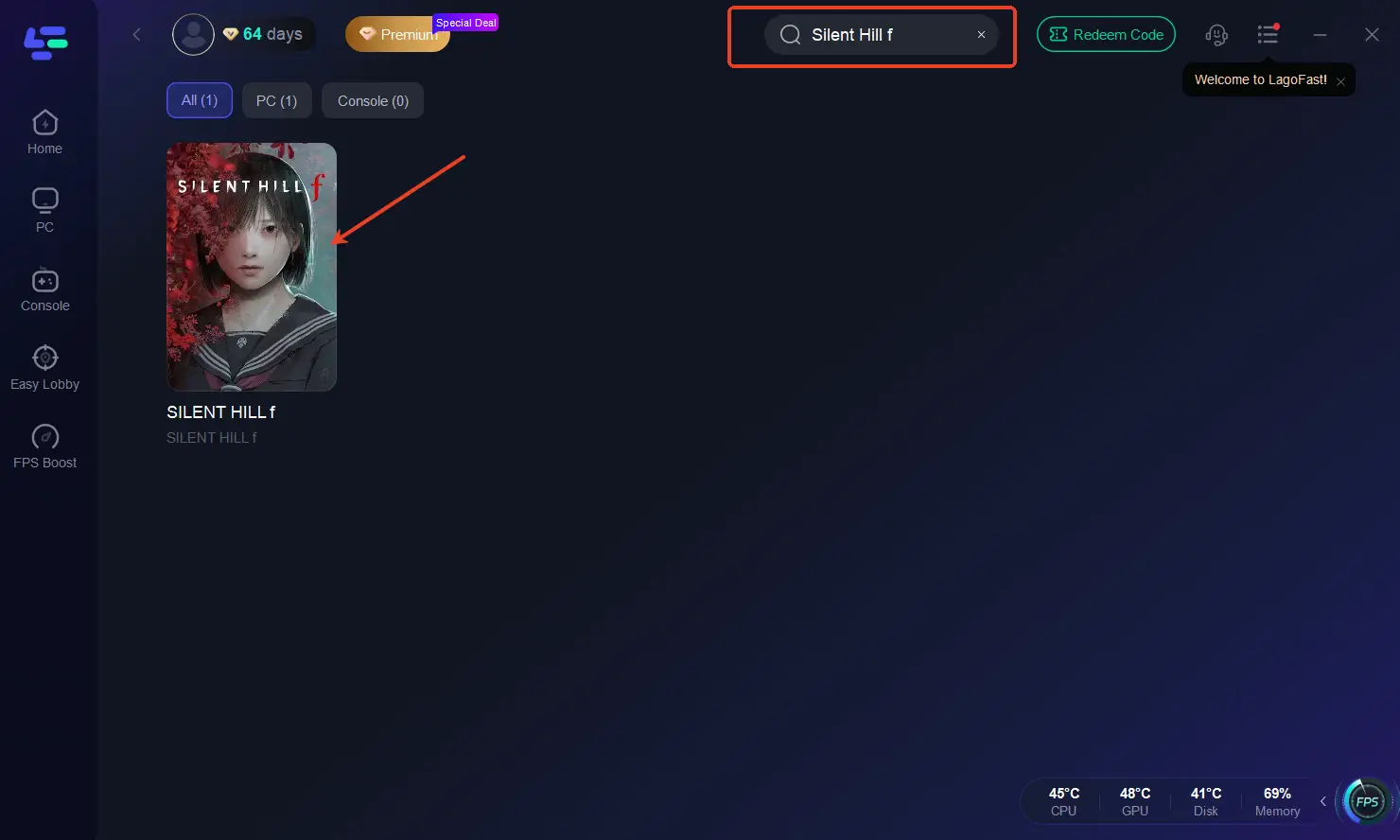
Step 2: Input “Silent Hill f” and Click the Result
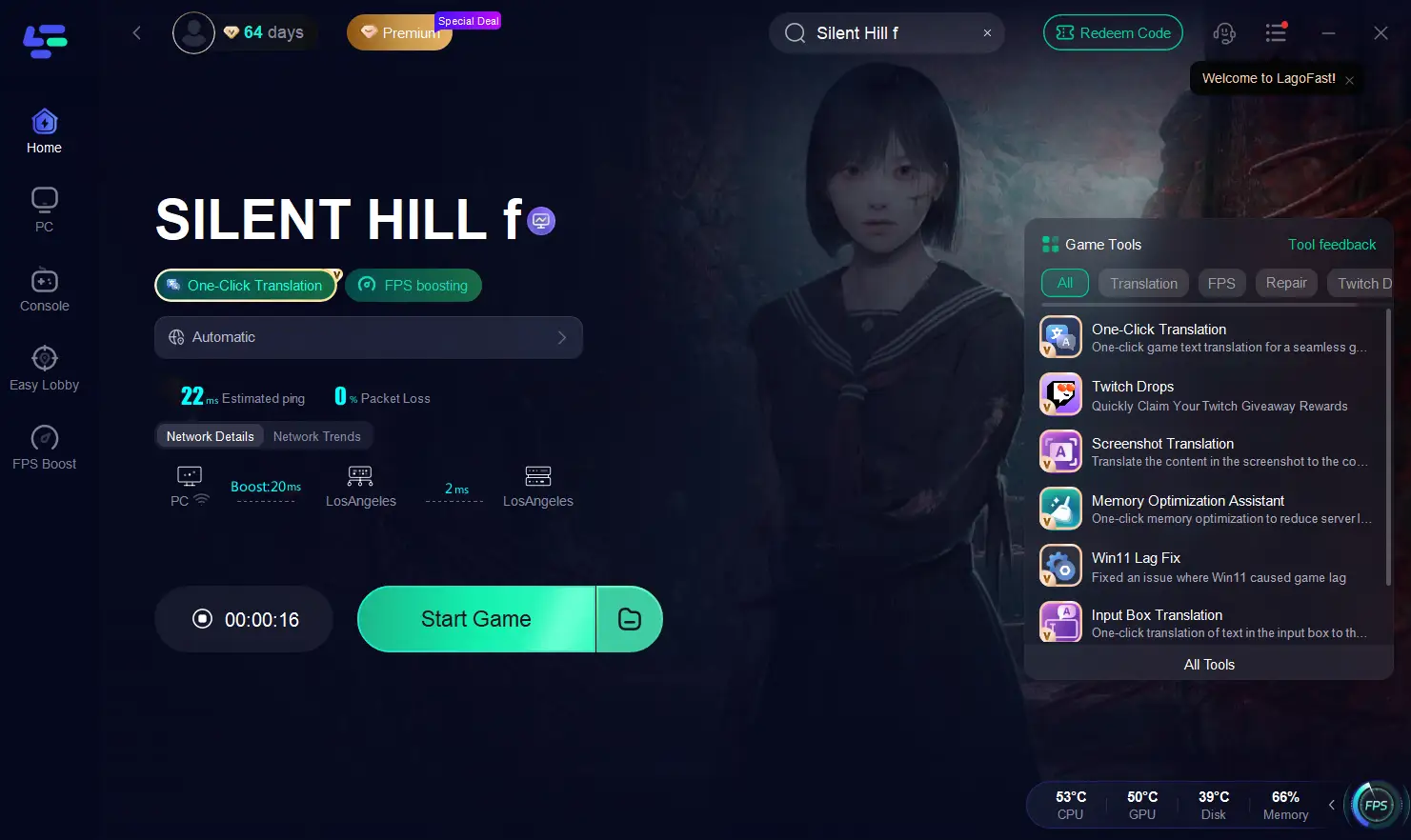
After launching LagoFast, type “Silent Hill f” into the search bar and click on the game result to open the optimization interface.
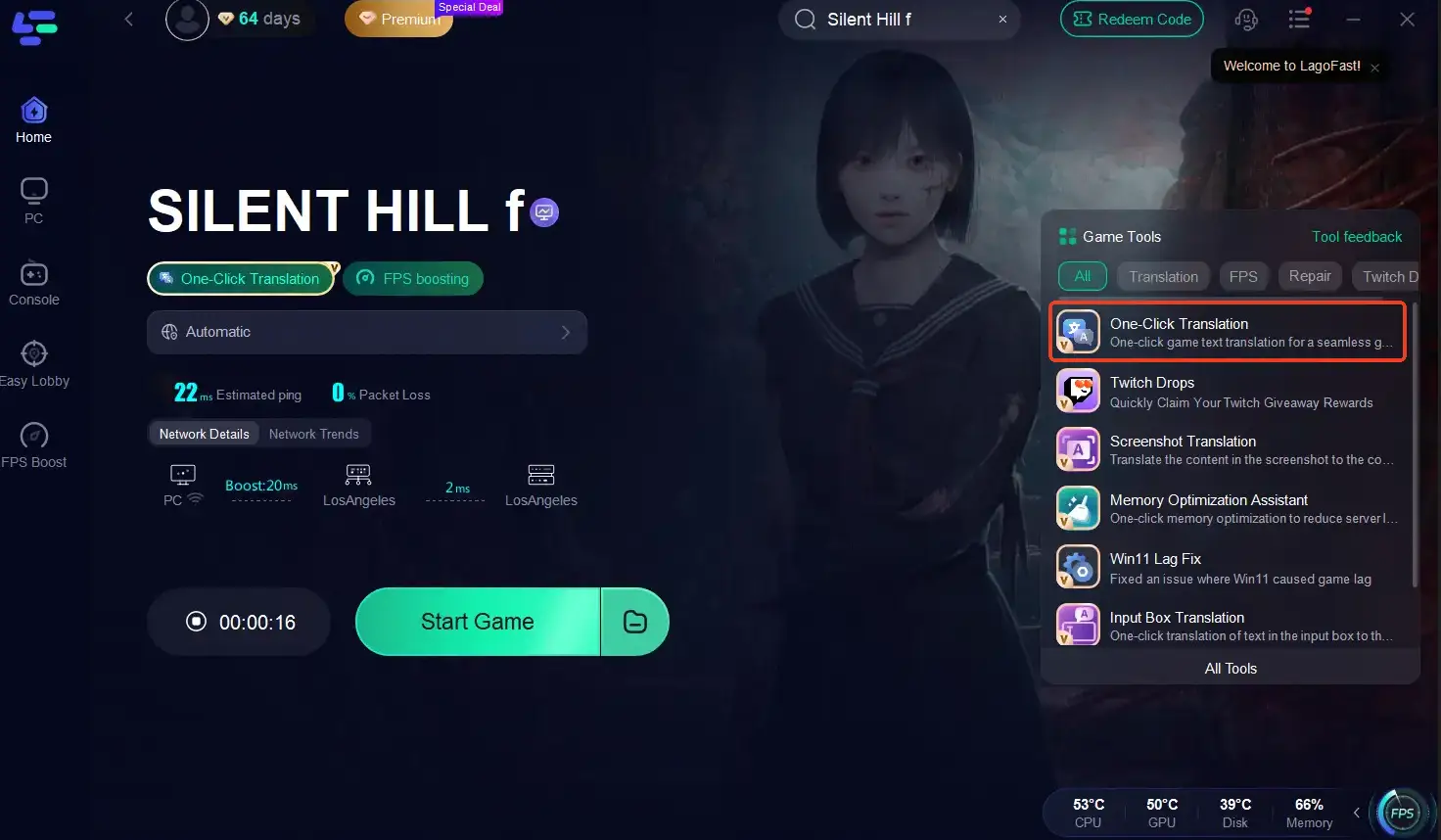
Step 3: Choose the One-Click Translation Tool
On the right-hand side, select One-Click Translation Tool. This built-in feature automatically detects in-game text, menus, or prompts from Silent Hill f and translates them in real time.
The translation tool supports Arabic, Turkish, Thai, and many other languages—making it easier for global players to fully enjoy the immersive horror experience without language barriers.
Step 4: Start Translation and Apply Settings
- Click Start Translation, choose your preferred language, and then click Apply.
- Once the translation is complete, close the translation window, click Boost, and launch the game.
Now you’ll see translated in-game text directly in your chosen language—whether you’re exploring haunted streets or reading cryptic notes. By using LagoFast’s One-Click Translation Tool, you can effortlessly navigate the registration process, menus, and dialogue in Silent Hill f—even if your preferred language isn’t officially supported. Enjoy the chilling world of Silent Hill without confusion or language limitations.
Part 6. Boosting Gameplay Performance with LagoFast
If your translated overlays or tools cause lag or stutter, using a game booster like LagoFast can help optimize performance. How LagoFast Helps LagoFast improves frame rates and network stability while you run translation tools or stream overlays.
Quick setup steps:
1. Download and install LagoFast.
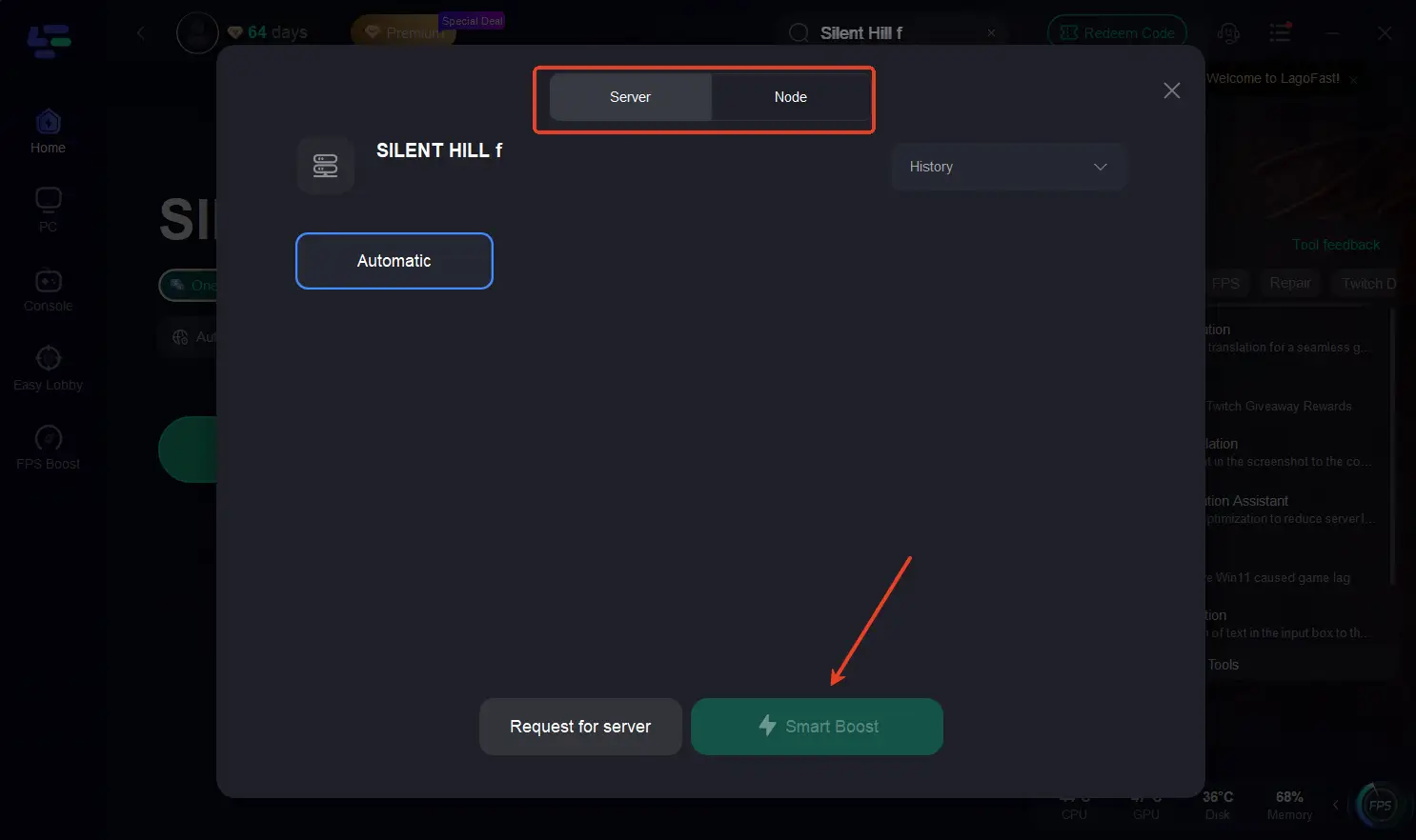
2. Search for Silent Hill f in the booster list.
3. Select the best server and node, then click Smart Boost.
4. Launch the game and enjoy smoother performance.
Benefits of LagoFast:
- Reduces FPS drops and ping spikes
- Ensures stable translation tool syncing
- Improves gameplay experience overall
Final Thoughts
Silent Hill f is more than just a horror game—it’s a story-driven masterpiece that deserves to be experienced in your own language. With translation tools and boosters like LagoFast, you can dive deep into the eerie world without losing meaning or performance. Whether you’re decoding haunted diaries or confronting the unknown, understanding every word makes the fear—and the story—feel more real.

Boost Your Game with LagoFast for Epic Speed
Play harder, faster. LagoFast game booster eliminates stutter and lags on PC, mobile, or Mac—win every match!
Quickly Reduce Game Lag and Ping!
Boost FPS for Smoother Gameplay!