
On June 17, 2025, Cygames' new online competitive digital card game, Shadowverse: Worlds Beyond, officially launched on both Mobile and PC platforms. The newly introduced battle mechanics and player interaction spaces are set to be warmly welcomed by players worldwide who speak various languages.
However, currently, the development team hasn't achieved full localization coverage for all languages in the game. This has significantly impacted the gaming experience for players who use languages not officially supported, especially Thai and Indonesian-speaking players, due to language barriers. This article will focus on the localized language support in Shadowverse: Worlds Beyond and recommend the best game translation tool for players.
Thai Version: วิธีรับคำแปลภาษาไทยของ Shadowverse: Worlds Beyond
Indonesian Version: Terjemahan bahasa Indonesia dari Shadowverse: Worlds Beyond

- ✅ Reduce Lag and High Ping.
- ✅ Boost FPS at the Same Time.
- ✅ Support 2000+ Popular Online Games.
- ✅ Safely Download and Play Games
Part 1: Shadowverse: Worlds Beyond Overview
Part 2: Languages Supported by Shadowverse: Worlds Beyond
Part 3: Best Shadowverse: Worlds Beyond Game Translation Tool
Part 4: How to Ensure a Smooth Gameplay in Shadowverse: Worlds Beyond
Part 1: Shadowverse: Worlds Beyond Overview
Shadowverse: Worlds Beyond is a highly anticipated digital card game developed by Cygames, officially launched and released on June 17th. Building upon its predecessor, Shadowverse, it introduces the new Super-Evolution mechanism and Shadowverse Park, enhancing the game's strategic depth and visual appeal, and creating a more personalized gaming experience for players. In Shadowverse: Worlds Beyond, a new Nightmare class has been added to the original seven card classes, allowing players to freely combine from eight classes and craft the most unique card decks based on their battle needs. Overall, Shadowverse: Worlds Beyond offers richer gameplay, deeper strategic mechanics, and more vibrant community features, certain to attract players worldwide speaking various languages.
Part 2: Languages Supported by Shadowverse: Worlds Beyond
One aspect that doesn't align with its wide release scope is the very limited language support for Shadowverse: Worlds Beyond. Currently, it only supports five languages: English, Japanese, Simplified Chinese, Traditional Chinese, and Korean. Moreover, only English and Japanese have full coverage for the game's interfaces, subtitles, and full audio, allowing players who speak these two languages to enjoy a fully localized gaming experience.
For players using other languages, such as Thai or Indonesian, they need to rely on their own English proficiency or use Shadowverse: Worlds Beyond game translation tool to understand the game's operation interfaces or mission prompts.
Part 3: Best Shadowverse: Worlds Beyond Game Translation Tool
To enable players using languages not officially supported to enjoy localized game content, engage in battles effortlessly in Shadowverse: Worlds Beyond, and interact with players from around the world in the new Shadowverse Park, it's essential to use an accurate and swift game translation tool. Here, we recommend LagoFast's Shadowverse: Worlds Beyond game translation tool because it can accurately translate the game's interfaces into Thai, Indonesian, and other languages within seconds, allowing players to enjoy a seamless gaming experience in their native language.
Below are the steps to use LagoFast's Shadowverse: Worlds Beyond game translation tool:
Using LagoFast to Translate Shadowverse: Worlds Beyond on PC
Click the free trial button to download and install LagoFast.
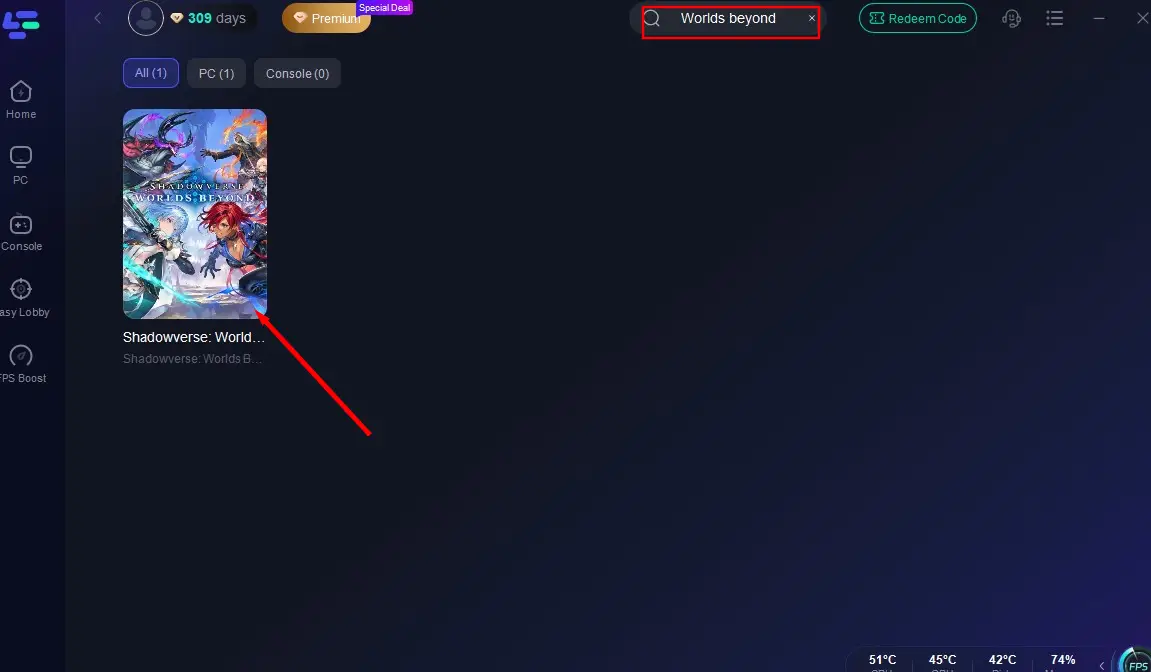
Launch LagoFast, search for "Shadowverse: Worlds Beyond" in its search bar, and click on it.
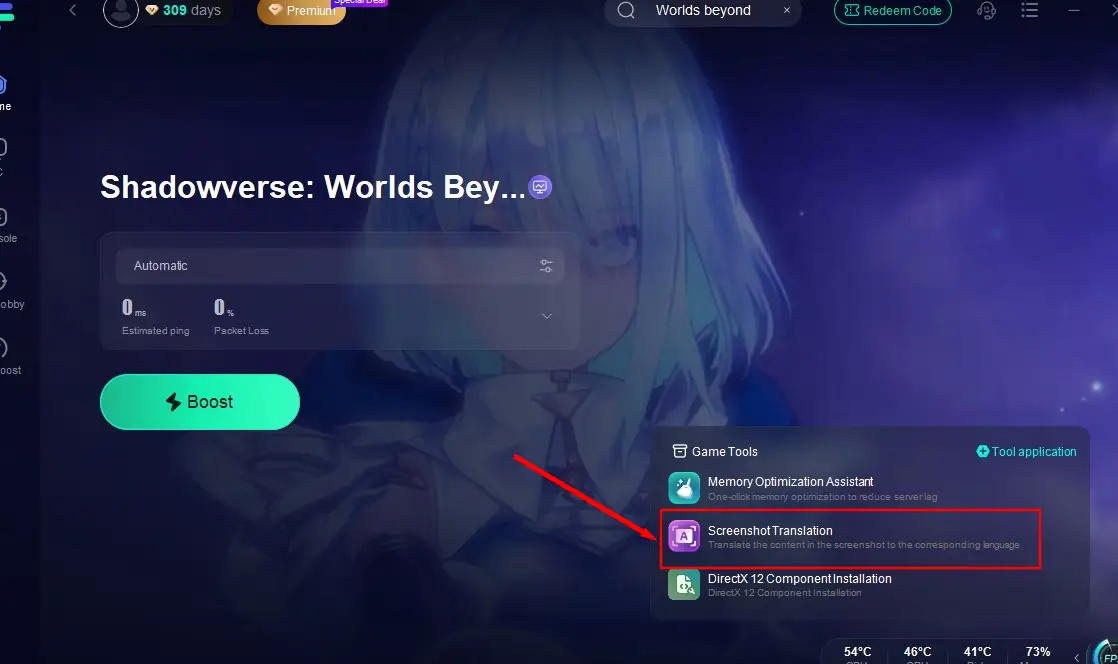
Click the screenshot translation tool located at the bottom right corner of the screen.
Set your target language and in-game hotkey.
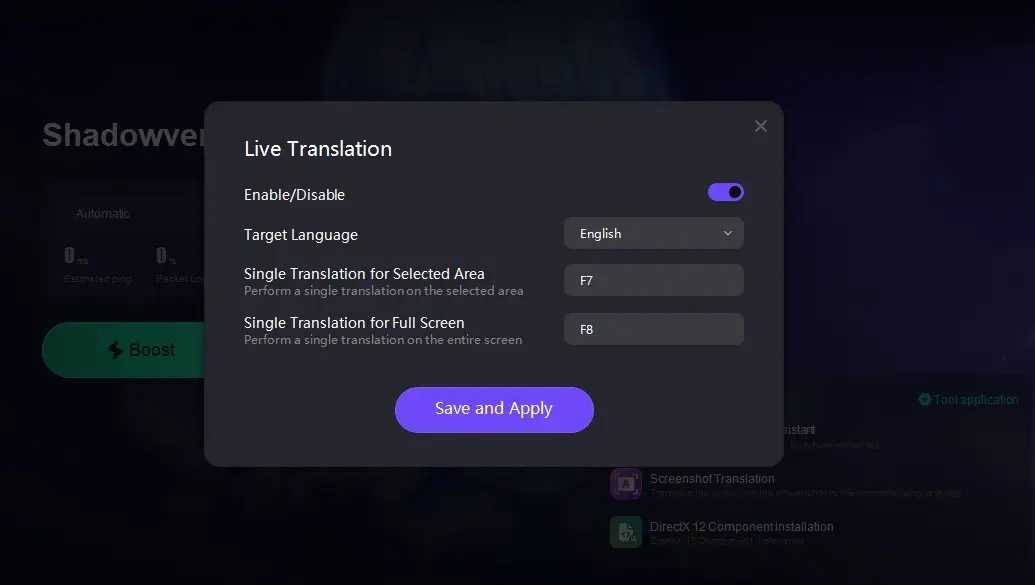
Return to the game, and press the hotkey to instantly translate Shadowverse: Worlds Beyond into your desired language.
Using LagoFast Mobile to Translate Shadowverse: Worlds Beyond on Mobile (Android Only)
Go to the official website of LagoFast Mobile to download the APK file of LagoFast Mobile.

After installation, open LagoFast Mobile, find "Shadowverse: Worlds Beyond" in the Boost tab at the bottom, and click the "Enable" button after the "Quick Translate" tool.
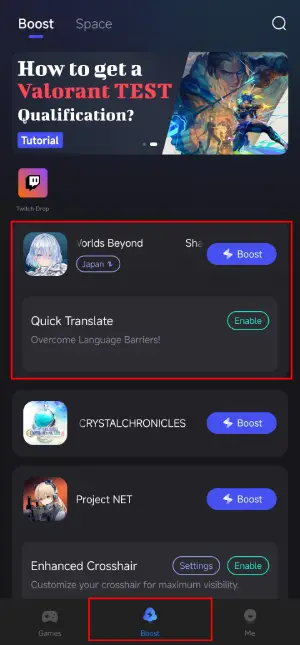
Complete the following two settings:
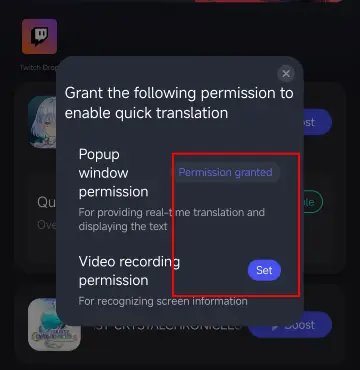
- Allow LagoFast to display on top of other pages.
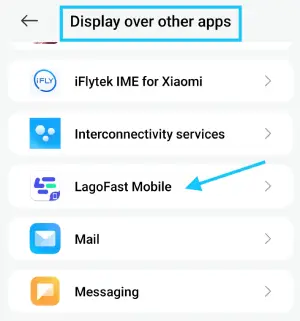
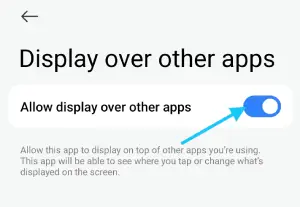
- Select "Entire scrren" in the application scope.
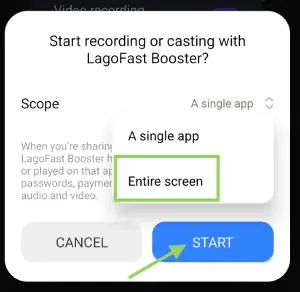
Finally, LagoFast Mobile will generate a floating translation ball. Return to Shadowverse: Worlds Beyond, and tap the translation ball to translate the page into your desired language.
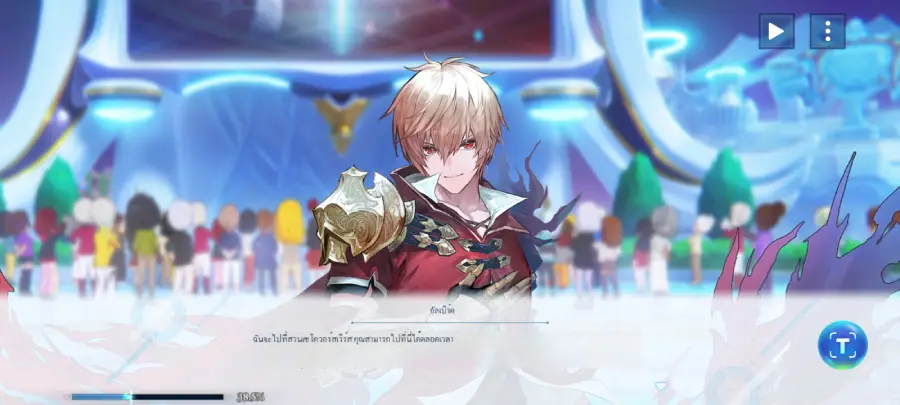
Note: LagoFast Mobile's Quick Translate tool does not require separate target language settings; it follows the system language of LagoFast Mobile. Please set LagoFast's system language to your target language in advance.
Hot Related: Shadowverse: Worlds Beyond Classes – Full Breakdown and How to Choose
Part 4: How to Ensure a Smooth Gameplay in Shadowverse: Worlds Beyond
Of course, in addition to providing players with Shadowverse: Worlds Beyond translation tools, LagoFast is also favored by global players for its excellent acceleration features. Its acceleration highlights can help players by:
- Reduces Ping and Lag: LagoFast routes your internet connection through optimized servers, minimizing latency.
- Stabilizes Connections: If disconnections are a frequent issue, LagoFast ensures a smoother and more stable connection.
- Stable Connection: Provides a consistent network connection, preventing disconnections during crucial moments.
- Optimize Performance: Enhances system performance, allowing for smoother graphics and faster load times.
Follow the steps below and use LagoFast to ensure a smooth gameplay in Shadowverse: Worlds Beyond
How to play Shadowverse: Worlds Beyond on PC
Step 1: Click the free trial button below to get LagoFast and complete the installation.
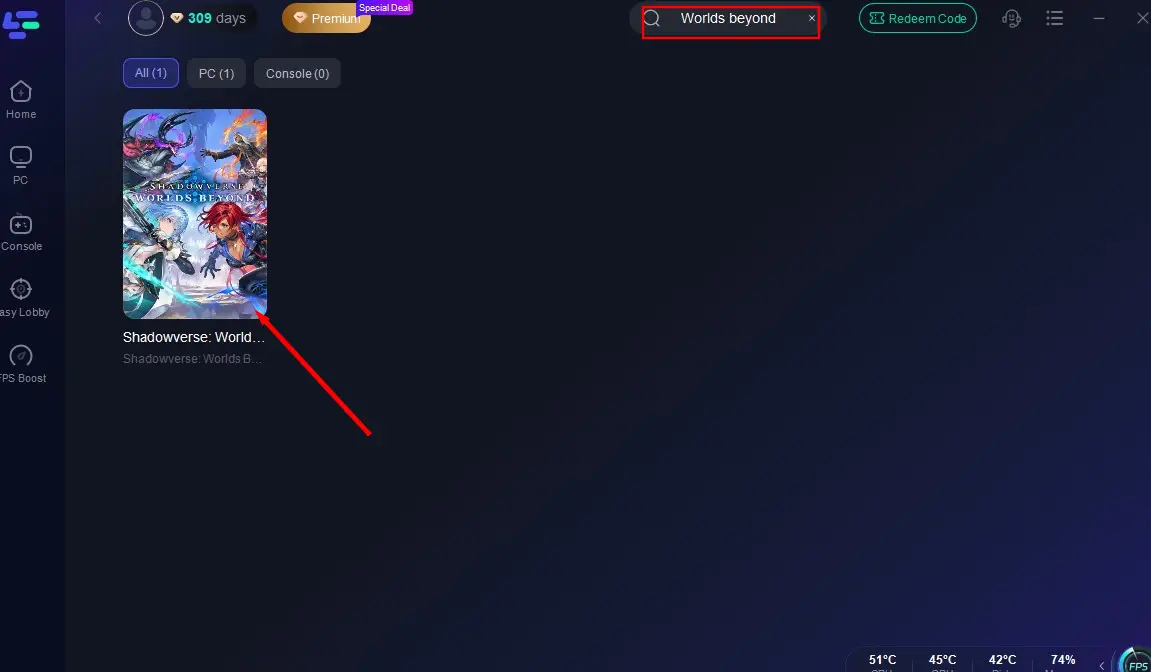
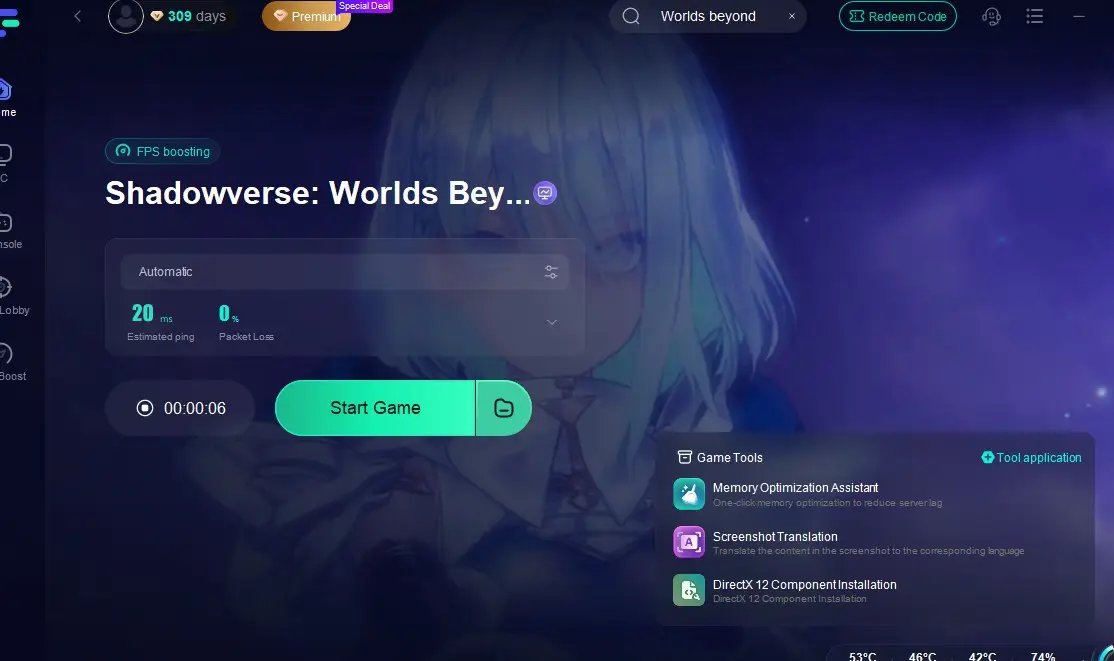
Step 2: Open LagoFast, find Shadowverse: Worlds Beyond through the search bar, and click on it.
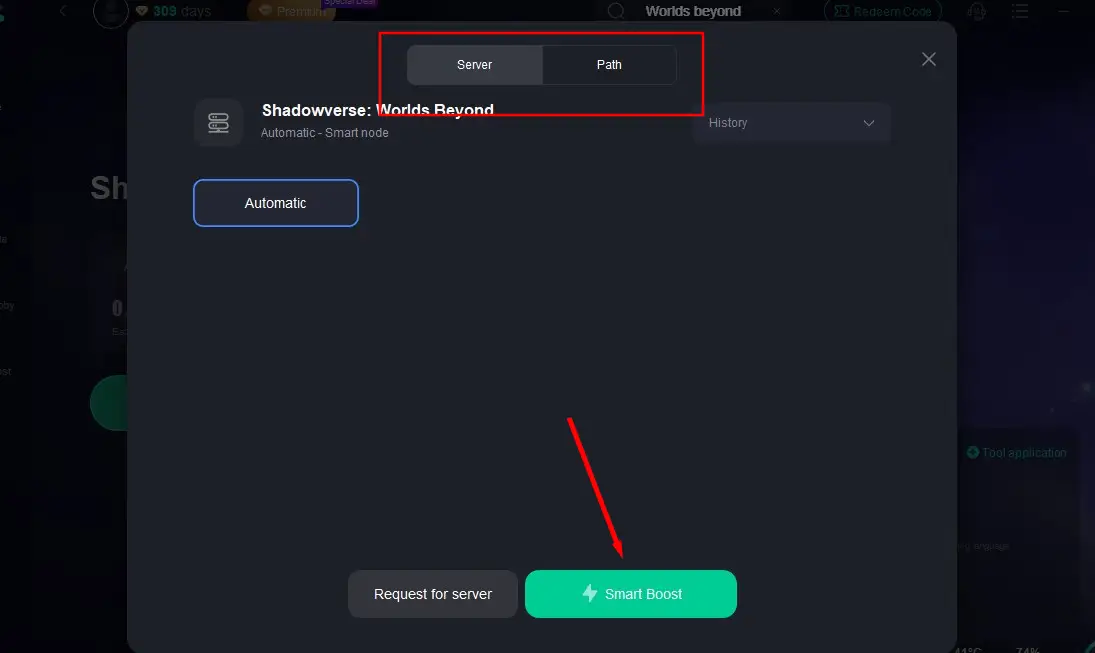
Step 3: Select a server with the best performance to connect to, and click "Smart Boost" to start accelerating.
Step 4: After confirming that the game acceleration has started, click "Start Game" to begin playing Shadowverse: Worlds Beyond.
How to Enhance Shadowverse: Worlds Beyond Experience on Mobile
Step 1: Go to the Google Play Store or App Store to download LagoFast Mobile, or scan the QR code in the image below to get it.

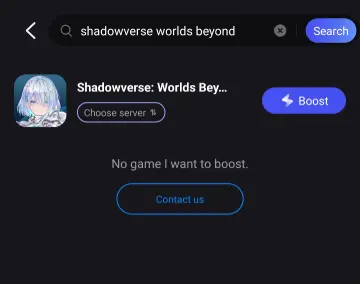
Step 2: Launch LagoFast Mobile, search for Shadowverse: Worlds Beyond, and click the "Boost" button.
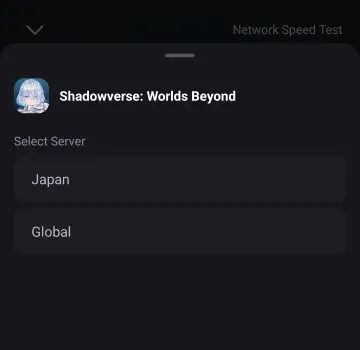
Step 3: Choose the best server to connect to based on your needs.
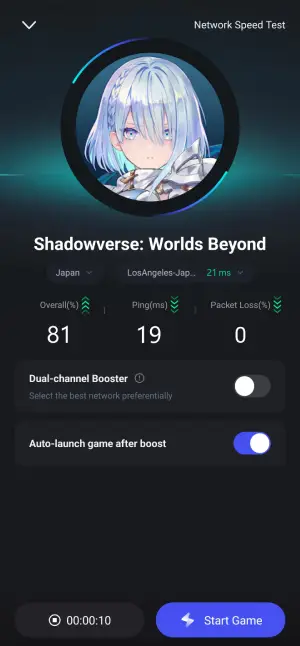
Step 4: After confirming that the game's packet loss rate and ping have been optimized, click "Start Game" to begin playing.
Conclusion
With LagoFast's Shadowverse: Worlds Beyond game translation tool, players from Thailand, Indonesia, and all around the world who speak various languages can enjoy a seamless gaming experience in their native tongue. Hurry up and click to download LagoFast to break down language barriers and fully immerse yourself in the new content and gameplay experience that Shadowverse: Worlds Beyond has to offer!

Boost Your Game with LagoFast for Epic Speed
Play harder, faster. LagoFast game booster eliminates stutter and lags on PC, mobile, or Mac—win every match!
Quickly Reduce Game Lag and Ping!
Boost FPS for Smoother Gameplay!