
Rust, the notoriously brutal survival game, is officially launching its China server on both PC and mobile, bringing its merciless open-world experience to a massive new audience. The action kicks off with PC early access recruitment starting in July 2025, followed by the mobile test recruitment in August 2025. The grand, dual-platform synchronized test is officially slated for September 19, 2025! Yet veterans and rookies alike will inevitably face the same crippling roadblock: Rust not connecting to servers. This guide will dive deep into the root causes and provide the ultimate solutions to get you in-game and fighting for your life.
Part 1: Why Rust Servers Are Not Working
Part 2: How to reconnect to server Rust
Part 3: Other Manual Fixes to Try
Part 1: Why Rust Servers Are Not Working
When you're ready to dive into the world of Rust but get stopped at the door, the problem usually looks like one of these frustrating scenarios.
1. Rust Doesn't Show Servers
This is the most blatant network issue. You've successfully launched the game, hit the server browser, and... it's a ghost town. An empty list means your game client failed to communicate with Rust's master server to fetch the list of available worlds, usually due to a network or DNS-level block.
2. Rust Does Not Respond When Starting
This one's even trickier. The game locks up completely – maybe on the loading screen, the main menu, or even before you can click a thing. Totally frozen. This usually means something deeper is wrong, beyond just your internet. Think corrupted game files, your antivirus getting in the way, or driver drama.
3. Why is Rust Not Responding When Joining a Server?
You can see the server list, you pick your battlefield, you click "Join", and the game just freezes solid. This means your client tried to talk to the specific server, but the connection "handshake" or initial asset loading failed catastrophically.
4. Why is Rust Taking So Long to Join a Server?
The other side of the connection coin. The game hasn't crashed, but you're staring at a loading screen that just won't quit. Minutes drag on. Classic sign you're stuck in ping hell with packet loss. Your data's taking a ridiculously slow, broken-up route to the server and back, making everything crawl.
Part 2: How to reconnect to server Rust
When facing Rust not connecting to servers error, why waste precious time tinkering with obscure network settings when you could be raiding a base?
The Ultimate Solution: Wield the Power of LagoFast Game Booster (For PC & Mobile)
When Rust doesn't show servers or fails to connect, you need a fix that's fast, reliable, and works on whatever you're playing on. That's exactly where LagoFast comes in.
Think of LagoFast not just as a tool, but as your personal high-speed lane straight to the Rust servers. It's built by gamers, for gamers, to crush the exact problems that drive us crazy.
- Plays on all your devices: Got a beastly gaming PC? Check. Planning to dominate on Rust Mobile? Check. LagoFast has dedicated apps for both, ensuring a seamless experience everywhere.
- A smarter, smoother path: Your regular internet is like taking side streets with traffic lights. LagoFast uses its own global network of super-fast routes, automatically finding the quickest, most stable path to the game server. If one path gets congested, its Multi-Path Connection technology instantly switches to another. Connection drops and "server not responding" messages become a thing of the past.
- More than just Ping: A good connection is useless if your frames are dropping. The PC version of LagoFast is a two-in-one beast, also featuring an FPS Boost that optimizes your system with one click. It's not just about a stable connection; it's about the buttery-smooth frames needed to win a firefight.
- Pay for what you play: Forget expensive monthly subscriptions. LagoFast's unique pay-per-minute plan means your wallet only takes a hit when you're actually boosting your game. It's smarter and fairer.
Getting LagoFast Running for Rust on PC:
Step 1: Click the Free Trial button to download and install LagoFast.
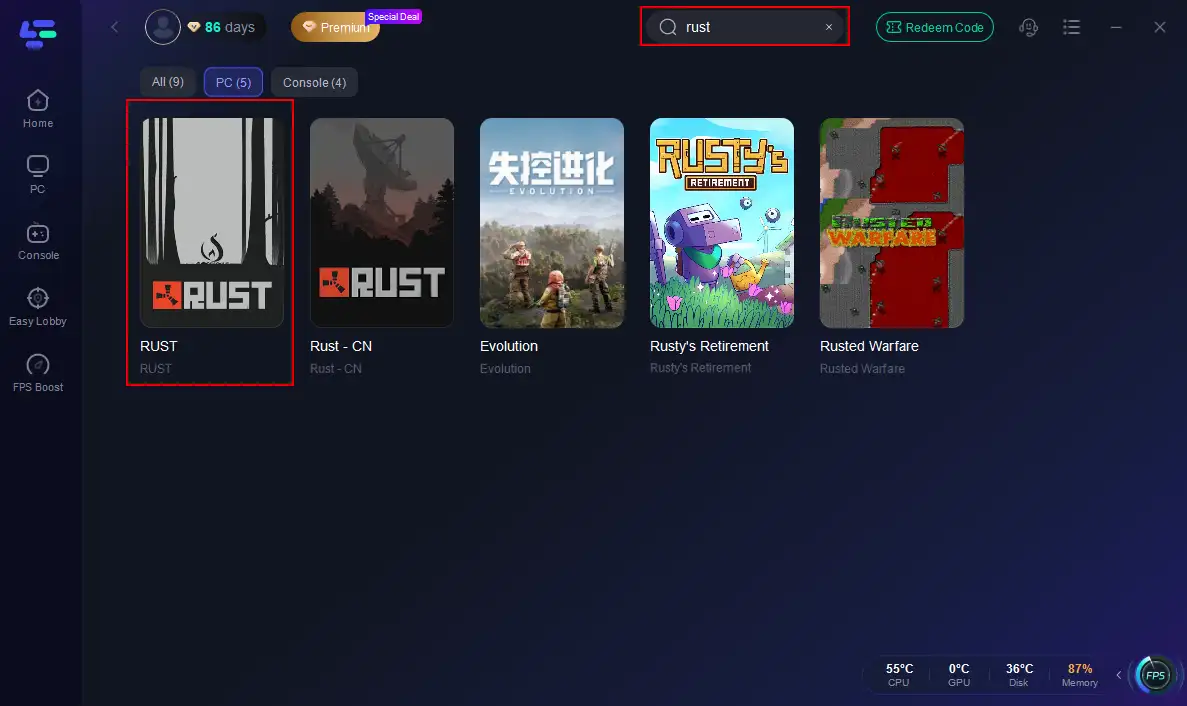
Step 2: Open LagoFast, then click the PC button on the left and search for Rust in the search bar, and click it after it appears.
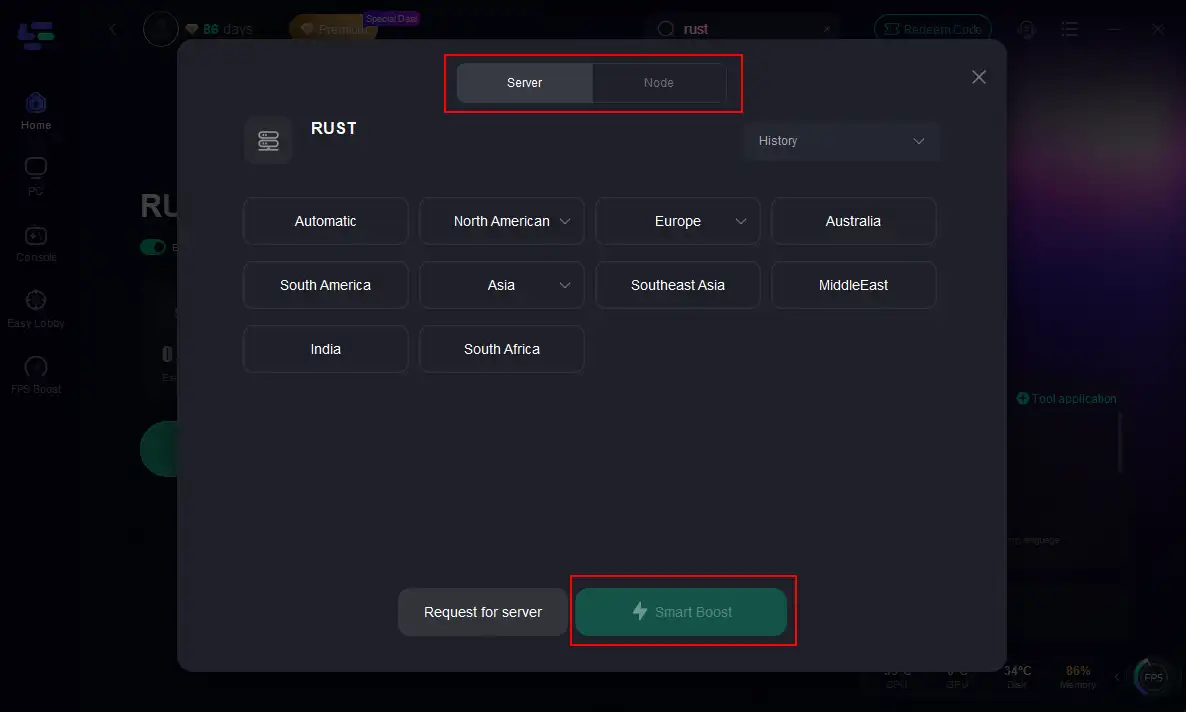
Step 3: Click on “Server” to change to a better server that maximizes the gaming experience, then click on “Smart Boost”.
Step 4: Check the specific game ping, packet loss, and multiple path connections on the right side. Finally, click the “Start Game” to play Rust.
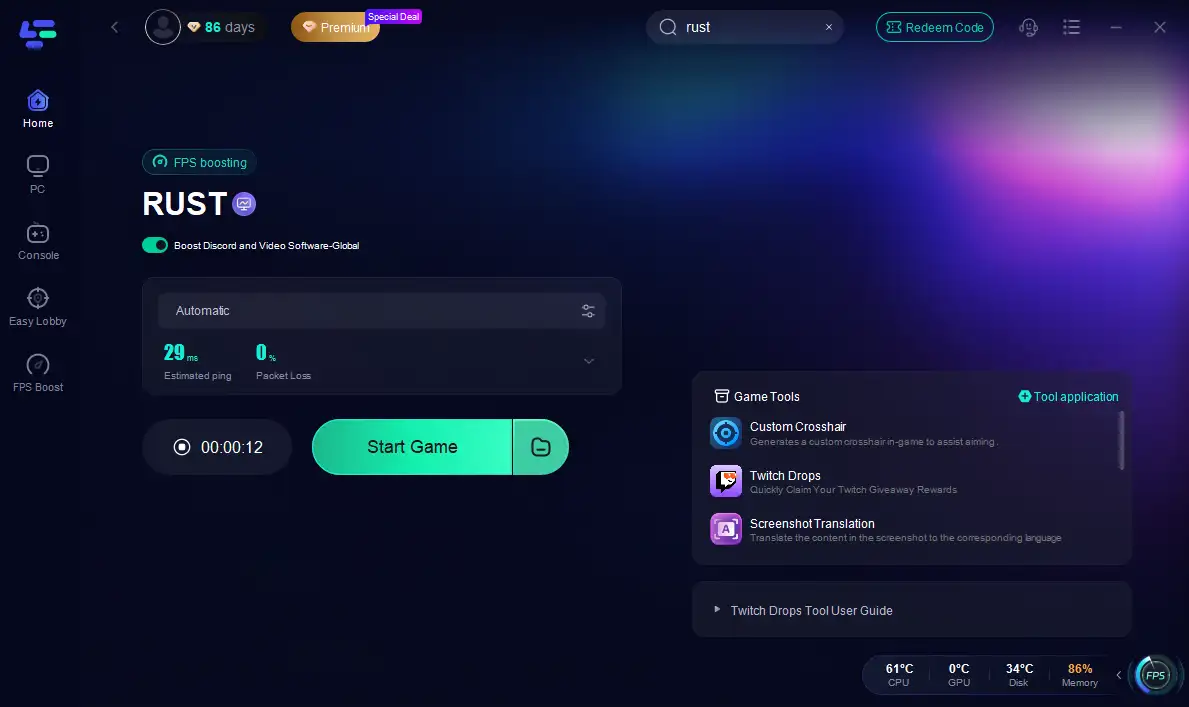
Unleashing LagoFast for Rust on Mobile:
Step 1: Click here to download the APK File of LagoFast mobile.
Step 2. Search for your game and select it.
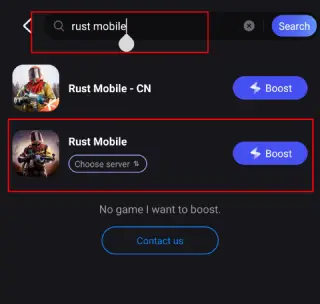
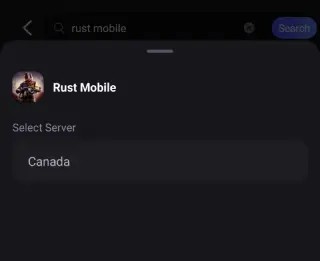
Step 3. Pick the server that suits you best.
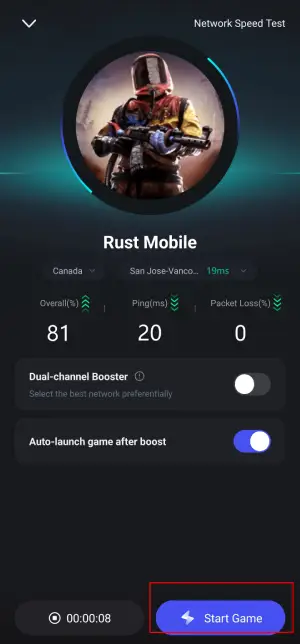
Step 4. Tap Boost, and LagoFast will display real-time ping and packet loss stats.
Part 3: Other Manual Fixes to Try
Before you let LagoFast handle it all, you can try the manual approach. Here are some classic troubleshooting steps.
Do a Server Status Recon:
Is it just you, or is everyone having a bad day? Check the official Rust Twitter or a site like DownDetector before you start tearing your hair out.
The Classic "Turn It Off and On Again":
The oldest trick in the IT book for a reason. Power cycle your PC/phone, your router, and your modem. Give them a full minute to rest before powering them back on.
Sanitize Your Game Files / Clear Cache:
- On PC: In Steam, right-click Rust > Properties > Installed Files > "Verify integrity of game files." Let Steam patch up any broken bits.
- On Mobile: Head to your phone's Settings > Apps > Rust Mobile and "Clear Cache." (Don't hit Clear Data unless you want to start fresh!)
Check Your Firewall and Antivirus:
Your overzealous security software might be blocking Rust from phoning home. Temporarily disable it to test, or better yet, add Rust to its exception list.
Update Your Gear:
- On PC: Outdated network drivers can cause chaos. Head to your motherboard or network card manufacturer's website and grab the latest version.
- On Mobile: Make sure your phone's OS is fully updated.
Go Wired or Get Closer:
- On PC: If you're on Wi-Fi, plug in an Ethernet cable. It's almost always faster and more stable.
- On Mobile: Get closer to your Wi-Fi router. Every wall between you and it is a potential source of lag.
Reset Network Settings: This is a last resort.
- On PC: Open Command Prompt as an admin and run netsh winsock reset followed by ipconfig /flushdns.
- On Mobile: Find "Reset Network Settings" in your phone's system settings. Be warned: this will forget all your saved Wi-Fi passwords.
Conclusion
Rust's world never pauses for connection struggles. You could spend hours troubleshooting, or you could take the fastest route back to your base. Stop battling your connection. Start securing your territory. Use LagoFast to permanently solve Rust server connection errors and reclaim your dominance.
Boost Your Game with LagoFast for Epic Speed
Play harder, faster. LagoFast game booster eliminates stutter and lags on PC, mobile, or Mac—win every match!
Quickly Reduce Game Lag and Ping!
Boost FPS for Smoother Gameplay!