
Rust is one of the most intense survival games in the world, demanding not only sharp instincts but also a stable and reliable connection. Unfortunately, countless players encounter the dreaded Rust disconnected message, cutting them off from the action without warning. These disconnections can come in many forms, from failed authentication to EAC client violations, and each has its own underlying causes. Below, we’ll explore why these issues happen, followed by practical fixes, and explain how LagoFast’s network optimization can help ensure smoother gameplay.

Part 1: Why Rust Disconnected Errors Happen & How to Fix
Part 2: The Fastest and Best Solution for Rust Disconnected Issues
Part 1: Why Rust Disconnected Errors Happen & How to Fix

Disconnected: Couldn’t Download Level Rust
This usually occurs when the client fails to properly download game data from the server. It may be due to corrupted files, missing updates, or interruptions during the download process. If a server is running a custom map or mod, mismatched files can also cause this disconnect.
How to Fix:
Start by verifying your game files through Steam to ensure nothing is corrupted. Delete any cached maps or modded content that may be conflicting. If downloading from a custom server, confirm you have the necessary files. A clean reinstall may also resolve stubborn cases.
Disconnect: Authentication Timed Out Rust
This happens when your computer fails to verify with Rust’s servers or Steam within the required timeframe. It’s often linked to slow internet connections, server overloads, or background processes interfering with Steam authentication.
How to Fix:
Restart Steam fully (not just minimized). Make sure your internet is stable and no heavy background downloads are interfering. Some players resolve this by flushing DNS and switching to a faster DNS provider. LagoFast can also reduce packet delays that often cause authentication to time out.
Disconnected: Returning to Main Menu Rust
Sometimes, players are suddenly booted back to the main menu without a clear reason. This issue can result from temporary server instability, packet loss, or game file corruption. It’s a generic disconnect that often masks deeper network issues.
How to Fix:
Check if the server you’re on is stable by trying others. If it happens across multiple servers, verify Rust’s files and update drivers. Switching from Wi-Fi to a wired connection can reduce sudden disconnections. LagoFast’s network routing can prevent abrupt packet loss that kicks you back to the menu.
Disconnected Server Rust
This message shows up when you lose the connection to the server you’re playing on. Causes include unstable Wi-Fi, router misconfigurations, or even ISP-level issues blocking stable traffic to Rust servers.
How to Fix:
Restart your router and modem, and make sure ports required by Rust are open. If your ISP blocks certain connections, using LagoFast’s routing can bypass restrictions and keep your session active. Switching servers may also reveal if the issue is on the server’s side.
Rust Disconnect Steam Auth
This happens when Steam cannot verify your account data with Rust. It can be triggered by Steam downtime, outdated client files, or local cache corruption. Essentially, Rust is unable to confirm that your Steam account is valid at that moment.
How to Fix:
Clear your Steam download cache and log out, then back into Steam. If the problem persists, reinstall Rust to refresh your Steam linkage. Many users find LagoFast helpful here, as it ensures authentication packets are delivered without delays or drops.
Disconnect Cheating Rust
If Rust detects suspicious behavior or potential third-party software running, you might be forcefully disconnected. Even legitimate software that interacts oddly with the game can be falsely flagged, triggering this disconnect.
How to Fix:
Check for background programs like overlays, macros, or even RGB software that may interfere. Disable unnecessary apps before launching Rust. If you believe it’s a false detection, reinstalling Rust and EAC may help. LagoFast’s clean routing can minimize false triggers caused by packet irregularities.

Disconnect Attempt Failed Rust
This message appears when Rust cannot establish a session with the server at all. It often points to blocked ports, ISP restrictions, or firewall settings preventing outbound connections.
How to Fix:
Test your internet by switching between Wi-Fi, Ethernet, or even a mobile hotspot. Ensure firewalls or antivirus programs aren’t blocking Rust. Port forwarding may also be necessary. With LagoFast, your traffic is rerouted through stable nodes, which often fixes failed attempts instantly.
Disconnected EAC Anti-Cheat Client Rust
Easy Anti-Cheat (EAC) protects Rust against unfair play. If your client fails to sync with EAC, you’ll be disconnected. This may happen because of corrupted EAC files, outdated installs, or security software interfering with the process.
How to Fix:
Navigate to Rust’s install folder, open the Easy Anti-Cheat setup file, and run a repair. Also, verify Rust’s files through Steam. Restart your PC to refresh system services. LagoFast ensures smoother communication with EAC servers by reducing latency in authentication.
Rust Disconnected EAC Client Integrity
This happens when EAC detects tampered or missing game files. If even a single file doesn’t match expected integrity checks, EAC forces a disconnect to protect the server from possible exploits.
How to Fix:
Verify the integrity of your Rust installation. Delete and reinstall EAC if needed. Make sure your system hasn’t blocked any EAC-related processes. LagoFast can assist by maintaining stable connections so files sync correctly with EAC’s checks.
Disconnected EAC Violation Rust
This is the harshest type of disconnection. If EAC believes your client is running unauthorized modifications, it triggers a violation. In many cases, this could be due to cheats, but sometimes legitimate programs can cause false positives.
How to Fix:
If you’ve been wrongfully flagged, a full reinstall of Rust and EAC is recommended. Avoid running unnecessary background software while playing. LagoFast helps maintain a clean and secure connection to EAC, reducing the risk of false positives caused by unstable packet transmission.
Part 2: The Fastest and Best Solution for Rust Disconnected Issues
When it comes to multiplayer games like Rust, a stable connection is the difference between victory and constant frustration. LagoFast is a gaming-optimized network accelerator designed to solve exactly these problems. Unlike generic VPNs, it focuses on low latency, packet loss reduction, and connection stability.
Key Features of LagoFast:
- Global Acceleration Nodes: Connect to the nearest, most stable route for Rust servers.
- Real-Time Packet Loss Reduction: Prevents dropped data that often triggers disconnects.
- Dynamic Ping Stabilization: Keeps your ping consistent instead of spiking mid-game.
- User-Friendly Interface: Easy setup with no complicated configurations.
- Multi-Game Optimization: Works not only for Rust but also for other online games.
With LagoFast, players experience smoother gameplay, fewer sudden disconnects, and a much more enjoyable survival experience.
For Rust PC Users, check this tutorial to ensure a better gaming experience:
Step 1: Click the Free Trial button to download and install LagoFast.
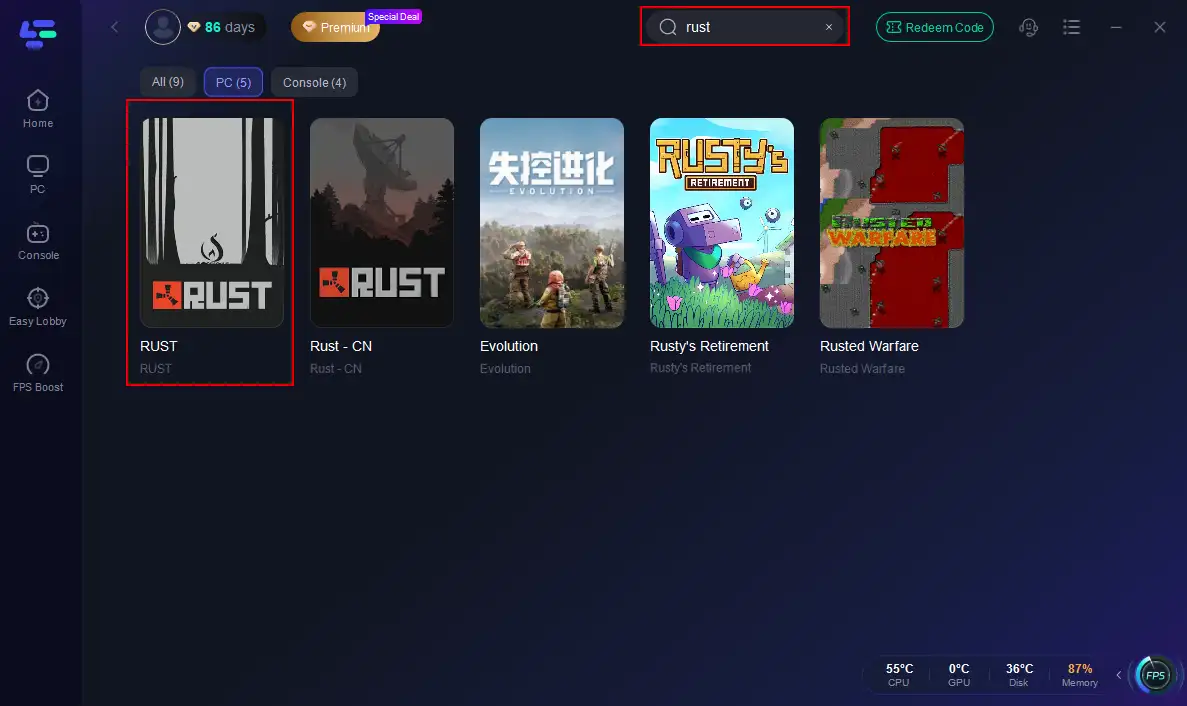
Step 2: Open LagoFast, then click the PC button on the left and search for Rust in the search bar, and click it after it appears.
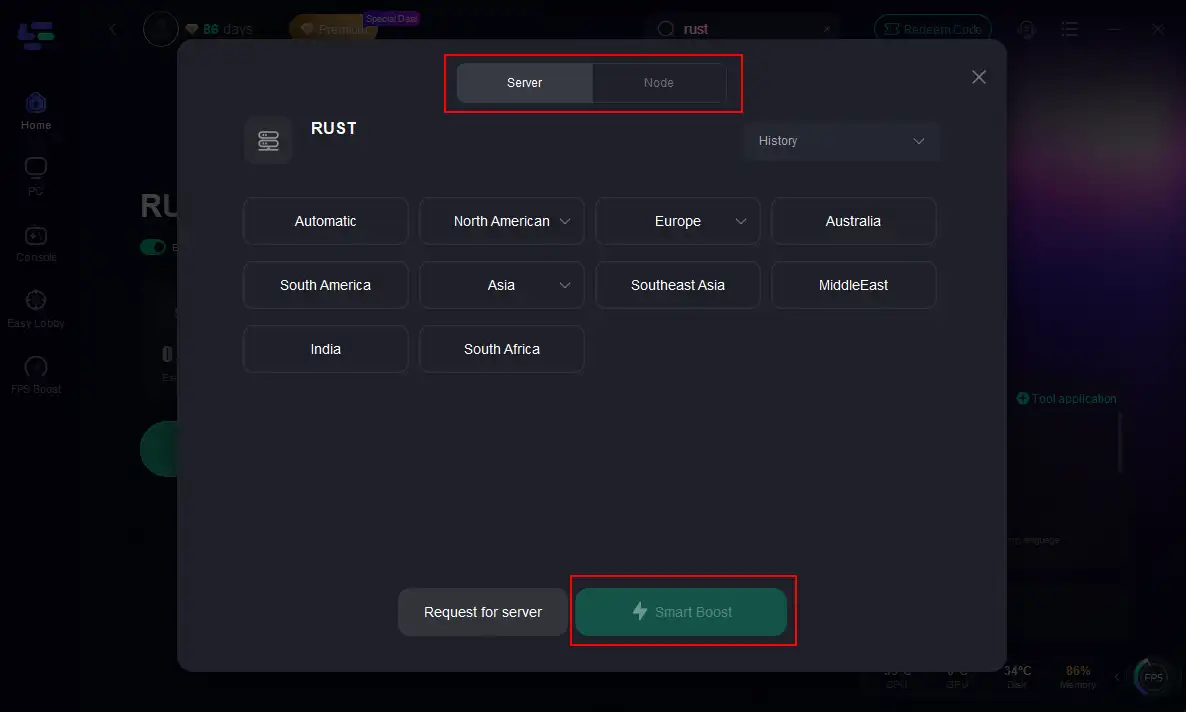
Step 3: Click on “Server” to change to a better server that maximizes the gaming experience, then click on “Smart Boost”.
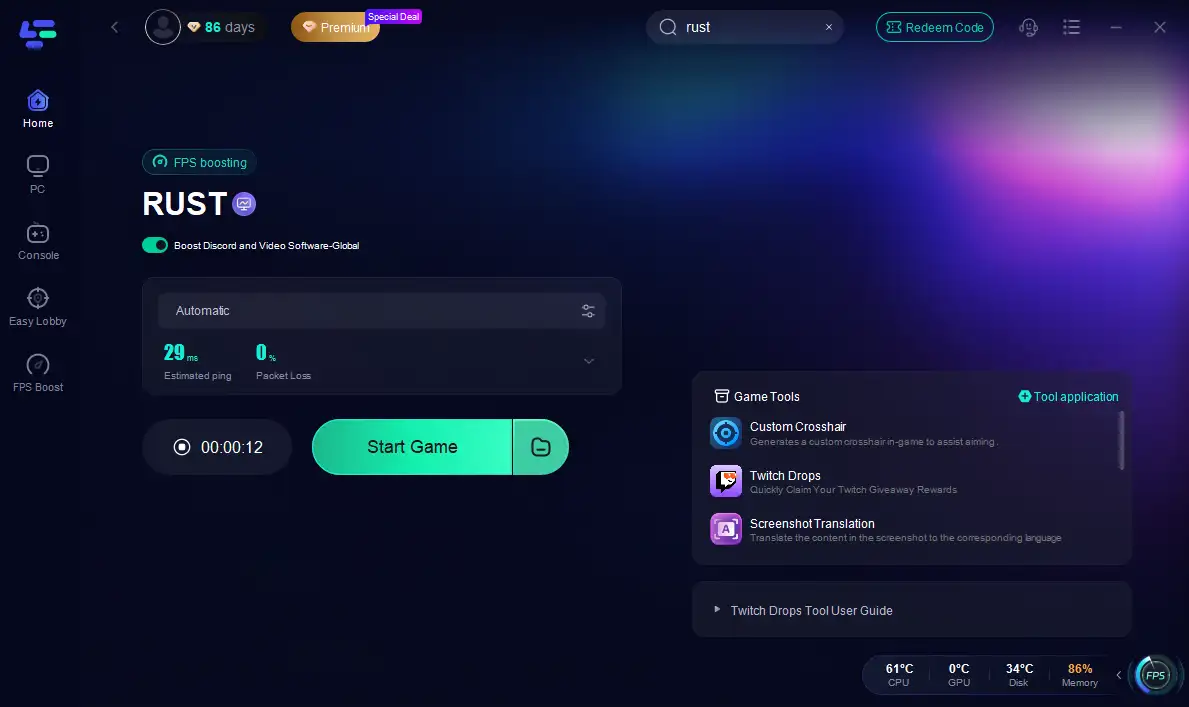
Step 4: Check the specific game ping, packet loss, and multiple path connections on the right side. Finally, click the “Start Game” to play Rust.
Follow the tutorial to use the LagoFast Mobile booster:
Step 1: Click here to download the APK File of LagoFast mobile.
Step 2. Search for your game and select it.
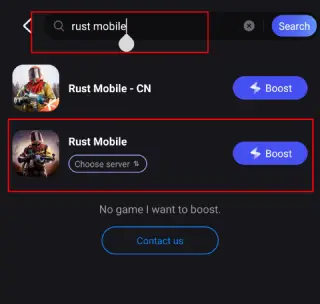
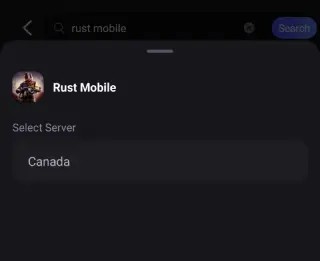
Step 3. Pick the server that suits you best.
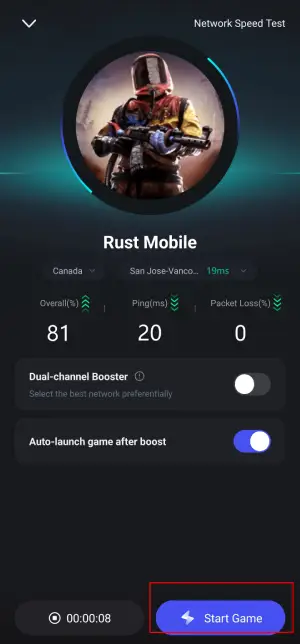
Step 4. Tap Boost, and LagoFast will display real-time ping and packet loss stats.
Conclusion
Rust is a thrilling survival game, but Rust disconnected errors can ruin the immersion quickly. From authentication timeouts to EAC client violations, each issue has unique causes and solutions. While verifying files, fixing network settings, and repairing EAC are crucial steps, nothing stabilizes your connection quite like LagoFast. By minimizing packet loss, reducing ping spikes, and optimizing your route to Rust servers, LagoFast ensures that your survival journey continues uninterrupted. If you want to spend more time surviving and less time troubleshooting, LagoFast is your best ally.

Boost Your Game with LagoFast for Epic Speed
Play harder, faster. LagoFast game booster eliminates stutter and lags on PC, mobile, or Mac—win every match!
Quickly Reduce Game Lag and Ping!
Boost FPS for Smoother Gameplay!