
Rust continues to be one of the most dynamic and engaging survival games, blending intense combat, complex crafting, and base-building in a harsh, ever-changing environment. As the game evolves into 2025, so do the tools and commands players use to gain an edge, whether on PC, consoles, or mobile platforms. Understanding the latest commands and how to use them can dramatically improve your gameplay experience.
While Rust's core gameplay remains familiar to longtime fans, new updates, especially related to console integration and upcoming mobile versions, make it essential for players to stay current. This guide will walk you through some of the most useful commands and binds for Rust in 2025, provide insights into the ongoing Chinese server testing, and share tips to ensure your gaming runs smoothly across devices.

Part 1: Rust Commands in 2025: The Most Useful for PC & Consoles
Part 2: How to Ensure Your Gaming Experience in Rust with LagoFast
Part 3: Rust Chinese Server Testing
Part 1: Rust Commands in 2025: The Most Useful for PC & Consoles
Rust's command console offers players a powerful way to customize controls, tweak performance, and manage in-game interactions. Accessed by pressing the F1 key on PC (or through dedicated menus on consoles), this console allows inputting commands and binds that can simplify gameplay or provide detailed control.
Key Commands You Should Know
Some commands remain staples for players who want to enhance their responsiveness or manage the game environment better:
- kill / respawn: These commands are basic but essential, allowing you to quickly reset your character if stuck or needing a fresh start.
- client.connect [server IP]: Perfect for directly joining a specific server without searching through the server browser, especially useful for private or community servers.
- client.directly.fps: Displays your current frames per second right in the console, helping you monitor performance without relying on external tools.
- fps.limit -1: Removes the FPS cap, giving your PC freedom to push higher frame rates if your hardware supports it.
- graphics.vm_fov_scale 0: Disables weapon field-of-view scaling, which can clear up your screen and improve your situational awareness.
- streamermode true/false: A toggle that hides player names and server details, great for streamers who want privacy or to avoid stream sniping.
- seed: Reveals the current map seed, useful for players tracking map generation or coordinating with friends.
Handy Binds to Speed Up Your Actions
Binds allow you to assign complex commands to single key presses, greatly simplifying actions during intense moments:
- bind f1 consoletoggle;combatlog: Opens the console and simultaneously activates combat logging to track hits during fights.
- bind x forward;sprint: Enables auto-run, which is a lifesaver when traveling long distances or escaping danger without holding down keys.
- bind z duck: Toggles crouching on and off, useful for sneaking or hiding quickly.
- bind mouse1 "+attack2;+input.sensitivity .45;input.sensitivity .2": Adjusts mouse sensitivity dynamically when aiming down sights for more precise control.
- bind mouse1 +lighttoggle;+attack2: Turns on your flashlight or laser sight while aiming, aiding in dark or low-visibility areas.
- bind mousewheelup "craft.add -2072273936 2": Quickly crafts bandages by scrolling up the mouse wheel—handy for quick healing on the move.
- bind f10 client.disconnect: Instantly disconnects you from the current server, useful if you need to exit fast.
- bind 7 chat.say "Hello everyone!": Sends a preset message to global chat, perfect for quick greetings or alerts.
- bind 8 chat.teamsay "Hey Team!!": Sends messages to your team chat without opening the chat window manually.
These binds and commands can be customized further depending on your playstyle, server settings, and hardware. Many players put frequently used commands into configuration files or launch options so they load automatically with the game.
Advanced Tweaks for Better Gameplay
For those who want even more control, some lesser-known commands can improve visuals and responsiveness:
- legs.enablelegs 0: Removes the leg model, which some players prefer to reduce distractions or improve FPS.
- effects.maxgibs -1: Removes debris and lingering objects after raids, clearing clutter and potentially improving performance.
- input.autocrouch true: Automatically crouches when jumping on half-height surfaces for smoother movement.
- graphics.vm_horizontal_flip 1: Flips weapon and hand view horizontally to switch handedness without changing your actual profile settings.
- hitnotify.notification_level 2: Stops invalid hit sounds, cleaning up audio feedback during fights.
Understanding and using these commands gives you an edge when navigating Rust’s challenging environment. Whether you’re raiding, defending, or exploring, smooth execution matters.
Rust Server Commands
If you’re hosting a server, rust server commands are your control panel. They dictate everything from player limits to environmental tweaks. Here are some essentials:
- server.hostname “Your Server Name”: Changes your server’s display name.
- server.maxplayers 100: Sets the maximum number of connected players.
- server.seed 12345: Determines the world seed for consistent maps.
- server.save: Forces an immediate save of the server state.
- server.writecfg: Saves your configuration to the server config file, ensuring settings persist after a restart.
Administrators often pair these with rust players teams management commands, especially in competitive or event-based environments, to create balanced matches or monitor player groups.
Console Commands Rust
The console commands Rust category includes a mix of client and debug tools. Accessed via the rust command console, they allow players to tweak visuals, check statistics, or quickly perform in-game actions without using menus.
- Combatlog: Shows recent combat details, perfect for post-fight analysis.
- fps.limit -1: Removes the FPS cap for maximum performance.
- graphics.vm_fov_scale 0: Disables FOV scaling for weapons.
- kill: Forces a respawn. Useful if you get stuck or bugged.
- respawn: Alternate respawn command if kill fails.
- client.connect <IP>: Directly connect to a server via its IP.
These commands are especially handy when combined with keybinds for instant access, saving you time in fast-paced situations.
Rust Admin Commands
For server administrators and event organizers, rust admin commands go far beyond moderation, they also include building and creative tools. This is where rust room commands and rust room build commands shine, especially for testing base designs or setting up events.
- noclip: Lets you fly through the map, ideal for inspections or cinematic shots.
- spawn <item>: Instantly generates items.
- Ent.kill: Deletes targeted entities.
- rust.room <size>: Creates a room structure instantly (part of rust room commands).
- rust.room.build <size> <material>: Builds a pre-configured room with specific materials (part of rust room build commands).
These tools are indispensable when you need to test raid scenarios, set up PvP arenas, or quickly prototype base layouts without spending hours farming materials.
Rust FPS Command
Performance can make or break a firefight, and rust fps command tools help you squeeze every frame from your hardware.
- client.fps: Displays your current FPS in the console.
- fps.limit <number>: Caps your FPS to reduce GPU load (or sets it to -1 for no limit).
- gc.buffer 2048: Adjusts memory buffer size for smoother gameplay.
The magic rust commands term often refers to little-known tweaks that provide noticeable improvements or unique effects. For example:
-
effects.maxgibs 0: Removes debris particles to improve visibility.
-
headlerp_inertia false: Removes head movement inertia for instant camera response.
These commands aren’t “magical” in the supernatural sense. They’re simply rare performance tweaks that can give you an edge without altering gameplay balance.
Rust Startup Commands
Rust startup commands are entered into your Steam launch options or server startup script. They execute automatically when the game or server boots, saving you from manually entering settings every time.
Popular startup entries include:
- -high: Runs the game in high CPU priority mode.
- -maxMem=16000: Allocates more RAM for Rust (adjust based on your system).
- -force-feature-level-11-0: Forces a specific DirectX feature level for compatibility.
- +gfx.loadbalancer true: Distributes rendering tasks for better GPU efficiency.
You can combine these with your most-used in-game tweaks, ensuring that every session starts with your preferred setup already active.
Part 2: How to Ensure Your Gaming Experience in Rust with LagoFast
When playing an intense and demanding game like Rust, smooth and reliable internet connectivity is crucial. Lag and latency issues can cost you valuable seconds and lead to frustrating gameplay.
This is where LagoFast comes into play. LagoFast is a cutting-edge acceleration platform designed specifically for gaming across multiple devices, including PC, consoles, and mobile phones. Its technology reduces latency by optimizing routing paths between your device and game servers, cutting down lag spikes and improving overall stability.
It supports features such as:
- Multi-platform support for PC, console, and mobile gaming
- Intelligent server selection to ensure you connect to the fastest possible routes
- Real-time latency monitoring and automatic rerouting during unstable periods
- Easy-to-use interface with customizable profiles for different games
- Enhanced security to protect your data during gaming sessions
For Rust players, especially those joining international servers like the new Chinese platform, LagoFast guarantees a more responsive and immersive experience. By minimizing lag, you stay competitive whether raiding, building, or fighting for survival.
Follow the tutorial to use the LagoFast Mobile booster:
Step 1: Click here to download the APK File of LagoFast mobile.

Step 2. Search for your game and select it.
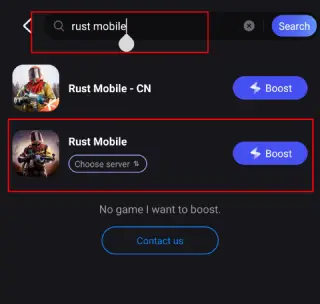
Step 3. Pick the server that suits you best.
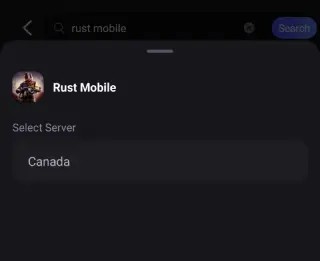
Step 4. Tap Boost, and LagoFast will display real-time ping and packet loss stats.

For Rust PC Users, check this tutorial to enjoy a better gaming experience:
Step 1: Click the Free Trial button to download and install LagoFast.
Step 2: Open LagoFast, then click the PC button on the left and search for Rust in the search bar, and click it after it appears.
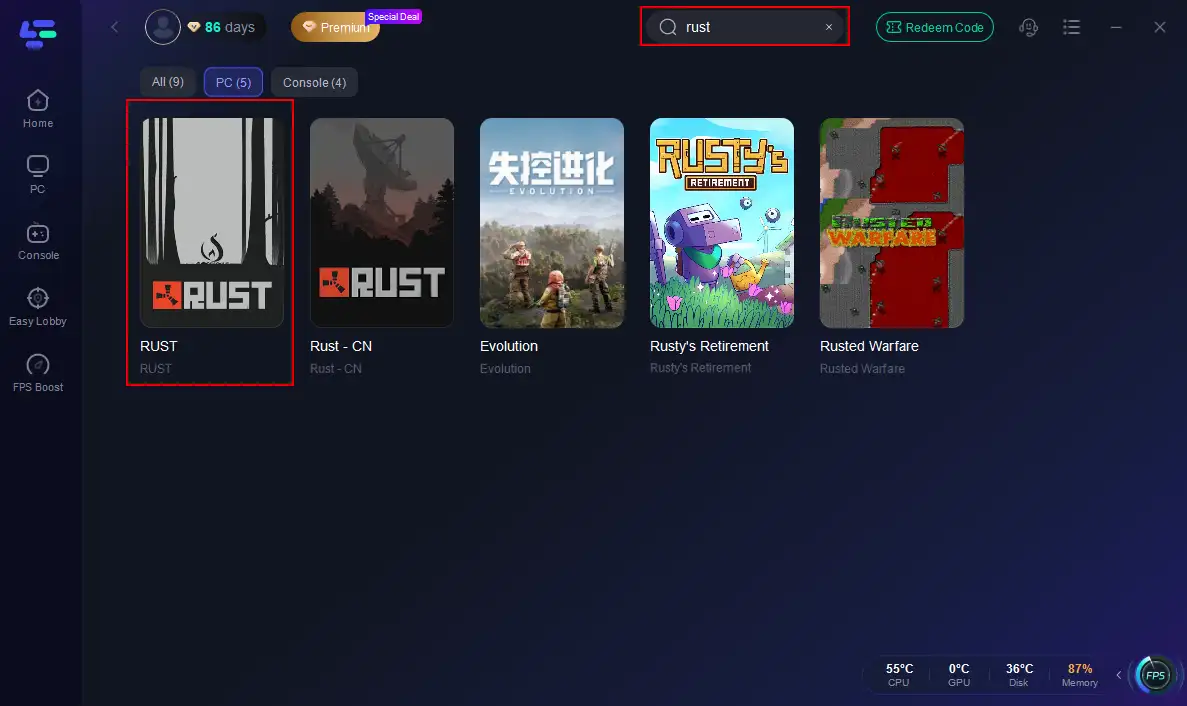
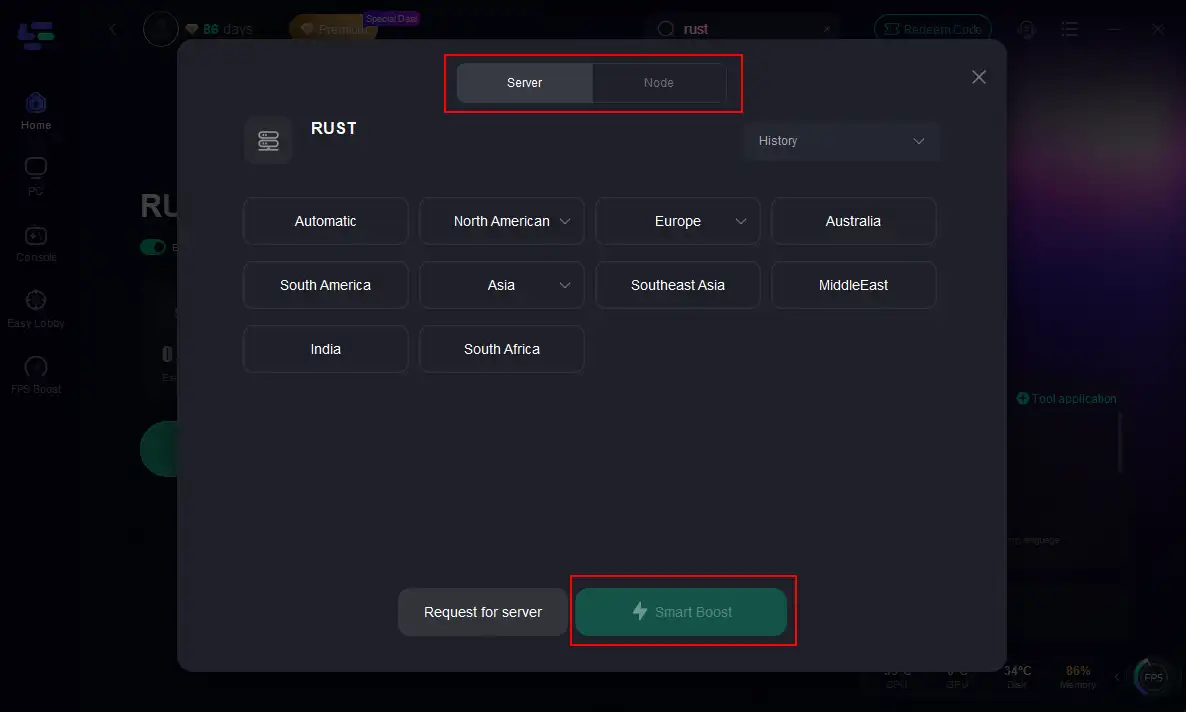
Step 3: Click on “Server” to change to a better server that maximizes the gaming experience, then click on “Smart Boost”.
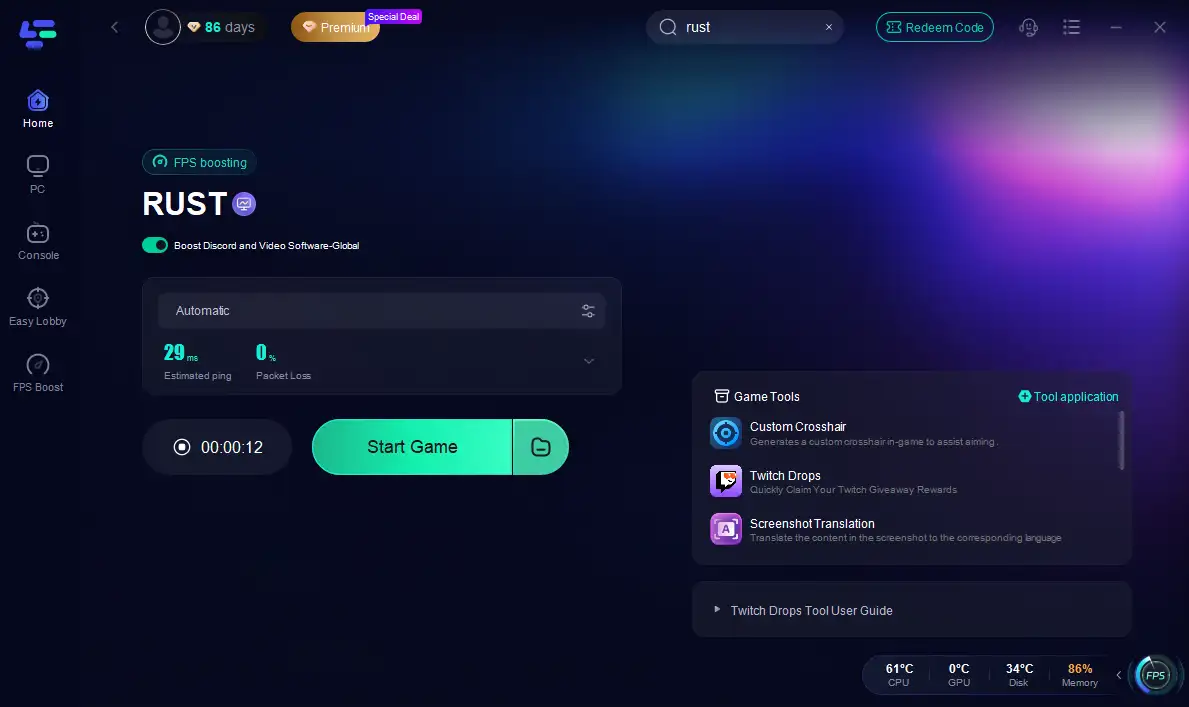
Step 4: Check the specific game ping, packet loss, and multiple path connections on the right side. Finally, click the “Start Game” to play Rust.
Part 3: Rust Chinese Server Testing

In 2025, Rust enthusiasts have a new exciting development with the upcoming Chinese server testing phase. This testing includes dual-platform trials on PC and mobile, opening up broader accessibility and more inclusive gameplay.
The license-based sandbox survival game, closely linked to Rust’s gameplay style, has been undergoing limited beta enrollments since April 2025. Starting in August for mobile and July for PC, early enrollment opportunities have attracted players eager to test new content and features. The Chinese server testing scheduled for September 19th, 2025, marks a critical milestone as it will gather data on network stability, performance, and user experience in a high-demand environment.
For many, this signals a growing trend of Rust adapting to diverse player bases, with mobile platforms no longer an afterthought but an integral part of the ecosystem.
Conclusion
In 2025, mastering Rust’s diverse commands and embracing new developments like the Chinese cross-platform servers will elevate your gameplay, while tools like LagoFast ensure a smooth, low-latency experience across PC, consoles, and mobile. With these resources, you’re set to survive and thrive in Rust’s ever-evolving world.

Boost Your Game with LagoFast for Epic Speed
Play harder, faster. LagoFast game booster eliminates stutter and lags on PC, mobile, or Mac—win every match!
Quickly Reduce Game Lag and Ping!
Boost FPS for Smoother Gameplay!