

Rust has always been a demanding survival game, but as 2025 rolls in, performance optimization has become more crucial than ever. With the game’s complex physics, massive maps, and dynamic environments, even powerful rigs can struggle with low FPS, stutters, or painfully long load times. Whether you’re raiding at dawn, farming scrap, or engaging in tense PvP firefights, having the right settings can mean the difference between winning and respawning naked on the beach.
This year brings more than just graphics tweaks. We’re also seeing exciting developments like dual-platform testing for Rust’s Chinese server, hinting at a wider cross-device future. But no matter where or how you play, dialing in the perfect settings can dramatically improve performance, especially for those on midrange or low-end PCs.
In this guide, we’ll cover the new Rust settings for 2025, tailored for different hardware levels, PvP priorities, and even stubborn loading issues.

Part 1: Rust Chinese Server Testing
Part 2: Rust Best Settings 2025
Part 3: How to Maximize Your Gaming Experience in Rust
Part 1: Rust Chinese Server Testing
2025 is shaping up to be a big year for Rust in China, with dual-platform testing set to expand the player base beyond traditional PC users. The testing schedule is already on the calendar:
- July 2025 – PC beta enrollment begins.
- August 2025 – Mobile beta signups open.
- September 19, 2025 – Full-scale testing kicks off.
The project is described as a license-based, open-world build-and-survival sandbox game. This makes it one of the most ambitious localized versions yet, aiming to deliver a near-identical Rust experience on both PC and mobile.
Why does this matter for performance optimization? If Rust’s cross-device future mirrors what we see here, we may need to start thinking about settings that work across different hardware generations and screen sizes. This could push developers to streamline resource usage, potentially benefiting players worldwide.
Part 2: Rust Best Settings 2025
With each update, Rust’s system requirements have crept upward, and the difference between “playable” and “frustrating” often comes down to fine-tuning your settings. Let’s break them down for different scenarios.

Rust Graphics Settings
If you’re hitting low FPS even after lowering your settings, it’s usually due to CPU bottlenecks, server-side lag, or poorly balanced graphics options. Here are the adjustments that help most players:
- Global Rendering: Off for older CPUs; On for high-end rigs.
- Shader Level: 350-450 for mid systems, up to 600 if you can handle it.
- Draw Distance: 2000 is a solid balance — anything higher drastically affects performance.
- Water Quality & Reflections: Set both to 1 for big FPS gains near rivers or the ocean.
- LOD Bias: Lower values help if settlements tank your FPS.
- Shadow Quality: 2 for balanced visuals; drop to 0 if desperate for frames.
- Mesh Quality: 75%-50% for struggling PCs.
- Textures & Filtering: Surprisingly, these don’t impact FPS much—max them out for better visuals.
Rust Settings for Weak PC — Minimal settings Rust
If your PC is below recommended specs, every setting matters. Focus on cutting the most demanding effects first:
- Resolution: 1080p or even 900p for extra breathing room.
- Graphics Quality: Low (1 or 2).
- Water Quality: 0 or 1.
- Shadows: Off completely.
- Draw Distance: 1500 or lower.
- Grass Quality: 0 (improves loot visibility).
- Ambient Occlusion & Sun Shafts: Off.
- Texture Mipmaps: Half to save VRAM.
Tip: Moving Rust to an SSD can drastically cut load times and prevent stutter.
Medium Settings Rust
For players with mid-range PCs, the goal is to maintain 60–90 FPS without losing too much visual fidelity:
- Resolution: 1440p if possible.
- Graphics Quality: 4-5.
- Shader Level: 500.
- Water Quality: 2, Reflections: 1.
- Draw Distance: 2000-2500 for decent sightlines.
- Shadows: Quality 2 with two cascades.
- LOD Bias: 2 for balanced detail.
- Texture Mipmaps: Full for crisp visuals.
These settings keep the game looking sharp while remaining responsive in firefights.
Rust Launch Settings
Tweaking Rust launch settings in Steam can free up extra performance. In your Steam Library:
- Steps: Right-click Rust → Properties → General → Launch Options.
- Add: -high -nolog -maxMem=16384 -graphics.waves 0 -force-d3d11-no-singlethreaded -effects.maxgibs -1
(Replace 16384 with your RAM in MB.)
These launch flags prioritize CPU usage, remove unnecessary effects, and optimize memory handling.
Rust Settings for PvP
Competitive PvP players often sacrifice visual beauty for raw speed and clarity:
- Shadows: Off or low to make enemy movement stand out.
- Grass Quality: 0 to improve spotting gear and enemies.
- Draw Distance: Max it if your PC can handle it—seeing players sooner gives you the edge.
- Anti-Aliasing: SMAA or Off for sharper visibility.
- Motion Blur & Depth of Field: Off to prevent aiming disruption.
- FOV: 90 for wider awareness.
These tweaks improve target visibility and reduce distractions in intense fights.
Part 3: How to Maximize Your Gaming Experience in Rust
Even with perfectly tuned settings, network lag and poor server performance can ruin Rust. That’s where LagoFast comes in — a dedicated gaming optimization service that works across PC, consoles, and mobile.
If you’ve ever wondered, “rust server takes a long time to load how to enable the setting,” LagoFast’s intelligent routing combined with proper game configuration can drastically cut waiting times so you can spawn in faster and get straight to survival.
LagoFast Key Features:
- Cross-Device Support: Works on PC, PlayStation, Xbox, and mobile devices.
- Ping Optimization: Reduces latency and packet loss for smoother online play.
- FPS Boosting: Optimizes system resource allocation for higher frame rates.
- Load Time Reduction: Speeds up texture and asset streaming.
- Region Switching: Lets you connect to servers in different countries for better performance or to play with friends abroad.
- Easy Setup: One-click optimization without manual config changes.
By pairing LagoFast with the settings above, you can make Rust run not only faster but also more consistently — whether you’re raiding, defending, or just exploring.
Follow the tutorial to use the LagoFast Mobile booster:
Step 1: Click here to download the APK File of LagoFast mobile.

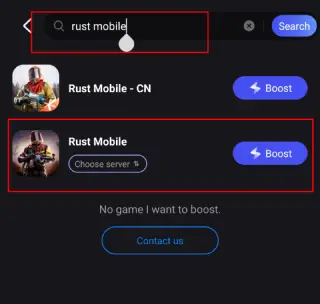
Step 2. Search for your game and select it.
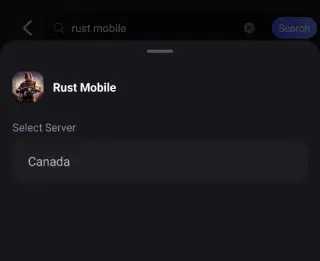
Step 3. Pick the server that suits you best.
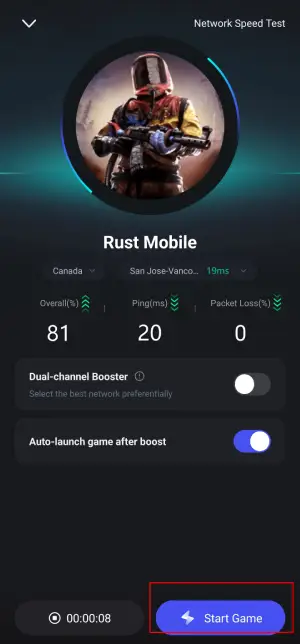
Step 4. Tap Boost, and LagoFast will display real-time ping and packet loss stats.
For Rust PC Users, check this tutorial to enjoy a better gaming experience:
Step 1: Click the Free Trial button to download and install LagoFast.
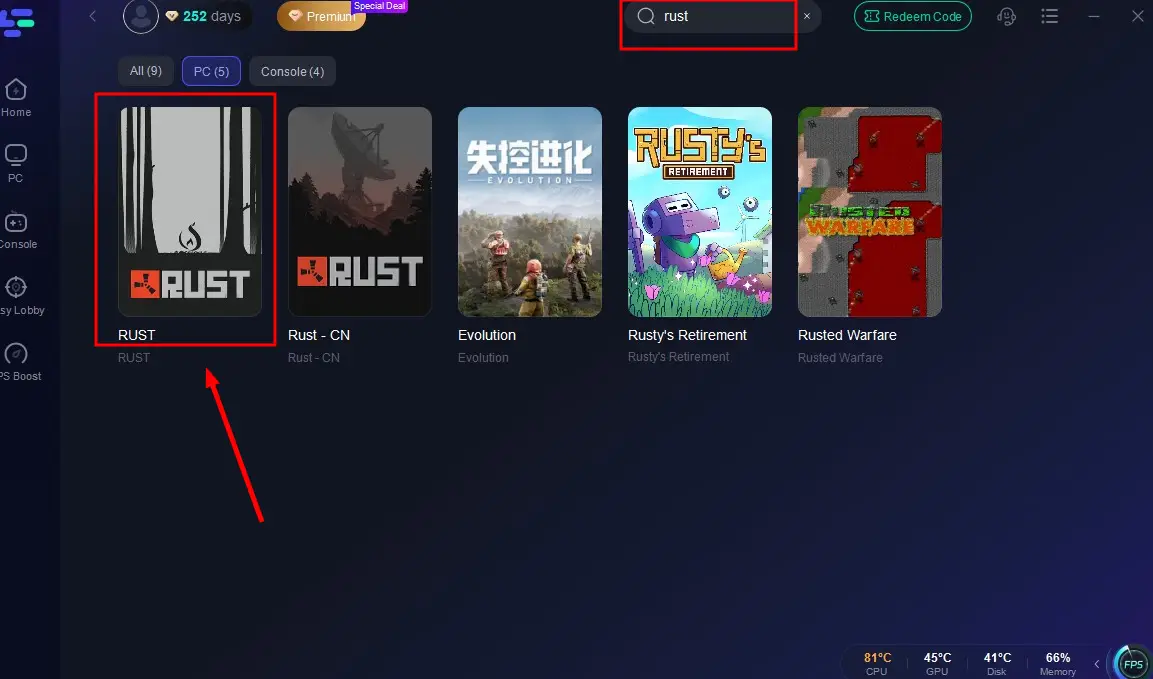
Step 2: Open LagoFast, then click the PC button on the left and search for Rust in the search bar, and click it after it appears.
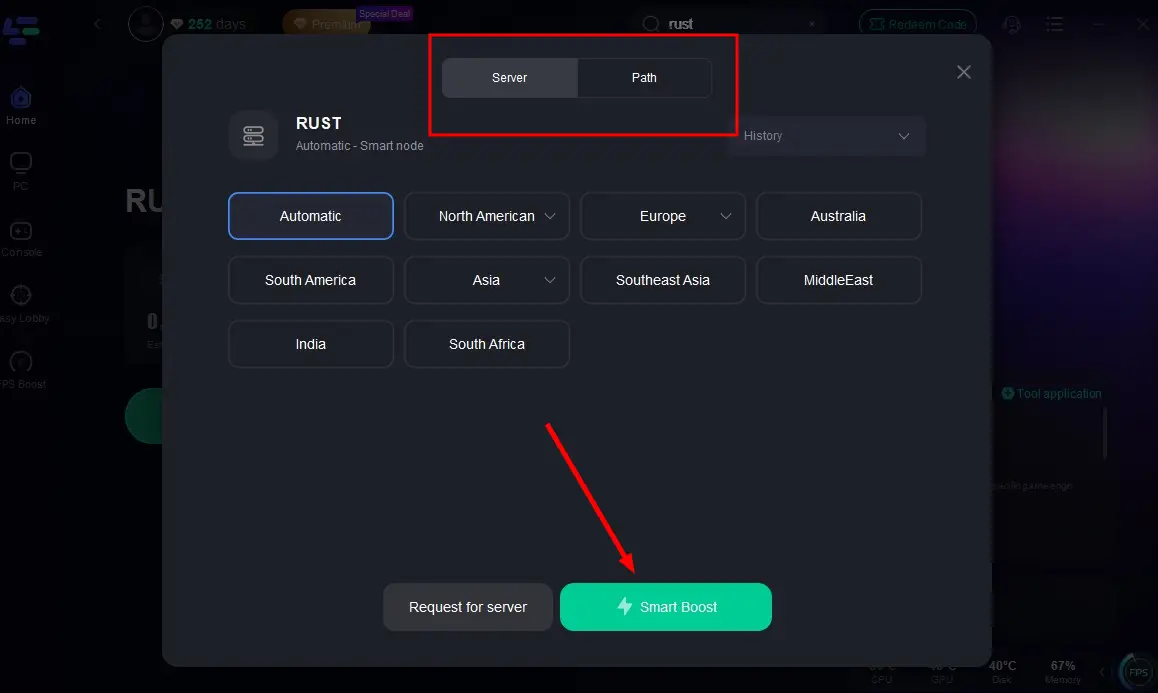
Step 3: Click on “Server” to change to a better server that maximizes the gaming experience, then click on “Smart Boost”.
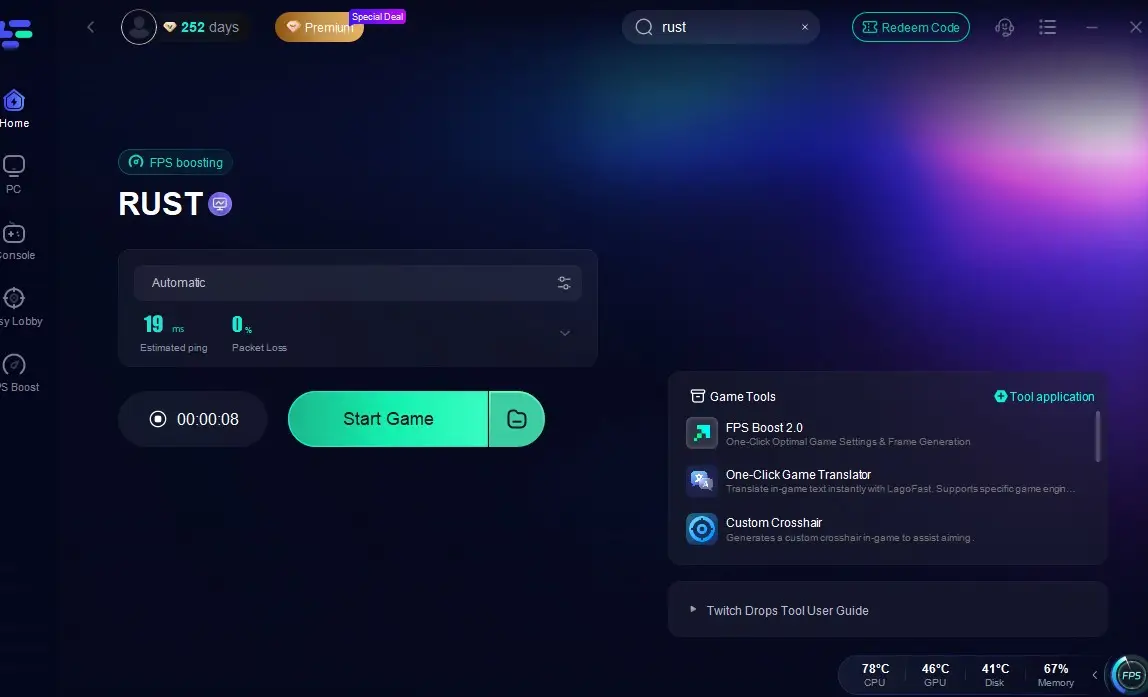
Step 4: Check the specific game ping, packet loss, and multiple path connections on the right side. Finally, click the “Start Game” to play Rust.
Conclusion
Rust in 2025 remains a demanding game, but by fine-tuning your graphics settings, applying smart launch tweaks, and using tools like LagoFast for cross-device optimization, you can significantly improve FPS, reduce lag, and speed up load times across all hardware levels. Whether you play on a high-end 4K rig, a midrange setup, or a modest PC, these adjustments help maintain smooth gameplay and better PvP performance without sacrificing too much visual quality. With ongoing improvements from dual-platform testing and new optimization techniques, you’re well-equipped to survive and compete effectively in Rust’s challenging world.

Boost Your Game with LagoFast for Epic Speed
Play harder, faster. LagoFast game booster eliminates stutter and lags on PC, mobile, or Mac—win every match!
Quickly Reduce Game Lag and Ping!
Boost FPS for Smoother Gameplay!