
Hey fellow ball chasers!
Ever been in the middle of an epic Rocket League session, about to snag that MVP title, when suddenly… freeze! You're staring at your desktop wallpaper instead of making that game winning aerial. Absolute tilt, right? Keyboard-smashing rage incoming?
You're definitely not the first player driven nuts by Rocket League crashing, and sadly, you won't be the last.
The issue of Rocket League constantly crashing feels almost mystical ‒ sometimes it strikes out of nowhere, other times it dies on startup.
So, why does Rocket League keep crashing? The reasons are all over the place: your PC might be acting up, the game itself could be glitching, or it could be those pesky internet gremlins.
Fear not! This guide will walk you through step-by-step solutions to hunt down and squash this bug!
Part 1: Common Causes of Rocket League Crashing
Part 2: Real Crash Situations f Rocket League from Players
Part 3. Various Solutions to Fix Rocket League Crashing and Freezing
Part 1: Common Causes of Rocket League Crashing
Graphics Driver Problems
A very common reason for crashes is graphics drivers. If your driver is outdated or has issues with Rocket League, the game might crash mid-match or at launch. Updating the driver—or rolling back to an older version—has helped many users.
Background Apps and Overlays
Apps like Discord, Xbox Game Bar, or mods like BakkesMod can cause crashes. These tools might interfere with Rocket League or conflict with how it runs.
Corrupt Game Files or Cache
If your game files are damaged or outdated, the game might crash. Clearing the cache or verifying the game files on Steam or Epic Games is a simple fix that often works.
Windows or System Issues
Some crashes come from your system, not the game. Old Windows versions or broken system files can make Rocket League unstable. Updating Windows or running system repair tools can help.
DirectX and Graphics Settings
Forcing Rocket League to use DirectX 11 and lowering graphics settings has stopped crashes for some players. High settings or using the wrong DirectX version may cause issues.
Audio Device Conflicts
Some crashes are caused by the wrong sound output. Players have fixed crashes by switching to the correct headphones or speaker in their Windows audio settings.
Hardware Problems
If your whole PC freezes or restarts, it might be hardware-related. Overheating, power issues, or bad RAM can cause Rocket League—and other games—to crash.
Part 2: Real Crash Situations f Rocket League from Players
Crashes on Launch
Some players say the game crashes right when it starts. Deleting the Rocket League cache, verifying files, or reinstalling the game often fixes this.
Crashing Mid-Game
Many users report crashes during a match. Rolling back graphics drivers or lowering video settings helped them play without issues.
Freezing After a Goal or Match End
Several players said the game crashes after scoring a goal or during the replay. Reinstalling the game or clearing settings usually solves it.
Crash After Updates
Sometimes, a new Rocket League update causes crashes. Waiting for a patch or running the game in compatibility mode can be a short-term fix.
Full System Crash
If Rocket League crashes your whole PC, it might be overheating or hardware-related. In this case, check your temps, memory, and power supply.
Overlay and Mod Conflicts
Turning off overlays (like Discord or GeForce Experience) or mods has fixed crashing problems for many users.
Audio Fixes
A few players fixed crashes just by changing their default sound device. Rocket League may not work well with certain virtual or unplugged devices.
Part 3. Various Solutions to Fix Rocket League Crashing and Freezing
The Primary Solution ‒ LagoFast Game Booster
Sometimes the crash isn't your PC's fault at all ‒ it's simple network issues, especially with rocket league crashing when joining game. This often means packet loss right when you're connecting.
This is where LagoFast shines.It significantly reduces ping latency, minimizes packet loss, and stabilizes FPS ‒ basically everything an online competitive gamer craves. It routes your connection through global dedicated lines, bypassing congested public networks for a direct path to the game servers. The result? Your ping plunges, packet loss hits zero, and thanks to the stable connection, even your FPS gets smoother.
Moreover, LagoFast supports multiplatform: PC, Mobile and Console. It delivers a buttery-smooth experience across devices.
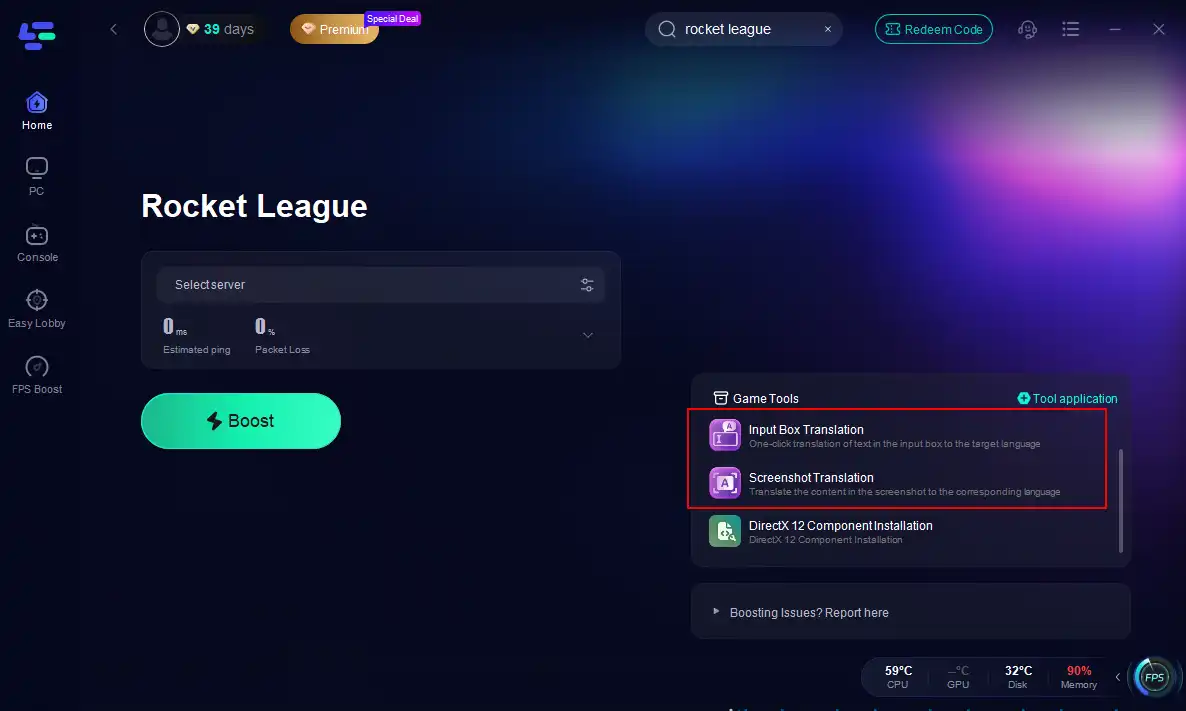
Another LagoFast’s feature which is worth mentioning: localized translations for select games. Want to play on foreign servers but get headaches from the language barrier? LagoFast has you covered, truly helping global players enjoy cross-region gaming. Calling LagoFast the ultimate global gaming companion isn't hype. If network issues are causing your crashes or lag, trust me, give it a shot ‒ the results will pleasantly surprise you.
How to use LagoFast to Fix Rocket League Crashing on PC:
Step 1: Download LagoFast
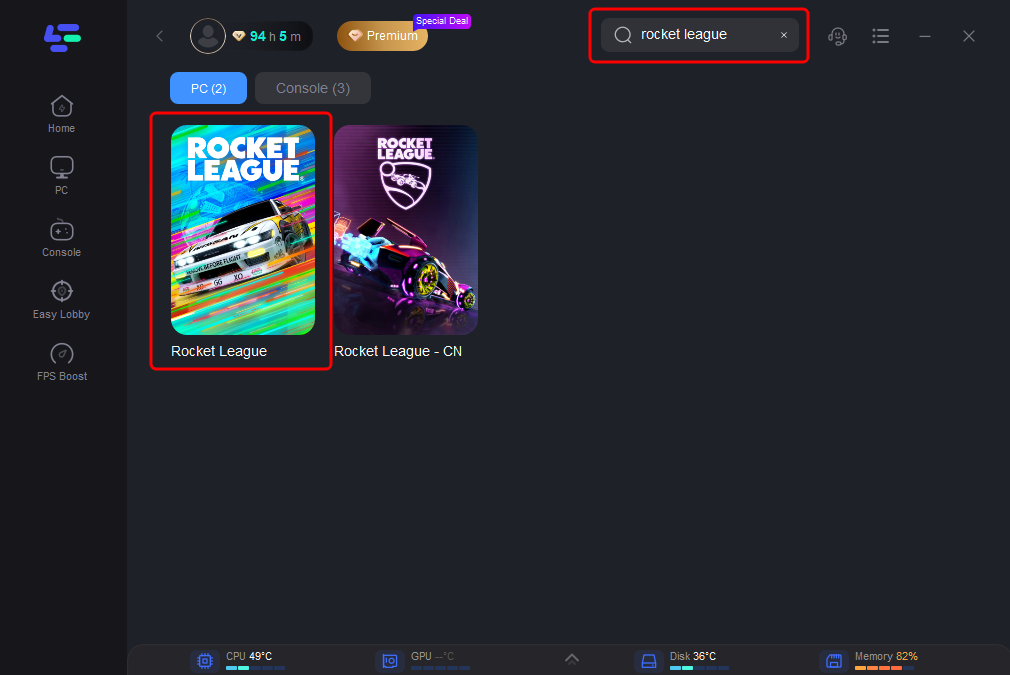
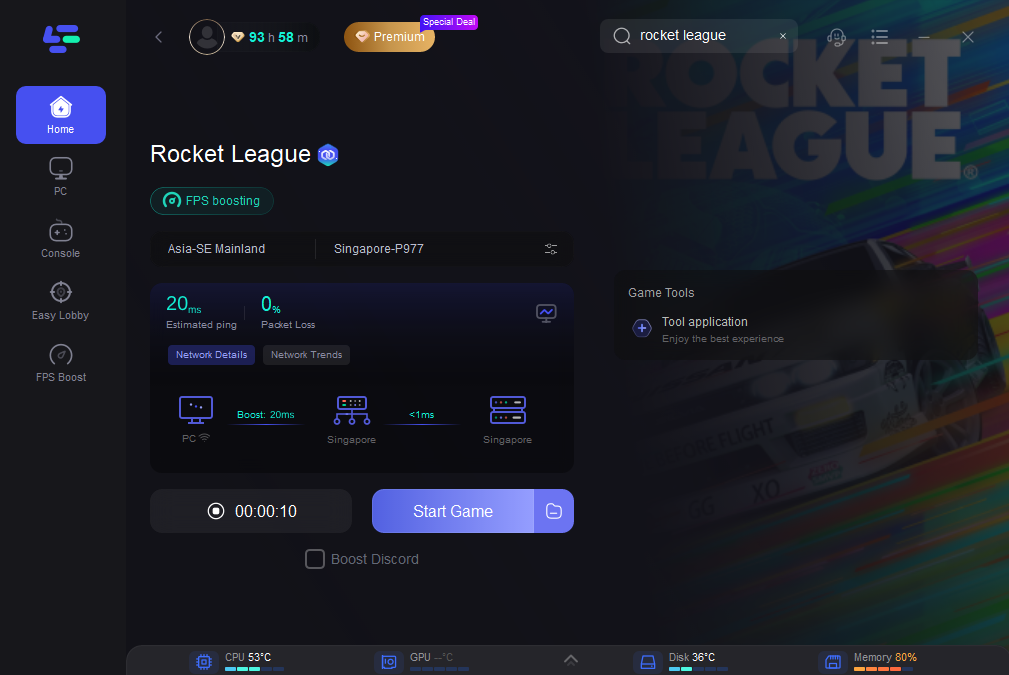
Step 2: Launch the application, type Rocket League in the search bar and select the game
Step 3: Select the recommended server (or any other if you wish)
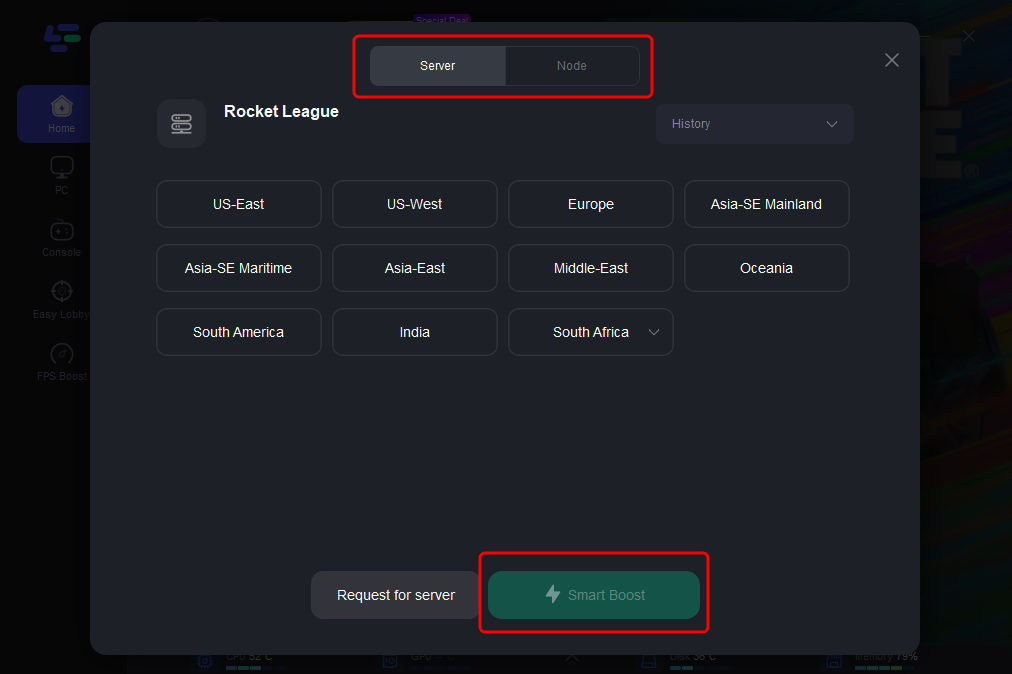
Step 4: Click the Smart Boost button to start optimization. You will see up-to-date metrics - ping, packet loss, etc.
How to Use LagoFast to Get In-Game Translation of Rocket League:
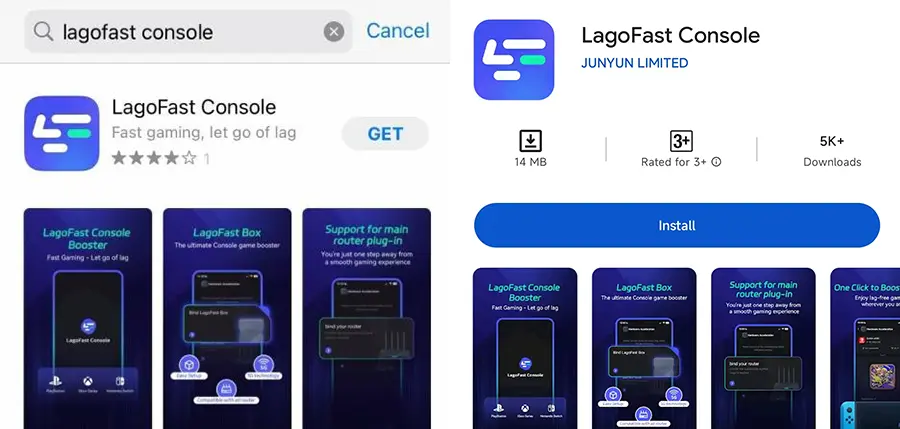
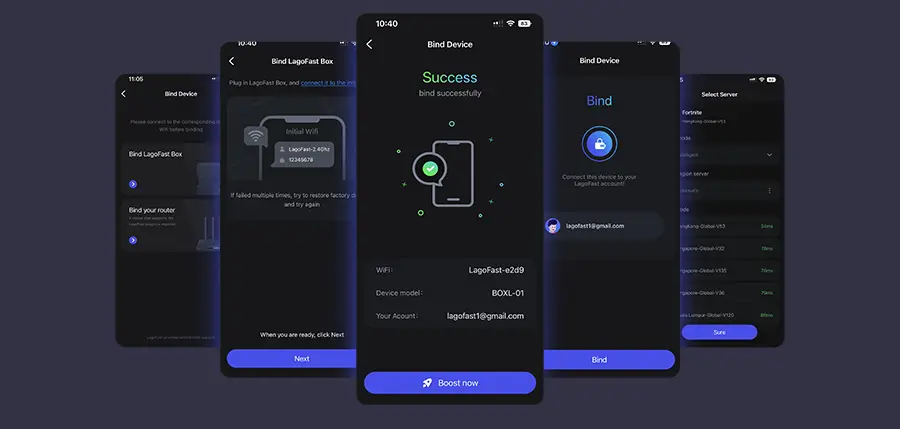
Tutorial on using LagoFast Box to enhance connection and enhance your console gaming experience:
Step 1: Download the LagoFast Console App on your phone to control the LagoFast Box.
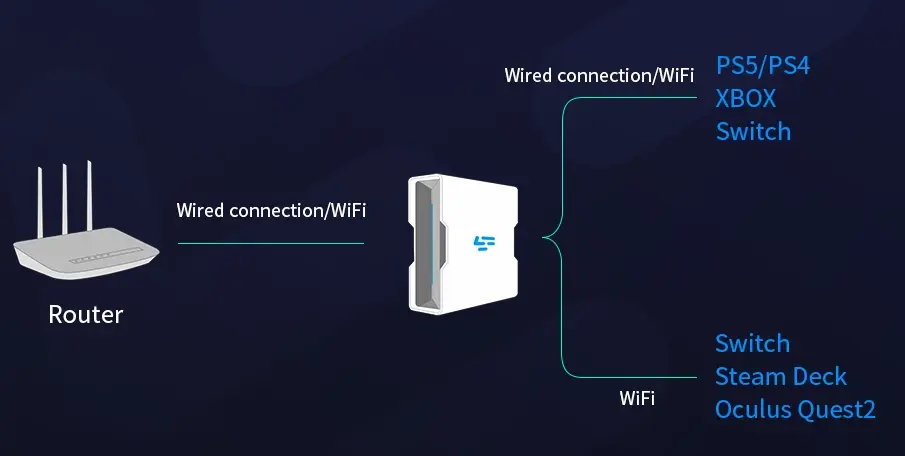
Step 2: Establish a connection between your LagoFast Box, router, and console, choosing between a wired or wireless connection.
Step 3: Launch the LagoFast Console App and boost Valorant. Once you have completed the binding process with the LagoFast Box, proceed to boost this game within the LagoFast Console App.
Fix 2: Verify Game Files
This fixes like 70% of rocket league crashing on startup issues. Updates can sometimes leave
files corrupted or missing; verifying usually sorts it quick and painless.
Steam Players:
- Right-click Rocket League in your Library -> "Properties".
- Go to the "Installed Files" tab -> Click "Verify integrity of game files".
- Let Steam do its thing. Restart the game afterwards.
Epic Games Players:
- Open Epic Launcher -> Go to "Library".
- Find Rocket League -> Click the "..." button.
- Select "Manage" -> Click "Verify".
Fire up the game and see if it runs smoother!
Fix 3: Update Your Graphics Drivers
This is the tech equivalent of "turn it off and on again" ‒ surprisingly effective! Outdated drivers are a top culprit for game crashes, as they often don't play nice with the latest game patches.
- NVIDIA Users: Open GeForce Experience -> Check for Driver Updates.
- AMD Users: Open AMD Software (Adrenalin) -> Check for Updates.
Key Reminder: Reboot your PC after updating! Otherwise, it won't take effect.
Fix 3: Reinstall the Game
If you've tried everything above and Rocket League still crashes randomly... it's time for the final solution: uninstall and reinstall.
It's a hassle ‒ downloading takes ages, settings need redoing ‒ but it's the only way to guarantee all game files are restored to a pristine, default state. Sometimes you gotta bite the bullet to get back to happy car-balling!
In Summary
These are my hard-earned fixes for defeating Rocket League crashing, polished over countless matches. From file checks to network optimization, there's a solution here for you. Patience is key ‒ work your way through the fixes. If crashes only happen during online matches, definitely focus on your network first. Installing a dedicated tool like LagoFast not only tackles crashes, but drastically boosts your overall experience, banishing lag and high ping for good. Here's to crash-free sessions, dominating the pitch, and hitting those absolutely filthy shots! See you on the field!

Boost Your Game with LagoFast for Epic Speed
Play harder, faster. LagoFast game booster eliminates stutter and lags on PC, mobile, or Mac—win every match!
Quickly Reduce Game Lag and Ping!
Boost FPS for Smoother Gameplay!