
RF ONLINE NEXT is finally available, but not everyone has been able to get into the game smoothly. Some players encounter download failed errors, stuck downloads, Netmarble Launcher issues, installation problems, or slow download speeds before they can even start playing. These issues can occur during pre-download, installation, or the initial setup process on both PC and mobile devices. In this guide, we'll explain the most common causes of RF ONLINE NEXT download problems and walk you through the solutions step by step.

- ✅ Reduce Lag and High Ping.
✅ Boost FPS at the Same Time.
✅ Support 2000+ Popular Online Games.
✅ Change Server without Latency.
✅ Boost Game Loading Speed.
Part 1: Why RF ONLINE NEXT Download Is Not Working
Part 2: Check Whether Pre-Download or Launch Is Available in Your Region
Part 3: How to Fix RF ONLINE NEXT Download Not Working on PC
Part 4: How to Fix RF ONLINE NEXT Download Not Working on Mobile
Part 5: What to Do If RF ONLINE NEXT Download Is Still Stuck
Part 1: Why RF ONLINE NEXT Download Is Not Working
If RF ONLINE NEXT won't download, the issue could be related to the game servers, launcher, network connection, storage space, or regional availability. The most common causes include:
- Server congestion – Heavy traffic during pre-download, launch, or major updates can cause downloads to fail or get stuck.
- Netmarble Launcher issues – Outdated launcher files or corrupted cache can prevent the download from starting properly.
- Pre-download not available yet – The feature may not be active in your region or has not started yet.
- Insufficient storage space – Not enough free space can stop installation or updates.
- Unstable network connection – Weak or unstable internet can lead to failed or stalled downloads.
- Firewall or antivirus restrictions – Security software may block launcher access or file downloads.
- Corrupted installation files – Interrupted downloads can break installation or verification.
- Regional or platform restrictions – The game may not be available in your region or on your platform yet.
Before trying the fixes below, quickly check which situation matches your issue.
Part 2: Check Whether Pre-Download or Launch Is Available in Your Region
make sure the game is actually available in your region and at the correct time. A lot of “download not working” issues simply happen because the pre-download or official launch hasn’t gone live yet.
In many cases, players try to download RF ONLINE NEXT too early, and the game client or store page won’t respond as expected. This doesn’t mean something is broken—it usually just means the release window hasn’t opened.
There are two common situations:
- Pre-download hasn’t started yet – If you’re trying to download the game before the official window, it may not appear or work.
- The game isn’t available in your region yet – Some regions may still be waiting for rollout on PC or mobile stores.
If you’re unsure, check official Netmarble announcements or your store page. If the game isn’t live yet, you simply need to wait for the official release.
Part 3: How to Fix RF ONLINE NEXT Download Not Working on PC
If you're downloading through the Netmarble Launcher or PC client, try the following fixes.
Restart the Netmarble Launcher
Launcher processes sometimes get stuck during installation.
Steps:
- Completely close the launcher.
- Open Task Manager.
- End all Netmarble-related processes.
- Relaunch as Administrator.
This often fixes launcher download failures.
Check Available Storage Space
Modern MMORPGs require significantly more installation space than the final game size.
Make sure you have:
- At least 30-50GB of free space
- Additional temporary installation space
- Enough room on the system drive
Storage shortages frequently cause installation stalls.
Disable Firewall or Antivirus Temporarily
Security software may block:
- Launcher updates
- Download files
- Installation packages
Temporarily disable protection and test the download again.
Change Download Location
If you're installing to a secondary drive:
- Choose a different folder.
- Avoid folders with permission restrictions.
- Install an SSD when possible.
Fix Slow RF ONLINE NEXT Downloads
Slow downloads are often caused by poor routing between your ISP and the game servers.
You can:
- Switch to a wired connection
- Restart your router
- Pause other downloads
- Use a gaming network optimization tool
Use LagoFast to Improve Download Stability
If RF ONLINE NEXT download speeds fluctuate or repeatedly fail, LagoFast can help optimize the connection route between your PC and the game servers.
Benefits include:
- More stable download connections
- Reduced packet loss
- Better server routing
- Fewer launcher disconnects
- Improved game connection after installation
For players experiencing persistent slow download issues, network optimization may be more effective than repeatedly restarting the launcher.
How to Boost RF Online Next with LagoFast
Step 1: Click the Free Trial button to download and install LagoFast.
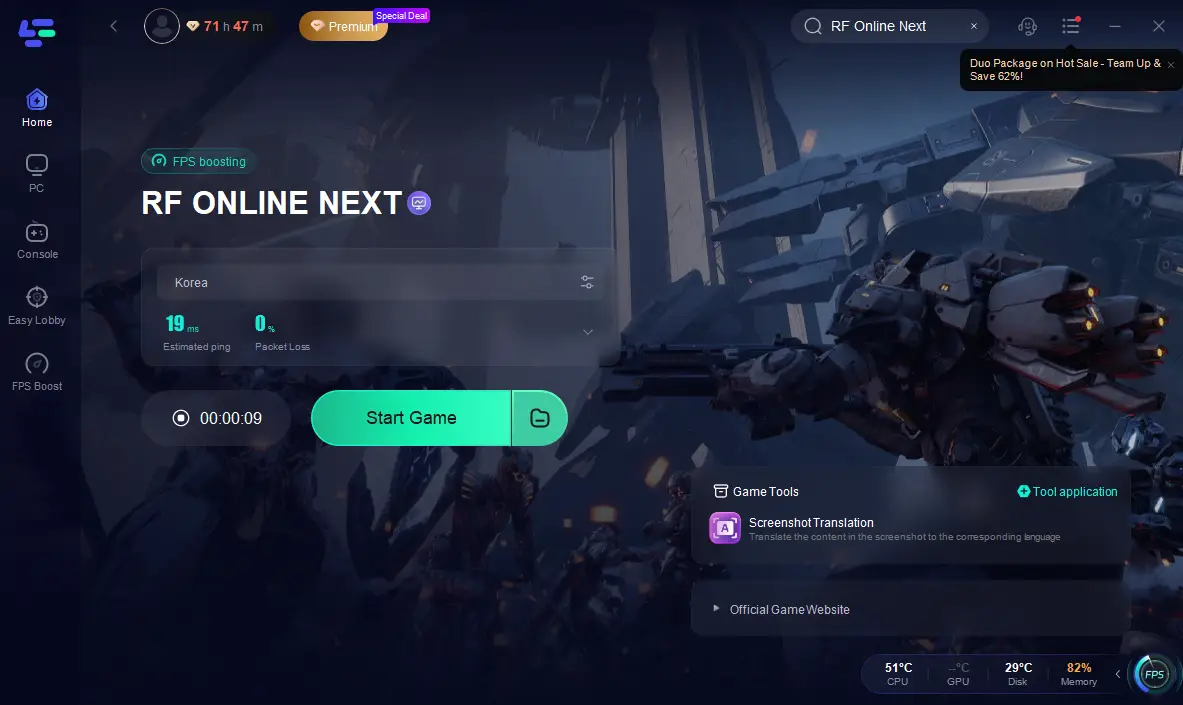
Step 2: After installation, search "RF Online Next " in the search bar and select the game.
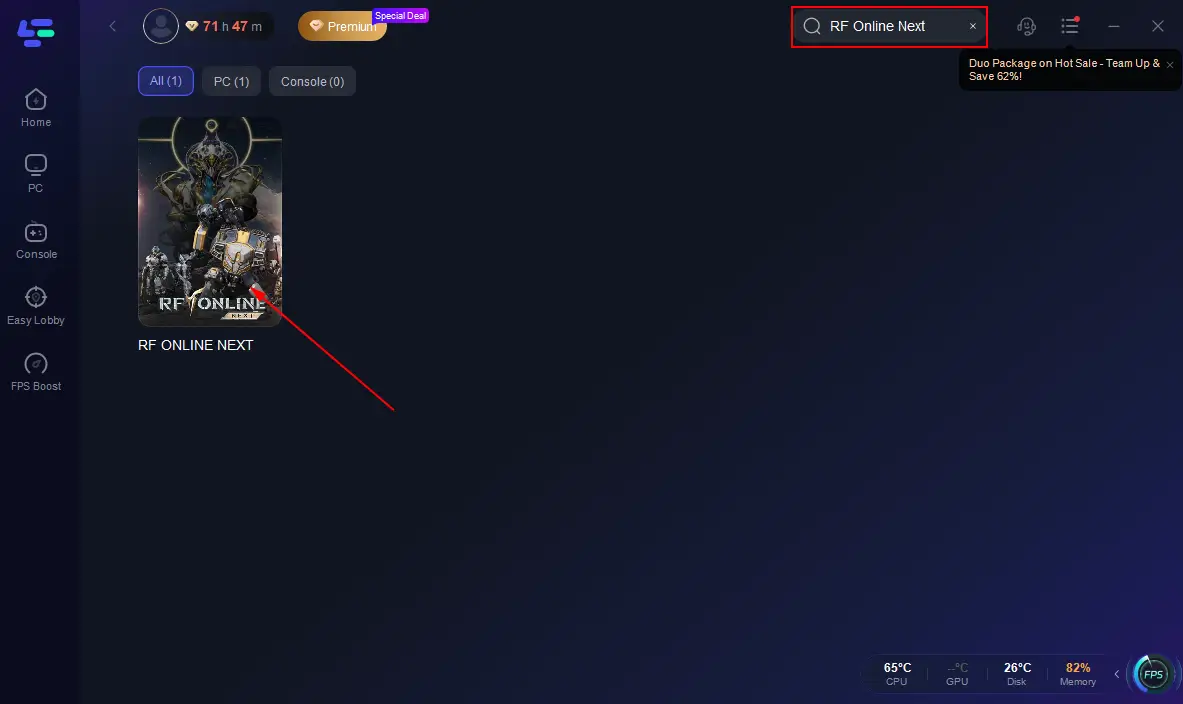
Step 3: Choose your preferred server node and click "Smart Boost" to start optimizing.
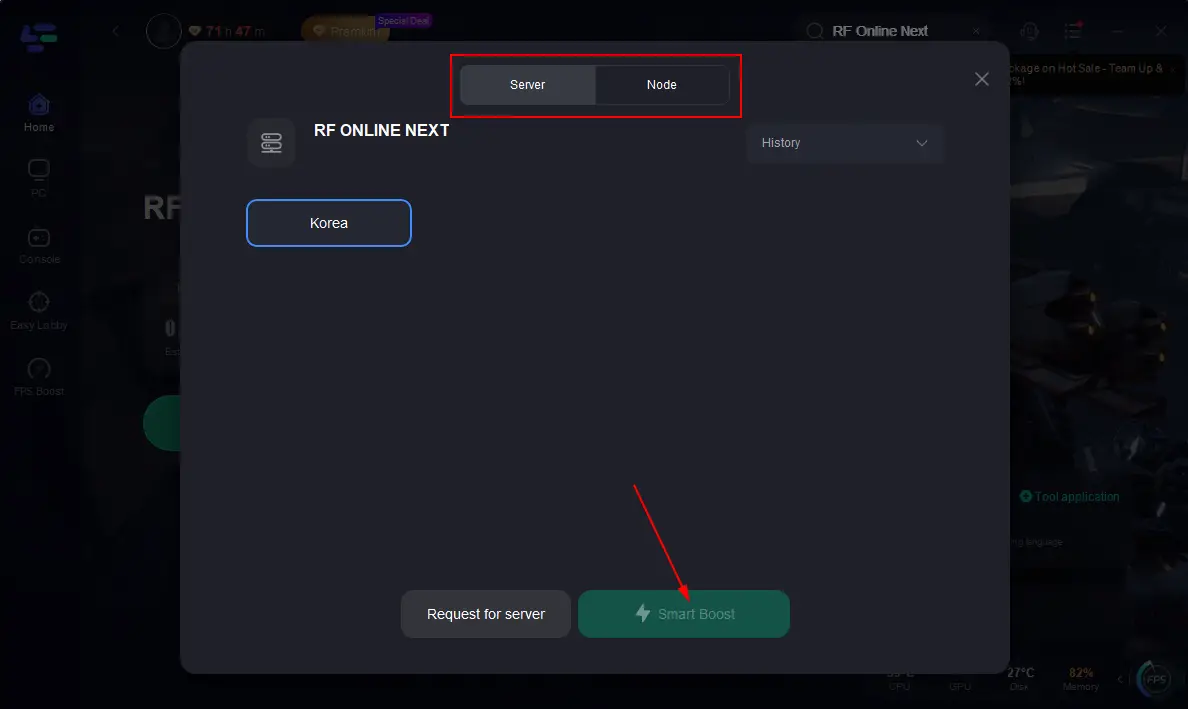
Step 4: Launch your game and enjoy smooth, optimized gameplay with lower ping and packet loss.
Part 4: How to Fix RF ONLINE NEXT Download Not Working on Mobile
Mobile players can encounter different problems from PC users.
Check Device Compatibility
If the game doesn't appear in the store:
- Verify your Android or iOS version
- Update your operating system
- Check device requirements
Unsupported devices may not see the download option.
Clear App Store Cache
For Android:
- Open Settings.
- Apps.
- Google Play Store.
- Clear Cache.
Then restart the store.
Switch Between Wi-Fi and Mobile Data
Sometimes a network restriction prevents downloads.
Try:
- Different Wi-Fi networks
- Mobile data
- Public networks (if safe)
Verify Available Storage
Many mobile installation failures are simply storage-related.
Before downloading:
- Remove unused apps
- Delete large videos
- Clear temporary files
Aim for at least double the game's expected size in available storage.
Re-Login to Your App Store Account
Store authentication problems can occasionally block downloads.
Try:
- Signing out
- Restarting your device
- Signing back in
Part 5: What to Do If RF ONLINE NEXT Download Is Still Stuck
If RF ONLINE NEXT is still stuck after basic fixes, focus on these final checks:
- Check for server overload or maintenance – Downloads may freeze when servers are under heavy traffic or temporarily down.
- Confirm regional availability – If the game isn’t fully live in your area, the download may not proceed at all.
- Avoid peak hours – Launch periods often cause congestion, leading to stalled or extremely slow downloads.
- Switch to a different network – Try another Wi-Fi or mobile hotspot to rule out routing issues.
- Wait for official updates – If multiple players are affected, the issue is usually server-side and needs a fix from Netmarble.
If everything looks normal on your side but the download still doesn’t move, the problem is likely not local. In most cases, waiting for server stabilization or official maintenance updates is the only real solution.
Part 6: FAQ
Why is RF ONLINE NEXT download stuck at 0%?
This usually happens when the download cannot properly connect to the game servers at the start, often due to high traffic during peak hours or temporary server instability.
Why did RF ONLINE NEXT download fail?
Download failures are often caused by interrupted server communication or a broken download session that cannot continue normally.
Why is RF ONLINE NEXT pre-download not working?
In most cases, the pre-download has not fully opened yet in your region, or access is being rolled out gradually by Netmarble.
How much storage does RF ONLINE NEXT need?
Storage requirements can vary depending on updates and platform, but extra free space is always needed for temporary installation files and updates.
Why is RF ONLINE NEXT downloading so slowly?
Slow download speeds are usually linked to server congestion or unstable routing between your network and the game servers, especially during launch periods.
Final Thoughts
RF ONLINE NEXT download issues usually come from a mix of server load, timing, network stability, and storage limits. Most problems happen during launch or pre-download periods when servers are heavily congested. The key is to first identify whether the issue is on your side or server-side. In most cases, once traffic stabilizes or your setup is adjusted, the download will continue normally.

Boost Your Game with LagoFast for Epic Speed
Play harder, faster. LagoFast game booster eliminates stutter and lags on PC, mobile, or Mac—win every match!
Quickly Reduce Game Lag and Ping!
Boost FPS for Smoother Gameplay!