

R.E.P.O. is a cooperative horror game that challenges you and your squad to retrieve valuable items while evading terrifying monsters. Thanks to its realistic physics and proximity voice chat, coordination and teamwork are crucial. Below, we cover everything you need to know about R.E.P.O.'s player limits, mods for larger squads, resurrecting teammates, and common issues that might arise in multiplayer.

- ✅ Reduce Lag and High Ping.
- ✅ Boost FPS at the Same Time.
- ✅ Support 1000+ Popular Online Games.
- ✅ Support Easy Lobby in all Cod Games without Lag
1. R.E.P.O.: How Many Players Can Join?
2. What Is the Maximum Number of Players in R.E.P.O.?
3. R.E.P.O. Mod for Number of Players (MorePlayers)
4. How to Resurrect a Player in R.E.P.O.
5. How to Revive a Player in R.E.P.O.
6. R.E.P.O.: How to Play with Other Players
7. How to Increase the Number of Players in R.E.P.O.
9. How to Fix R.E.P.O. Can't Hear Players
10. Optimize Your Gameplay with LagoFast
1. R.E.P.O.: How Many Players Can Join?
R.E.P.O. supports a team size of up to six players in a single session. You can tackle missions solo or recruit friends to improve your chances of survival—especially useful for carrying heavy objects, dispatching monsters, and organizing strategies. Keep in mind that matchmaking is currently unavailable, so you must invite friends manually via Steam.
2. What Is the Maximum Number of Players in R.E.P.O.?
By default, R.E.P.O. caps the lobby at six players. This limit is set to balance gameplay and maintain stable connections. In upcoming patches, the developers may introduce new features or matchmaking options, but for now, the official max remains six.
3. R.E.P.O. Mod for Number of Players (MorePlayers)
Want to push beyond the default six-player cap? That's where the MorePlayers mod comes into play. This unofficial mod allows you to decrease or increase the maximum player limit in R.E.P.O.
How It Works
- Install the Mod: Place the MorePlayers mod files into your R.E.P.O. installation folder.
- Launch the Game: After installing, start R.E.P.O. to generate the necessary configuration file.
- Adjust "MaxPlayers": Navigate to BepInEx -> config -> zelofi.MorePlayers.cfg. Look for the "MaxPlayers" value and set it to your desired number.
- Use a Mod Manager (Optional): If you have a tool like Gale, you can modify the .cfg settings directly in the launcher.
Warnings and Tips
- Excessive Player Counts: Setting max players to extremely high numbers (e.g., 100) can cause severe performance or stability issues, as the game engine may not handle large groups well.
- Compatibility: MorePlayers is an unofficial mod. Use it at your own risk, and keep in mind it's not endorsed by the developers.
4. How to Resurrect a Player in R.E.P.O.
When a teammate is downed by monsters or environmental hazards, resurrection might be possible if game rules or certain items allow it. The exact steps vary depending on your build or mods in use:
- Start a game of R.E.P.O. and play until a teammate goes down.
- Search the map carefully until you spot their head lying on the ground.
- Pick up the head and carry it to the Extraction Zone.
- Gather enough salvage to meet the level's quota for extraction.
- Drop the final piece of salvage into the Extraction Zone to hit the target.
- Wait as the zone processes your loot and confirms your success.
- Once complete, your teammate will respawn instantly and be ready to jump back into action!
5. How to Revive a Player in R.E.P.O.
Reviving in R.E.P.O. is simple in concept but risky in execution. Here's exactly how to bring your teammates back to life:
1. Locate Your Teammate's Head
When a player dies, their body disappears, but their robotic head stays behind. Keep an eye out for it—it's essential for the revival process. Without the head, you won't be able to revive them.
2. Carry the Head to an Extraction Point
Once you've found the head, bring it to an Extraction Point. These points are specially marked on the map and are required to initiate the revival. However, you're not done yet.
3. Fulfill the Valuables Quota
Every Extraction Point has a required quota of Valuables (the in-game currency). Collect and deposit enough Valuables at the Extraction Point to start the revival process.
4. Wait for Extraction to Complete
After meeting the quota, the shutter will close, signaling the revival is in progress. Once it opens again, your teammate will be successfully revived.
5. Protect the Revived Player
Teammates return with only 1 HP, making them extremely vulnerable to even minor damage. To keep them safe:
- Share your health if possible.
- Guide them to the truck for a free 25 HP heal.
What Happens If You Skip the Revival?
Sometimes, it's safer to continue without reviving a teammate. If you leave them behind:
- They will automatically revive at the shop after the mission but start with only 1 HP.
- If you bring their head back to the truck, they'll revive instantly with 25 HP, saving healing costs.
Weigh the risks carefully—sometimes, it's better to extract and survive rather than endanger the whole team.
6. R.E.P.O.: How to Play with Other Players
- Launch R.E.P.O. and select the Host Game option.
- Next, click Yes on the notification about the need for a good internet connection.
- Then, create a game to join the lobby.
- Finally, click the Invite button to invite your friends.
7. How to Increase the Number of Players in R.E.P.O.
If six isn't enough for your group:
- Install the MorePlayers Mod: As outlined in Section 3, you can adjust the player cap beyond the standard six.
- Test Incrementally: Bump the limit by a few slots at a time to avoid severe server strain or crashes.
- Check Compatibility: Some game updates might break mod functionality, so always back up your files.
8. Player R.E.P.O. Crashes
If a teammate experiences repeated crashes:
- Verify Game Files: On Steam, right-click R.E.P.O., select "Properties," then "Local Files," and click "Verify Integrity."
- Update Drivers: Make sure your graphics and network drivers are current.
- Disable Overlays: Turn off in-game overlays like Steam or Discord overlays, which can conflict with R.E.P.O.
- Check Mod Conflicts: If using MorePlayers or other mods, confirm that all participants have the same mod versions installed.
9. How to Fix R.E.P.O. Can't Hear Players
Proximity voice chat is a standout feature of R.E.P.O., so losing audio can diminish the experience:
- Check In-Game Audio Settings: Ensure voice chat is enabled and the volume is turned up.
- Adjust System Settings: Verify your microphone and output devices in Windows or your OS's sound settings.
- Use a Stable Network: Voice chat requires a steady connection; if you're lagging or seeing packet loss, consider switching to a wired or more reliable Wi-Fi setup.
- Disable Extra VoIP Software: Other voice chat apps might conflict with R.E.P.O.'s in-game communication.
10. Optimize Your Gameplay with LagoFast
If you want to get a richer gaming experience, you can use mods—and with LagoFast, you can enjoy many mod-supported games while also stabilizing your network and boosting performance. Just follow these quick steps to get started.
How to Use LagoFast on PC
Download LagoFast by clicking the Free Trial button.
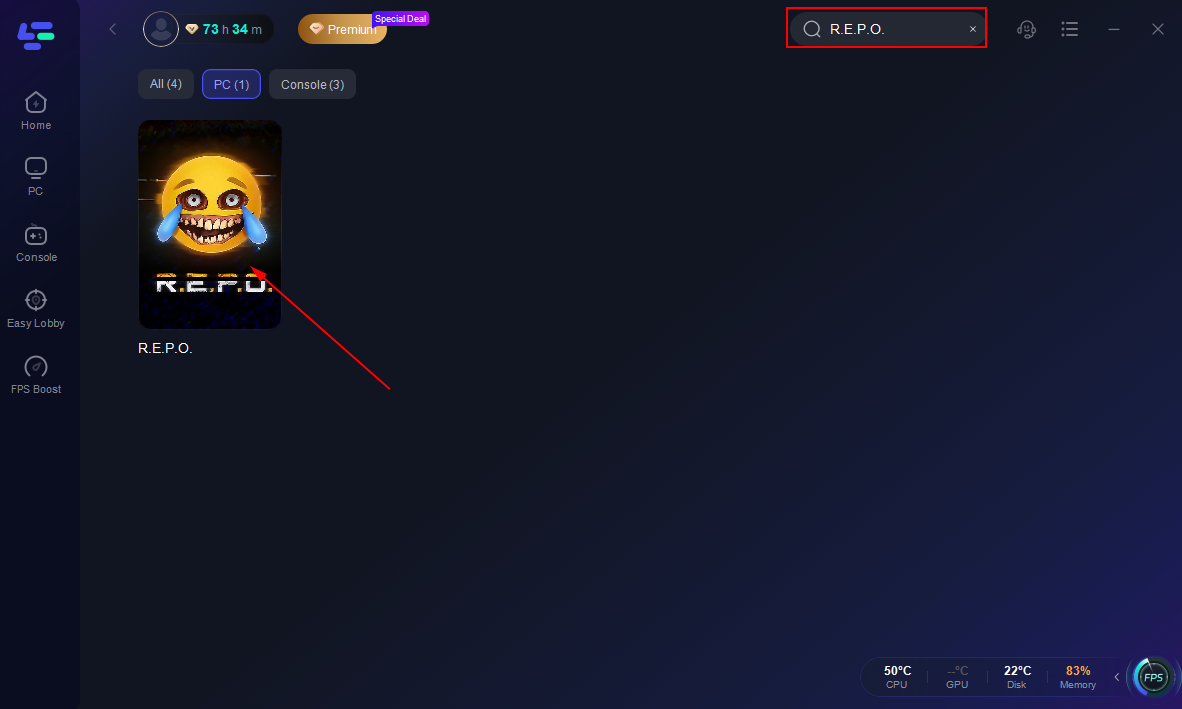
Search for your game inside the LagoFast app before launching it.
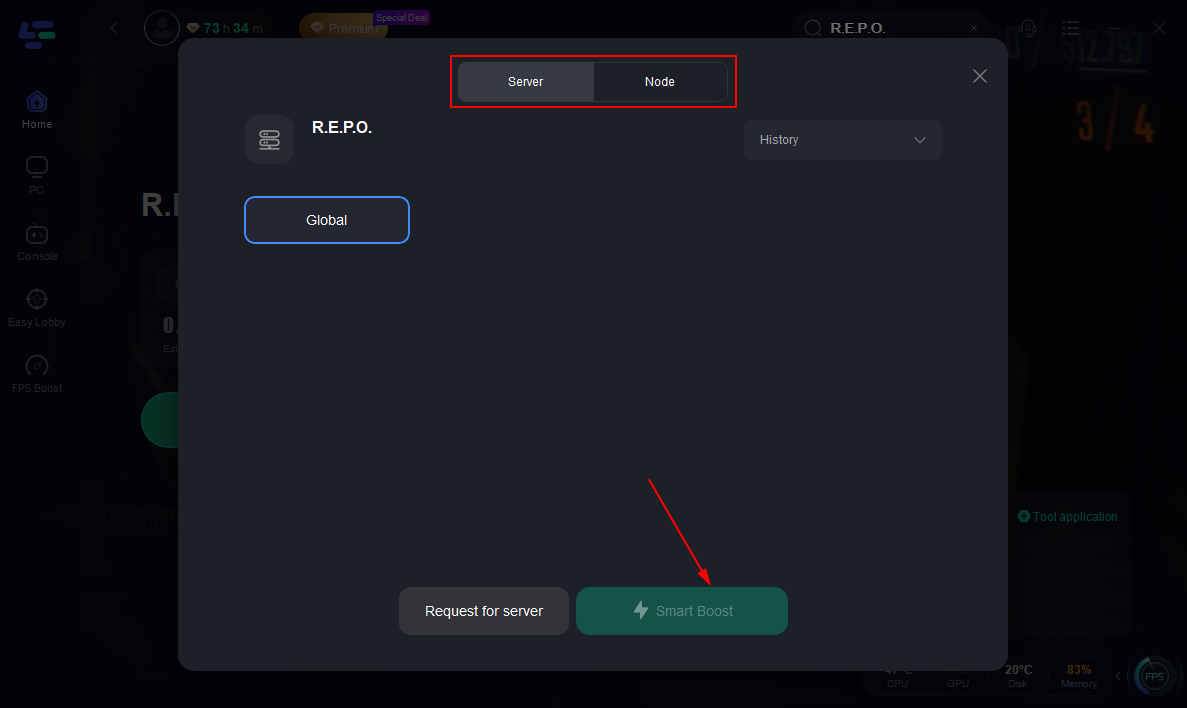
Pick the best server and node to ensure a stable, low-ping connection.
Activate Smart Boost to monitor real-time ping, packet loss, and network status.
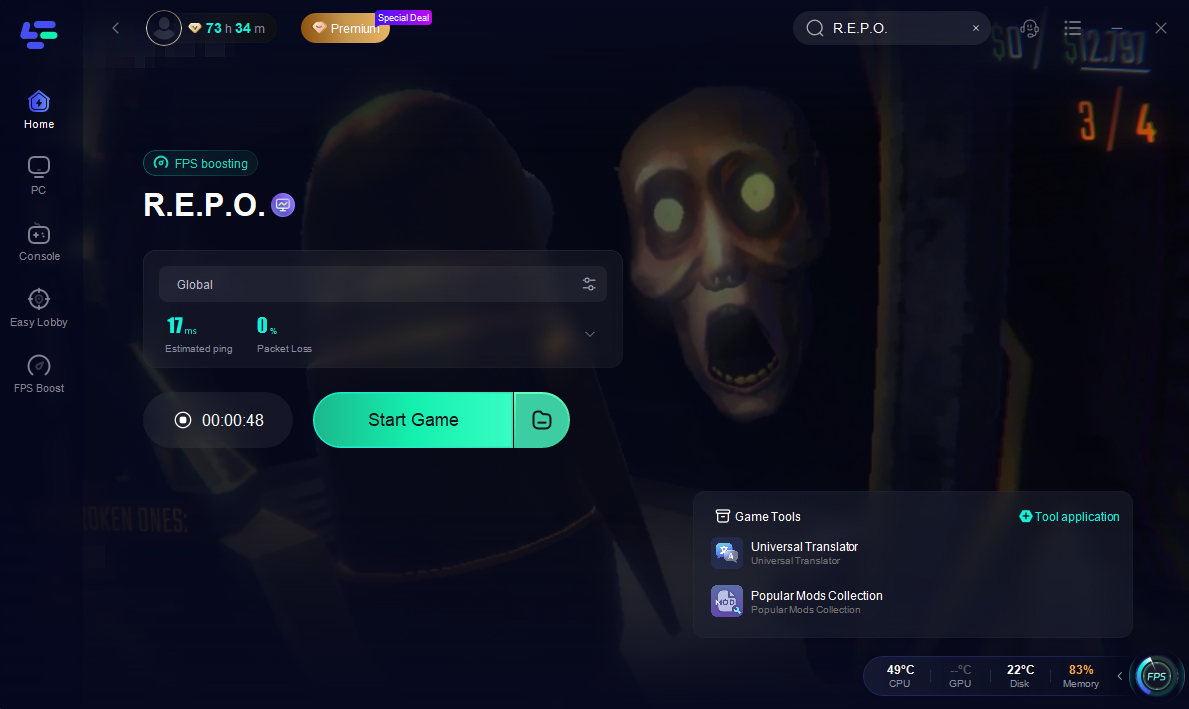
With LagoFast running, you'll enjoy faster response times and fewer interruptions. Let LagoFast handle the network optimization so you can focus fully on your gameplay!
How to Get Better Gaming on Mobile with LagoFast
Download LagoFast from the App Store or Google Play

Search for your game and tap the result.
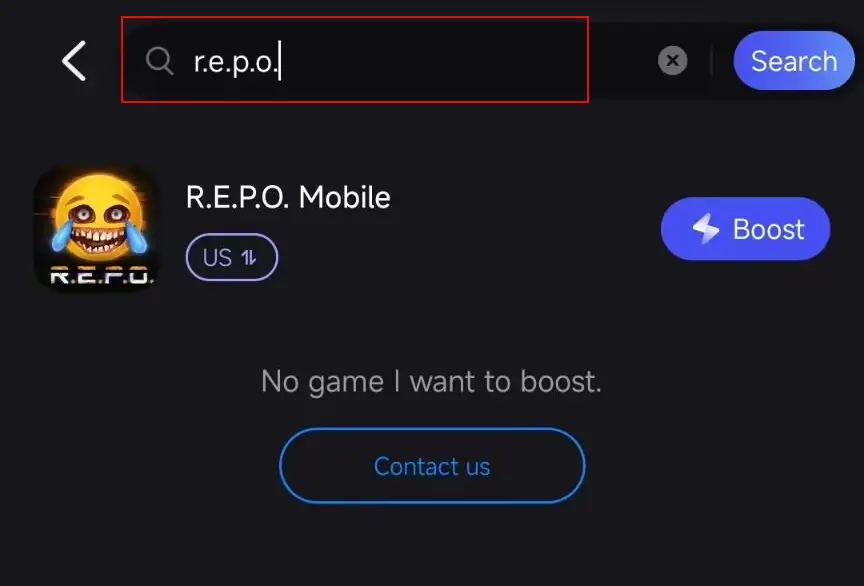
Select your preferred server based on region or performance, and then click "Boost" to start optimizing.
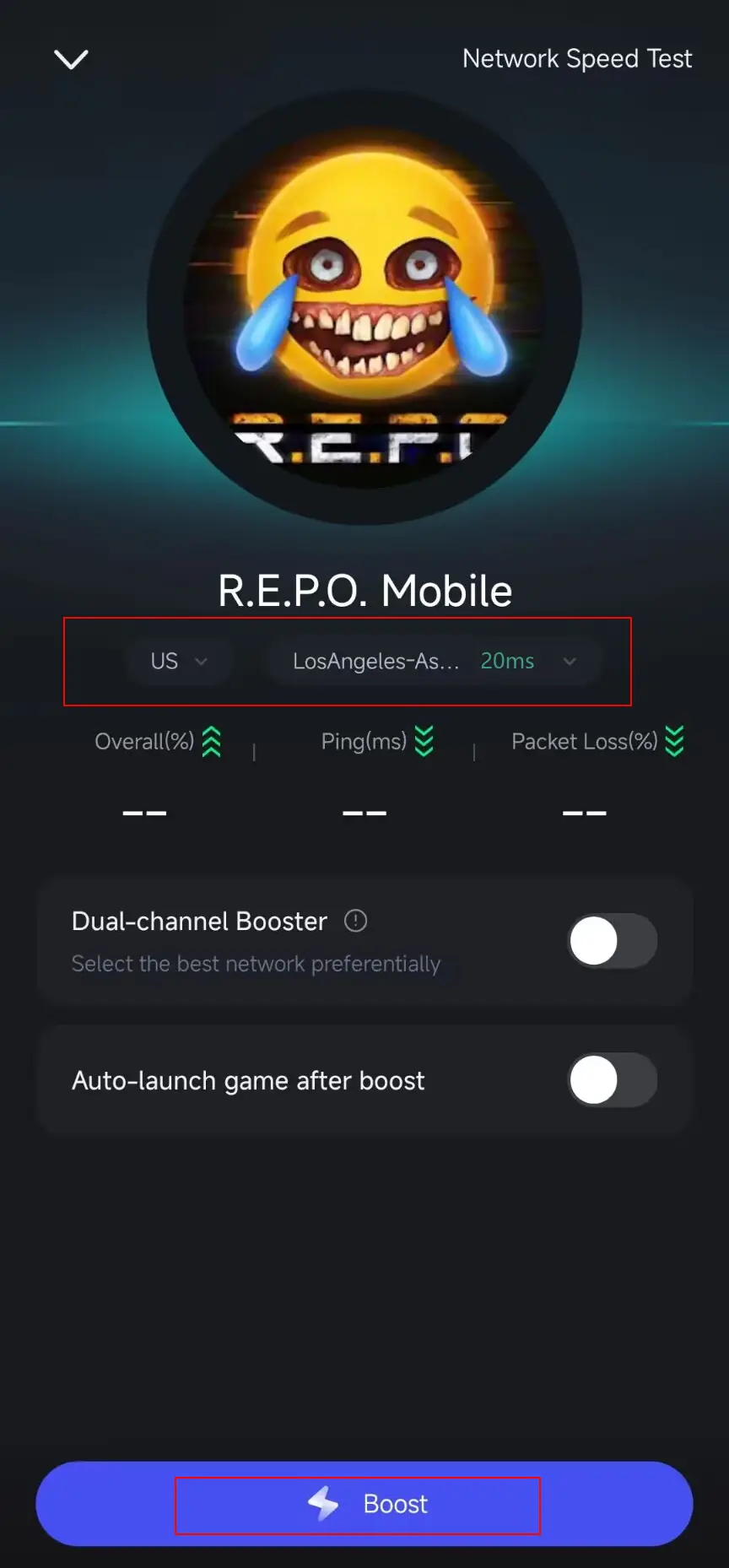
Check the real-time ping and packet loss stats before tap the "Start Game" button.
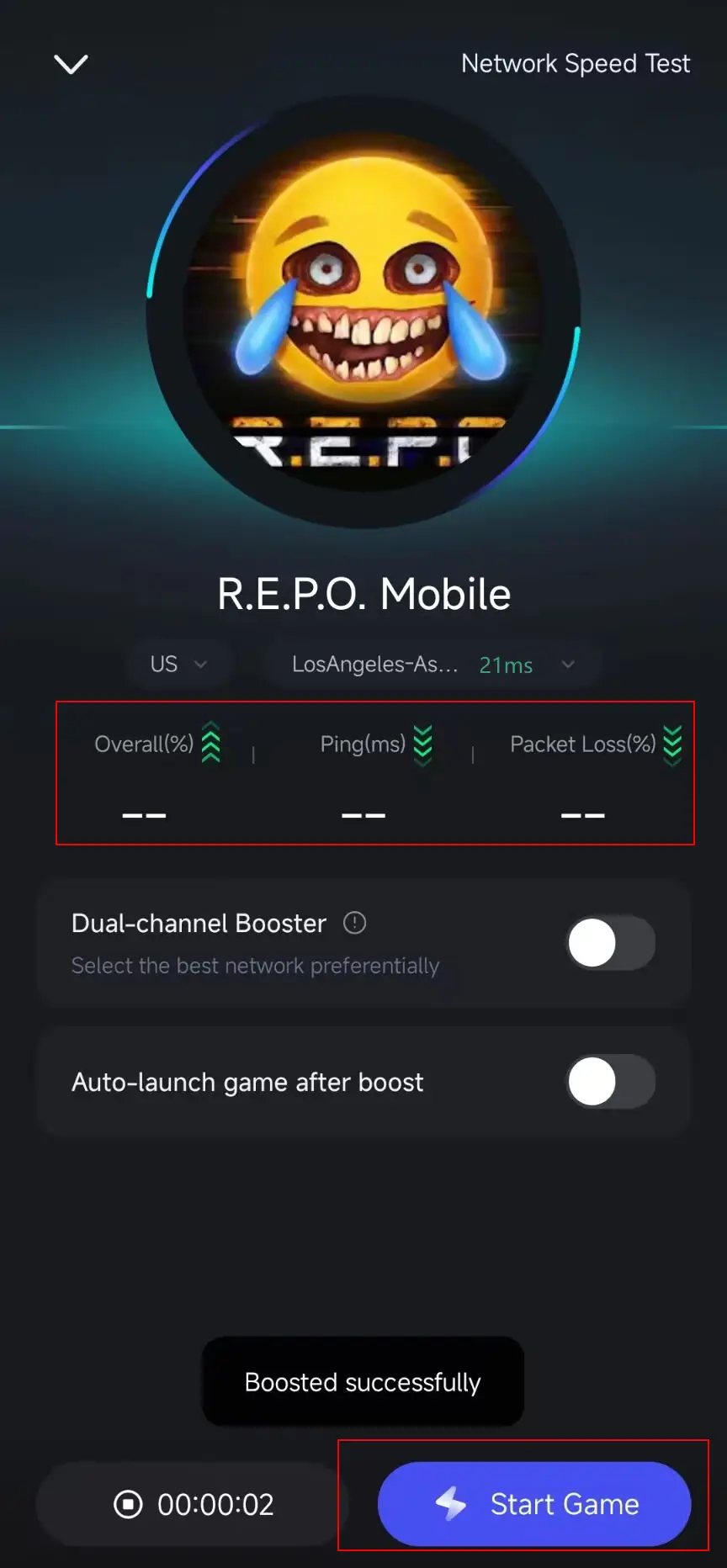
With LagoFast, mobile gaming becomes smoother, more stable, and far more enjoyable. No more disconnects or frustrating lag—just tap, boost, and dominate the game.
11. FAQs
Q: Can I play R.E.P.O. solo?
A: Yes. You can tackle R.E.P.O. alone, but the game is significantly more challenging without teammates.
Q: Is there matchmaking for random players?
A: Currently, R.E.P.O. does not support public matchmaking. You must invite friends manually through Steam.
Q: Does the MorePlayers mod work for every update?
A: The mod typically follows official game patches. Always check for the latest version of MorePlayers or revert R.E.P.O. to a compatible build if you face issues.
Q: Can you permanently resurrect teammates?
A: It depends on the level, difficulty setting, and any installed mods. Some modes may allow limited or no resurrections at all.
Q: Why does the game crash when I set more than six players?
A: R.E.P.O. wasn't designed for very large groups. Exceeding the stable threshold can cause performance and connection issues.
Conclusion
Whether you're part of a six-person squad or experimenting with mods to bring in extra friends, R.E.P.O. offers a tense and rewarding co-op horror experience. Managing team size, reviving fallen allies, and handling crashes or audio bugs is all part of the adventure. With proper communication and a bit of creativity—like using the MorePlayers mod—you can customize R.E.P.O. to your group's liking. Good luck and stay vigilant out there!
Boost Your Game with LagoFast for Epic Speed
Play harder, faster. LagoFast game booster eliminates stutter and lags on PC, mobile, or Mac—win every match!
Quickly Reduce Game Lag and Ping!
Boost FPS for Smoother Gameplay!