
Customization is a huge part of modern competitive games, and Sloclap’s upcoming multiplayer title Rematch is no exception. With a growing catalog of Rematch skins, players can personalize their characters, goal cages, and even their style of play. In this article, we’ll walk through every confirmed type of Rematch skin, how to unlock them, and what the future might hold for cosmetic rewards.

- All Rematch Skins (Confirmed Categories)
- How to Get Rematch Skins
- How to Change Player Skin in Rematch
- How to Make Kaiser Skin in Rematch
- Tips for Collecting Skins Faster
- How to Use LagoFast to Fix Lag and Boost Game Performance
1. All Rematch Skins (Confirmed Categories)
While Sloclap continues to expand the game’s skin library, here are the currently known types of Rematch skins:
|
Skin Type |
Description |
|---|---|
|
Character Skins |
Jerseys, uniforms, streetwear outfits |
|
Footwear Skins |
Custom sneakers, cleats, and themed shoes |
|
Goal-Cage Skins |
Visual cosmetics for your team’s net area |
|
Special Skins |
Unique styles like the Kaiser skin |
|
Seasonal Skins |
Limited-time rewards tied to events or passes |
Skins do not affect gameplay, but they’re a major part of personalizing your experience—and showing off your grind.

2. How to Get Rematch Skins
There are four main methods to unlock skins in Rematch:
1. Captain Pass
Rematch includes a seasonal progression system called the Captain Pass, featuring free and premium reward tracks. You’ll earn:
- Character outfits
- Footwear skins
- Goal cage designs
- In-game currency (Quants) for future seasons
2. In-Game Store
Visit the Rematch Store to buy skins using:
- Blocks (earned through gameplay)
- Quants (premium currency)
Bundles and exclusive drops rotate frequently, so check back often for limited-time offers.

3. Challenges
Some skins—especially rumored Mastery Skins—will likely be locked behind high-skill challenges or long-term goals. Expect requirements like:
- Reach Elite rank
- Win 100+ ranked matches
- Complete daily/weekly quests
4. Special Events
Sloclap may release event-exclusive skins during global tournaments, game anniversaries, or collaborations. These skins will only be available for a short time.
3. How to Change Player Skin in Rematch
Changing your character’s appearance in Rematch is quick and easy:
- Go to the Main Menu
- Select “Customization” or “Locker Room”
- Choose Character / Footwear / Goal Cage
- Browse your unlocked cosmetics
- Click “Equip” on the skin you want
Your chosen look will now appear in all online matches. Make sure you save your layout before exiting!

4. How to Make Kaiser Skin in Rematch
The Kaiser skin is one of the most sought-after styles in Rematch, known for its sharp, high-status design. While Sloclap hasn’t officially released it under the “Kaiser” name, here’s how to replicate the look based on community builds:
Kaiser Skin Recipe (Unofficial Guide):
|
Component |
Suggested Option |
|---|---|
|
Top |
Black or gold Captain jacket (Premium Pass) |
|
Pants |
Slim-cut dark athletic pants |
|
Shoes |
All-white or gold-accented cleats |
|
Goal Cage |
“Regal Pulse” or similar color theme |
|
Accessories |
Sunglasses (if available) |
You’ll need to unlock these via the Captain Pass or the Premium Store. If Kaiser becomes a named skin in future seasons, expect it to be high-tier or part of a challenge set.

5. Tips for Collecting Skins Faster
- Complete daily and weekly missions to earn Blocks fast
- Finish each season’s Captain Pass to earn enough Quants for the next
- Save Quants for limited-edition skins or bundles
- Play ranked consistently to unlock future mastery skins
6. How to Use LagoFast to Fix Lag and Boost Game Performance
If you’re struggling with high ping, lag spikes, or packet loss during gameplay, LagoFast offers a simple and efficient solution. Designed for gamers, it optimizes your network in real time by connecting you to the most stable servers and routes. Whether you’re playing competitive FPS games or large-scale online titles, LagoFast helps ensure a smoother experience.
Key Benefits of Using LagoFast
- Reduce ping and latency with smart routing
- Fix packet loss and stuttering issues
- Choose the best global servers and nodes
- Real-time display of network stats and game performance
- No complex setup—just plug and play
Quick Steps to Get Started
Step 1: Click the Free Trial button to download and install LagoFast.
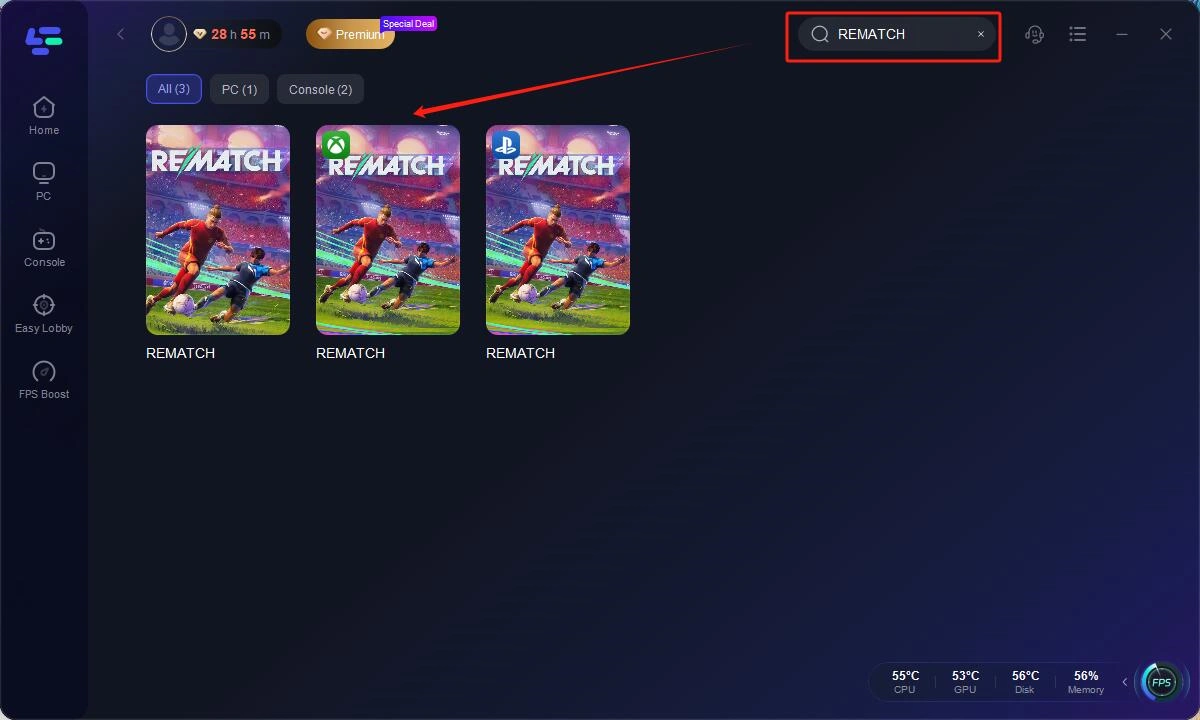
Step 2: Open LagoFast, then click the PC button on the left and search REMATCH in the search bar, click it after it appears.
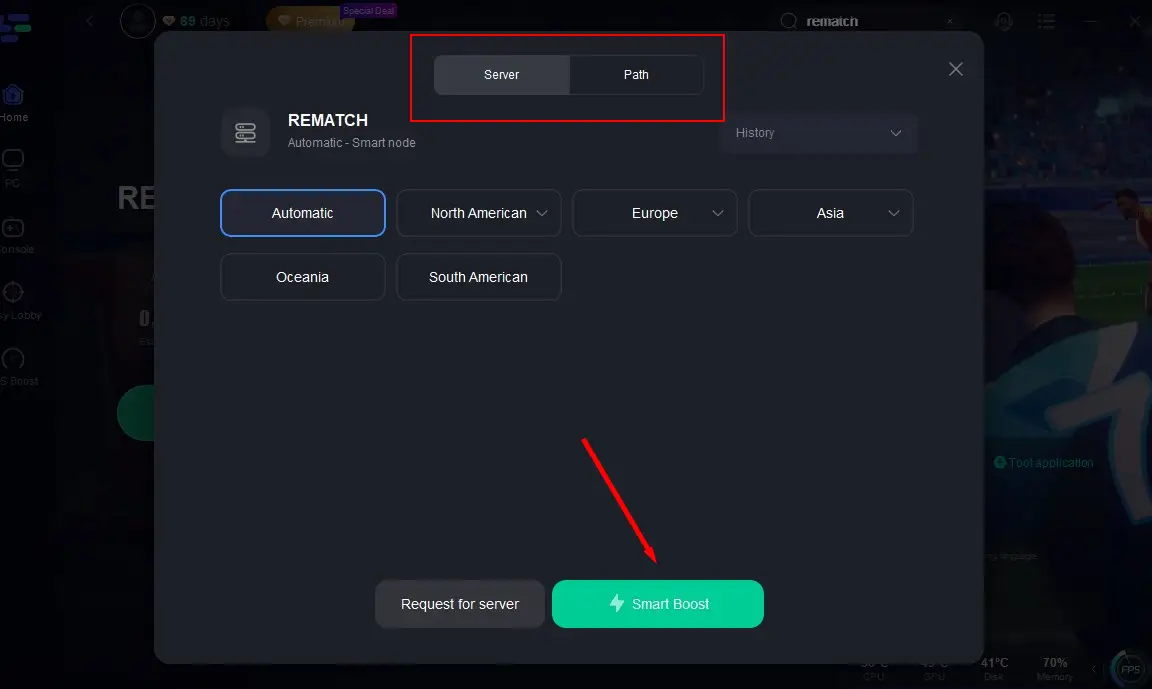
Step 3: Click on "Server" to change to a better server that ensures the gaming experience, then click on "Smart Boost".
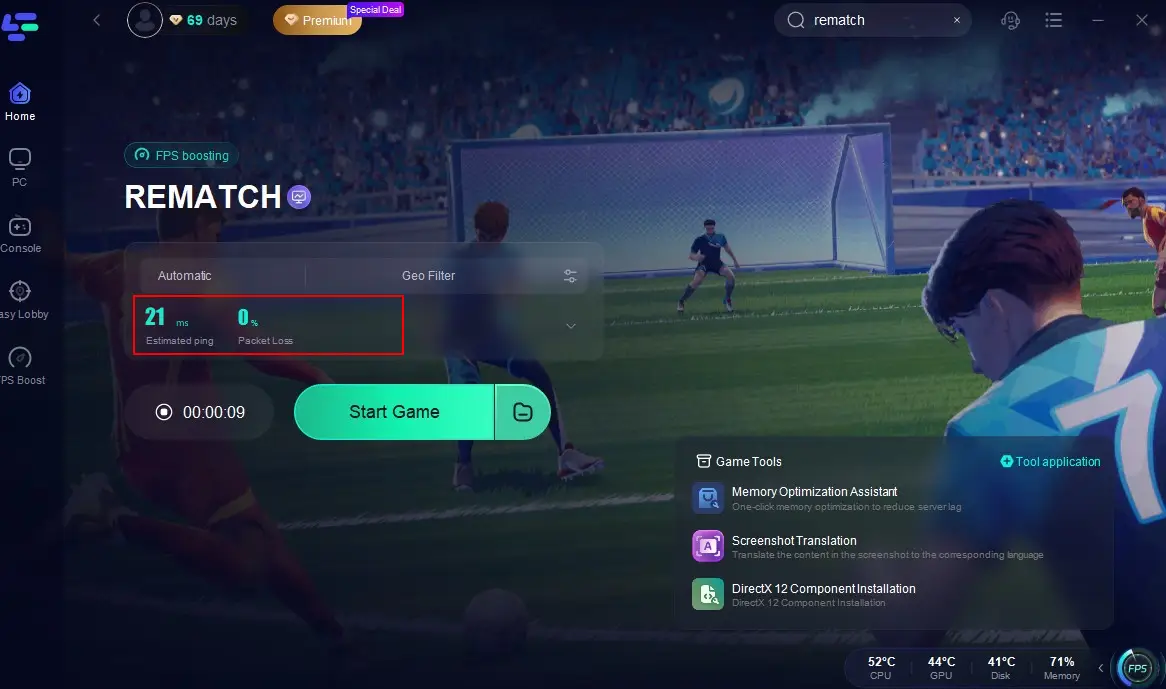
Step 4: Check the specific game ping, packet loss, and multiple path connection on the right side. Finally, click the "Start Game" to play the game.
With just a few clicks, LagoFast intelligently routes your traffic and improves game responsiveness instantly. Whether you’re grinding ranked matches or just want a smoother experience, LagoFast is your go-to tool to take control of your network and level up your gameplay.
Conclusion
Whether you’re grinding through the Captain Pass or browsing the premium Store, Rematch skins add personality, prestige, and flair to every match. From ranked rewards to seasonal bundles, Sloclap’s cosmetic system offers plenty of incentive to stand out on the field. As new content rolls in with each season, we’ll keep this guide updated with the latest skins, unlock methods, and event exclusives.
Boost Your Game with LagoFast for Epic Speed
Play harder, faster. LagoFast game booster eliminates stutter and lags on PC, mobile, or Mac—win every match!
Quickly Reduce Game Lag and Ping!
Boost FPS for Smoother Gameplay!