
Rematch, the electrifying 5v5 arcade-style football game developed by Sloclap and published by Kepler Interactive, is turning heads with its high-octane gameplay and bold visual flair. Now officially available on Xbox Series X|S, PC, and via the cloud, it’s drawing players eager to experience fast-paced online matches where every pass and tackle counts.
A major highlight from Xbox Game Pass in June 2025 confirmed that Rematch is available on day one through the service. But with multiple editions, pre-order perks, and confusion around upgrade access, many players are left wondering how to unlock the full experience. This article breaks down Rematch’s availability on Xbox and PC Game Pass, clarifies what each edition includes, and offers guidance on optimizing gameplay, particularly through tools like LagoFast. We’ll also answer the top FAQs to help ensure a smooth, frustration-free launch.

Part 1: Will Rematch Be Available on Xbox and Different Editions?
Part 2: Will Rematch Stay on Xbox Game Pass?
Part 3: How to Ensure a Smooth Rematch Gaming Experience on PC & Xbox
Part 1: Will Rematch Be Available on Xbox and Different Editions?

Yes, Rematch is officially part of Xbox Game Pass, PC Game Pass, and Game Pass Ultimate, and it's available from June 19, 2025, as a day-one release. Players can access it via cloud, PC, or Xbox Series X|S with their subscription. However, while the base edition of Rematch is included in Game Pass, access to Pro or Elite editions depends on separate upgrades, which are not covered by the subscription itself.
Here’s a quick breakdown of each version:
|
Edition |
Price |
Included in Game Pass? |
Notable Perks |
|
Base Edition |
$29.99 |
Yes |
Standard access, Adopter Hat (pre-order bonus) |
|
Pro Edition |
$39.99 |
No (Upgrade Required) |
72h Early Access, Blazon Jewel Set, Tank Top, Captain Pass Upgrade Ticket |
|
Elite Edition |
$49.99 |
No (Upgrade Required) |
Includes Pro Edition perks + Glitcher Trainers, AR Cage, Cap, second Captain Pass Upgrade Ticket, and exclusive cosmetics for top-tier personalization |
Accessing Upgrades
Upgrading to a premium edition on Xbox or PC involves purchasing the upgrade separately from the Microsoft Store. Several users reported issues installing or accessing the upgrade, especially when pre-ordering through Xbox Game Pass. A workaround involved navigating to the Microsoft Store and manually locating the base game before re-attempting the upgrade install. It’s essential to ensure your Game Pass account is linked and active during this process.
Part 2: Will Rematch Stay on Xbox Game Pass?

As of the June 2025 Xbox Game Pass Wave 2 announcement, Rematch was added as a day-one release, which typically means the game will remain available for at least several months. Xbox has not confirmed how long Rematch will be part of the Game Pass catalog, but day-one games often stay for 6-12 months, depending on publisher agreements.
This means subscribers can expect to enjoy Rematch throughout the rest of 2025, unless otherwise announced. However, premium content (such as additional cosmetics and season passes) may still require separate purchases or in-game currency, regardless of Game Pass status.
Part 3: How to Ensure a Smooth Rematch Gaming Experience on PC & Xbox
While Rematch’s 5v5 gameplay focuses on skill and team coordination, technical performance plays a critical role. Lag, high ping, or dropped connections can ruin a match, especially in fast-paced games with no pause, fouls, or downtime.
To get the smoothest experience possible on both PC and Xbox, players are turning to LagoFast, an intelligent game booster and lag reducer designed for cross-platform performance.
Why LagoFast is Ideal for Rematch:
- Ping Stabilization: Reduces latency spikes and stabilizes ping, vital for fast-paced football matches.
- Global Game Routes: Connects you to optimal servers regardless of your region.
- Smart Matchmaking Optimization: Helps reduce lag during player matchmaking in real-time.
- Cross-Device Compatibility: Works seamlessly across PC, mobile devices, and consoles, making it the ideal tool for multi-platform Rematch gamers.
- In-App Console Management: Control Xbox optimization from mobile when boosting remotely.
- Secure, Encrypted Network Paths: Reduces packet loss and ensures smoother data flow, particularly in competitive modes.
If you’re serious about your gameplay and want to eliminate frustrating performance issues, LagoFast is a must-have companion for Rematch.
Tutorial to use LagoFast to ensure your REMATCH gaming experience on PC:
Step 1: Click the Free Trial button to download and install LagoFast.
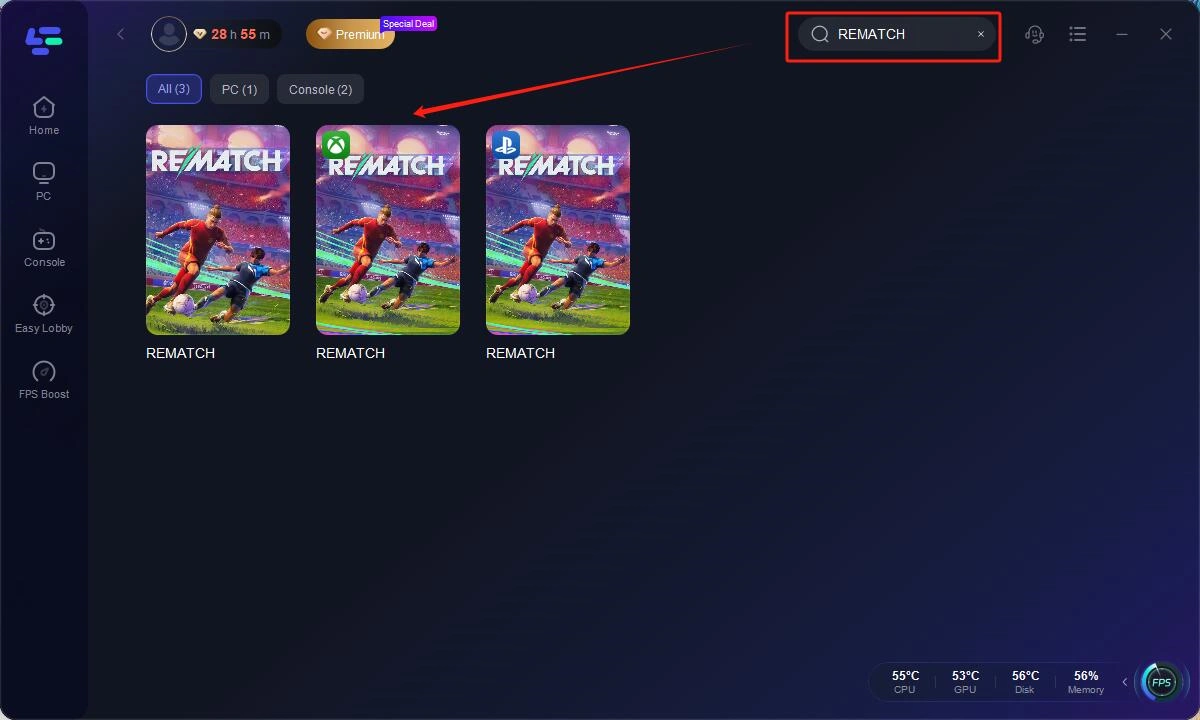
Step 2: Open LagoFast, then click the PC button on the left and search REMATCH in the search bar, click it after it appears.
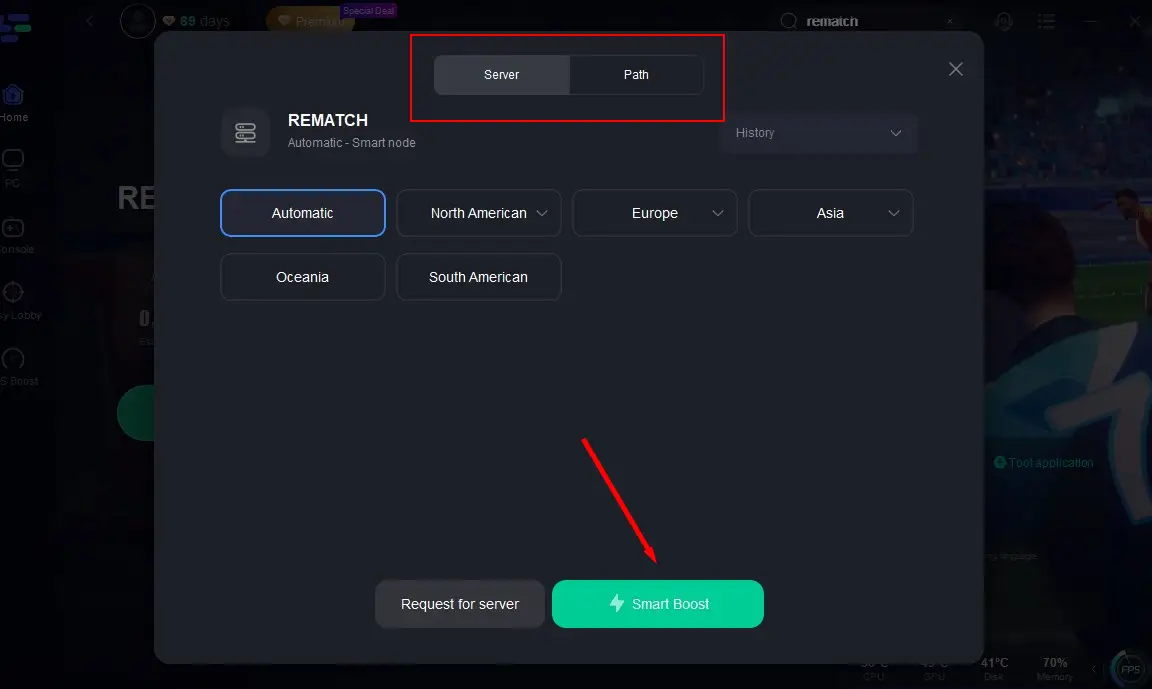
Step 3: Click on "Server" to change to a better server that ensures the gaming experience, then click on "Smart Boost".
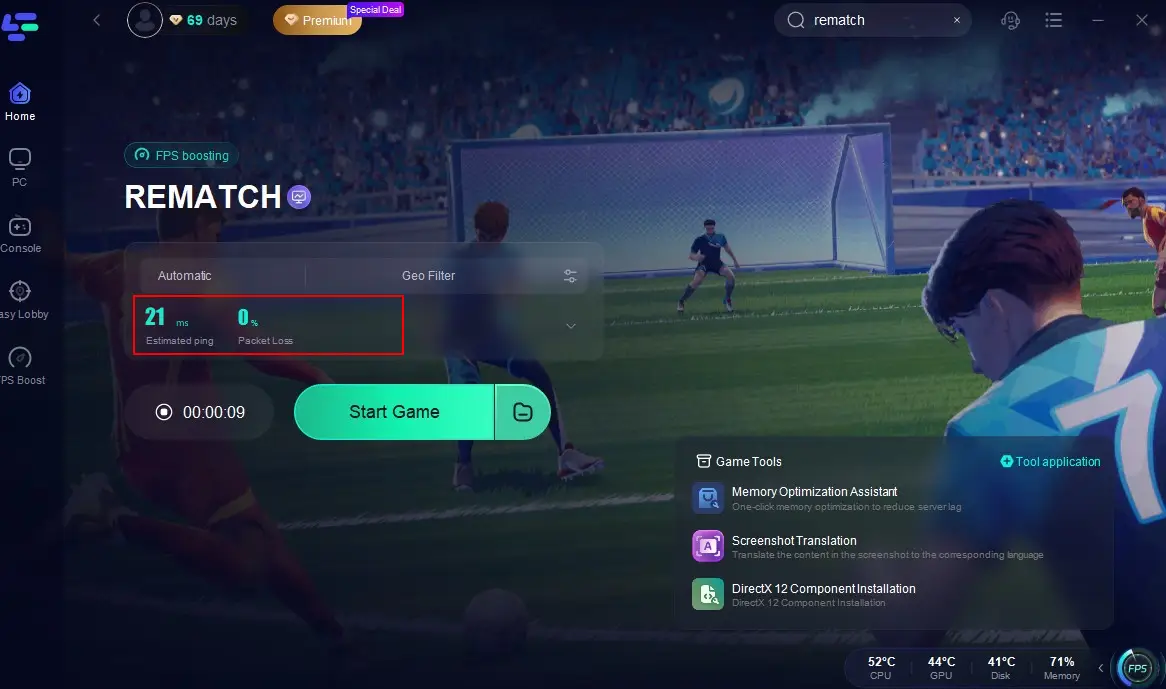
Step 4: Check the specific game ping, packet loss, and multiple path connection on the right side. Finally, click the "Start Game" to play the game.
Tutorial to use LagoFast Box to enhance your console gaming experience:
Step 1: Download the LagoFast Console App on your phone to control the LagoFast Box.

Step 2: Establish a connection between your LagoFast Box, router, and console, choosing between a wired or wireless connection.

Step 3: Launch the LagoFast Console App and boost REMATCH. Once you have completed the binding process with the LagoFast Box, proceed to boost this game within the LagoFast Console App.

Part 4: Rematch FAQs
Is Rematch really free on Game Pass?
Yes, the base version of Rematch is included with Xbox Game Pass, PC Game Pass, and Game Pass Ultimate starting June 19, 2025.
Why can’t I access the Pro or Elite content on Game Pass?
Game Pass only includes the base edition. To access Pro or Elite content, such as 72-hour early access or exclusive gear, you must purchase an upgrade pack separately.
Can I play Rematch with friends across platforms?
Yes! Rematch supports cross-play across Xbox Series X|S, PS5, and PC. You can squad up in online 5v5 matches regardless of platform.
I bought the upgrade, but can’t launch the game. What should I do?
Many users have reported this issue. Try the following steps:
Step 1. Go to the Microsoft Store, search “Rematch,” and scroll to the base game listing.
Step 2. Click the listing again even if it says “Purchase Again.”
Step 3. If you're still having trouble, try pre-installing the base version from your phone to Xbox.
Does LagoFast work on Xbox?
Yes! LagoFast works across Xbox, PC, and mobile, offering network optimization and in-game lag reduction for Rematch and many other titles.
Conclusion
Rematch is shaping up to be one of 2025’s most exciting team-based sports games, now available via Xbox Game Pass, PC, and cloud gaming, making it easier than ever to jump in. To truly maximize your experience, whether climbing the ranks, unlocking elite cosmetic items, or enjoying smooth multiplayer, you’ll need to understand the edition differences, Game Pass access, and how to optimize network performance. LagoFast is your best teammate for that, offering low ping, faster matchmaking, and smooth cross-platform gameplay through smart acceleration tech. So choose your edition, prep your squad, and dominate the pitch. Let the rematches begin.

Boost Your Game with LagoFast for Epic Speed
Play harder, faster. LagoFast game booster eliminates stutter and lags on PC, mobile, or Mac—win every match!
Quickly Reduce Game Lag and Ping!
Boost FPS for Smoother Gameplay!