
As one of the most surprising yet exciting multiplayer experiences of 2025, REMATCH has taken the gaming world by storm with its intense 5v5 soccer-style gameplay, stripped of traditional rules like offsides and fouls. Developed by Sloclap—the studio behind combat-centric titles Absolver and Sifu—REMATCH fuses the energy of Rocket League with the precision and teamwork of real soccer, but with a unique twist: players only control one character throughout each match.
Whether you're chasing your first win or looking to climb competitive leaderboards, controller optimization is key. In this guide, we'll walk you through everything you need to know about the best REMATCH controller settings in 2025, how to tweak them, and how to boost your overall performance using LagoFast.

Part 2: Understanding Controller Settings in REMATCH
Part 3: How to Change Controls in REMATCH
Part 4: Recommended Controller Settings for 2025
Part 5: Graphic Settings for Optimal Performance
Part 6: How to Change Settings in REMATCH
Part 7: How to Use LagoFast to Enhance your Game Experience
Part 1: Introduction
Unlike traditional sports games like FIFA or eFootball, REMATCH isn’t about controlling the whole team. Each player is responsible for one position, and teamwork is non-negotiable. Because of this, your control settings need to be precise, responsive, and tailored to your gameplay style. The right controller setup can make the difference between a game-winning tackle and a frustrating loss.
In this article, we’ll not only dive into the best controller settings but also show you how to change them, what graphics settings work best alongside them, and how LagoFast can help elevate your competitive gameplay experience.
Part 2: Understanding Controller Settings in REMATCH
REMATCH offers a wide array of controller configuration options, which is refreshing for a competitive sports title. From basic movement and sprint sensitivity to tackle types and camera behavior, everything is customizable. Given the fast-paced nature of the game and the constant need for positioning, quick reflexes, and communication, having optimal control mapping is essential.
Here are the core controller setting categories you’ll encounter:
- Movement Sensitivity: Controls how quickly your player reacts to input.
- Camera Sensitivity: Governs how fast the camera rotates or snaps.
- Tackle/Action Buttons: Assign actions like slide tackle, jump header, pass, and shoot.
- Deadzones: Determines how much movement your analog sticks require before registering input.
- Assists: Optional toggles for assisted passing or auto-snap to ball.
Each of these elements can be fine-tuned to suit different player roles (defender, midfielder, striker) and playstyles.
Part 3: How to Change Controls in REMATCH
Changing your controls in REMATCH is simple and user-friendly:
- Launch REMATCH and navigate to the Main Menu.
- Select Settings (usually accessible via the gear icon or the pause menu).
- Head to the Controls tab.
- Choose between Presets (Default, Classic, Custom) or begin configuring your Custom Setup.
- You can rebind every individual action by selecting the control, pressing a new button, and confirming it.
- Adjust sensitivity sliders and deadzone ranges under the Advanced Controls tab.
Remember to test your changes in practice mode before jumping into ranked games to ensure your setup feels natural and responsive.
Part 4: Recommended Controller Settings for 2025
After testing across multiple roles and playstyles during both the open beta and post-release updates, here are our best controller settings for REMATCH in 2025:
Movement and Sensitivity
- Left Stick Sensitivity: 85%
- Right Stick (Camera) Sensitivity: 70%
- Deadzone (Left/Right Stick): 5%
- Sprint Toggle: On (better for positioning endurance)
- Auto-Snap to Ball: Off (manual control allows more advanced plays)
Camera Settings
- Camera Distance: 10 (provides wider field view)
- Camera Height: 8
- Camera Rotation Speed: 75%
- Follow Ball Camera: Toggle On/Off depending on experience level
Action Mapping Suggestions
- Pass (Ground): A / Cross
- Shoot: B / Circle
- Lob/Chip: Y / Triangle
- Tackle: X / Square
- Sprint: RT / R2
- Call for Ball / Ping: LB / L1
- Position Snap / Reposition: RB / R1
Part 5: Graphic Settings for Optimal Performance
While controller settings handle physical responsiveness, graphics settings determine how fluid and visually readable the game is during heated moments. Sloclap recommends playing REMATCH on an SSD, and the following settings will give you a smoother experience:
Recommended Graphics Settings (for RTX 3050 or RX 5600 XT and above):
- Resolution: 1920x1080
- V-Sync: Off
- Frame Rate Cap: Uncapped (or 144 for 144Hz monitors)
- Texture Quality: High
- Shadow Quality: Medium
- Anti-Aliasing: TAA Low or FXAA
- Post-Processing: Low
- Motion Blur: Off
- Effects Quality: Medium
- Field of View (FOV): 100
Keeping visual distractions to a minimum while maintaining clarity ensures you don’t miss crucial plays or teammate movements.
Part 6: How to Change Settings in REMATCH
Customizing your gameplay isn’t limited to just controls—REMATCH lets you tweak a range of in-game options. Here’s how to adjust other important settings:
- Access Settings from the main menu or pause screen.
- Navigate through Controls, Gameplay, Video, and Audio tabs.
- Adjust Gameplay Options like vibration feedback, stamina bars, and minimap positioning.
- Save your changes and consider binding profiles (if your controller supports it) for switching between different playstyles.
Don’t forget to revisit these settings after each game update, as patches may affect default responsiveness or introduce new control schemes.
Part 7: How to Use LagoFast to Enhance your Game Experience
Even with perfect controller settings, network performance can ruin your competitive edge. That’s where LagoFast Game Booster comes in. LagoFast is designed for multiplayer games like REMATCH, LagoFast optimizes your ping, reduces lag, and helps you get into smoother, less congested servers.
Benefits of Using LagoFast:
- Reduced Ping: Minimizes latency for smoother gameplay.
- Stable Connection: Reduces packet loss and connection drops.
- Optimized Routing: Selects the best server routes for optimal performance.
How to Boost Rematch with LagoFast on PC
Step 1: Click the Free Trial button to download and install LagoFast.
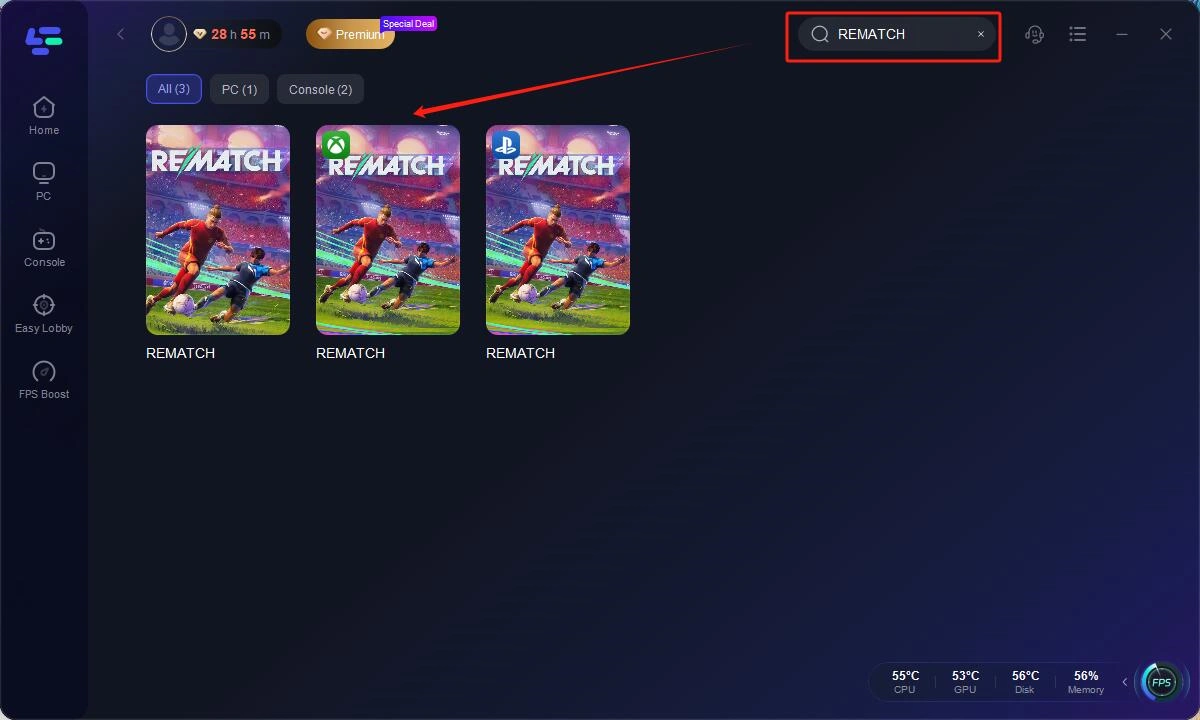
Step 2: Open LagoFast, then click the PC button on the left and search REMATCH in the search bar, click it after it appears.
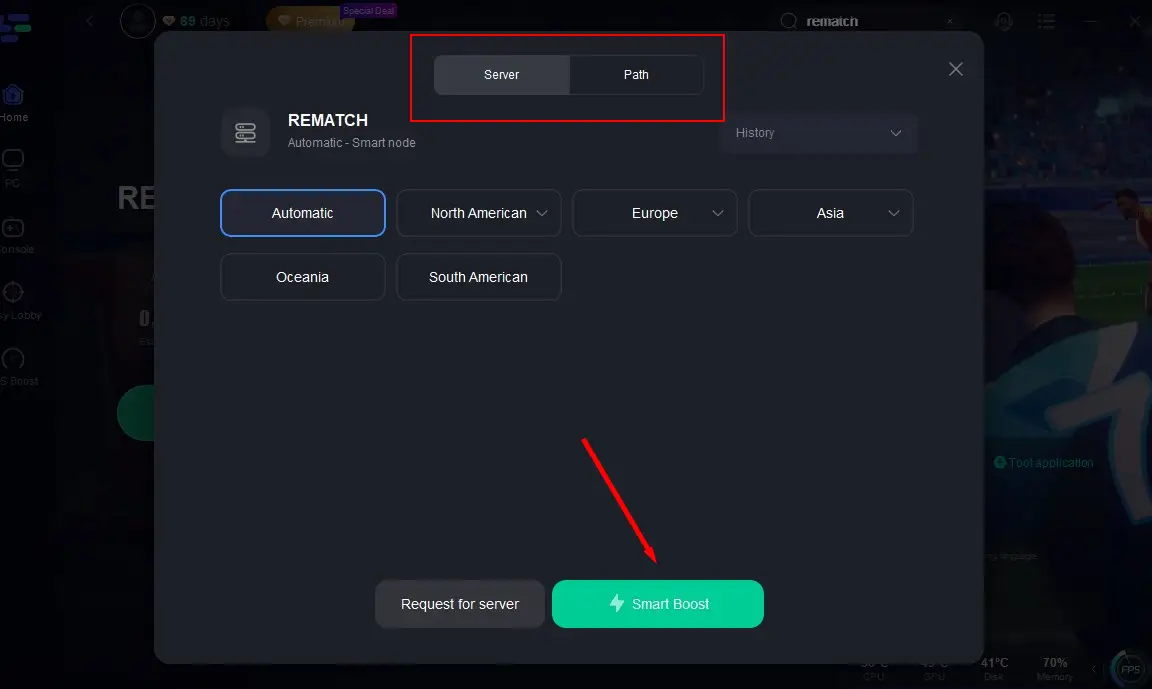
Step 3: Click on "Server" to change to a better server that ensures the gaming experience, then click on "Smart Boost".
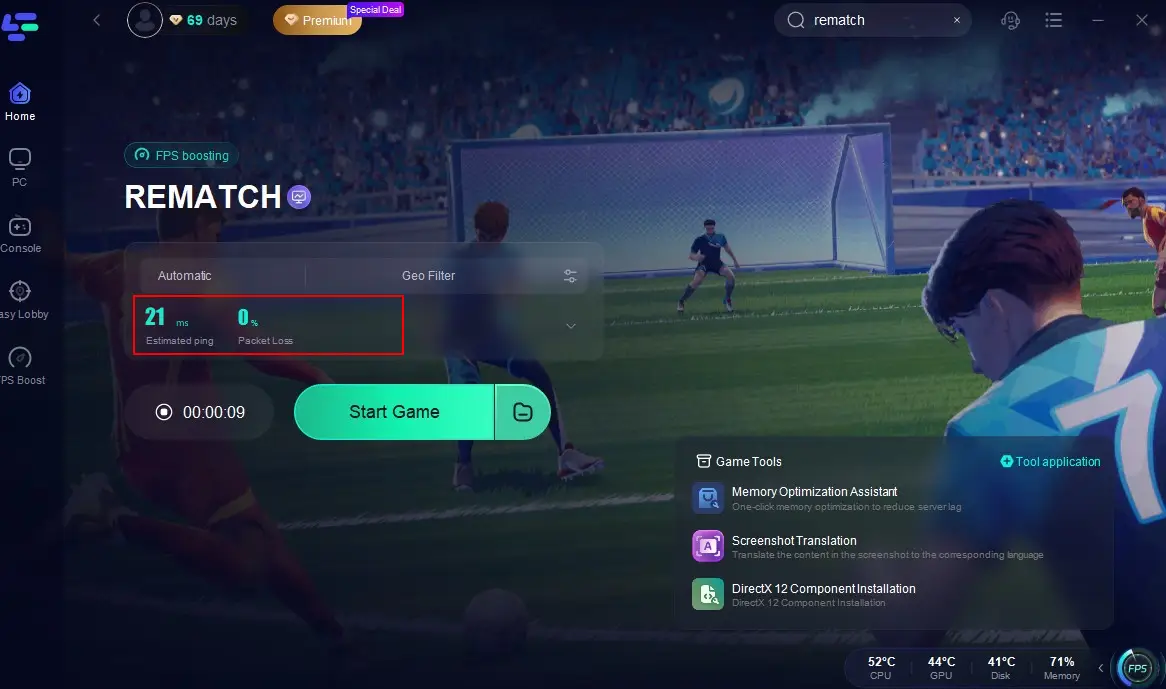
Step 4: Check the specific game ping, packet loss, and multiple path connection on the right side. Finally, click the "Start Game" to play the game.
Tutorial to use LagoFast Box to enhance your console gaming experience:
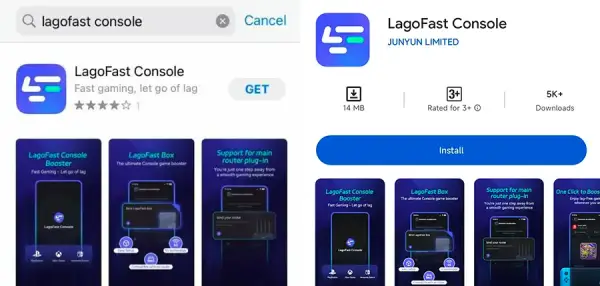
Step 1: Download the LagoFast Console App on your phone to control the LagoFast Box.
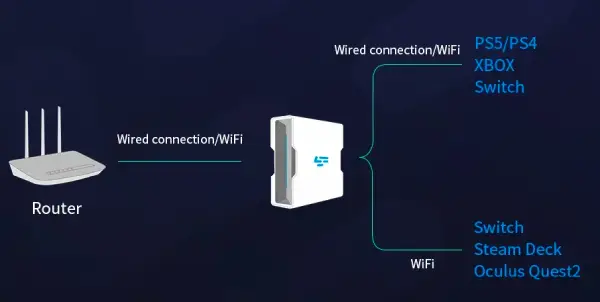
Step 2: Establish a connection between your LagoFast Box, router, and console, choosing between a wired or wireless connection.
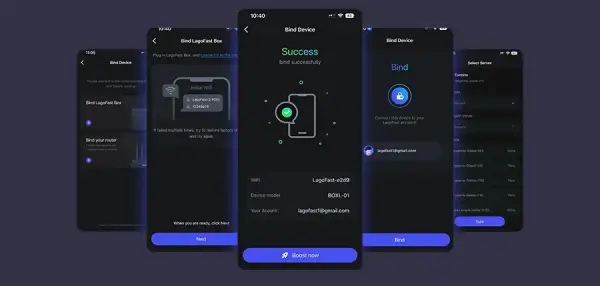
Step 3: Launch the LagoFast Console App and boost REMATCH. Once you have completed the binding process with the LagoFast Box, proceed to boost this game within the LagoFast Console App.
Especially for a fast-paced multiplayer game like Rematch, where every second and frame matters, LagoFast can give you that much-needed competitive edge.
Conclusion
REMATCH is poised to be one of the most skill-intensive and exciting team-based sports games of 2025. Mastering your controller settings, paired with the right graphics options and network enhancements from LagoFast, can elevate your play from casual to competitive.
Whether you’re a striker looking to break defenses or a defender aiming for precision tackles, the right setup ensures you’re always where the play is—sharp, responsive, and ready to win.

Boost Your Game with LagoFast for Epic Speed
Play harder, faster. LagoFast game booster eliminates stutter and lags on PC, mobile, or Mac—win every match!
Quickly Reduce Game Lag and Ping!
Boost FPS for Smoother Gameplay!