
There’s a fresh breeze in the arena of arcade sports gaming, and its name is Rematch. Developed by Sloclap and published by Kepler Interactive, Rematch reimagines the soccer genre with futuristic design, competitive 5v5 gameplay, and stylish character customization. For those unfamiliar with the title or seeking a solid starting point, this guide provides a full breakdown, from installation and controls to where to buy and how to play offline. Whether you're a sports game veteran or an action game enthusiast intrigued by this hybrid, Rematch promises high-octane fun wrapped in street-style flair.

- ✅ Reduce Lag and High Ping.
✅ Boost FPS at the Same Time.
✅ Support 2000+ Online Games
✅ Change Server Without Latency.
✅ Multiplatform: PC, Console, Mobile.
✅ End Stuck, Connection & Crashing Issues
Part 1: What is Rematch and What Makes It Unique?
Part 2: How Long Does a Match Last in Rematch?
Part 3: How Many Players Can Join in Rematch?
Part 4: Rematch for Beginners: How to Download and Play
Part 5: Where to Buy Rematch and What Does It Cost?
Part 6: How to Receive the Ball in Rematch
Part 7: How to Run Rematch & Can You Play Rematch Offline?
Part 1: What is Rematch and What Makes It Unique?
Rematch is a team-based 5v5 arcade-style soccer game that breaks away from the traditional football simulation. Instead of mimicking real-world tactics, it focuses on fast, physics-based movement, unique characters with custom flair, and exaggerated animations that make every match feel like a highlight reel.
Gameplay Features:
- 5v5 Competitive Matches: Engage in high-energy team battles where skill, reflexes, and coordination are key.
- Character Customization: Equip your player with tank tops, sneakers, and even augmented reality cages, not just for looks, but also identity.
- Stylized Presentation: Think neon courts, high-flying shots, and an aesthetic that blends urban fashion with sci-fi technology.
- Cross-Platform Availability: Play on PC, PlayStation 5, or Xbox Series X/S, making it highly accessible.
Rematch doesn’t try to compete with FIFA or eFootball. Instead, it carves its own lane, where flashy moves, street culture, and expressive customization rule.
Part 2: How Long Does a Match Last in Rematch?

A standard game in Rematch is built for fast fun. Each match typically lasts around 5-7 minutes, making it perfect for quick sessions or extended play. This short format supports repeat play and allows you to refine your skills across many matches without investing excessive time in one round.
Some game modes may extend that length slightly, but the focus remains on dynamic, action-filled gameplay that keeps you constantly moving.
Part 3: How Many Players Can Join in Rematch?

Rematch supports 10 players per match, split into two teams of five. You can jump into matches with friends or get auto-matched with others online. Additionally, there may be local or private custom game modes offered in the future.
Each player controls one unique character with different cosmetics and personal flair, adding a sense of individuality within the team-based setup.
Part 4: Rematch for Beginners: How to Download and Play
Getting started with Rematch is simple, whether you’re on console or PC. Here’s how to access the game:
If you're launching the game for the first time, here’s how to go from downloading to dominating:
Step 1: Choose Your Platform
Rematch is available on:
- PC (Steam)
- PlayStation 5
- Xbox Series X|S

Step 2: Download and Install
PC (Steam)
- Open Steam.
- Search “Rematch.”

- Choose your edition.

- Add to cart, complete payment, and install.
PlayStation 5
- Go to the PlayStation Store.
- Search “Rematch.”
- Select the game and complete checkout.
- The game auto-downloads to your library.
Xbox Series X|S
- Open the Microsoft Store.
- Enter “Rematch” in the search bar.
- Select your preferred edition.
- Purchase and install.
Step 3: Set Up Your Avatar
Upon entering the game, you’ll create your avatar. Customize your look with standard options, or use premium outfits from pre-order editions if you have them.
Step 4: Learn the Controls
Each platform uses slightly different button mapping, but movement, sprinting, tackling, and special abilities are consistent. Beginners should spend some time in Training Mode to learn how to:
- Sprint and dash
- Tackle
- Pass and shoot
- Use power-ups and AR visuals
Step 5: Join Your First Match
Use the “Quick Match” or “Ranked” option to join live matches. Starting with unranked games is advised until you're confident with your mechanics.
Step 6: Play Rematch Smoothly
To ensure lag-free gameplay and the lowest possible ping during fast-paced matches, many Rematch players rely on LagoFast, a top-tier game booster that helps optimize internet routes and boost FPS. Whether you're on a mid-range PC or a high-end rig, even in consoles, LagoFast stabilizes your connection and removes performance hiccups that can cost you the game.
Tutorial to use LagoFast to ensure your REMATCH gaming experience on PC:
Step 1: Click the Free Trial button to download and install LagoFast.
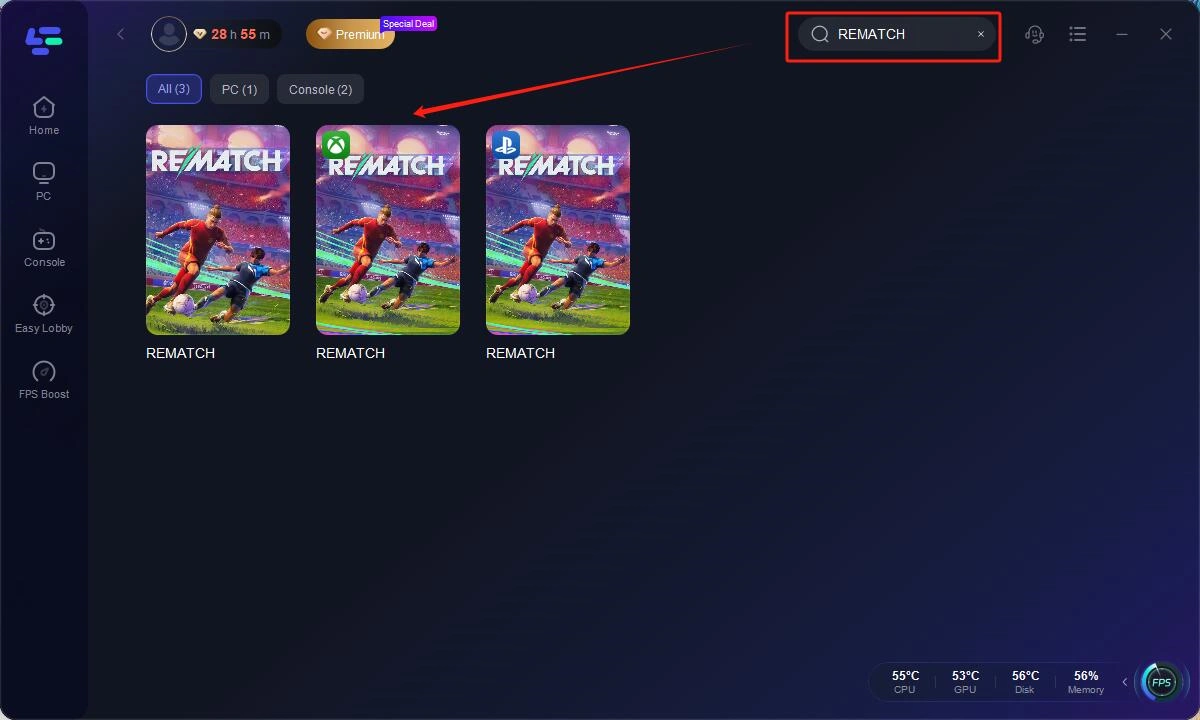
Step 2: Open LagoFast, then click the PC button on the left and search REMATCH in the search bar, click it after it appears.
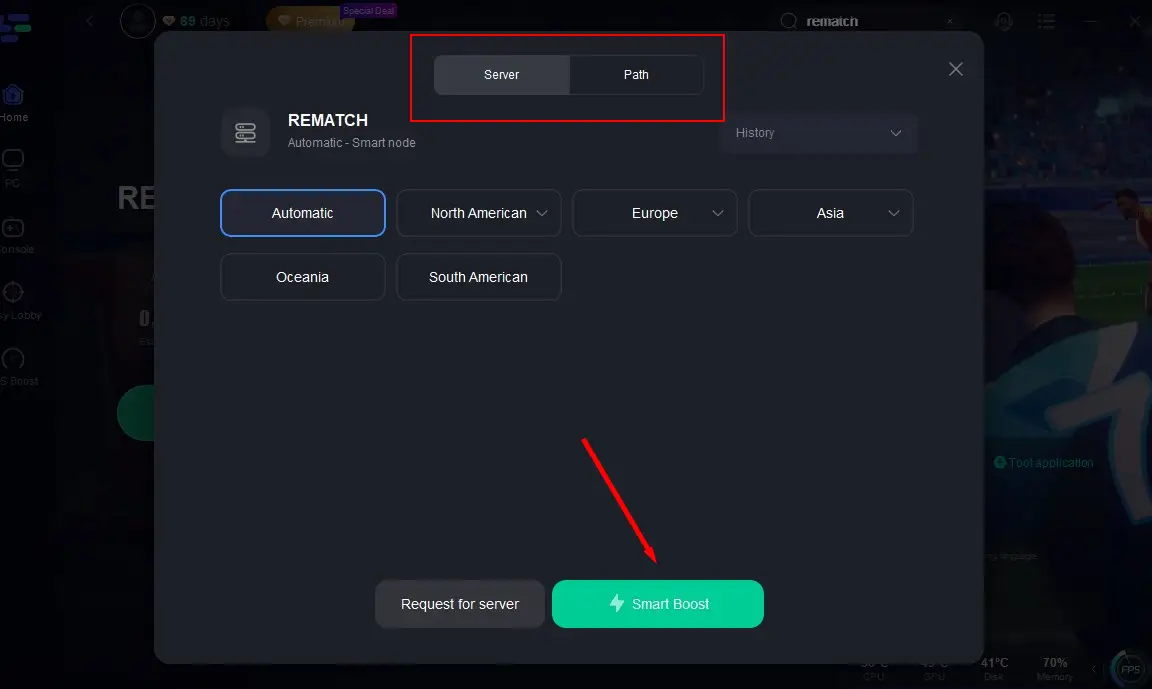
Step 3: Click on "Server" to change to a better server that ensures the gaming experience, then click on "Smart Boost".
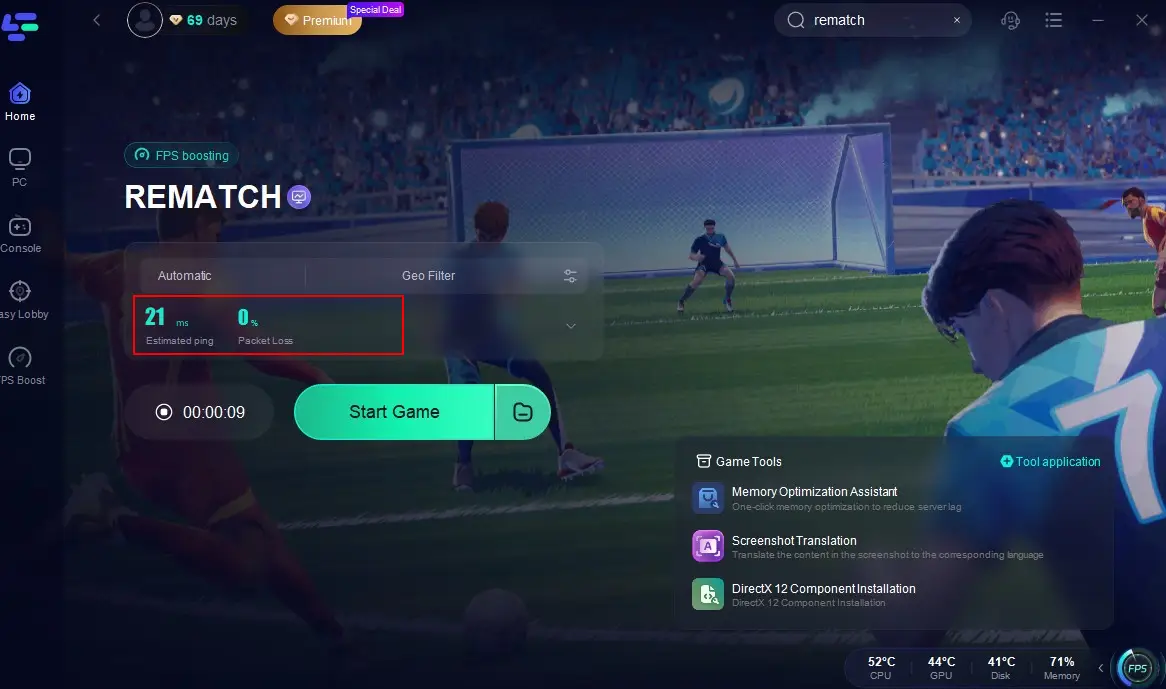
Step 4: Check the specific game ping, packet loss, and multiple path connection on the right side. Finally, click the "Start Game" to play the game.
REMATCH System Requirements on PC
Minimum:
- OS: Windows 10 / Windows 11
- Processor: AMD Ryzen 5 3400G / Intel Core i5-9400, or better
- Memory: 8 GB RAM
- Graphics: AMD Radeon RX 5500 (4GB) / NVIDIA GeForce RTX 1060 (4GB), or better
- DirectX: Version 12
- Network: Broadband Internet connection
- Storage: 20 GB available space
- Additional Notes: Minimum requirements are not final and are subject to change.
Recommended:
- OS: Windows 10 / Windows 11
- Processor: AMD Ryzen 3700x / Intel Core 11600k or better
- Memory: 8 GB RAM
- Graphics: AMD Radeon RX 5600 XT (6GB) / NVIDIA GeForce RTX 3050 (6GB), or better
- DirectX: Version 12
- Network: Broadband Internet connection
- Storage: 20 GB available space
- Additional Notes: SSD recommended -Support DirectX 12 Shader Model 5
Part 5: Where to Buy Rematch and What Does It Cost?
Rematch is available digitally across major platforms. Here are the current pricing tiers:
- Base Edition: $29.99
- Pro Edition: $39.99
- Elite Edition: $49.99

Editions Comparison:

All versions can be pre-ordered or purchased through:
- Steam (PC)
- PlayStation Store (PS5)
- Xbox Store (Xbox Series X/S)
Keep an eye out for special bundles or seasonal content that may drop post-launch.
Part 6: How to Receive the Ball in Rematch
Receiving the ball in Rematch is less about complex tactics and more about quick reactions and positioning. Here’s a basic tip: use the left analog stick or movement keys to position your player toward the ball’s trajectory while pressing the receive/pass button (typically "A" on Xbox, "X" on PlayStation, or a mapped key on PC).
Additionally:
- Anticipate rebounds off the cage-like walls.
- Utilize quick passes and directional taps for smoother possession.
- Advanced players use timing boosts or sidesteps to outmaneuver opponents before catching the ball.
Part 7: How to Run Rematch & Can You Play Rematch Offline?
As of the latest release, Rematch requires an online connection for both matchmaking and character progression. It does not support a full offline mode at launch, though local practice modes or private lobbies may be introduced in future updates.
That said, single-session training modes or character customization can be accessed with limited connectivity, but to play actual matches, you’ll need to be connected to the internet.
Part 8: Rematch Game Reviews
Community reception of Rematch has been mostly positive, especially during its beta phases. Reddit threads highlight the following:
Positives:
- "Super addictive gameplay!" - Multiple users loved the fast pacing and low time investment per match.
- "The AR cage goal animation is sick!" - Elite edition buyers are enjoying the visual flair.
- "Way better teamplay than I expected." - Even casual players are finding communication and teamwork rewarding.
Criticisms:
- "Needs more depth in solo queue." - Some users hope for ranked solo improvements.
- "A tutorial mode would help a lot." - Beginners requested a built-in guide beyond external resources.
Reddit consensus: Rematch hits the sweet spot between casual fun and competitive intensity. It’s not a simulation title, and that’s exactly why it works.
Conclusion
If you’re looking for a refreshing break from traditional sports sims, Rematch is an absolute blast. It strips soccer down to its most entertaining fundamentals, adds a dose of style, and builds a team-based, fast-action multiplayer title that thrives on its simplicity. With affordable pricing, cross-platform play, and ongoing community feedback, Rematch is shaping up to be a sleeper hit in the competitive arcade sports genre.

Boost Your Game with LagoFast for Epic Speed
Play harder, faster. LagoFast game booster eliminates stutter and lags on PC, mobile, or Mac—win every match!
Quickly Reduce Game Lag and Ping!
Boost FPS for Smoother Gameplay!