

Rainbow Six Mobile is a tactical shooter where positioning, timing, and reaction speed decide every round. There are no quick respawns to save you—one small delay can cost the entire match. So if you peek first, shoot first, and still lose the fight, the problem might not be your aim. In many cases, Rainbow Six Mobile lag and high ping are the real reasons behind those frustrating deaths.
This guide breaks down why it happens and what you can do to fix it for a smoother, more stable experience.

- ✅ Reduce Lag and High Ping.
✅ Boost FPS at the Same Time.
✅ Support 2000+ Online Games
✅ Change Server Without Latency.
✅ Multiplatform: PC, Console, Mobile.
✅ End Stuck, Connection & Crashing Issues
Part 1: Why Is Rainbow Six Mobile Lag and Having High Ping?
Part 2: How to Fix Rainbow Six Mobile Lag and High Ping?
Part 1: Why Is Rainbow Six Mobile Lag and Having High Ping?
Many players think Rainbow Six Mobile lag is simply “bad internet.” That’s part of it—but not the whole story. High ping and delay usually come from a combination of server distance, network stability, and device performance. Here’s what’s really going on.
Server Distance and Poor Routing
Ping measures how long it takes for your device to communicate with the game server.
If the server is physically far from your location, your ping will naturally increase. But distance isn’t the only issue. Sometimes your ISP routes your traffic inefficiently, sending your data through longer paths before reaching the server.
That’s why you might see 20–30 ms in other games but 90–120 ms in Rainbow Six Mobile.
In this case, Rainbow Six Mobile high ping isn’t about slow Wi-Fi. It’s about server routing and network paths.
Unstable Wi-Fi or Mobile Data
You can have 300 Mbps download speed and still experience Rainbow Six Mobile lag if your connection fluctuates. Small drops in stability cause ping spikes and packet loss.
Common reasons include:
- Shared home networks during peak hours
- Someone streaming or downloading large files
- Weak router signal through walls
- Switching between Wi-Fi and 4G/5G
When your connection becomes unstable, you’ll notice it immediately—rubberbanding, delayed shots, and enemies skipping across the screen. In a tactical shooter like Rainbow Six Mobile, even a small delay can decide the fight.
Device Performance and FPS Drops
Not all lag is network-related.
Sometimes what feels like Rainbow Six Mobile high ping is actually low FPS. If your device struggles to render the game smoothly, input delay increases.
Typical causes:
- Overheating
- Low available RAM
- Maximum graphics settings
- Background apps consuming resources
When frames drop during gunfights, it can feel identical to Rainbow Six Mobile high ping. The result is the same—you react, but the game responds late.
Background Apps and Hidden Data Usage
Even if your internet seems stable, background apps can quietly cause Rainbow Six Mobile lag. Cloud backups, automatic updates, and social media syncing all use bandwidth without you noticing.
While you’re in a live match, these small data transfers compete with your connection to the game server. The result is sudden Rainbow Six Mobile high ping right in the middle of a round.
Part 2: How to Fix Rainbow Six Mobile Lag and High Ping?
In most cases, the issue comes down to unstable connections, inefficient routing, background interference, or device performance. The key is fixing the right problem.
Use LagoFast—The Best Rainbow Six Mobile Lag and Ping Reducer
If you want an easy way to fix Rainbow Six Mobile lag and high ping, LagoFast is a solid option. It’s a professional game booster that optimizes the connection between your device and the game server by improving routing paths, reducing packet loss, stabilizing ping, and lowering latency, which helps make gunfights feel more responsive. It also offers FPS optimization and smarter server routing, so you can choose a better connection path for smoother gameplay—especially useful if you’re dealing with consistently high ping.
Tutorial To Use LagoFast To Fix Rainbow Six Mobile Lag and High Ping:
Step 1: Search “LagoFast Mobile booster” in the Google App Store or Apple App Store. Alternatively, click here to download the APK file.
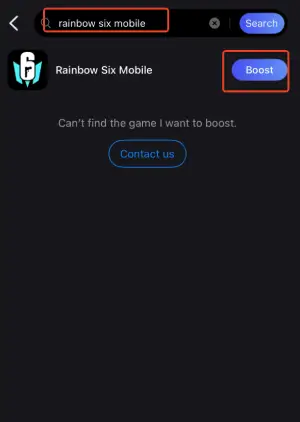
Step 2: Open LagoFast, then search for Rainbow Six Mobile in LagoFast Mobile.
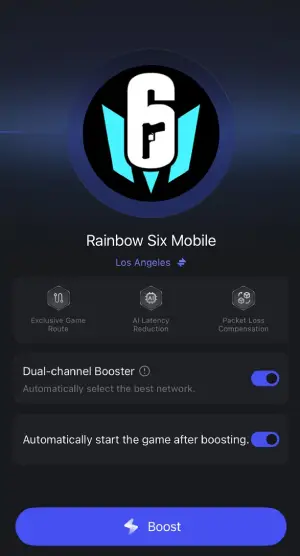
Step 3: Click "boost" and select your corresponding server region to connect.
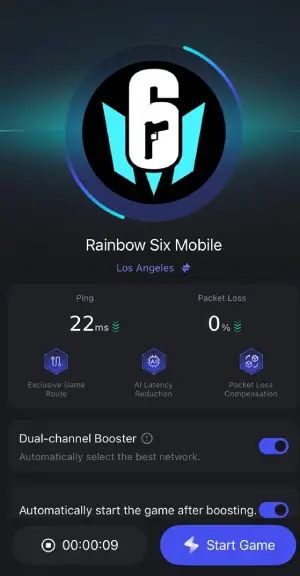
Step 4: Once optimized performance is confirmed, click "Start Game" to launch the game.
Use a Stable Network (Not Just a Fast One)
Speed looks good on paper. Stability wins matches.
To reduce Rainbow Six Mobile ping spikes:
- Use 5GHz Wi-Fi if available
- Move closer to your router
- Restart your router before long sessions
- Avoid public Wi-Fi
If your home internet feels inconsistent, test your mobile data. In some cases, a strong 5G connection is more stable than overloaded home broadband.
Lower Graphics to Improve FPS Stability
Not all lag is network-related. FPS drops can feel like high ping because delayed frames slow your visual response time.
Inside the game settings:
- Lower texture quality
- Reduce shadow settings
- Disable unnecessary visual effects
- Enable performance mode
Higher FPS means faster visual feedback and lower input delay. Smooth frames often make a bigger difference than ultra graphics.
Close Background Apps and Stop Hidden Data Usage
Background activity can quietly interfere with your connection and cause random ping spikes.
Before launching Rainbow Six Mobile:
- Close streaming platforms
- Pause downloads
- Disable automatic updates
- Clear recent apps
This frees both RAM and bandwidth, reducing the chance of sudden ping spikes mid-round.
Restart Your Device Before Playing
If both your network and FPS feel unstable, a quick restart can help.
Restarting your device:
- Clears temporary memory
- Stops lingering background processes
- Resets network modules
If your ping has been unstable all day, a fresh reboot often stabilizes it instantly.
Conclusion
Lag and high ping in Rainbow Six Mobile usually aren’t random—they come from routing issues, unstable connections, background interference, or device performance limits. The key is identifying which one is affecting you and fixing it directly. Start with connection
stability, optimize your settings, and remove hidden background usage. Once your network and device are properly tuned, every gunfight feels more consistent—and your results start reflecting your actual skill, not your ping.

Boost Your Game with LagoFast for Epic Speed
Play harder, faster. LagoFast game booster eliminates stutter and lags on PC, mobile, or Mac—win every match!
Quickly Reduce Game Lag and Ping!
Boost FPS for Smoother Gameplay!