
PlayerUnknown's Battlegrounds (PUBG) has attracted hundreds of millions of players around the world and is now one of the most popular battle royale games. However, the original PUBG Mobile has high hardware requirements for devices, making it hard for players with low-end devices to enjoy the game smoothly.
That’s why PUBG Mobile Lite was created. Developed by the same team as PUBG, it allows players with lower-end smartphones to experience the thrill of PUBG. This article will give you a complete PUBG Mobile Lite guide, including its gameplay features, download instructions and tips to win, so you can enjoy the game without any worries!

- ✅ Reduce Lag and High Ping.
- ✅ Boost FPS at the Same Time.
- ✅ Support 2000+ Popular Online Games.
- ✅ Change Server all over the World.
- ✅ Optimize the Operating Space.
Part 1: What is PUBG Mobile Lite
Part 2: PUBG Mobile Lite Gameplay Features
Part 3: PUBG Mobile Lite Download Guide
Part 4: Best PUBG Mobile Lite VPN - LagoFast
Part 5: PUBG Mobile Lite Winning Guide
Part 1: What is PUBG Mobile Lite
PUBG Mobile Lite is a lightweight version of PUBG Mobile designed for smartphones with limited storage or less powerful chipsets than flagship devices. Targeting players with older or low-spec smartphones, it primarily launched in 2019 in selected counties across Asia, Africa, Europe, the Americas, and Oceania. Later in September 2019, it officially released in India following strong demand from local players. While optimized for lower-end devices, PUBG Mobile Lite retains all the core features and gameplay that made the original PUBG popular, delivering a similar authentic battle royale experience.
Part 2: PUBG Mobile Lite Gameplay Features
PUBG Mobile Lite keeps the core gameplay of PUBG Mobile but has differences in player numbers, map layouts, and graphics quality. Here are its key features for its gameplay:
- Smaller Map: Optimized for faster-paced battles with strategic intensity.
- Reduced Player Count: Smaller lobbies with increased bot presence, particularly in early ranks.
- Simplified Visuals: Lower resolution and fewer graphical effects for smoother performance on budget devices.
- Accelerated Pace: Smaller maps and fewer competitors create non-stop action from start to finish.
- Regional Restrictions: Official availability limited to specific regions, requiring VPNs or APK sideloading for global access.
Part 3: PUBG Mobile Lite Download Guide
Currently, PUBG Mobile Lite is only available for Android players to download and play. The base game file size is 500MB, with additional game data and resource packs required after installation. Check the minimum system requirements before starting downloading it:
- Android OS: Version 4.1.1 or higher
- Minimum RAM: 1GB (2GB recommended for smoother performance)
Once you confirm your device meets these requirements, players in supported regions can download it directly from the Google Play Store or get the APK file from the official website for installation, and then you can play PUBG Mobile Lite without VPN.
Players outside supported regions will need to use a gaming VPN like LagoFast to bypass geographical restrictions.
Part 4: Best PUBG Mobile Lite VPN - LagoFast
For players outside supported regions, LagoFast is the safest and most reliable VPN for downloading and playing PUBG Mobile Lite. It helps bypass geographical restrictions and switches network locations to enable successful downloads and gameplay. Here's why you need to choose LagoFast:
- Global Server Network: Access low-latency nodes worldwide for stable connections.
- Faster Downloads: Accelerates game pre-loads, updates, and downloads through optimized delivery routes.
- Multi-Path Optimization: Utilizes advanced routing to ensure optimal connection quality.
- Free Trial: After downloading, players can claim a 3-day free trial to test the service risk-free.
How to download PUBG Mobile Lite using LagoFast Mobile
1. Download the official LagoFast Mobile APK file from its website

2. After installation, search for "PUBG Mobile Lite" in the app and click the download button
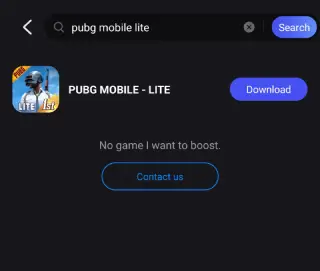
3. Follow prompts to complete installation - this allows global access to PUBG Mobile Lite!
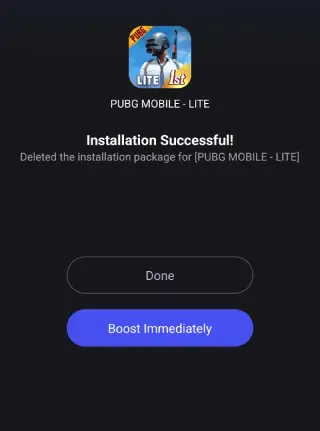
Though PUBG Mobile Lite requires less storage and offers smoother performance, players may still face network lag or server congestion. LagoFast solves this by connecting to global servers for a seamless experience:
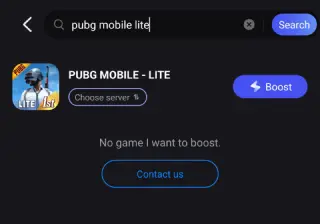
1. Open LagoFast Mobile and search for "PUBG Mobile Lite"
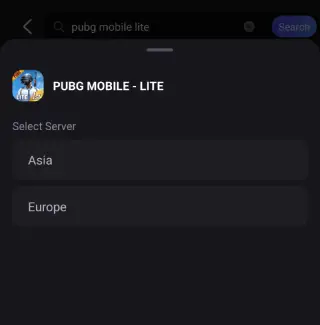
2. Select the best server location to connect
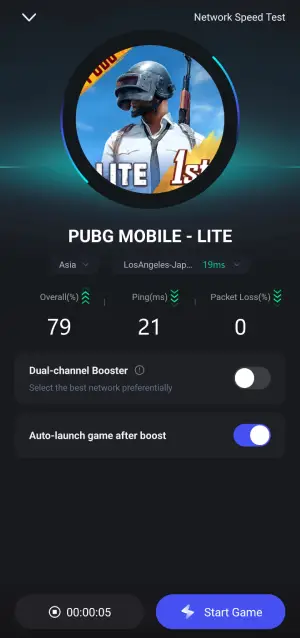
3. Verify optimized performance through the real-time monitor, then click "Start Game" to launch PUBG Mobile Lite!
Part 5: PUBG Mobile Lite Winning Guide
With LagoFast's assistance, implementing the following winning guide for PUBG Mobile Lite will unlock the ultimate gaming experience.
Landing & Looting
- Land Wisely: Steer clear of hot drops. Land in quieter spots near buildings for quick gear.
- Loot Fast: Prioritize weapons, armor, & heals first. Manage your backpack essentials.
Circle & Awareness
- Mind the Circle: Plan early moves to stay inside the safe zone (blue = bad).
- Use Terrain & Sound: Take high ground/cover. Listen for footsteps & gunshots to locate enemies.
Tactical Engagements
- Choose Fights: Only engage when confident you'll win. Avoid unnecessary scraps.
- Adapt Style: Play aggressive with good gear, stealthy when weak. Stay flexible.
Coordinate
- Communicate Constantly: Use voice/pings for info, loot, & plans.
- Stick Together: Support teammates. Don't wander solo & become an easy kill.
Utilize Resources & Stay Sharp
- Vehicle Tactics: Use for fast travel/positioning (loud!). Use as cover/escape.
- Keep Calm & Focus: Stay composed in fights. Prioritize survival & winning.
- Practice & Learn: Train your aim. Review matches to fix mistakes.
Conclusion
PUBG Mobile Lite's compact size and identical gameplay experience have earned it over 100 million downloads worldwide. By following the PUBG Mobile Lite guide provided in this article, players can easily download and enjoy the wanderful game. If your phone has limited storage, don't hesitate - PUBG Mobile Lite and LagoFast are the perfect choices for you!

Boost Your Game with LagoFast for Epic Speed
Play harder, faster. LagoFast game booster eliminates stutter and lags on PC, mobile, or Mac—win every match!
Quickly Reduce Game Lag and Ping!
Boost FPS for Smoother Gameplay!