
If you’ve ever been taken out without even seeing the enemy, misjudged the distance of gunfire, or been completely caught off guard by a third party, you already know PUBG’s biggest challenge: missing crucial information. Every second counts. A small mistake in awareness can turn a promising game into a quick elimination.
That’s exactly where the PUBG BATTLEGROUNDS Reconnaissance Assistant comes in—to give you a clearer picture of the battlefield, helping you spot threats, plan smarter moves, and stay one step ahead of your opponents.

- ✅ Reduce Lag and High Ping.
✅ Boost FPS at the Same Time.
✅ Support 2000+ Popular Online Games.
✅ Change Server without Latency.
✅ Boost Game Loading Speed.
Part 1: What is PUBG BATTLEGROUNDS Reconnaissance Assistant?
Part 2: Why You Need Reconnaissance Assistant in PUBG BATTLEGROUNDS
Part 3: How to Use PUBG BATTLEGROUNDS Reconnaissance Assistant Effectively
Part 1: What is PUBG BATTLEGROUNDS Reconnaissance Assistant?
Think of it as an extra pair of eyes on the battlefield—a tactical assistant that helps you read the situation and make smarter moves before you pull the trigger. It allows you to spot threats earlier, make better decisions when rotating or entering fights, and reduce unnecessary deaths caused by poor situational awareness. The assistant does not take control of your game or modify any files; it simply provides the information you need to stay one step ahead of your opponents.
Part 2: Why You Need Reconnaissance Assistant in PUBG BATTLEGROUNDS
In PUBG BATTLEGROUNDS, dying often isn’t about bad aim—it’s about missing information at the wrong time. Whether it’s being ambushed, misjudging a gunfight, or rotating into danger, a lack of awareness can cost you the game.
The Reconnaissance Assistant addresses these problems by giving you real-time battlefield insight, helping you stay one step ahead. Here’s why it’s essential:
- Spot threats earlier – See enemies and potential ambushes before they see you.
- Reduce costly mistakes—avoid misjudging distances, poor rotations, and dangerous areas.
- Level the playing field—gain better map awareness and sound cues even if you’re not a pro.
- Turn information into advantage—make smarter decisions, survive longer, and turn awareness into kills.
Part 3: How to Use PUBG BATTLEGROUNDS Reconnaissance Assistant Effectively
In PUBG, having the right information can be just as important as having good aim. After all, most deaths happen not because of poor shooting, but because players are caught off guard or make decisions without enough awareness.
To address this, LagoFast’s PUBG Reconnaissance Assistant provides a reliable way to stay aware of your surroundings, make smarter decisions, and reduce unnecessary deaths—without taking control of your game.
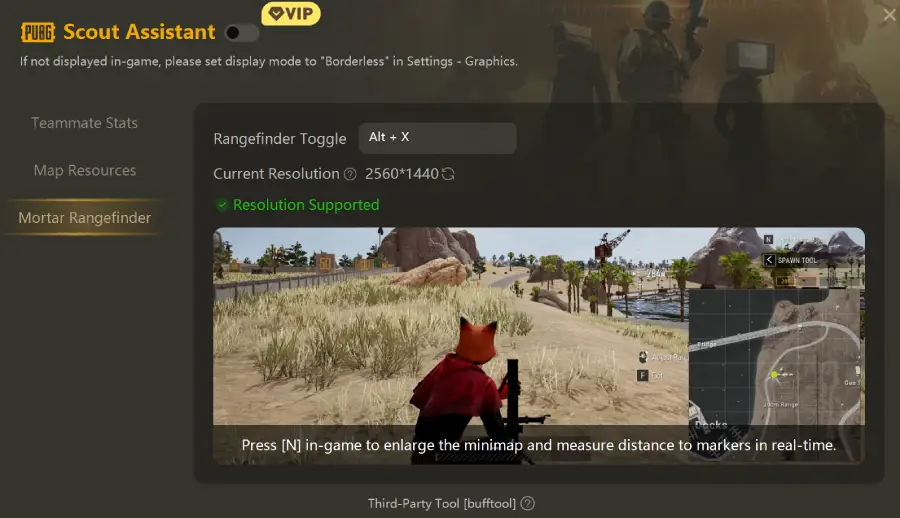
The tool is split into three independent modules, so you can enable only what you need or switch between them quickly using the left-side tab.
Modules Overview
Teammate Stats Lookup
- Quickly check teammates’ historical performance
- Understand team strength and plan roles
- Perfect for random squads or unfamiliar teammates
Map Resource Locations
- Displays key loot points and high-value resources
- Helps plan drop zones and rotations efficiently
- Reduces wasted time running around aimlessly
Mortar Distance Measurement (New Feature)
- Measures real-time distance from your own or teammates’ markers to your position
- Maximum range: 495 meters
- Helps land precise mortar strikes instead of guessing
How to Enable the LagoFast Reconnaissance Assistant
Step 1: Download and install LagoFast.
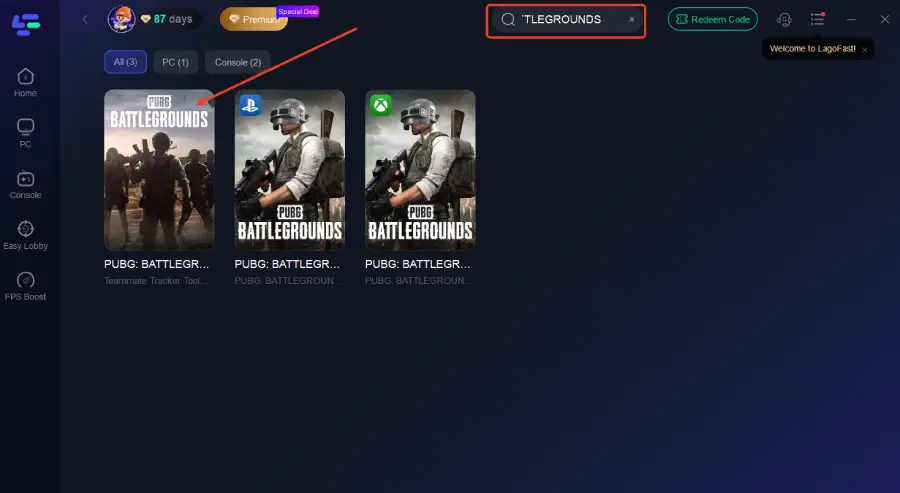
Step 2: Open LagoFast and search for PUBG BATTLEGROUNDS in the search bar.
Step 3: Select the modules you want to use from the bottom-right corner.
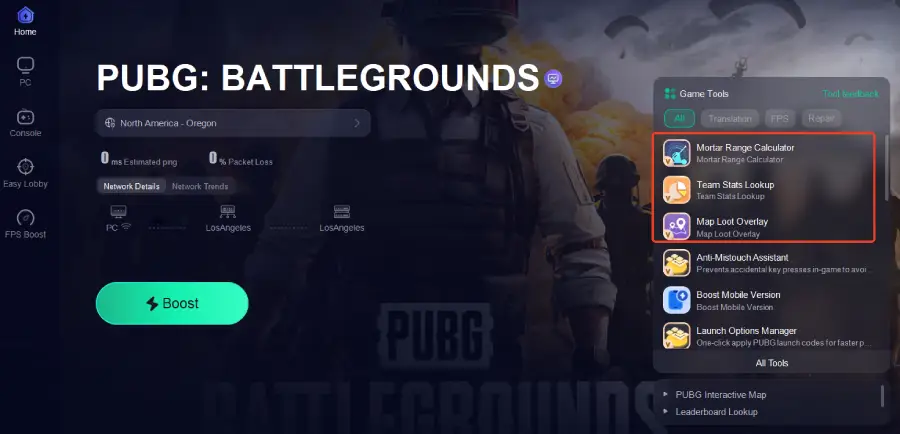
Step 4: Switch between modules and play—for mortars, enlarge the in-game minimap for accurate measurements.
More Benefits of Using LagoFast
Besides the Reconnaissance Assistant, LagoFast offers several features to enhance your PUBG BATTLEGROUNDS experience:
- Reduce Ping & Optimize Network – Improve connection stability and reduce lag during matches.
- Stable Routing—Ensure smoother online gameplay even on long-distance servers.
- Boost FPS—Optimize your system performance for higher and more stable frame rates.
- Instant Translation—Translate in-game text and chat in real time for better communication.
- Anti-Mistouch Assistant – Prevent accidental key presses or misclicks during intense gameplay.
These additional tools make LagoFast a complete game-enhancing solution, helping you play smarter, smoother, and more efficiently.
Step 1: Open LagoFast, and use the search bar to find PUBG BATTLEGROUNDS
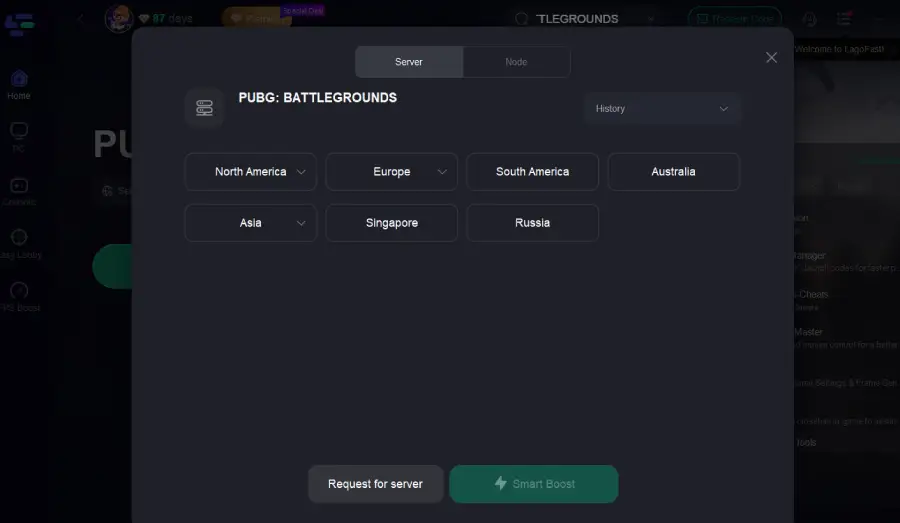
Step 2: Select the best server or route for your region to ensure optimal stability.
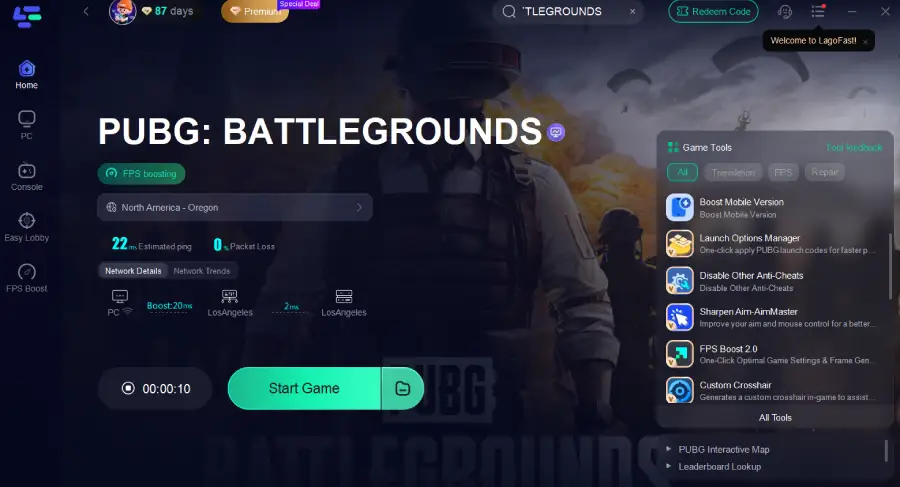
Step 3: Optimize network settings—LagoFast will automatically select the best connection path to minimize lag, packet loss, and high latency for smoother gameplay.
Part 4: FAQs
Q1: Is Reconnaissance Assistant safe to use?
Yes. It does not inject code or modify game files and focuses purely on information support.
Q2: Is it suitable for beginners?
Absolutely. It’s especially helpful for new players, map learners, and those unfamiliar with mortar mechanics.
Q3: Do I need to enable all tools?
No. Each module works independently, so you can activate only what fits your playstyle.
Q4: Will it instantly improve my KD?
Not instantly, but it significantly reduces avoidable deaths and improves long-term consistency.
Conclusion
In PUBG BATTLEGROUNDS, most deaths aren’t from bad aim—they’re from missing information. The LagoFast Reconnaissance Assistant helps you stay aware, make smarter decisions, and react faster.
With its three modules—Teammate Stats Lookup, Map Resource Locations, and Mortar Distance Measurement—you can choose what you need and gain a real edge on the battlefield. Safe, easy to use, and non-intrusive, it’s a tool that helps you survive longer and play smarter.
Boost Your Game with LagoFast for Epic Speed
Play harder, faster. LagoFast game booster eliminates stutter and lags on PC, mobile, or Mac—win every match!
Quickly Reduce Game Lag and Ping!
Boost FPS for Smoother Gameplay!