
After years of anticipation and several "indefinite" delays that tested the patience of every Capcom fan, Pragmata finally hit the shelves on April 17, 2026. This sci-fi action-adventure, set in a hauntingly beautiful lunar wasteland, has captivated players with its unique dual-character mechanics involving Hugh and the mysterious android Diana. However, as players globally dive into the lunar research station’s secrets, a common hurdle has appeared: the language barrier. While the game is a visual masterpiece, fully grasping the complex sci-fi lore and mission objectives requires understanding every line of dialogue. If your native tongue isn't on the official list, you might find yourself lost in space, but there is a way to bridge that gap instantly.

- ✅ Reduce Lag and High Ping.
✅ Boost FPS at the Same Time.
✅ Support 2000+ Popular Online Games.
✅ Change Server without Latency.
✅ Boost Game Loading Speed.
Part 1: Official Language Support in Pragmata
Part 2: LagoFast Translation Tool for Pragmata
Part 3: Manual Language Setting Methods (For Supported Languages)
Part 4: Elevating Your Pragmata Experience: Beyond Translation
Part 1: Official Language Support in Pragmata
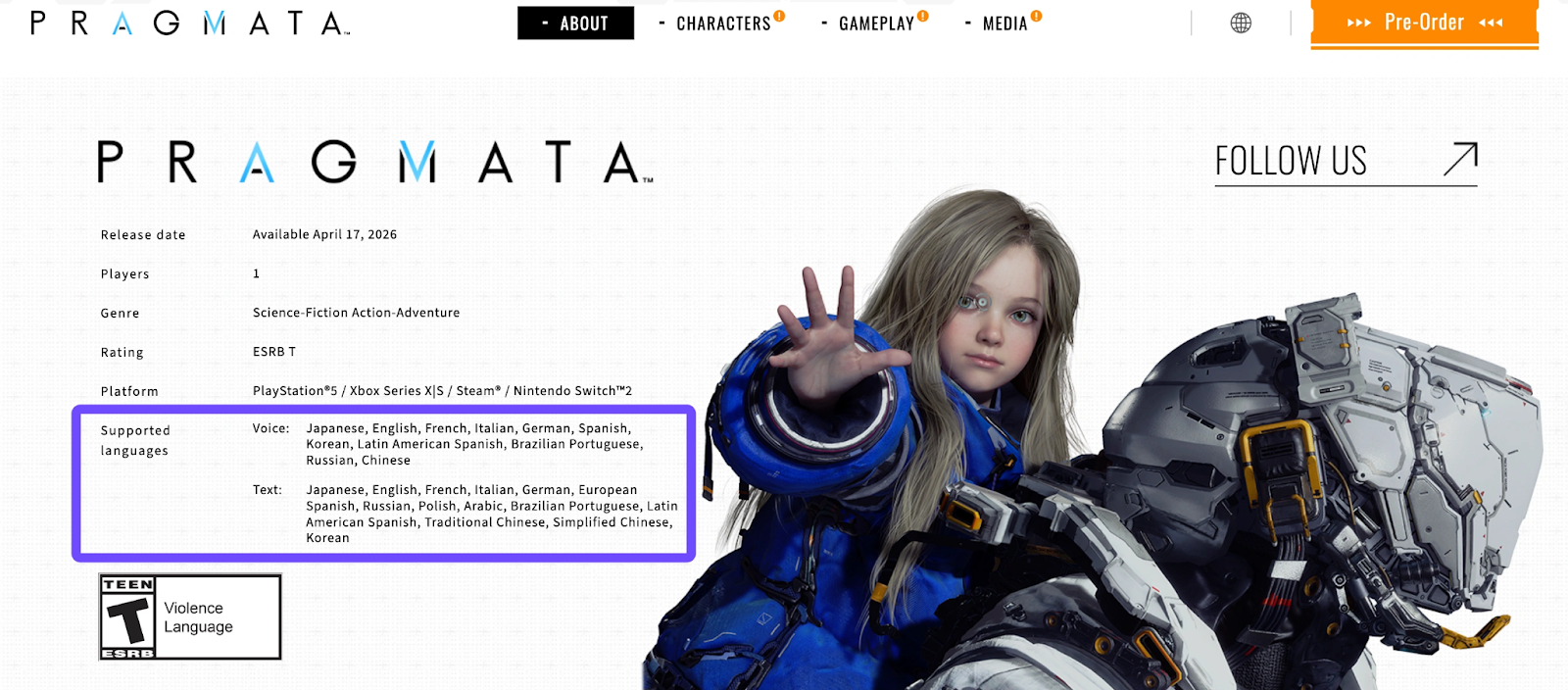
Capcom has been relatively generous with its localization efforts for Pragmata, offering a wide range of text and voice options to cover major global markets. Before looking for external tools, check if your preferred language is already included in the game settings.
The officially supported languages for Pragmata include:
- Full Audio & Text: English, Japanese, French, Italian, German, Spanish (Spain & Latin America), Korean, Brazilian Portuguese, and Russian.
- Text Only: Traditional Chinese, Simplified Chinese, Arabic, Polish, and European Spanish.
If you speak one of these languages, you can simply head to the "Language" or "Language Settings" tab in the main menu to make your selection. However, for players who prefer languages like Turkish, Thai, Vietnamese, or others not listed above, the narrative-heavy world of Pragmata can feel inaccessible.
Part 2: LagoFast Translation Tool for Pragmata
For the community of gamers whose languages were left out of the official build, the LagoFast Translation Tool is becoming an essential companion. While Pragmata is a fast-paced game, much of its world-building is hidden in terminal logs and character interactions.
Why Use LagoFast for Pragmata?
LagoFast is now integrating a built-in Game Translation Pro feature for Pragmata. This allows you to see real-time translated text directly over the game interface without alt-tabbing or using your phone, with support for Turkish and Thai.
Beyond Game Translation Pro, you can utilize these powerful built-in utilities:
- Screen Capture Translation: Simply hit a hotkey to capture a specific dialogue box or mission prompt, and LagoFast will instantly translate the text in a floating window.
- Input Translation: If you are interacting with community features or need to search for specific in-game terms, you can type in your native language, and the tool will convert it for you.
Key Features of the LagoFast Translation Tool:
- Real-Time Accuracy: Uses advanced recognition to ensure sci-fi terminology is translated correctly.
- Zero Impact on Privacy: Unlike some mods, LagoFast doesn’t mess with your game files, keeping your account safe.
- Multi-Language Support: Supports dozens of languages, including those ignored by major publishers.
Step-by-Step Tutorial:
Step 1. Grab the latest version of the LagoFast client from the official site.
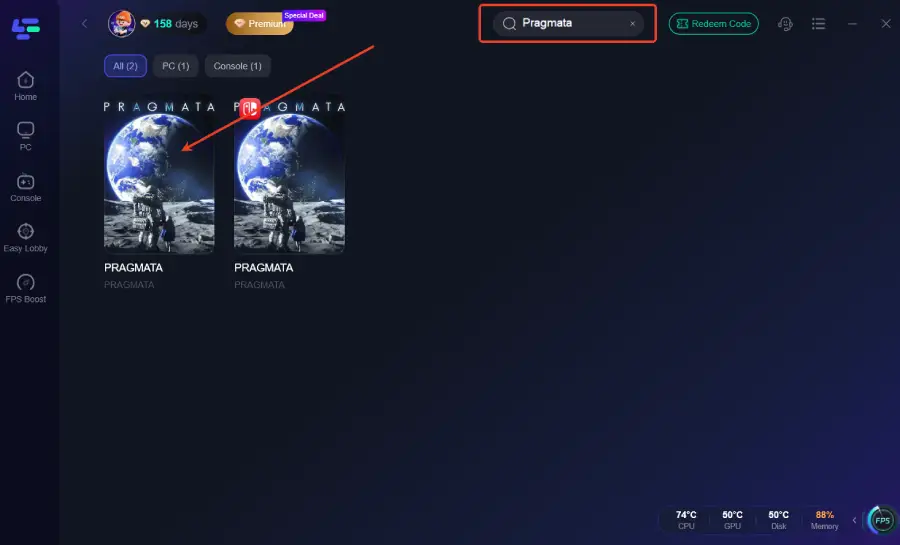
Step 2. Type "Pragmata" into the search bar and add it to your game list.
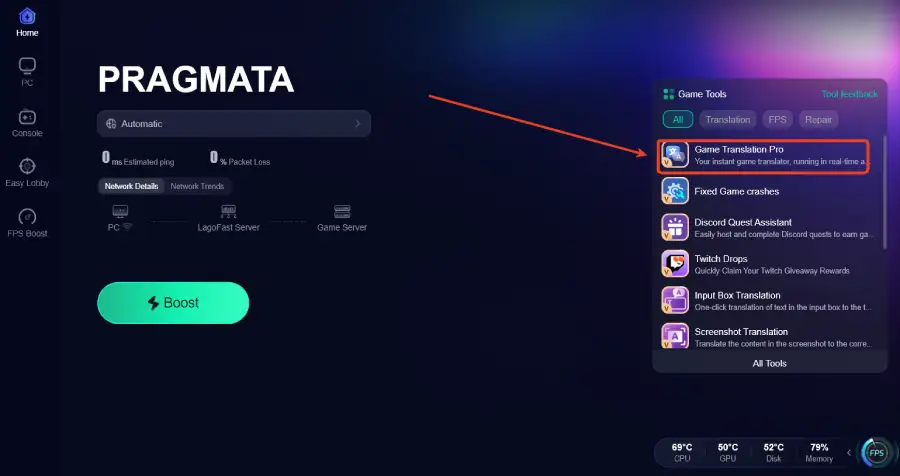
Step 3: Click the Game Translation Pro Tool on the right side of the screen.
Step 4: Select the game file path and install the translated text file.
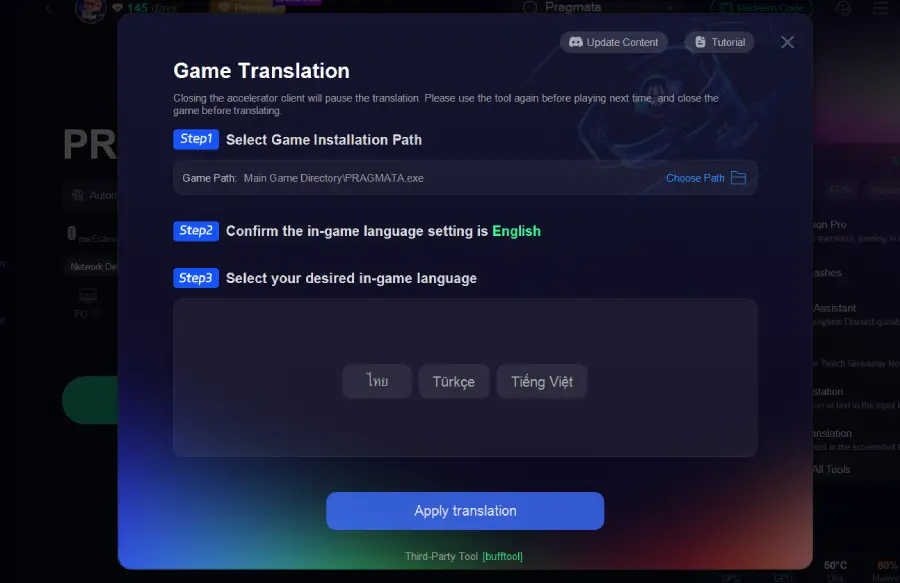
Step 5. Launch & Play: Start the game through LagoFast. Use the designated hotkeys to translate on-screen text as you explore the lunar surface.
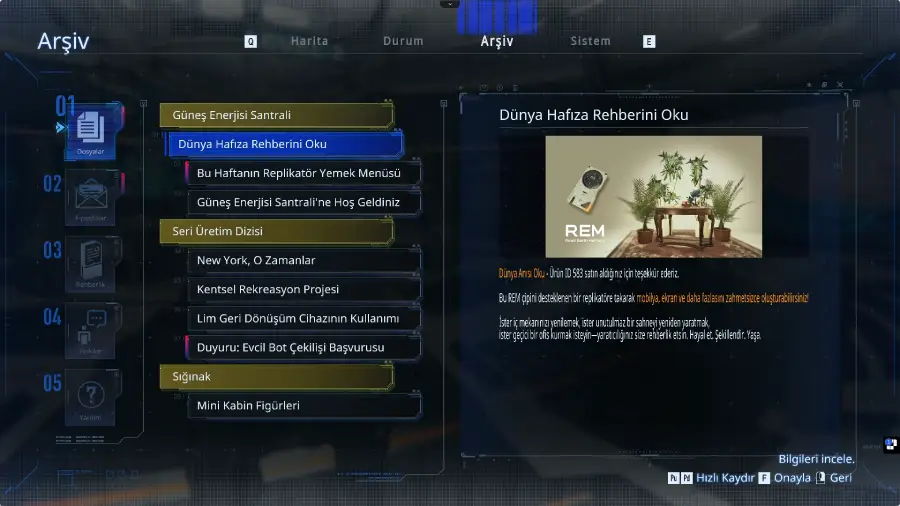
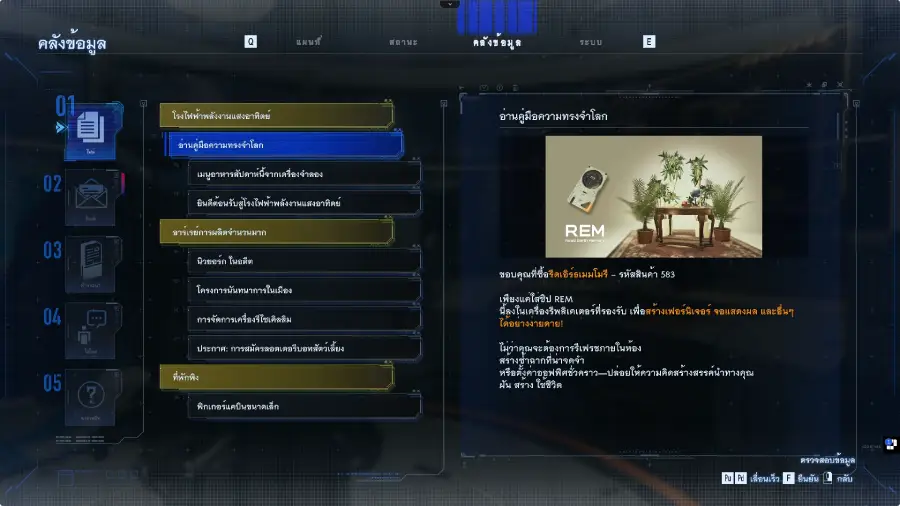
The translation results are as follows:
Turkish
Thai
Part 3: Manual Language Setting Methods (For Supported Languages)
If you are lucky enough to speak one of the supported languages but the game defaulted to the wrong one, you don't need external tools.
To manually change the language in Pragmata:
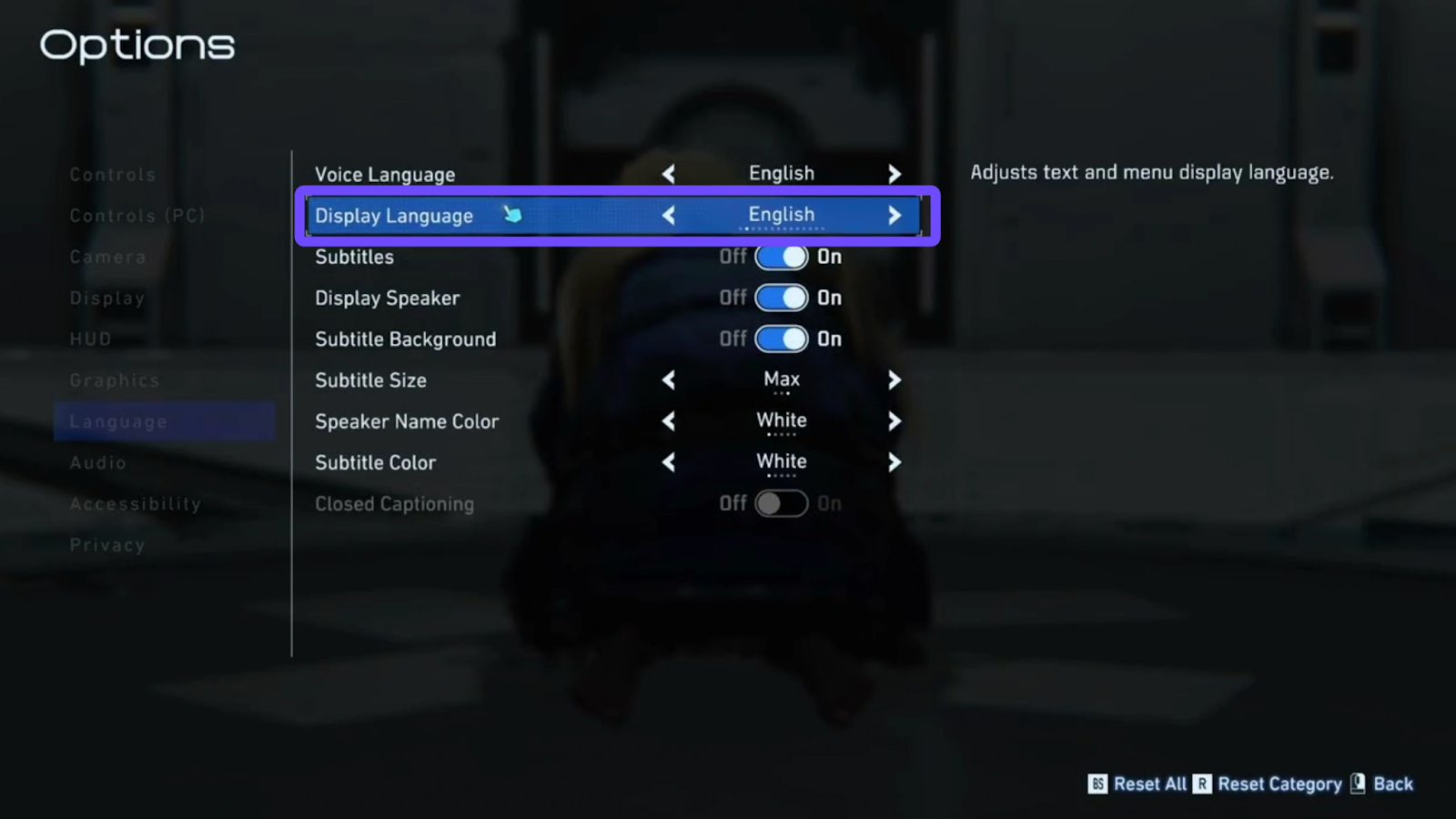
Step 1. Navigate to the Options menu from the Title Screen.
Step 2. Select Language Settings.
Step 3. Change the "Display Language" or "Voice Language" to your preference.
Note: Some platforms, like Steam or the Xbox app, might require you to change the language in the "Properties" or "Manage" tab of the game launcher itself to trigger a small download for the new language files.
Part 4: Elevating Your Pragmata Experience: Beyond Translation
Translation is only half the battle. Because Pragmata utilizes the RE Engine at its most demanding level, especially with the intricate "Lunafilament" physics and AI-generated environments, performance can be an issue. High latency or "stuttering" during combat can lead to a quick "Game Over" when you're trying to protect Diana.
To address these issues, LagoFast is a game-optimized network acceleration tool designed to improve overall gaming performance. More than just a utility for reducing latency, it functions as a full-scale performance suite. By optimizing your network route, it ensures that your connection to game servers (especially for the PC/Steam version) is as direct and stable as possible.
Core Benefits of LagoFast Booster:
- Ping Reduction: Automatically finds the fastest route to the server, cutting down on "ghosting" and lag.
- FPS Optimization: One-click system tuning that stops background processes from hogging your CPU.
- Multipath Connection: Keeps your connection stable even if your local ISP experiences a jitter or spike.
- No-Lag Gameplay: Essential for the hacking minigames in Pragmata where precision timing is everything.
Tutorial to Use LagoFast to Improve Pragmata Performance:
Step 1: Click the Free Trial button to download and install LagoFast.
Step 2: Open LagoFast, then click the PC button on the left and search for Pragmata in the search bar, and click it after it appears.
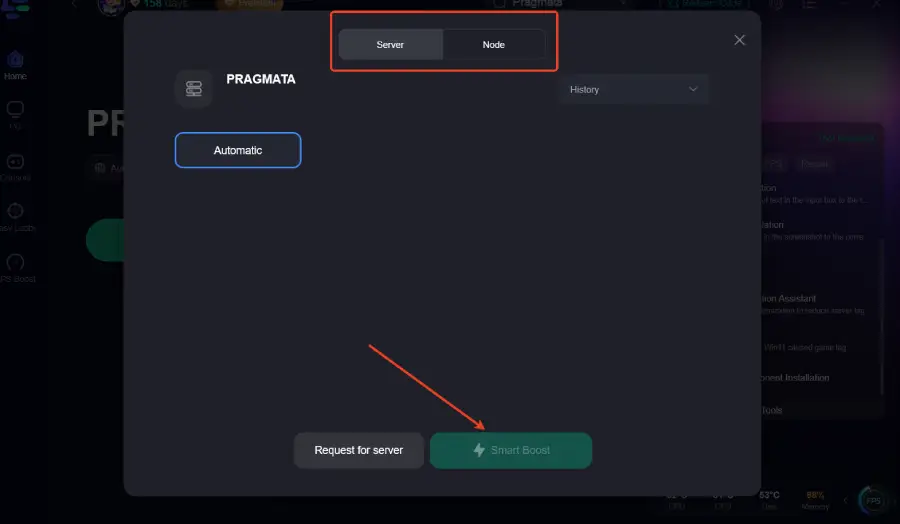
Step 3: Click “Server” to switch to a better server, which can ensure a stable gaming experience. Then click “Smart Boost” to fix other issues.
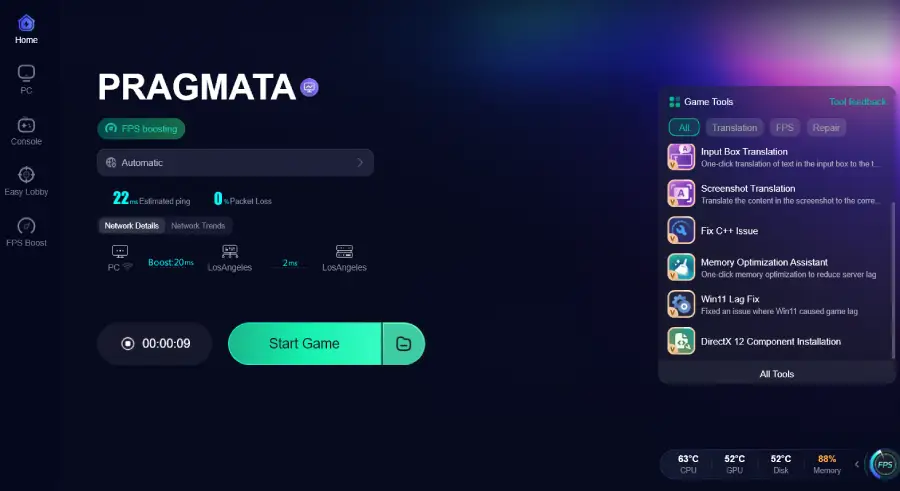
Step 4: Check the specific game ping, packet loss, and multiple path connections on the right side. Finally, click the “Start Game” to play the game.
Part 5: FAQs
Is the LagoFast translation tool safe to use with Pragmata?
Yes. LagoFast uses an external overlay and screen-reading technology. It does not modify the Pragmata game executable (.exe), which means it won't trigger anti-cheat systems or lead to bans.
Does LagoFast work on consoles like PS5 or Xbox Series X?
While the deep translation tool is primarily a PC feature, the LagoFast can be used to boost the network performance and reduce lag for the console versions of Pragmata.
Will the translation tool cause my FPS to drop?
No. LagoFast is designed to be extremely lightweight. In fact, most users find that by using the "FPS Boost" feature alongside the translator, their game actually runs smoother than before.
When will the One-Click Translation for Pragmata be available?
The team is working hard on the specialized library for Pragmata. Keep your LagoFast client updated; you will see a notification on the Pragmata game page as soon as it is live!
Do I need to pay for each language?
No. Once you have access to the LagoFast tool, you can switch between any of the dozens of supported languages at no extra cost.
Conclusion
Pragmata is a journey worth taking, but you shouldn't have to do it with a dictionary in one hand and a controller in the other. By combining the official language support with the LagoFast Translation Tool, you can experience the lunar mystery exactly the way Capcom intended, regardless of what language you speak. Furthermore, don't let technical lag ruin the cinematic beauty of the moon. Use the LagoFast booster to ensure your frame rates are as high as your expectations for this 2026 masterpiece. Happy hunting on the lunar surface!
Boost Your Game with LagoFast for Epic Speed
Play harder, faster. LagoFast game booster eliminates stutter and lags on PC, mobile, or Mac—win every match!
Quickly Reduce Game Lag and Ping!
Boost FPS for Smoother Gameplay!