
Pokémon Champions is a competitive battle-focused game where every second matters, but language can quickly become a problem when menus, abilities, or battle terms don’t make sense. If you’ve ever found yourself hesitating mid-match just to figure out what a skill or option means, you already know how much it can affect your gameplay. That’s exactly why a Pokémon Champions translation tool becomes useful—it helps you understand the game in real time so you can focus on the battle instead of the language.

- ✅ Reduce Lag and High Ping.
✅ Boost FPS at the Same Time.
✅ Support 2000+ Popular Online Games.
✅ Change Server without Latency.
✅ Boost Game Loading Speed.
Part 1: Pokémon Champions Release Date and Game Features
Part 2: What Languages Does Pokémon Champions Support
Part 3: How to Play Pokémon Champions in Any Language — Best Game Translation LagoFast
Part 1: Pokémon Champions Release Date and Game Features
Pokémon Champions launched on Nintendo Switch and Switch 2 on April 8, 2026, before expanding to iOS and Android on June 17, 2026. With full cross-platform support, players can battle across console and mobile using the same competitive system.
Instead of story-focused gameplay, it’s built around fast, strategy-heavy battles where you spend most of your time building teams, testing matchups, and competing in online matches where every decision matters.
Key Game Features
- Cross-Platform Battles: Play and compete across Switch, Switch 2, iOS, and Android without being locked to one device.
- Competitive-Focused Gameplay: Designed around PvP battles instead of story progression or open-world exploration.
- Team Building Strategy: Players create and adjust teams based on matchups, roles, and battle tactics.
- Ranked & Casual Modes: Choose between competitive ranked play or more relaxed casual battles.
- Fast Match Structure: Battles are designed to be quick, tactical, and decision-driven.
- Balanced Competitive Updates: Ongoing adjustments help keep the battle system fair and engaging over time.

Part 2: What Languages Does Pokémon Champions Support
Pokémon Champions supports multiple languages, making it accessible to a global player base, but the experience can still vary depending on your region and language familiarity.
The game currently supports the following languages:
- Japanese
- English
- European Spanish
- Latin American Spanish
- French
- German
- Italian
- Korean
- Simplified Chinese
- Traditional Chinese
Language Barriers Players May Still Face
Even with broad language support, some players still run into issues when playing Pokémon Champions:
- The game is not always available in every region’s preferred language
- Competitive terms and battle mechanics can be difficult to understand quickly
- Ability descriptions may feel confusing during fast-paced matches
- Menu navigation can slow you down if you’re not fully fluent
For players in unsupported regions—such as Vietnamese players who do not have full localized language support—these barriers can make matches harder to follow and react to in real time.
Part 3: How to Play Pokémon Champions in Any Language — Best Game Translation LagoFast
If you want to play Pokémon Champions in Vietnamese or any other language that isn’t fully supported in-game, LagoFast can be a useful option. Its Game Translation tool provides real-time translation that helps you understand menus, skills, and battle text instantly, so you don’t have to guess what’s happening during matches.
It also includes an OCR translation feature that lets you take screenshots and translate on the spot for quicker understanding. On top of that, LagoFast helps improve overall gameplay stability by reducing lag, fixing packet loss, and optimizing your connection. It even offers a game download feature, making it easier to access and play supported games in one place.
How to Use LagoFast for Pokémon Champions Translation
Step 1: Click download and install LagoFast Mobile
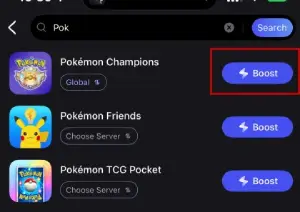
Step 2: Open LagoFast, then search for Pokémon Champions in LagoFast Mobile.
Step 3: Click the OCR Translation Tool below.
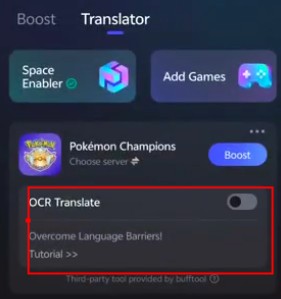
Step 4: Select your preferred language, and you can enjoy the game instantly.
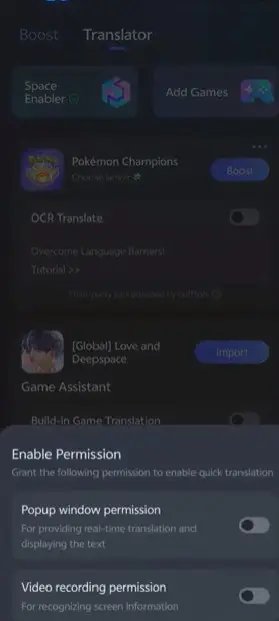
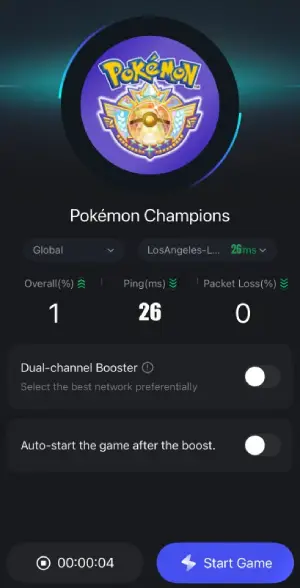
Step 5: Click boost and select your corresponding server region to connect.
Step 6: Once optimized performance is confirmed, click "Start Game" to launch the game.
Final Thoughts
Pokémon Champions is built for fast, competitive battles, but language barriers can easily slow you down if you’re not fully comfortable with the in-game text. A translation tool like LagoFast helps you understand menus, skills, and battle information in real time, so you can stay focused on gameplay instead of guessing what things mean. Combined with OCR translation and network optimization features, it also helps make the overall experience smoother. In the end, it’s all about making the game easier to play and enjoy, no matter what language you use.

Boost Your Game with LagoFast for Epic Speed
Play harder, faster. LagoFast game booster eliminates stutter and lags on PC, mobile, or Mac—win every match!
Quickly Reduce Game Lag and Ping!
Boost FPS for Smoother Gameplay!