

Odin: Valhalla Rising, a visually stunning MMORPG developed by Kakao Games and Lionheart Studio, has captivated players worldwide with its immersive Norse mythology-inspired world, dynamic combat, and deep RPG mechanics.
While the game has multiple regional servers, the JP Server (Japan Server) offers a unique experience tailored to Japanese-speaking players, complete with localized events, community activities, and optimized connectivity. This guide will walk you through everything you need to know to start playing Odin: Valhalla Rising on the JP Server, including setup methods, server benefits, and strategies to enhance your experience in Odin: Valhalla Rising.

- ✅ Reduce Lag and High Ping.
- ✅ Boost FPS at the Same Time.
- ✅ Support 2000+ Popular Online Games.
- ✅ Change server without any latency.
Part 1: Release details for Odin: Valhalla Rising? Platform?
Part 2: Advantages to play Odin: Valhalla Rising on japan server
Part 3: How to play Odin: Valhalla Rising on japan server with LagoFast?
Part 1: Release details for Odin: Valhalla Rising? Platform?
Odin: Valhalla Rising, an MMORPG developed by Lion Heart Studio in collaboration with Kakao Games, has the following release details:
- On June 29, 2021, the South Korean server of Odin: Valhalla Rising officially launched.
- On March 29, 2022, the servers for Hong Kong, Macau, Taiwan, and Japan were released.
- According to official announcements, the global server of Odin: Valhalla Rising will officially launch on April 29, 2025. Players can begin pre-registration starting April 3, and pre-loading will be available from April 28.
The platform of Odin: Valhalla Rising:
Odin: Valhalla Rising is confirmed for release on PC and mobile devices with cross-play support. This allows players to log into the game on their preferred device (mobile or PC) based on their needs, with synchronized progress across both platforms. The cross-device connectivity in Odin: Valhalla Rising ensures seamless gameplay and provides greater flexibility in how players interact with the game.
While there's no confirmation of a console version, future updates might expand Odin's reach to PlayStation and Xbox. Given the increasing trend of MMORPGs moving to consoles, fans are hopeful for additional platform support post-launch.
Part 2: Advantages to play Odin: Valhalla Rising on japan server
Since the release of Odin: Valhalla Rising's Japanese server, the game has garnered immense popularity among players. Playing on the Japanese server offers the following advantages:
- Low Latency for Players: If you're located in Japan or nearby regions, the JP Server ensures smoother gameplay with reduced lag.
- Exclusive Events: Participate in Japan-only in-game events, collaborations, and seasonal festivals inspired by Japanese culture.
- Active Community: Engage with a dedicated player base known for its cooperative guilds and competitive PvP scene.
- Language Support: Full Japanese localization for quests, UI, and voice acting, ideal for native speakers or learners.
Part 3: How to play Odin: Valhalla Rising on japan server with LagoFast?
Due to the region-locked official servers of Odin: Valhalla Rising, players from other regions who wish to play on the Japanese server can use LagoFast:
As a professional game acceleration tool, LagoFast provides access to server nodes in over 60 countries and 150 cities worldwide, including Japan. This allows Odin: Valhalla Rising players to switch server nodes with a single click, easily connect to the Japanese server, and start a multilingual gaming experience.
Below is a tutorial for downloading Odin: Valhalla Rising JP server via LagoFast:
Step 1:Click the button to download and install LagoFast for free.
Step 2: With LagoFast's one-click region switching tool, players can instantly switch to the Japanese server of Odin: Valhalla Rising by simply adjusting to the required Japanese time zone and region with just a single click, while also gaining access to a Japanese font package.

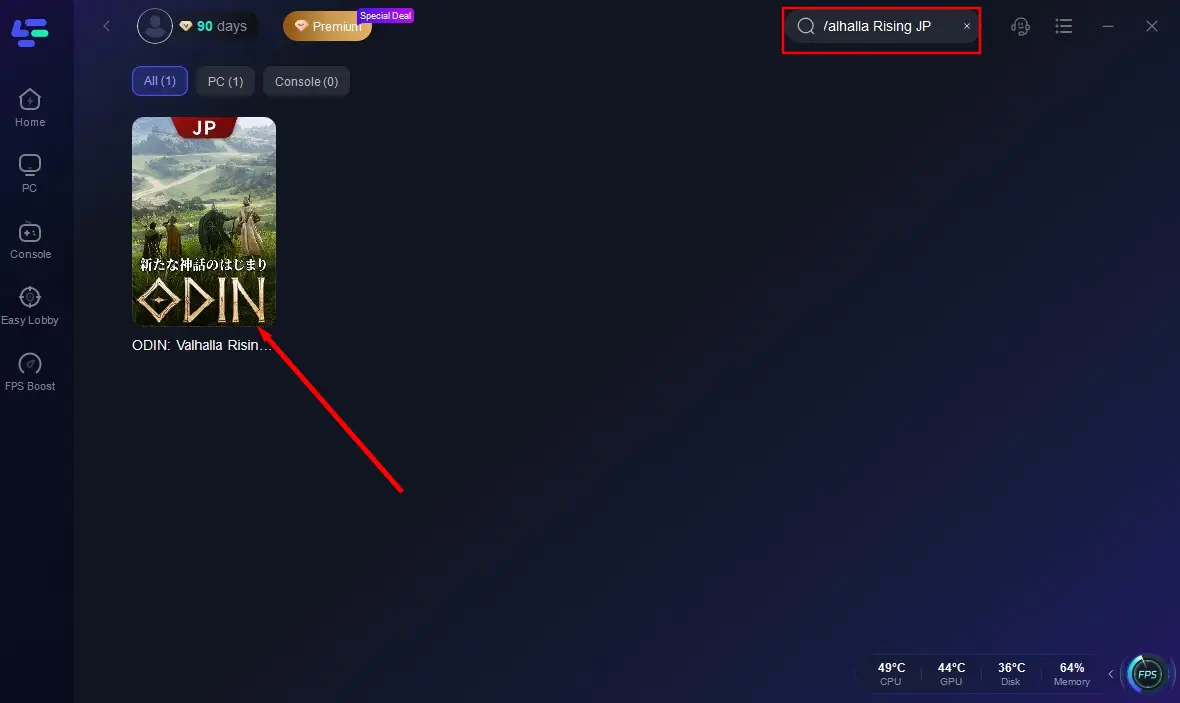
Step 3: Search for "Odin: Valhalla Rising JP" in the search bar of LagoFast, and select the Japanese version from the results.
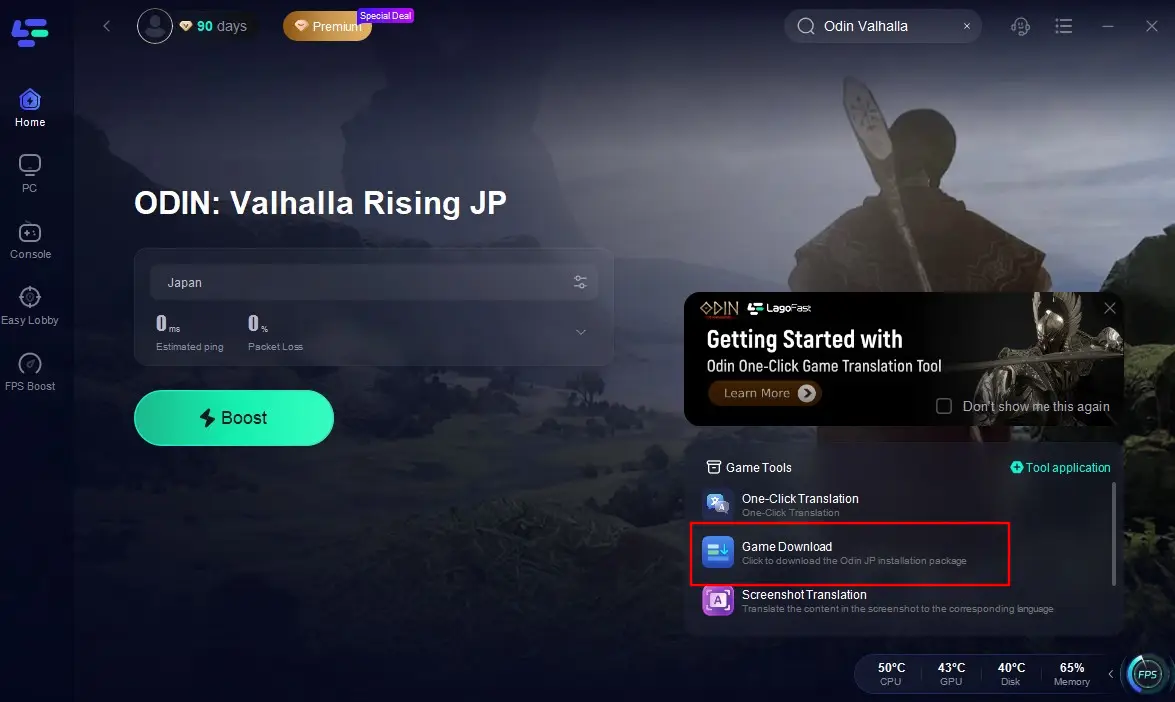
Step 4: Click on the Game Download Tool on the right side of the screen to begin the download.
Step 5: Wait patiently for the download to complete, then install it on your device.
After installation, you can enhance your gaming experience in Odin: Valhalla Rising JP with LagoFast:
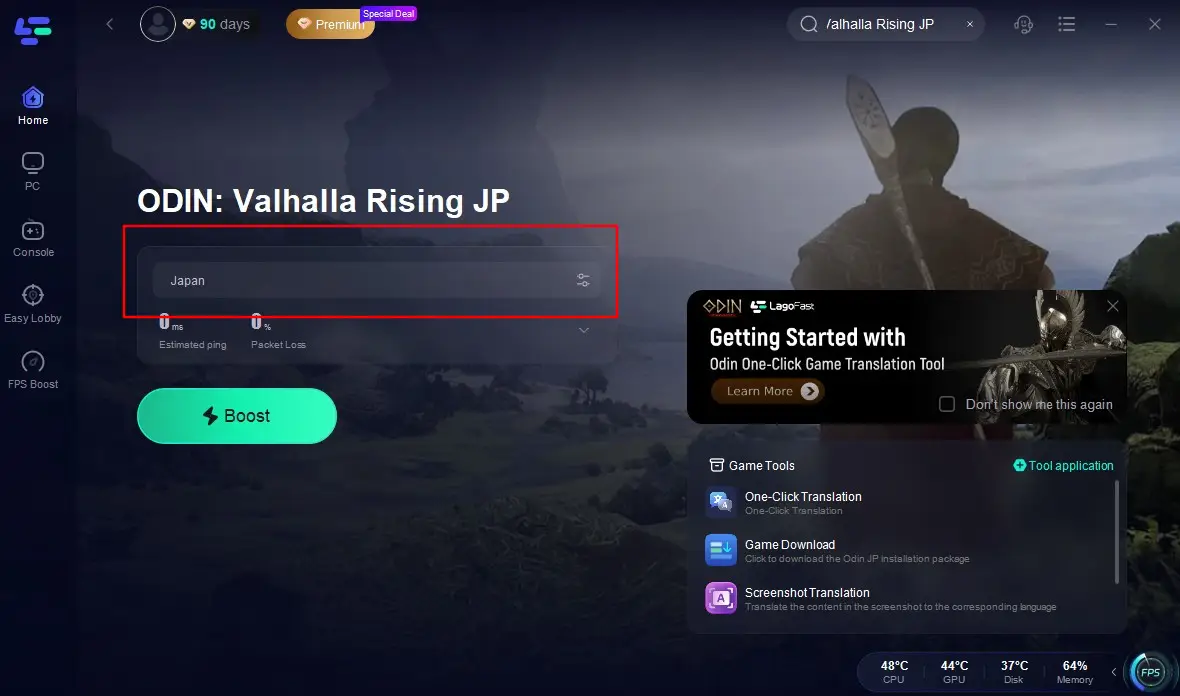
Launch LagoFast and search "Odin: Valhalla Rising JP" in search bar, click the result. At the same time, keep the changed time zone and IP region.
Confirm the Japanese server and node, then click "Start Boost".
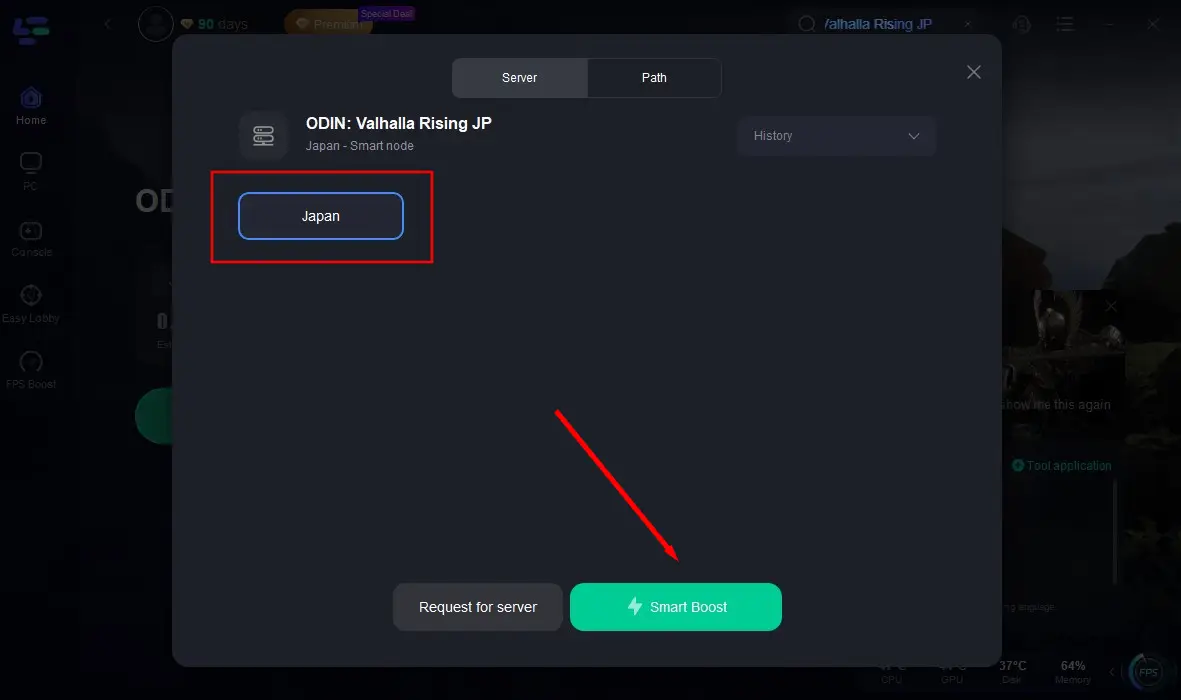
Check the packet loss rate and ping value before launching the game, then enter the Japanese server of Odin: Valhalla Rising.
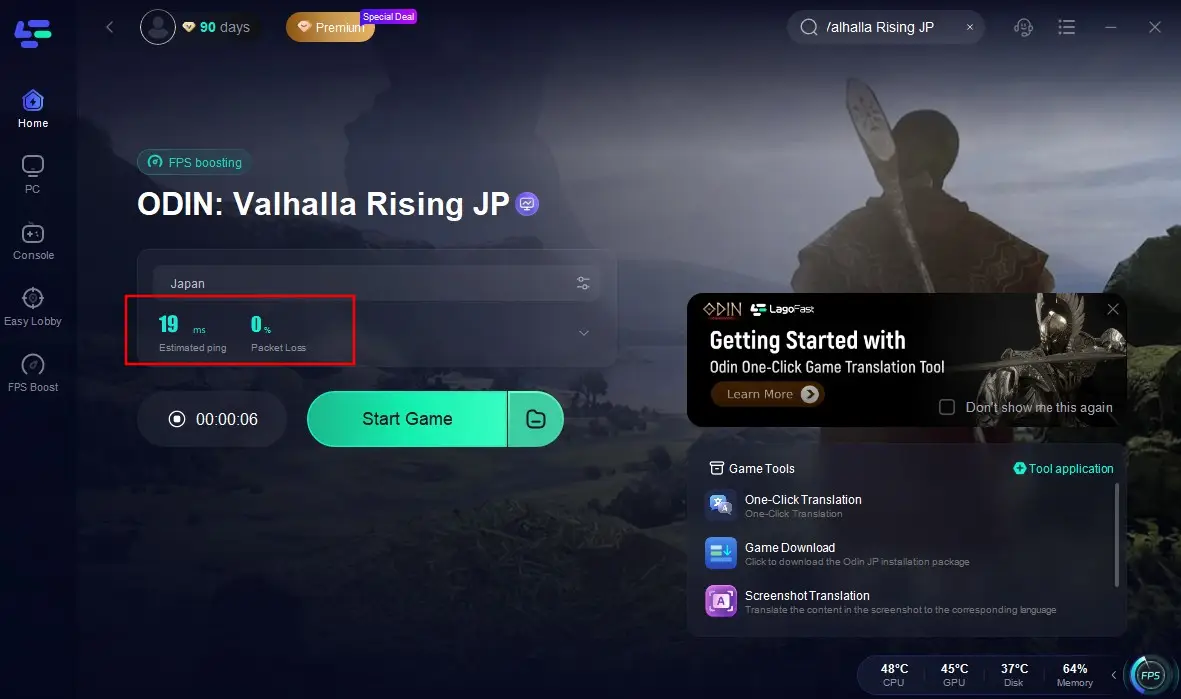
While allowing players to access the Japanese server, LagoFast also monitors network connection quality in real-time. It automatically and intelligently optimizes the best possible network path for players, reducing issues like latency and frame drops during gameplay. This ensures a smooth and comfortable Odin: Valhalla Rising experience for players across all regions.
Additionally, LagoFast equips players with a built-in game translation tool, allowing them to effortlessly overcome language barriers when playing Odin: Valhalla Rising on the Japanese server. Enjoy a seamless gaming experience in your native language! Here are the steps to use LagoFast's translation tool:
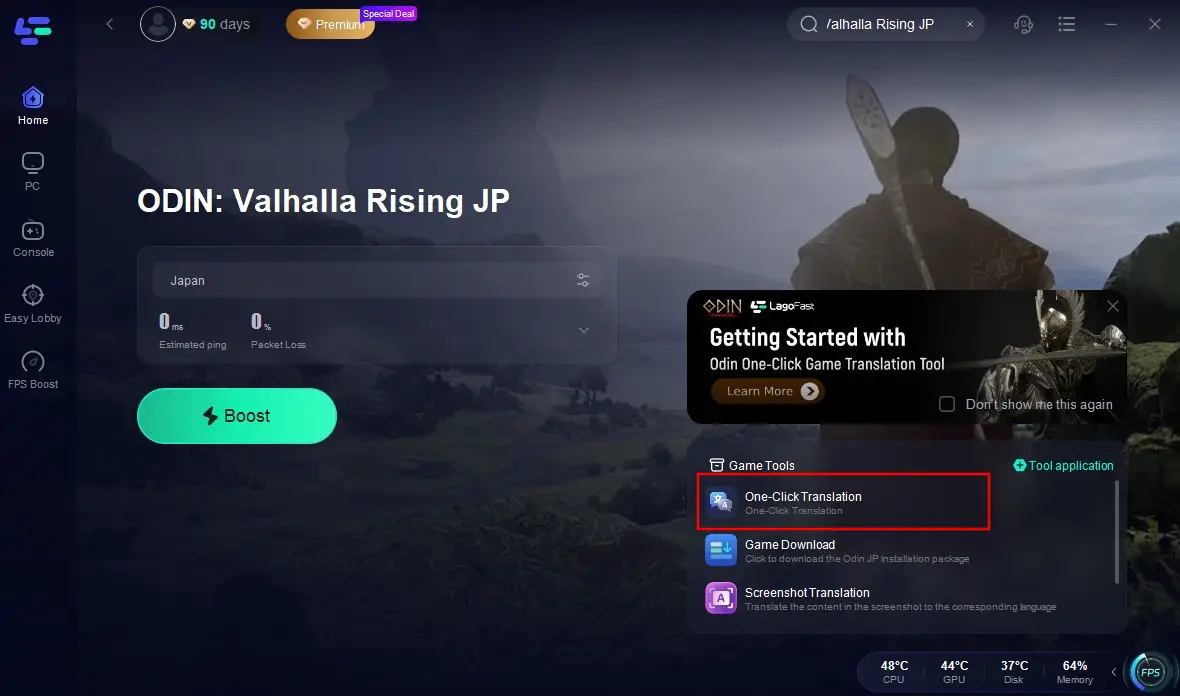
Click the "One-Click Translation" button in the game toolbar located at the bottom-right corner of the screen.
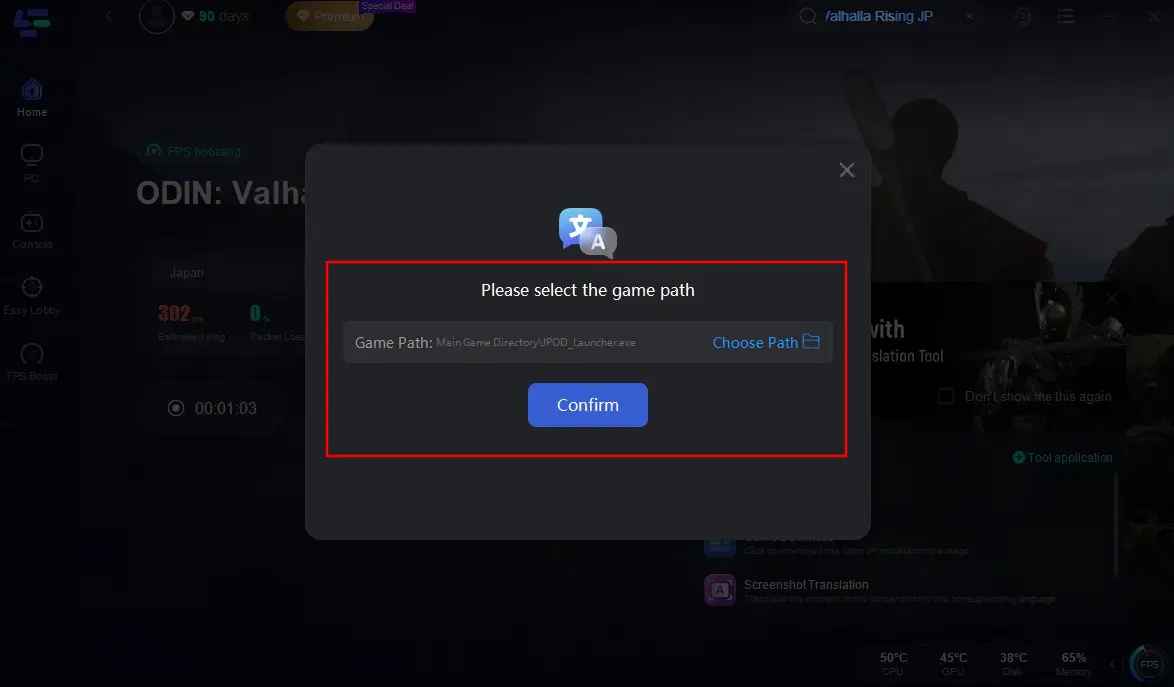
Import the Odin: Valhalla Rising game installation package and click "Confirm".
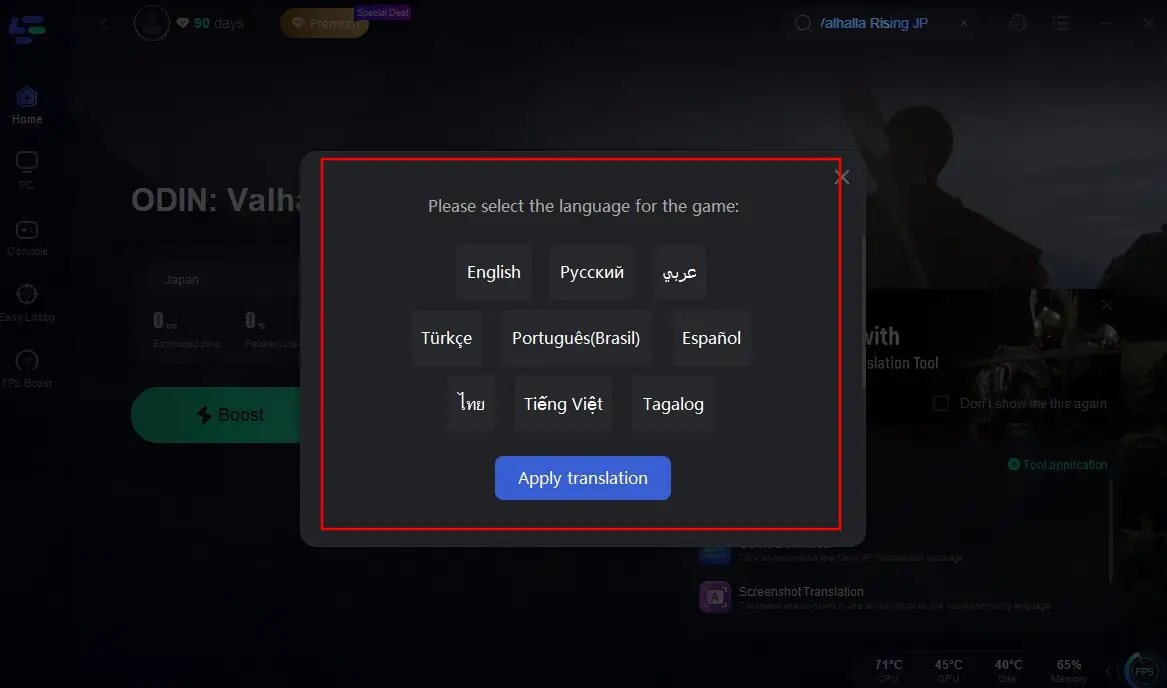
Select your target language, click "Apply Translation", and wait a moment. Relaunch the game to experience Odin: Valhalla Rising on the Japanese server without language barriers!

Hot Related: Best Odin: Valhalla Rising TW Version Translation Tool
Part 4: FAQs
Where to play Odin in Valhalla Rising?
You can play Odin: Valhalla Rising on PC and on Mobile ( iOS-App Store and Android-Google Play).
When does Odin: Valhalla Rising JP version release?
Odin: Valhalla Rising released in Japan and Taiwan in 2022, soon after its initial launch in South Korea on June 29, 2021.
What are the system requirements of Odin: Valhalla Rising?
Minimum PC requirements of Odin: Valhalla Rising:
- OS: Windows 10/11
- Processor: Intel Core i5-9600K or AMD Ryzen 5 3600
- RAM: 16GB
- Graphics: NVIDIA GeForce RTX 2060 or AMD Radeon RX 5700 XT
- Storage: 50GB available space
Conclusion
Playing Odin: Valhalla Rising on the JP Server opens doors to a passionate community, exclusive content, and a polished gaming experience. By using LagoFast, you'll navigate language barriers, optimize performance, and dive into epic Norse adventures!

Boost Your Game with LagoFast for Epic Speed
Play harder, faster. LagoFast game booster eliminates stutter and lags on PC, mobile, or Mac—win every match!
Quickly Reduce Game Lag and Ping!
Boost FPS for Smoother Gameplay!