
Black Beacon, GloHow’s action-packed RPG, has taken mobile gaming by storm with its immersive storyline and strategic combat. But why settle for touchscreen controls when you can dominate its myth-shattering battles on PC? Whether you’re a seasoned RPG veteran or new to the genre, this guide breaks down how to play Black Beacon on PC using Google Play Games Beta and top-tier emulators like BlueStacks and LDPlayer. Plus, discover how LagoFast’s game booster can eliminate lag and supercharge your performance. Let’s dive in.

- ✅ Reduce Lag and High Ping
- ✅ Boost FPS in Real Time
- ✅ End All Connection Login Issues.
- ✅ Support 2000+ Online Games.
- ✅ Multiplatform: PC, Mobile, Console
Part 2: How to Play Black Beacon on PC
Part 3: Ensure Smooth Black Beacon Gaming Experience on PC with LagoFast
Part 1: Black Beacon Overview
Black Beacon Release Date & Platforms
Glohow will launch Black Beacon on Android and iOS platforms worldwide on April 10, 2025. Prior to this, Black Beacon had already conducted a global beta test in January 2025, which impressed people with its gorgeous graphics, wonderful storyline, English dubbing, smooth action combat and role-playing games.
While the official PC version is still in development, players can already enjoy the game on Windows and macOS using Google Play Games Beta or emulators like BlueStacks and LDPlayer. These tools mirror the mobile experience while offering keyboard-mouse controls and performance optimizations.
Black Beacon Game Features
- Epic Storyline: As the Seer, you lead EME-AN, a secret organization tasked with protecting humanity from a time-traveling crisis triggered by the mysterious Black Beacon. Uncover betrayals, ancient gods, and the fate of the Tower of Babel through branching narratives.
- Diverse Cast of Characters: Assemble a team of unique heroes like Zero (a stoic librarian with cosmic powers) and Shamash (a law-enforcer bound by unbreakable shackles). Each character boasts distinct skills, voiceovers, and customizable costumes.
- Strategic Combat: Master combo-based battles with dynamic skill synergies. Timing and positioning matter—chain attacks, exploit elemental weaknesses, and unleash devastating ultimates to turn the tide.
- Immersive Worldbuilding: Explore visually stunning realms blending myth and reality, from the Library of Babel to post-apocalyptic landscapes. The game’s art style and full voice acting (available in multiple languages) draw you into its lore-rich universe.

Part 2: How to Play Black Beacon on PC
Method 1: Google Play Games Beta
Step 1: Check System Requirements
- OS: Windows 7 or later
- Processor: Intel/AMD CPU
- RAM: 4GB+
- Storage: 5GB free space
- Virtualization: Enable Windows Hypervisor Platform in BIOS.
Step 2: Install Google Play Games Beta
- Visit play.google.com/googleplaygames and click Download Beta.
- Run the installer, agree to terms, and enable virtualization if prompted.
- Sign in with your Google account and search for Black Beacon.
- Click Install and launch the game.
Pros: Official Google support, seamless integration with Android saves, and optimized performance.
Cons: Limited game library and requires Windows 10/11 for best results.
Method 2: Use Emulators (BlueStacks/LDPlayer)
BlueStacks Setup:
- Download BlueStacks from bluestacks.com.
- Install, sign in to Google Play, and search for Black Beacon.
- Customize controls (e.g., map WASD for movement) and launch.
LDPlayer Setup:
- Get LDPlayer from ldplayer.net.
- Enable keyboard mapping for combos (e.g., macro keys for skill sequences) .
- Adjust graphics settings for smooth gameplay.
Pros: Wider customization, better compatibility with older systems, and support for higher FPS.
Cons: Requires manual updates and may consume more resources.
Part 3: Ensure Smooth Black Beacon Gaming Experience on PC with LagoFast
Since Black Beacon is a mobile game, players can only access it directly on mobile devices. To play Black Beacon on a PC, you need to launch it via the Google Play Games platform. Below is a step-by-step guide on how to use LagoFast to access Google Play Games and seamlessly play Black Beacon.
Key Features of LagoFast:
- Ultra-Low Latency: Optimize network routes to reduce ping by up to 50%, ensuring seamless skill execution.
- FPS Boost: Automatically tweak CPU/GPU settings to eliminate stuttering and enhance frame rates.
- Multiplatform Support: Works with Google Play Games Beta, BlueStacks, and LDPlayer.
- One-Click Optimization: Disable background processes and allocate resources to Black Beacon.
How to Use LagoFast for Better Experience of Black Beacon on PC:
Step 1: Begin by clicking the Free Trial button to download and install the LagoFast Free Trial.
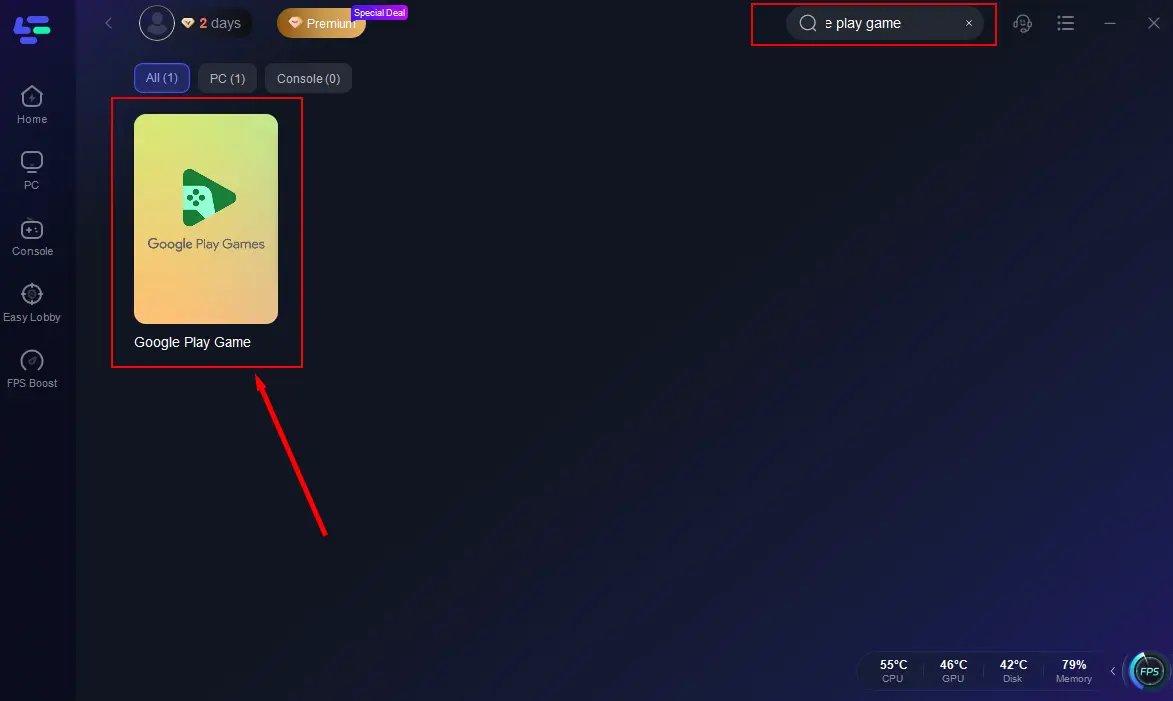
Step 2: Open LagoFast then click the PC button on the left and search "Google Play Game" in the search bar, click it after appearing.
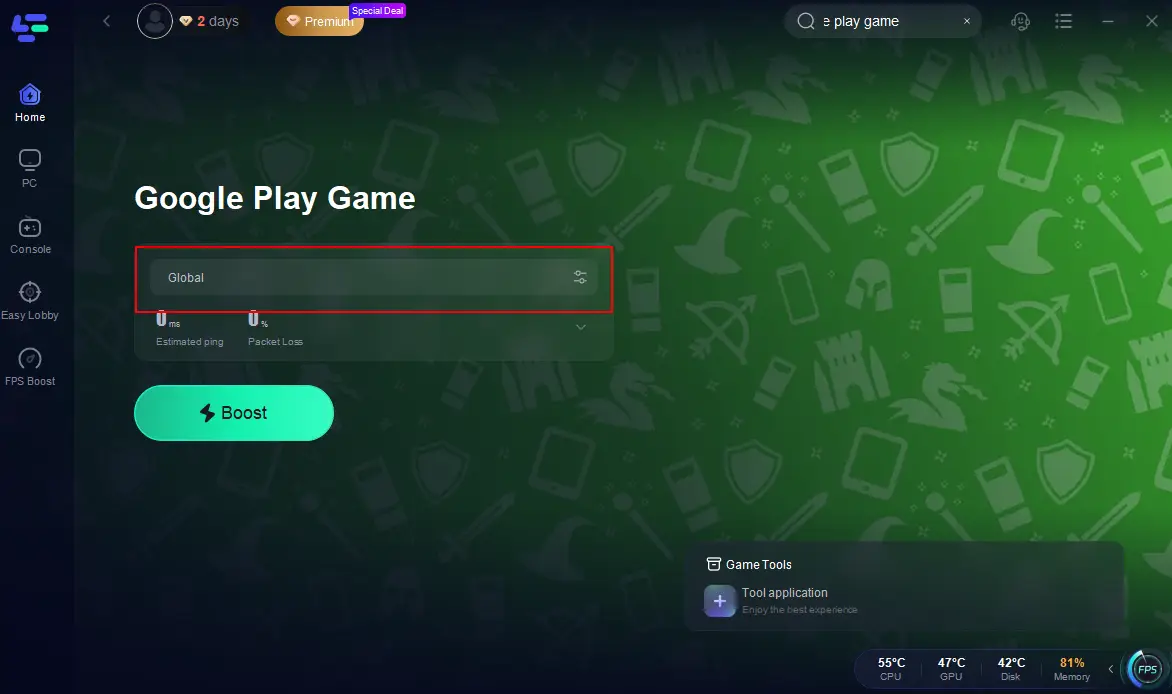
Step 3: Change to a better server that ensures smooth gameplay, then click on “Smart Boost”.
Step 4: Check the specific game ping, packet loss, and multiple path connection on the right side. Finally, click the “Start Game” to play the game.
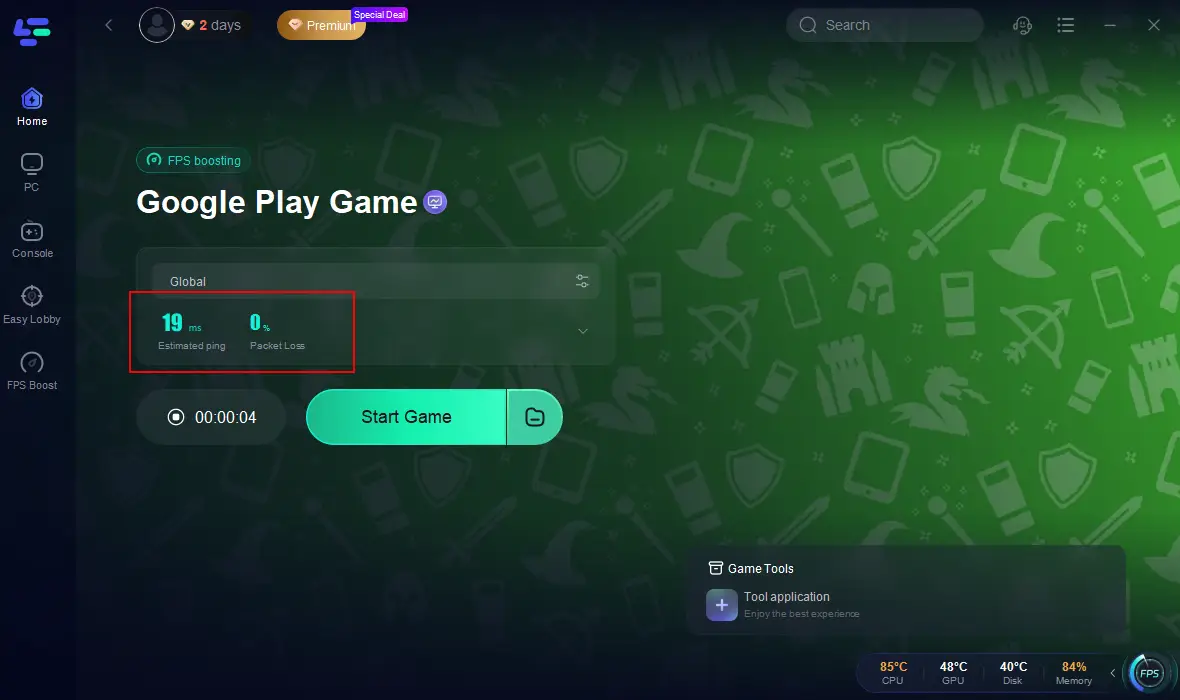
LagoFast’s global server network and real-time route switching bypass congestion, while its FPS booster fine-tunes your PC for peak performance.
Conclusion
Black Beacon on PC delivers a next-level RPG experience, combining console-quality controls with mobile accessibility. Whether you choose Google Play Games Beta for simplicity or emulators for customization, pairing it with LagoFast ensures smooth, competitive gameplay. Dive into the time-traveling chaos, master your team’s synergies, and save humanity—all from the comfort of your PC.
Boost Your Game with LagoFast for Epic Speed
Play harder, faster. LagoFast game booster eliminates stutter and lags on PC, mobile, or Mac—win every match!
Quickly Reduce Game Lag and Ping!
Boost FPS for Smoother Gameplay!