

Many PEAK players report the same problem: lag, stuttering, and FPS drops that ruin teamwork and break immersion. Instead of battling the mountain, you end up fighting technical issues. The good news? These problems can be fixed. In this guide, we’ll explain the causes of PEAK lag and give you step-by-step solutions to make the game run smoothly.

- ✅ Reduce Lag and High Ping.
✅ Boost FPS at the Same Time.
✅ Support 2000+ Online Games
✅ Change Server Without Latency.
✅ Multiplatform: PC, Console, Mobile.
✅End Disconnection and Crashing Issues
Part 1: Why the Peak Game Lags
Part 2: What to Do If Peak Lags
Part 1: Why the Peak Game Lags
Many players report experiencing severe performance problems in Peak, even on high-end PCs that can run AAA games smoothly. This frustrating situation is typically caused by a combination of the following factors.
The Game's Own Optimization Issues
This is the core reason why Peak game lags and the most discussed topic in the community.
- New game & early access stage: As a newly released title, Peak's code and engine optimization are still in their early stages. The development team requires time to collect performance data across a broad spectrum of hardware setups and to deploy necessary optimization updates.
- Negative effects of patches: Sometimes, updates intended to fix problems can sometimes create new performance regressions and instability, making stability inconsistent from version to version.
- Poor hardware compatibility: The game struggles with a range of hardware configurations, including specific components and drivers. This leads to stuttering and subpar performance on even high-end PCs, with no clear winner between Vulkan and DX12.
Network Connection
As a game that emphasizes cooperation, Peak's network connection quality is paramount. Any network fluctuation translates directly into in-game lag and stuttering.
- High Ping: Physical distance from the game server is a key cause of high ping. The farther the data has to travel, the more latency it will be. In Peak game, even a slight delay can make your character feel unresponsive, as if it's constantly trying to catch up with your actions.
- Network congestion & packet loss: The internet connection works like a highway. At rush hour when lots of people are gaming, the traffic builds up. This congestion can delay or even lose packets of game data. In practice, this means occasional freezes or short pauses that interrupt the action before the game speeds up again.
- Unstable Wi-Fi: Wi-Fi is generally less stable than wired connections though it's convenient. Physical obstructions and interference from other devices can weaken the signal, causing unexpected lag spikes and packet loss.
PC Configuration and Software Settings
While game optimization is the primary cause, your PC's own state also significantly impacts performance.
- Outdated graphics drivers: Using outdated graphics drivers can seriously affect your gaming experience. NVIDIA and AMD regularly release updates to improve performance and fix issues in new games. Therefore, if you're using an old driver, you might notice visual bugs, sudden crashes, or overall sluggish performance, even though you're using a powerful PC.
- Background Applications Hogging Resources: Background programs like web browsers, antivirus scans, or downloads can use a surprising amount of the PC's CPU and memory. When these resources are diverted elsewhere, Peak may not have enough power to run smoothly. This often leads to unexpected frame rate drops or stuttering, especially during intense moments.
- Unreasonable Graphics Settings: It's tempting to max out every graphics setting, especially on a high-end PC. But if a game isn't fully optimized, ultra settings can push your system too hard. That's why many players get better results by lowering some options—not because their rig is weak, but because it helps balance load until the game improves.
Part 2: What to Do If Peak Lags
Facing such complex issues, troubleshooting each one can be consuming and frustrating. Fortunately, there is a smarter, more efficient solution, which is to use LagoFast.
How LagoFast Precisely Tackles Peak's Lag Issues
LagoFast is a game booster created for the ultimate gaming experience in Peak. It tackles lag caused by multiple sources such as network problems, poor game optimization, and more. This tool offers a complete solution that doesn't just fix one issue but solves all the root causes that might ruin your game.
- For network performance, LagoFast uses global exclusive routes and multi-path connection technology to find the best path for your game data. This greatly reduces latency and packet loss, giving you a stable connection. It monitors your network in real time and can avoid crowded nodes to keep ping low. If one connection path fails, it instantly switches to another so you never drop out at a key moment. This is essential for Peak.
- For PC performance, LagoFast offers a one-click FPS boost feature. Though you're using high-end PCs, PEAK doesn't always run smoothly, because the game's own optimization still needs work. Lagofast helps by optimizing your system behind the scenes, directing resources toward the game so it performs better. It adjusts CPU and GPU settings, clears up memory, and ensures your graphics drivers are current. All of these technical adjustments happen automatically, resulting in a consistently smooth frame rate without stutters or screen tearing.
Tutorial to use LagoFast on PC if Peak lags:
Step 1: Download and install LagoFast via the free trial button
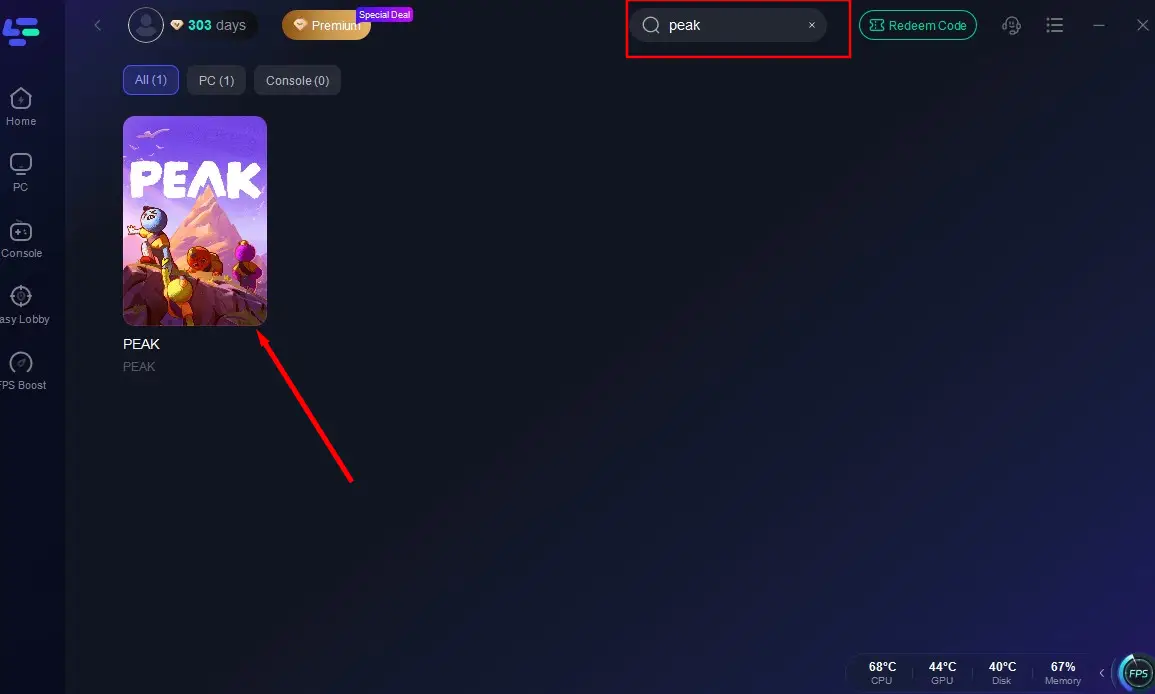
Step 2: Search Peak in the Search Box and select it in the search result.
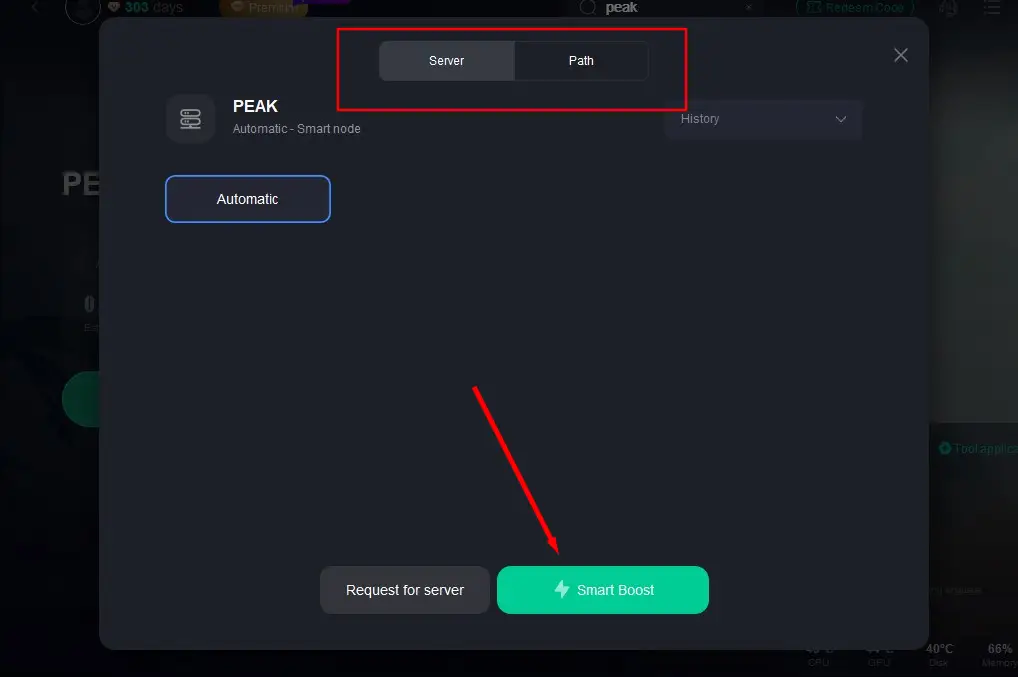
Step 3: Choose the server and click "Smart Boost" to start optimizing.
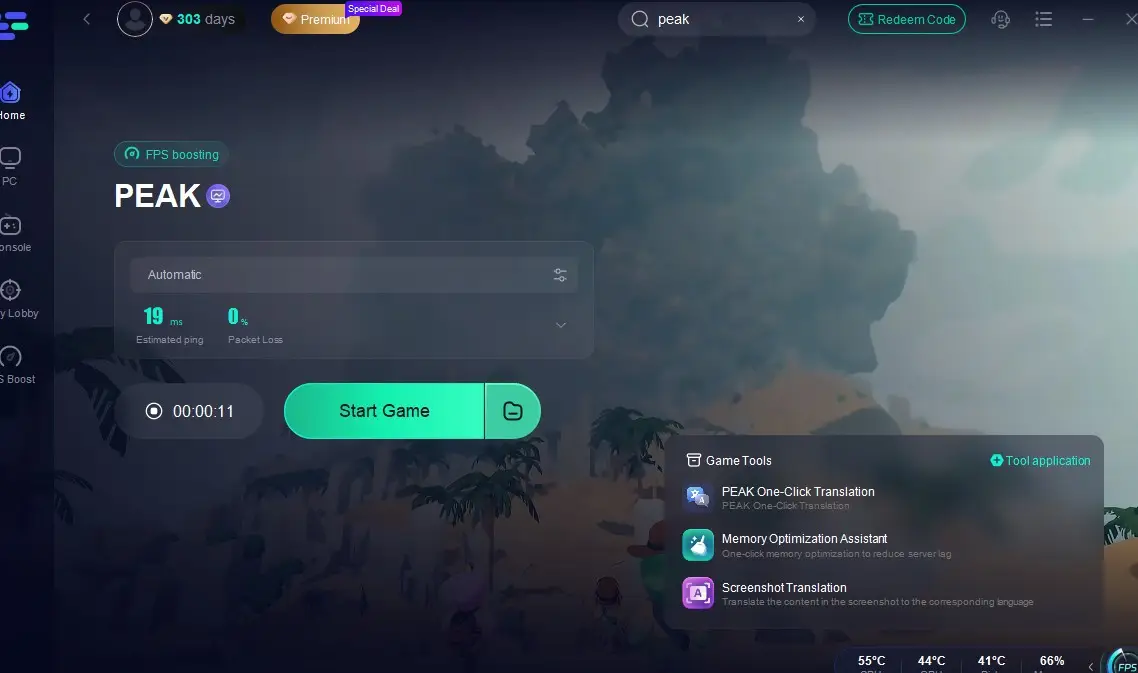
Step 4: Here, you can verify real-time performance metrics and launch Peak with optimized settings
Other Conventional Fixes You can Try
While using LagoFast as your primary solution, you can also try these conventional methods as supplementary measures to further optimize your gaming environment:
- Update graphics drivers: Download the latest drivers directly from NVIDIA or AMD's websites. Keeping your GPU software up to date is essential for compatibility and performance.
- Adjust Peak graphics settings: Try reducing demanding options like shadows, textures, anti-aliasing, and view distance. Experiment to find a balance that maintains visual quality while significantly improving smoothness.
- Close unnecessary background applications: Try to end non-essential programs, like browsers, downloads, or media apps, freeing up system resources like CPU, RAM, and network bandwidth for Peak.
- Use a wired connection: For a more stable online experience, connect your computer directly to the router via an Ethernet cable. Wired connections typically offer stronger stability and lower latency than Wi-Fi.
- Optimize Windows settings: Enable Game Mode and switch your power plan to High Performance in Windows. These adjustments help your system prioritize gaming. Tools like LagoFast can also apply these optimizations automatically.
Conclusion
So, what's the bottom line? PEAK's performance problems are a mix of a new game finding its footing, messy internet connections, and the endless variety of PC hardware out there. You can spend your time tweaking settings, but it’s often a temporary fix that needs constant attention.
Or, you can use a tool that handles it all for you. LagoFast gives you a clean, stable connection for lag-free teamwork while also tuning up your PC to run the game better. It compensates for PEAK's current optimization limits with a single click. And because you only pay for the minutes you use, it’s a smart, affordable way to get a better experience.
Stop letting performance issues hold you and your team back. Try LagoFast to get a smooth game.

Boost Your Game with LagoFast for Epic Speed
Play harder, faster. LagoFast game booster eliminates stutter and lags on PC, mobile, or Mac—win every match!
Quickly Reduce Game Lag and Ping!
Boost FPS for Smoother Gameplay!