
Staring at a black screen when you’re trying to play PEAK? Whether you get a black screen with sound, a crash mid-game, or the game simply won't launch past the splash screen—as many players on Reddit report—you’re not alone. This frustrating problem can stem from anything from driver issues to conflicting overlays. This guide cuts through the confusion, providing clear, step-by-step solutions to fix the PEAK black screen for good and get you back in the game.
If you’re experiencing a black screen when launching PEAK or during gameplay, you’re not alone. This is one of the most common and perplexing issues gamers face. The good news is that it’s almost always solvable. The problem can stem from a variety of sources, from your own PC to the game’s servers.
This comprehensive guide will walk you through why this happens and provide a step-by-step troubleshooting process to fix the black screen in PEAK game issue for good.
Part 1. Why Is There a Black Screen in the PEAK?
Part 2. What are the situations where PEAK has a black screen?
Part 3. What to Do If PEAK Has a Black Screen: A Step-by-Step Fix
Part 1. Why Is There a Black Screen in the PEAK?
Before we jump into solutions, it helps to understand what’s happening behind the scenes. A black screen is a generic error—it’s your system’s way of saying, "I tried to display the game, but something critical failed." Here are the most common culprits:
Outdated or Corrupt Graphics Drivers:
This is the number one cause. Your graphics card driver is the translator between your operating system and your GPU. If it's outdated, it might not understand the instructions from a new game or a recent game update, resulting in a display failure.
Corrupted Game Files:
During a download or an update, files can become corrupted. When the game tries to load a broken asset or script, it can crash to a black screen.
Software Conflicts:
Aggressive antivirus programs or, more commonly, third-party overlays can interfere with how a game renders. Applications like Discord, NVIDIA GeForce Experience, or even the Steam Overlay itself can sometimes cause a PEAK black screen.
Incorrect Display Settings:
The game might be trying to launch in a resolution or refresh rate that your monitor doesn't support. This can happen after a driver update or if you’ve recently changed your display hardware.
Insufficient Hardware or Overheating: While less common for a simple black screen on launch, if your GPU or CPU is overheating or doesn't meet the game's minimum requirements, it can lead to instability and crashes that manifest as a black screen.
Server-Side Issues:
Especially during PEAK gaming hours (pun intended!), the game servers can be overloaded. Sometimes, the black screen is a sign that your game client is struggling to connect and authenticate with the servers.
Part 2. What are the situations where PEAK has a black screen?
Black Screen When Launching PEAK
This is the most common situation, which is manifested as:
- The screen is completely black after the game is launched, but the menu background music can be heard
- The mouse pointer is visible but cannot be operated
- The screen goes black immediately after the game logo is briefly displayed
Random Black Screen During Gameplay
According to feedback from the Reddit community, this situation often occurs when the cutscene is switched, when a specific map is loaded, and after the online mode is successfully matched.
Fullscreen/Windowed Mode Switch Black Screen
Some players also reported that this situation may occur when switching windows with ALT+Tab. It may also occur when switching from 4K resolution to 1080p.
Post-Update Black Screen
In addition to the above situations, some players also reported that the black screen problem will suddenly appear after the game is updated. This is usually due to reasons such as incompatibility of the device after the update.
Part 3. What to Do If PEAK Has a Black Screen: A Step-by-Step Fix
Let’s work through the solutions, starting with the simplest and moving to the more involved. Follow these steps in order.
Must-Try Solution—Use LagoFast Game Booster
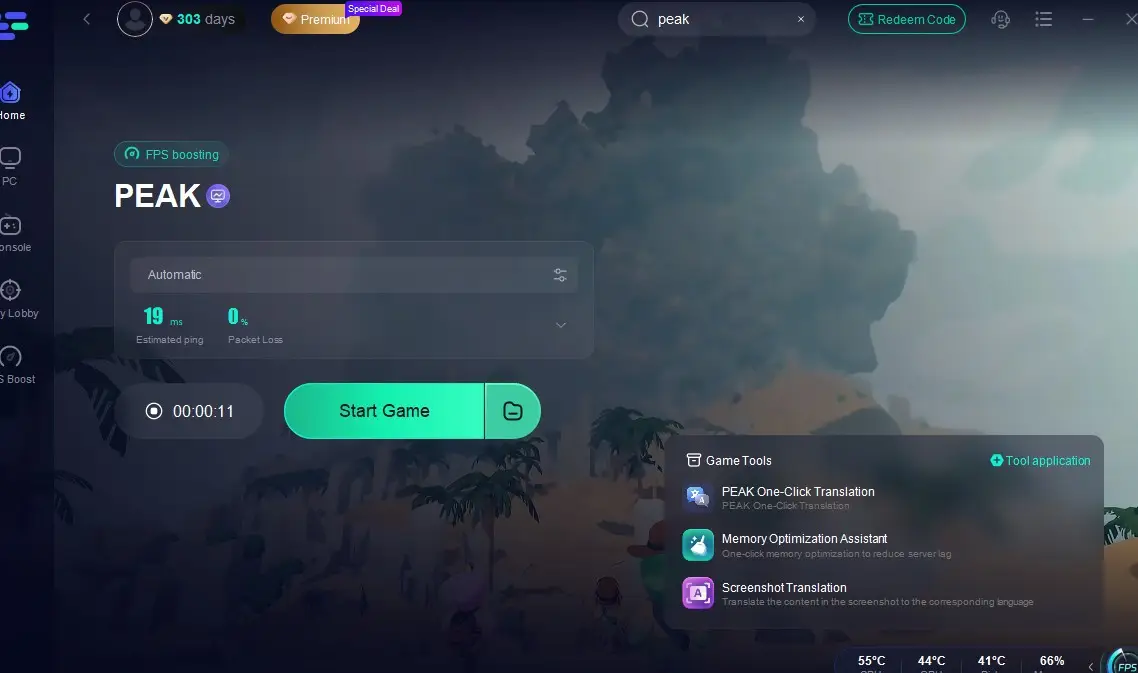
Sometimes, a black screen isn’t caused by your PC or the game files but by an unstable connection to the game servers. If you want to enhance your PEAK experience even further, LagoFast also lets you explore and enjoy a wide range of game mods—helping you customize gameplay while ensuring a smoother, more stable connection. It’s not just a game booster—it’s your one-click fix for connection issues, FPS drops, and launch failures. By optimizing the data route to the PEAK servers, LagoFast can eliminate black screen errors caused by unstable connections or performance hangs.
How to Use LagoFast to Fix PEAK Black Screen Issue:
Download and install LagoFast via the free trial button
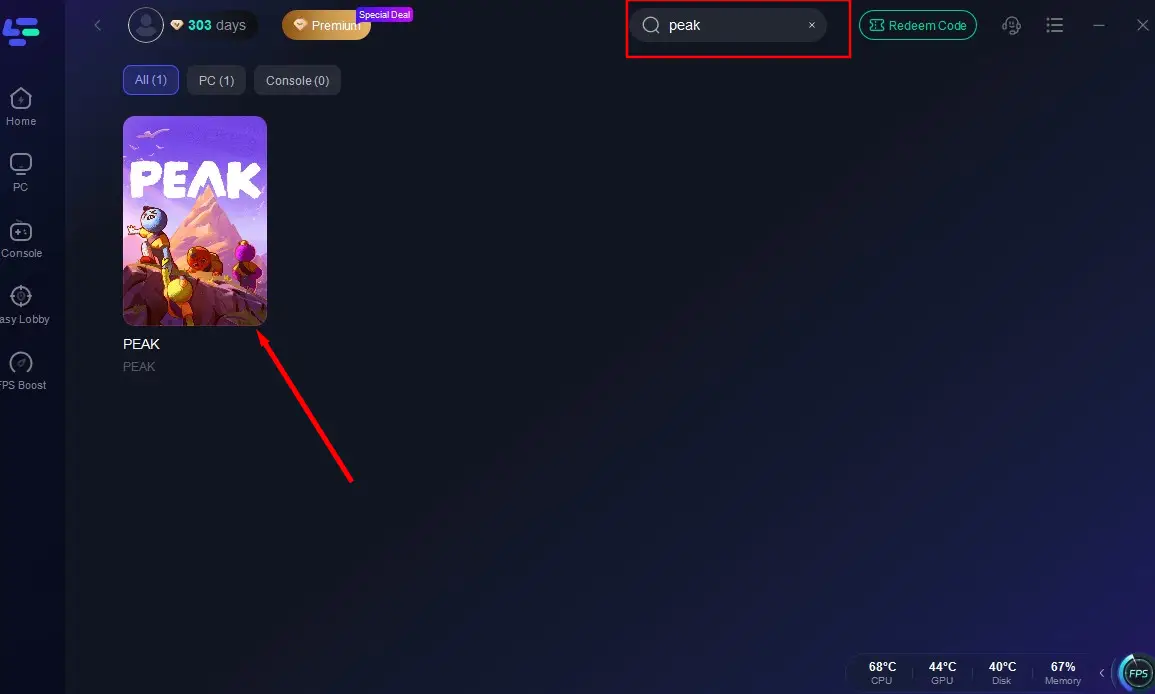
Launch the app, search "PEAK", and select the game result
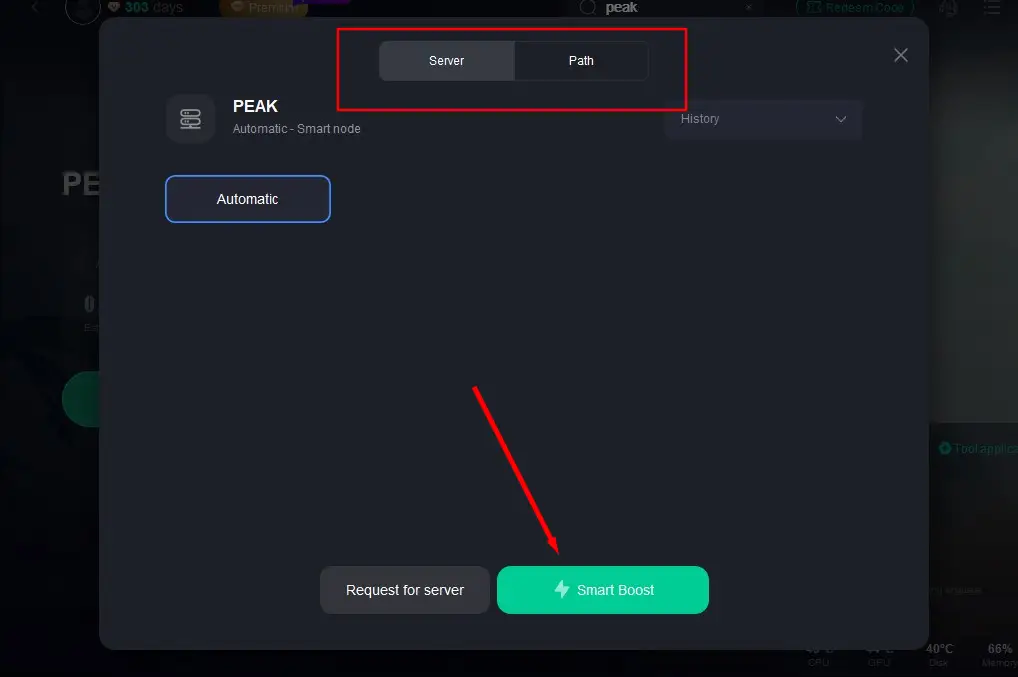
Choose your preferred server node and click "Smart Boost" to start optimize
Verify real-time performance metrics and launch PEAK with optimized settings
Solution 2: The Basic Checks (Don't Skip These!)
- Restart Everything: The oldest trick in the IT book is often the most effective. Close the game completely (use Task Manager with Ctrl+Shift+Esc if needed) and restart your PC. This clears temporary files and resolves minor system glitches.
- Check Server Status: Before you start tearing apart your system settings, check if the game itself is having issues. Look for the official PEAK social media accounts (Twitter/X) or its official Discord server. Gamers on forums like the Steam Community are also quick to report widespread outages. If others are reporting the same problem, you may just need to wait for a server-side fix.
Solution 3: Verify the Integrity of Game Files
This is a crucial step. It forces your game client (like Steam or the Epic Games Store) to scan all of PEAK’s files on your computer and compare them against the master version on the server. If any files are missing or corrupt, it will automatically re-download and replace them.

On Steam:
- Open your Steam Library.
- Right-click on PEAK and select "Properties."
- Go to the "Installed Files" tab.
- Click "Verify integrity of game files."
Let the process complete, and then try launching the game again.
Solution 4: Update Your Graphics Drivers
As mentioned, this is a major cause of the PEAK black screen. Don't rely on Windows Update; go directly to the source for the latest drivers.

- NVIDIA: NVIDIA Driver Downloads
- AMD: AMD Drivers and Support
- Intel: Intel Drivers & Software
Download the latest stable driver for your specific graphics card model and perform a "Clean Installation" if the option is available. This removes old driver profiles that could cause conflicts.
Solution 5: Disable Overlays and Background Applications
Overlays are a common source of conflict. Try disabling them one by one to see if one is the culprit.
- Discord Overlay: Go to User Settings > Game Overlay and turn it off.
- Steam Overlay: In Steam, go to Settings > In-Game and uncheck "Enable the Steam Overlay while in-game."
- Other Software: Temporarily disable NVIDIA ShadowPlay/Ansel, Xbox Game Bar, and any performance monitoring software like MSI Afterburner or RivaTuner Statistics Server.
Solution 6: Adjust Launch Options and Permissions
- Run as Administrator: Locate the game’s executable file (.exe). Right-click it, go to "Properties," click the "Compatibility" tab, and check the box for "Run this program as an administrator”.
- Force Windowed Mode: Sometimes the game fails when trying to launch in full-screen. You can force it into windowed mode. In your Steam Library, right-click PEAK > Properties > General. In the "Launch Options" box, type -windowed -noborder and try launching the game.
Solution 7: Advanced Solutions and Helpful Tools
If the PEAK black screen persists, it’s time for some deeper fixes.
- Reinstall Essential Components: Games rely on software packages like Microsoft Visual C++ Redistributables and DirectX. Sometimes these can become corrupted. You can typically find installers for these within the PEAK game folder itself (often in a subfolder named _CommonRedist). Re-running these installers can resolve the issue.
- Hardware Monitoring Tools: Use a tool like HWMonitor or MSI Afterburner to monitor your CPU and GPU temperatures while trying to launch the game. If temperatures are spiking above 90°C (194°F), you may have an overheating issue that needs to be addressed with better cooling or by cleaning dust from your PC.
- Clean Driver Reinstallation: If a simple driver update didn't work, you can use Display Driver Uninstaller (DDU). This is a powerful free tool that completely removes every trace of your old graphics drivers, allowing for a truly clean installation. Use this with care and follow the instructions on their website.
Discussions on forums, such as a Reddit thread about Android data recovery that incidentally touched on general black screens, sometimes mention data recovery tools. However, for a PC game like PEAK, this is rarely necessary. If file corruption is so severe that verifying files doesn't work, a complete reinstallation of the game is a much safer and more effective solution than attempting file-level recovery.
Bringing It All Together
The PEAK black screen is a roadblock, but it’s one you can overcome with a systematic approach. By starting with simple restarts, verifying your files, and ensuring your drivers are pristine, you’ll solve the problem in over 90% of cases. For the more stubborn instances, digging into software conflicts and system settings will almost certainly get you back to playing.
Don't let a blank screen end your gaming session. Work through these steps, and you’ll conquer the void and get back to enjoying everything PEAK has to offer.

Boost Your Game with LagoFast for Epic Speed
Play harder, faster. LagoFast game booster eliminates stutter and lags on PC, mobile, or Mac—win every match!
Quickly Reduce Game Lag and Ping!
Boost FPS for Smoother Gameplay!