

Path of Exile (PoE), developed by Grinding Gear Games in 2013, is a renowned action role-playing game (ARPG) that has captivated players worldwide with its deep gameplay mechanics, vast skill tree, and dynamic itemization system. One of the key features that contribute to PoE's intricate gameplay is the Item Filter system. Whether you're a seasoned veteran or a newcomer, understanding how to effectively use and customize item filters can significantly enhance your gaming experience.

- ✅ Reduce Lag and High Ping.
- ✅ Boost FPS at the Same Time.
- ✅ Support 2000+ Popular Online Games.
- ✅ Support Game Translation Tool.
- ✅ Change Server without Latency.
Part 1: What Is Path of Exile Item Filter
Part 2: Best Path of Exile Filter- LagoFast
Part 3: Other Path of Exile Filters
Part 4: How to Enhance Gaming Experience of PoE
Part 1: What Is Path of Exile Item Filter
In Path of Exile, item filter is a powerful tool that allows players to customize how dropped items are displayed in-game. By applying filters, players can modify the appearance of items based on criteria such as rarity, item type, base item, and specific mods that items can have. This customization helps players quickly identify valuable items amidst the clutter of dropped loot, saving time and improving efficiency during gameplay.
How it work
Path of Exile Item filter operate on a set of rules defined by the player. These rules determine which items are highlighted, colored, or even hidden based on predefined conditions. For instance, a player might set a filter to highlight all rare items with a specific combination of mods, making it easier to spot potential upgrades or items of interest. Filters can also be configured to play sounds or trigger visual effects when certain items drop, adding another layer of immersion to the gameplay.
Part 2: Best Path of Exile Filter Mod - LagoFast
LagoFast's Path of Exile filter mod is officially authorized through collaboration with Grinding Gear Games and developed using Path of Exile's official filtering scripts. This mod enables players to filter and identify high-value items through various categorization commands, allowing them to prioritize rare items while hiding unwanted ones. This makes it easier for players to focus on relevant dropped items. Additionally, the mod supports merging different item categories, ensuring both safety and reliability without compromising gameplay smoothness.
Here's how to obtain LagoFast's PoE Filter Mod:
Click the free trial button, download and install LagoFast.
Use the search bar to locate Path of Exile. Players can also select other versions based on their needs.
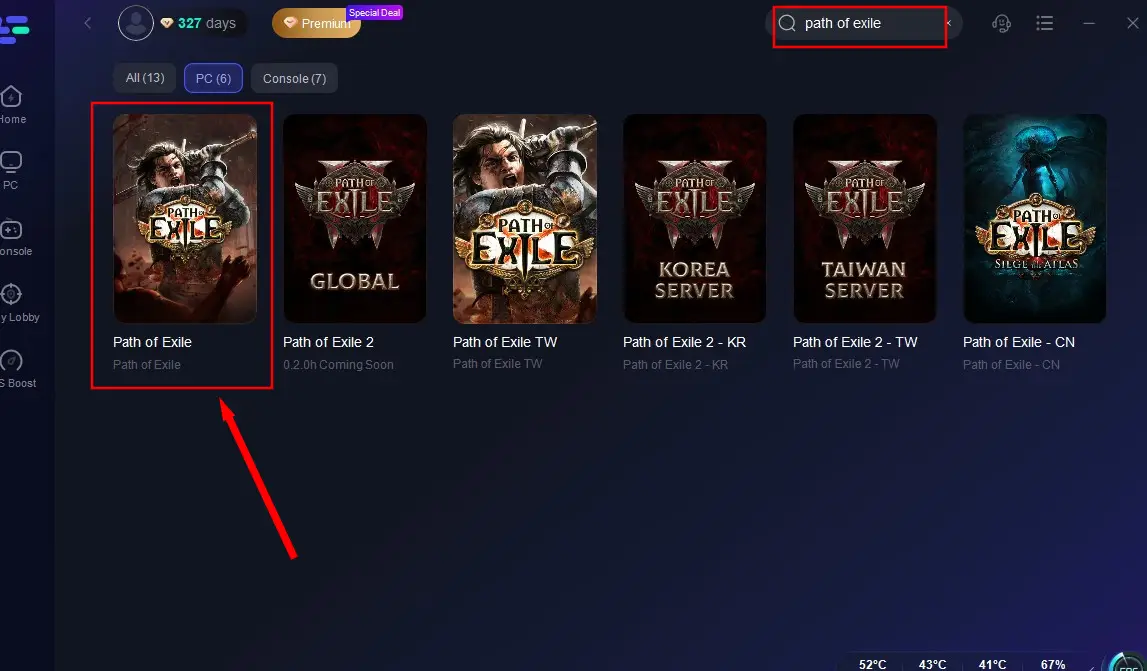
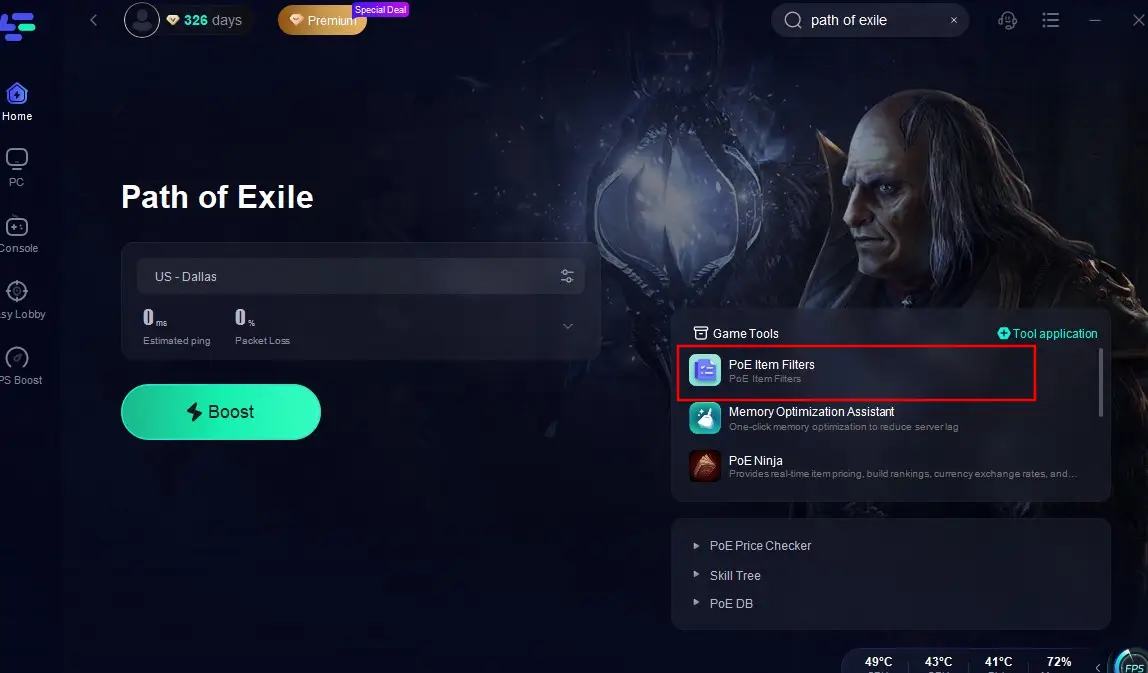
Click the "Item Filters" mod in the bottom-right corner, complete the installation, and restart the game. Once in-game, the filter will activate automatically. You can customize the Path of Exile filter settings at any time according to your gameplay habits or preferences to achieve the most efficient item categorization and organization.
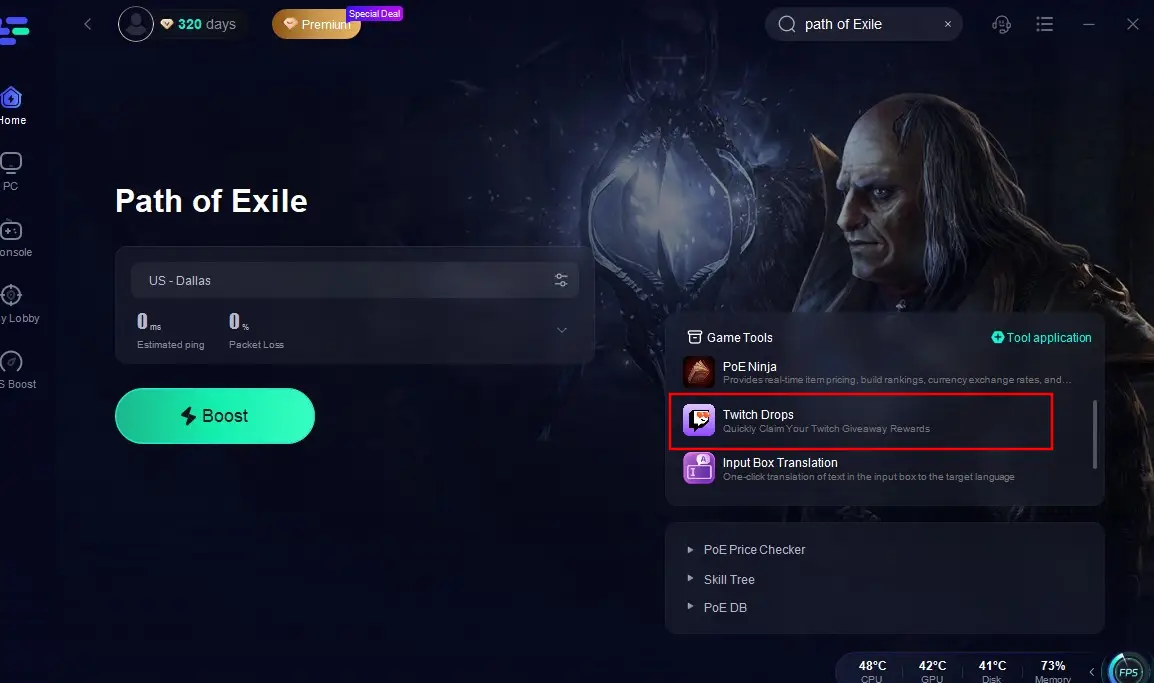
In the meanwhile, numerous Twitch Drops of Path of Exile have been prepared for players. If players want to save time and obtain these drops using the fastest and most efficient method, we recommend using LagoFast's PoE Drops feature. Here's a tutorial on how to use it:
Click on the "Twitch Drops" tool located at the bottom right corner.
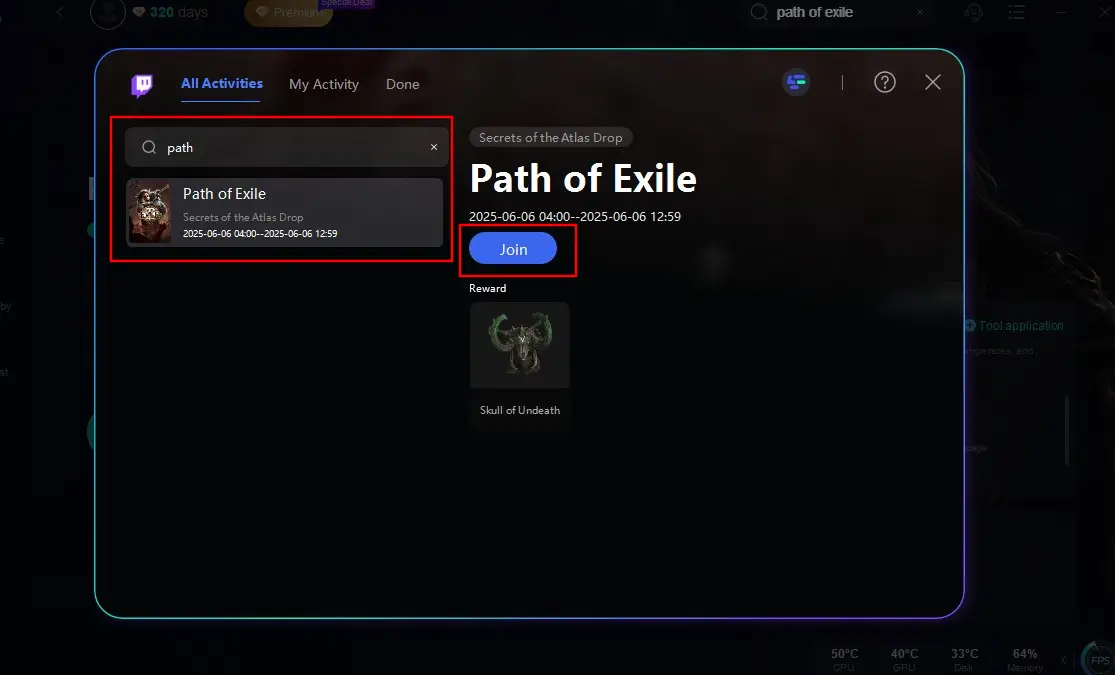
Search for Path of Exile again in the search bar and click the "Join" button on the right. That's it! You can now get Path of Exile's loot drop skins without having to watch the live stream!
Part 3: Other Path of Exile Filters
There are also several other Path of Exile item filters that can assist players in filtering and organizing their loot:
NeverSink-1regular-softcore
This filter adheres to the most standard Path of Exile filtering criteria and updates automatically every four hours. It sources economic data from poe.ninja to ensure accuracy.
3.25 RF Campaign Filter 1-80
This filter helps players identify early-game gear or linked items. In the late game, it focuses on weapon filtering, hiding rarely used equipment like bows or swords. With this filter, you can collect and sell gear during the early stages to build strength for the second phase of gameplay, including combat and gearing up.
AAA Loot Filter NG
Tailored for Endgame and Solo Self-Found (SSF) modes, this filter is suitable for most players.
Wreckers SSF Filter for Everyone
This filter can be used on any configuration, assisting players in filtering and collecting items throughout all stages of the game. In the late game, its filtering criteria become increasingly stringent.
Part 4: How to Enhance Gaming Experience of PoE
In addition to using LagoFast's filter mod, don’t forget to leverage LagoFast’s acceleration feature to ensure the smoothest Path of Exile (PoE) gameplay experience! LagoFast offers the following advantages:
- Stabilizes Connections: If disconnections are a frequent issue, LagoFast ensures a smoother and more stable connection.
- Reduced Lag: Minimizes latency issues, ensuring real-time responsiveness during combat.
- Stable Connection: Provides a consistent network connection, preventing disconnections during crucial moments.
- Optimized Performance: Enhances system performance, allowing for smoother graphics and faster load times.
Here's how to use LagoFast to play Path of Exile
Click the "Free Trial" button to download LagoFast.
Search for Path of Exile in the app (other versions are also available).
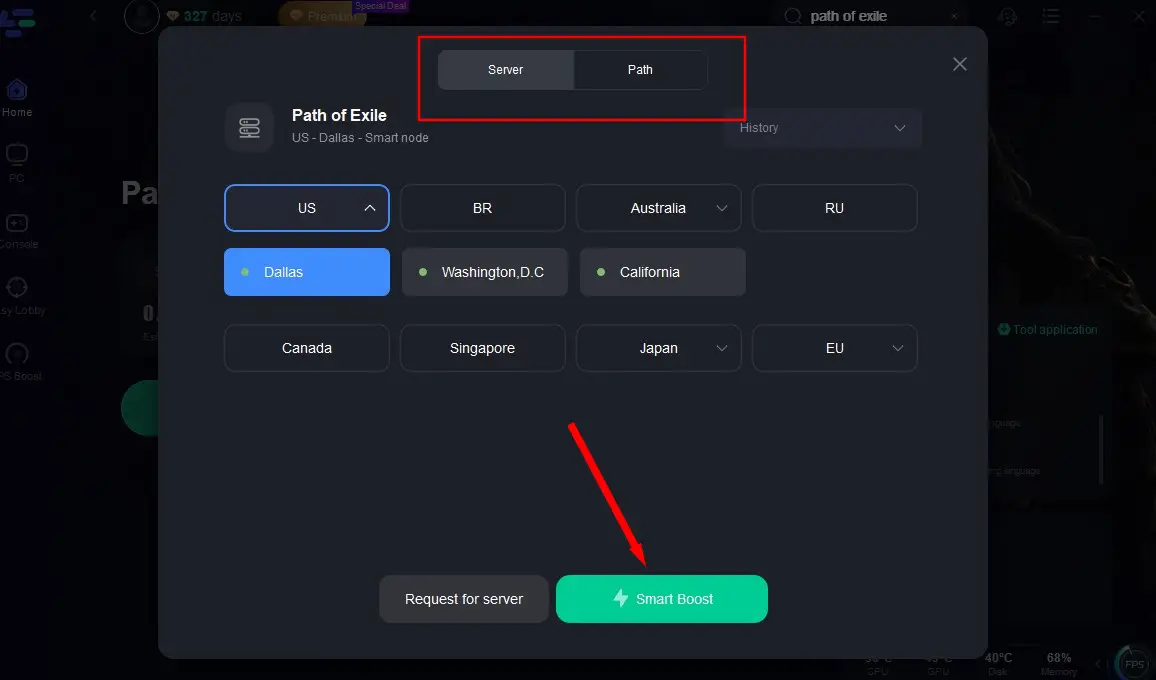
Click "Select Server" to choose the optimal node and start acceleration.
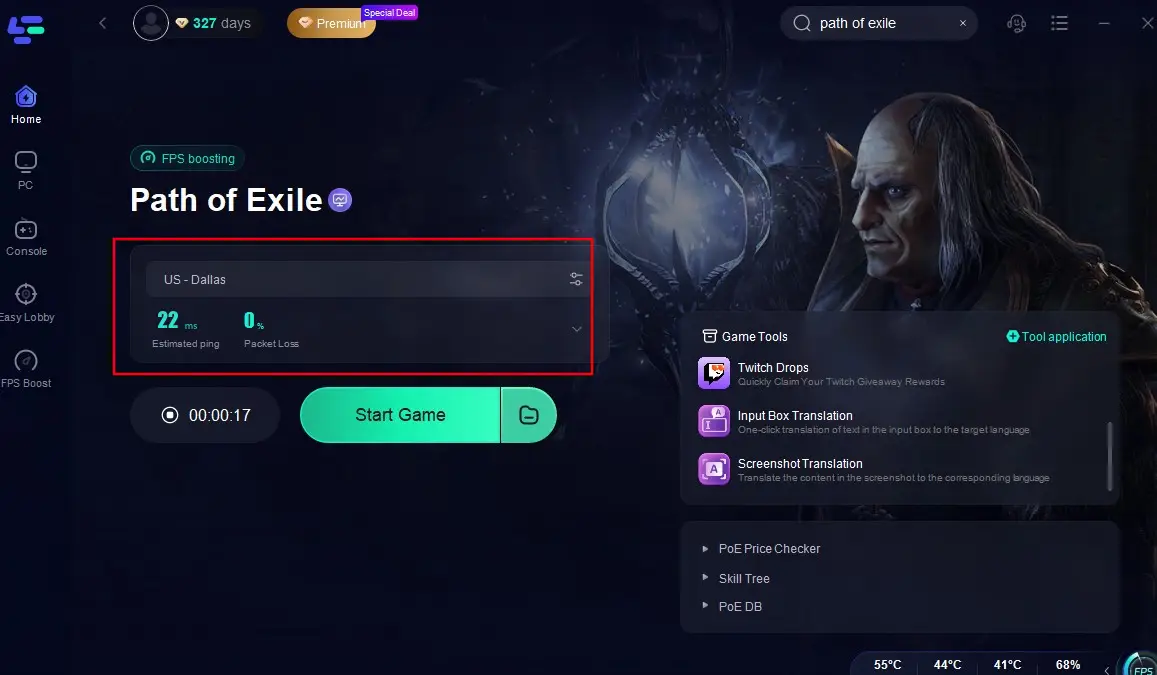
Check the optimized packet loss and Ping rates, then click "Start Game" to enjoy a lag-free PoE experience!
Conclusion
Path of Exile filter mod of LagoFast is a powerful tool that can significantly enhance your gaming experience by allowing you to quickly identify and prioritize valuable items. By understanding how filters work, customizing them to suit your playstyle, and optimizing them for performance, you can take full advantage of this feature to improve your efficiency and enjoyment of the game. Whether you're a casual player or a hardcore enthusiast, mastering item filters is a skill that will serve you well in the vast and ever-evolving world of Path of Exile.

Boost Your Game with LagoFast for Epic Speed
Play harder, faster. LagoFast game booster eliminates stutter and lags on PC, mobile, or Mac—win every match!
Quickly Reduce Game Lag and Ping!
Boost FPS for Smoother Gameplay!