
Quick Answer: How to Translate Outbound into Your Language
To translate the open-world van-life game Outbound into your preferred language, use the built-in settings from Square Glade Games by navigating to the main menu, selecting Settings, and choosing your language under the "Accessibility" or "Language" tab. If your language isn’t supported or you face region restrictions, a real-time translation tool like LagoFast can help. It provides instant text overlay translation, breaks regional barriers, and enhances immersion without requiring manual patches or complicated installations.
Outbound by Square Glade Games has captivated indie fans with its relaxing, off-grid gameplay, letting players build, garden, and explore solo or in co-op. However, language barriers can break immersion, especially with complex crafting and UI text. Using a reliable translation tool and network optimizer ensures smoother, more enjoyable gameplay worldwide.

- ✅ Reduce Lag and High Ping.
✅ Boost FPS at the Same Time.
✅ Support 2000+ Popular Online Games.
✅ Change Server without Latency.
✅ Boost Game Loading Speed.
Part 1: Outbound Supported Language
Part 2: Outbound Game Translation Tool - LagoFast
Part 3: Beyond Translation: Optimize Your Gaming Experience with LagoFast
Part 4: Outbound Supported Platforms
Part 5: Outbound System Requirement
Part 1: Outbound Supported Language
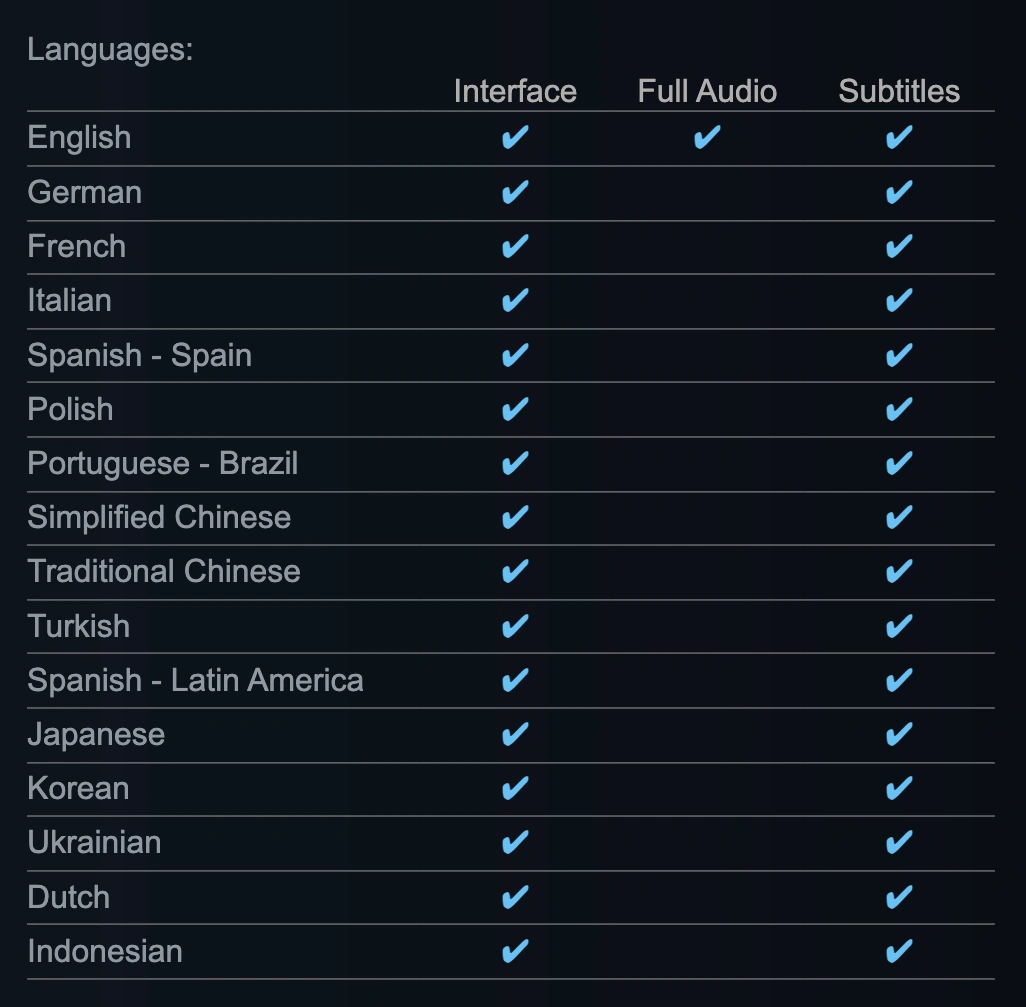
Understanding what options are natively packaged inside the game files helps you determine when a custom translator is necessary. The title provides comprehensive text localization across multiple regions, though full audio support is currently exclusive to English.
The officially supported interface and subtitle languages include:
- Americas: English, Spanish (Latin America), Portuguese (Brazil)
- Europe: German, French, Italian, Spanish (Spain), Polish, Russian, Dutch, Ukrainian
- Asia: Simplified Chinese, Traditional Chinese, Japanese, Korean, Indonesian
- Middle East: Turkish
Even with this extensive coverage, the text overlay often experiences formatting bugs on specific resolutions, or certain community-made language packs can fail to load during co-op sessions. When official patches disrupt the local language files, an automated translation tool ensures you never lose track of your crafting blueprints.
Part 2: Outbound Game Translation Tool - LagoFast
When official language support falls short, a powerful outbound game translation tool becomes essential. LagoFast Translation Tool stands out as one of the most practical solutions for modern gamers who want instant access to multilingual gameplay.
Instead of forcing you to copy and paste text into external translators, LagoFast works directly within the game environment. It overlays translated text in real time, meaning you can keep playing without interruptions.
Key Features of LagoFast Translation Tools:
- Real-time in-game translation: Menus, dialogues, mission descriptions, and system messages are translated instantly while you play. There’s no delay or need to pause the game.
- OCR + AI-powered accuracy: Even stylized fonts and complex UI elements are recognized using OCR (Optical Character Recognition) and translated with AI, making it suitable for visually rich games like Outbound.
- One-click translation system: You can activate translation with a simple shortcut or floating tool, making it extremely user-friendly, even for beginners.
- Chat and input translation: Playing co-op? LagoFast can translate incoming chat messages and even convert your typed responses into another language automatically.
- Voice and dialogue support: Some versions include voice-to-text translation, allowing you to understand spoken dialogue more easily.
- Screenshot translation: If something isn’t auto-detected, you can capture a screenshot and translate it instantly.
This kind of flexibility is especially valuable in Outbound, where exploration, crafting, and environmental storytelling require constant understanding of text elements.
Step-by-Step Tutorial to Use LagoFast Translation Tool:
Step 1. Click the Free Trial button to download and install LagoFast.
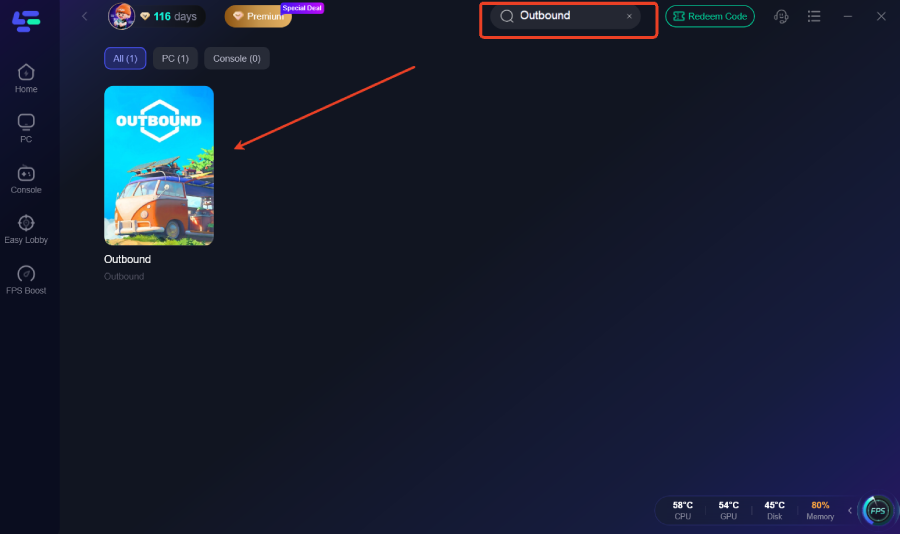
Step 2. Type "Outbound" into the search bar and add it to your game list.
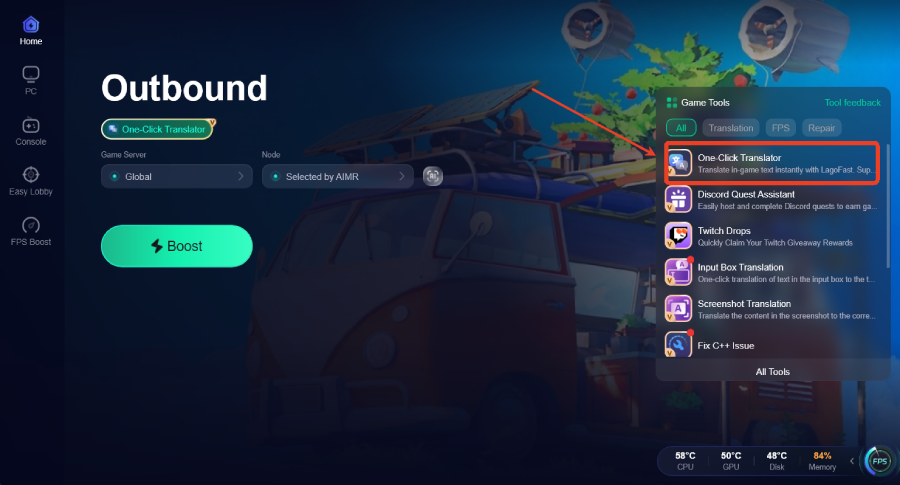
Step 3. Enable Translation: On the game’s dashboard within LagoFast, look for the "Translation Tool" icon on the right-hand sidebar.
Step 4. Set Your Language: Select your target language (e.g., Turkish or Thai).
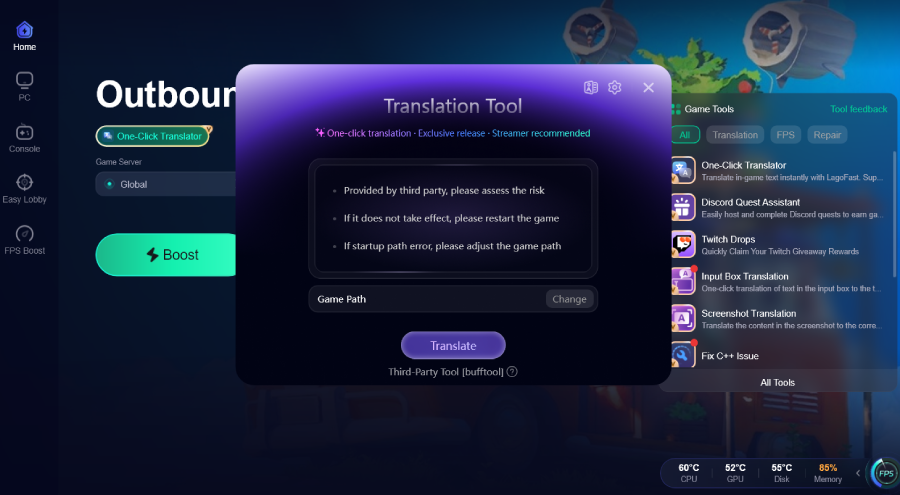
Step 5. Launch & Play: Start the game through LagoFast. Your game language will be automatically translated into the language you selected.
Part 3: Beyond Translation: Optimize Your Gaming Experience with LagoFast
LagoFast is far more than just a premium translation utility; it is a comprehensive, all-in-one gaming booster engineered to eliminate hardware and network bottlenecks. By dynamically optimizing your system's connection routes and freeing up critical CPU resources, it ensures that your journey across diverse biomes remains completely fluid, stutter-free, and highly responsive.
Key Features of LagoFast:
- Lag Reducer & Ping Booster: Utilizes proprietary, smart multi-path technology to automatically detect and route your connection through the fastest global server pathways, minimizing packet loss and lowering network latency.
- Game Crash Fix Tool: Features a built-in, one-click troubleshooting mechanism designed to repair broken configurations, missing libraries, or runtime errors that cause sudden desktop crashes.
- FPS Booster: Fine-tunes your operating system settings, allocates maximum priority to your game client, and temporarily suspends redundant background processes to maximize your frame rates.
- Easy Server Multiplexer: Allows multiplayer fans to easily jump between regional servers without experiencing the severe routing penalties usually associated with long-distance data transmission.
Tutorial to Optimize Your Outbound Gaming Experience with LagoFast:
Step 1: Click the Free Trial button to download and install LagoFast.
Step 2: Open LagoFast, then click the PC button on the left and search for Outbound in the search bar, and click it after it appears.
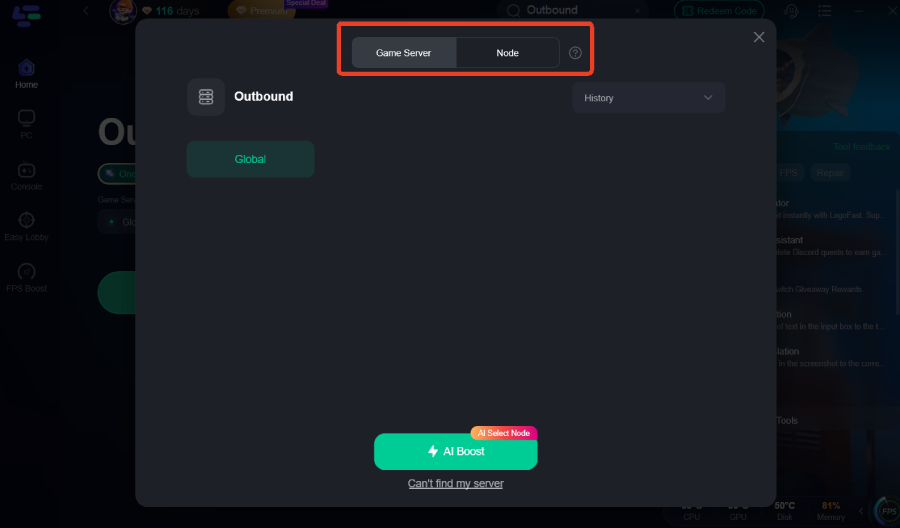
Step 3: Click on “Server” to change to a better server that provides a smooth gaming experience, then click on “Smart Boost” to fix the Outbound common issues.
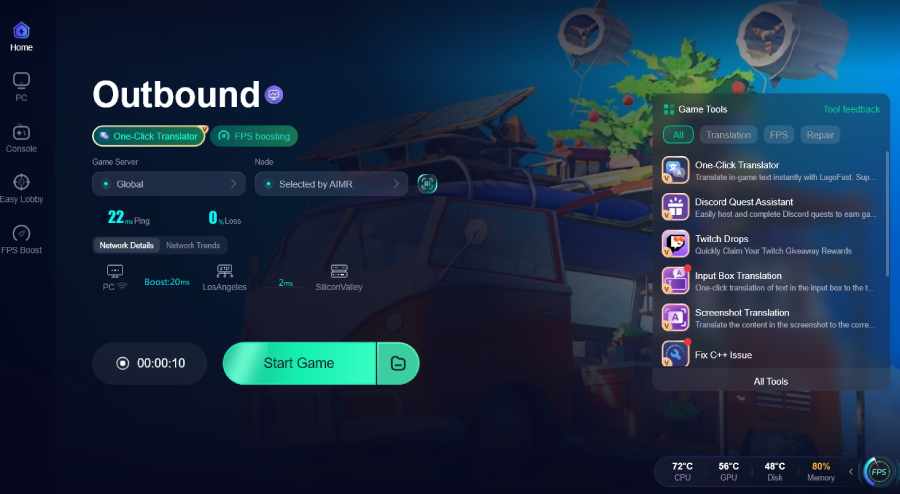
Step 4: Check the specific game ping, packet loss, and multiple path connections on the right side. Finally, click the “Start Game” to play the game.
Part 4: Outbound Supported Platforms

To cater to all types of cozy gaming enthusiasts, the developers have ensured that Outbound is accessible across all modern gaming hardware. The title is natively available on the following platforms:
- PC: Available via Steam and the Epic Games Store (Fully optimized for portable play on the Steam Deck).
- Xbox: Native support for Xbox Series X and Xbox Series S.
- PlayStation: Fully compatible with the PlayStation 5.
- Nintendo: Available across both the original Nintendo Switch ecosystem and the next-generation Nintendo Switch 2.
Because the game utilizes a unique multiplayer code system for its 4-player co-op mode, players across different storefronts (like Steam and Epic Games Store) can easily join forces, making network optimization and clear communication tools vital for cross-launcher lobbies.
Part 5: Outbound PC System Requirements
Before heading out onto the open road, it is critical to verify whether your hardware can handle the vast biomes and physics-based building systems of Outbound. Use the reference table below to check your PC setup:
|
Hardware Component |
Minimum Specifications |
Recommended Specifications |
|
Operating System |
Windows 10 (64-bit) |
Windows 11 (64-bit) |
|
Processor (CPU) |
Intel Core i3-10100 / AMD Ryzen 3 3100 |
Intel Core i5-11600K / AMD Ryzen 5 5600X (or higher) |
|
Memory (RAM) |
4 GB RAM |
8 GB RAM |
|
Graphics Card (GPU) |
NVIDIA GeForce GT 1030 |
NVIDIA GeForce GTX 1650 / Radeon RX 5500 XT |
|
DirectX Version |
Version 10 |
Version 11 |
|
Available Storage |
4 GB available space (SSD preferred) |
4 GB available space (SSD preferred) |
|
Sound Card |
DirectX Compatible Sound Card |
DirectX Compatible Sound Card |
Part 6: FAQs
How do I fix high ping and lag in Outbound multiplayer?
Cooperative multiplayer lag is usually caused by poor network routing or distance from the host player. To fix this, launch LagoFast before starting your game session, select Outbound from your dashboard, and choose the optimal node closest to your co-op host. LagoFast’s smart multi-path technology will stabilize your connection and noticeably drop your in-game ping.
Does LagoFast work with the Steam, Epic Games, and Windows versions?
Yes, LagoFast offers comprehensive platform compatibility. Whether you launched the game via Steam, purchased it on the Epic Games Store, or run the independent Windows client, the network acceleration and real-time translation features function identically across all PC storefronts.
What should I do if Outbound keeps crashing on my PC?
If you experience frequent desktop crashes while driving or loading new biomes, you can utilize the built-in "Game Crash Fix Tool" inside the LagoFast application. With a single click, this feature checks for missing system dependencies, cleans cache conflicts, and optimizes hardware environment settings to establish game stability.
Will the translation tool slow down my game’s frame rates?
Generic translation software that captures full video feeds can strain your CPU, leading to noticeable drops in FPS. However, LagoFast’s translation engine uses high-efficiency visual recognition that consumes minimal background processing power, ensuring your frame rates remain smooth and consistent during gameplay.
Can I translate the game into languages not officially supported by the developer?
Absolutely. The primary reason players utilize the real-time translation tool is to access languages skipped during the official localization phase. The software handles dozens of global languages, converting the text instantly so that international communities can enjoy the utopian van-life simulation without boundaries.
Does Outbound support full cross-play across PlayStation and PC?
At launch, the indie studio Square Glade Games confirmed that full console-to-PC cross-play is not actively supported due to certification complexities. However, PC players on Steam and Epic Games Store can play together flawlessly using in-game connection codes.

Boost Your Game with LagoFast for Epic Speed
Play harder, faster. LagoFast game booster eliminates stutter and lags on PC, mobile, or Mac—win every match!
Quickly Reduce Game Lag and Ping!
Boost FPS for Smoother Gameplay!