
Odin: Valhalla Rising, a visually stunning MMORPG developed by Lionheart Studio and published by Kakao Games, has captivated players worldwide with its immersive Norse mythology-inspired universe. The game's Japan version stands out as a masterclass in localization, blending authentic cultural adaptation with technical precision.
This article delves into the game's core features, its multilingual support, and how to get its Japanese version, to translate the japanese version and enhance your gaming experience with LagoFast.

- ✅ Reduce Lag and High Ping.
- ✅ Boost FPS at the Same Time.
- ✅ Support 1000+ Popular Online Games.
- ✅ Support Easy Lobby in all Cod Games without Lag
Part 1: What is Odin: Valhalla Rising? Release date?
Part 2: Which language does Odin: Valhalla Rising support?
Part 3: Why choose Odin: Valhalla Rising JP version?
Part 4: How to get Odin: Valhalla Rising JP version?
Part 5: How to translate Odin: Valhalla Rising JP version with LagoFast?
Part 6: Enhance Odin: Valhalla Rising JP gaming experience with LagoFast
Part 1: What Is Odin: Valhalla Rising? Release date?
Odin: Valhalla Rising is a visually stunning MMORPG (Massively Multiplayer Online Role-Playing Game) set in a universe inspired by Norse mythology. Developed by Lionheart Studio and published globally by Kakao Games, the game combines immersive storytelling, cinematic graphics, and large-scale multiplayer gameplay.
Set in the realms of Yggdrasil, Odin: Valhalla Rising combines open-world exploration, dynamic combat, and intricate storytelling. Players choose from four classes—Warrior, Sorceress, Priest, or Rogue—to embark on quests shaped by Norse legends.
Key features:
- Cross-Platform Play: Seamless transition between mobile (iOS/Android) and PC.
- Cinematic Graphics: Unreal Engine 4-powered visuals with 4K support.
- Massive PvP & Raids: 200-player battles and cooperative dungeon challenges.
- Lifelike Economy: Player-driven trading and crafting systems.
The official launch of Odin: Valhalla Rising Kakao Games will happen on April 29th, 2025 on PC and mobile, optimized for cross-play. It's Pre-registration opens on April 3rd, 2025, offering players exclusive in-game rewards include a limited edition Viking themed avatar and a mount. . What's more, the preload of Odin: Valhalla Rising will happen on April 28th,2025.
Part 2: Which language does Odin: Valhalla Rising support?
Odin: Valhalla Rising offers multilingual support tailored to its global player base, though available languages vary slightly by region and platform. Below is a detailed breakdown of its language options:
Full Localization (UI, Text, Voice Acting):
- Korean: Original version with complete voice acting and subtitles.
- Japanese: Dedicated voice dubbing by renowned seiyū (voice actors) and full UI/text translation.
- English: Full localization for global servers, including voice acting and menus.
Partial Localization (UI & Text Only):
- Traditional Chinese
- Simplified Chinese
- Thai
- German
- French
- Spanish (Latin America)
Part 3: Why choose Odin: Valhalla Rising JP version?
If you are a game player based in Asia, the Odin: Valhalla Rising Japan version will be your ultimate choice.
- Cultural Localization: Norse mythology blended with Japanese aesthetics (e.g., Shinto shrine-inspired towns).
- Lower Ping: Dedicated servers in Osaka for players in Asia.
- Early Updates: Japan often receives new content 1-2 weeks before global releases.
Part 4: How to get Odin: Valhalla Rising JP version?
Here's a step-by-step guide to accessing the Odin: Valhalla Rising Japan version translation, including how to get the Japanese-localized game and utilize its multilingual features:
How to download Odin: Valhalla Rising JP version on your PC with LagoFast:
LagoFast provides players with a package download tool that allows them to conveniently switch IP addresses while quickly and securely downloading and installing Odin: Valhalla Rising. This streamlined and user-friendly tool saves players valuable time, making it undoubtedly the optimal choice for downloading Odin: Valhalla Rising! Below is a tutorial on using LagoFast to download the game:
Step 1: Click the Free Download button to download and install LagoFast.
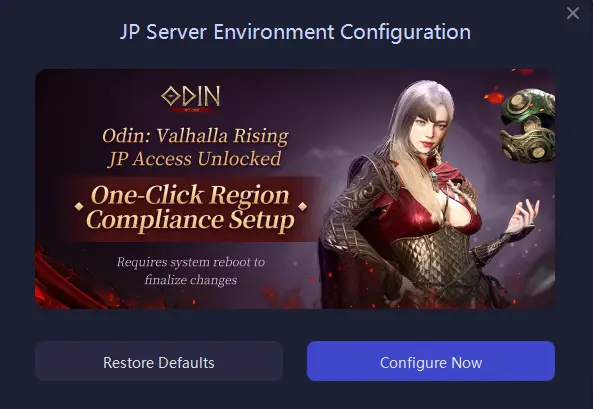
Step 2: Due to the region-locked official servers of Odin: Valhalla Rising, players from other regions who wish to play on the Japanese server must change Japanese time zone and region and get Japanese font package before accessing the game. With LagoFast's one-click region switching tool, players can instantly complete these settings with just a single click.
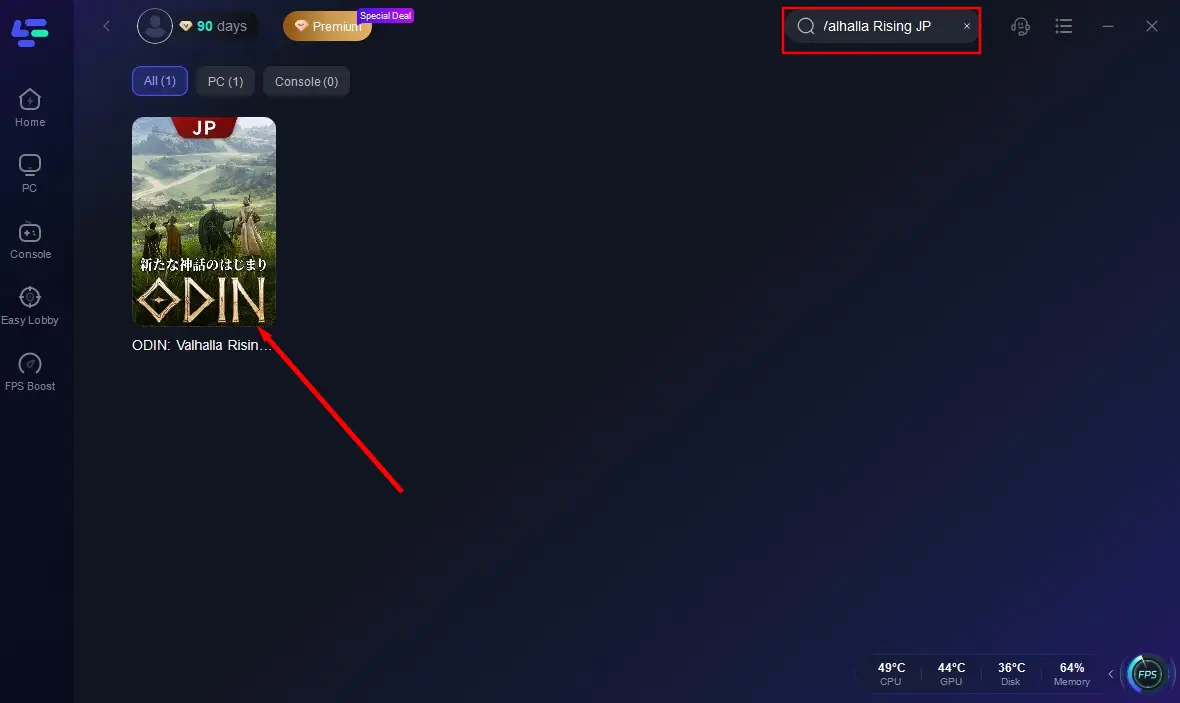
Step 3: Search for Odin: Valhalla Rising JP in the search bar and click on it once the result appears.
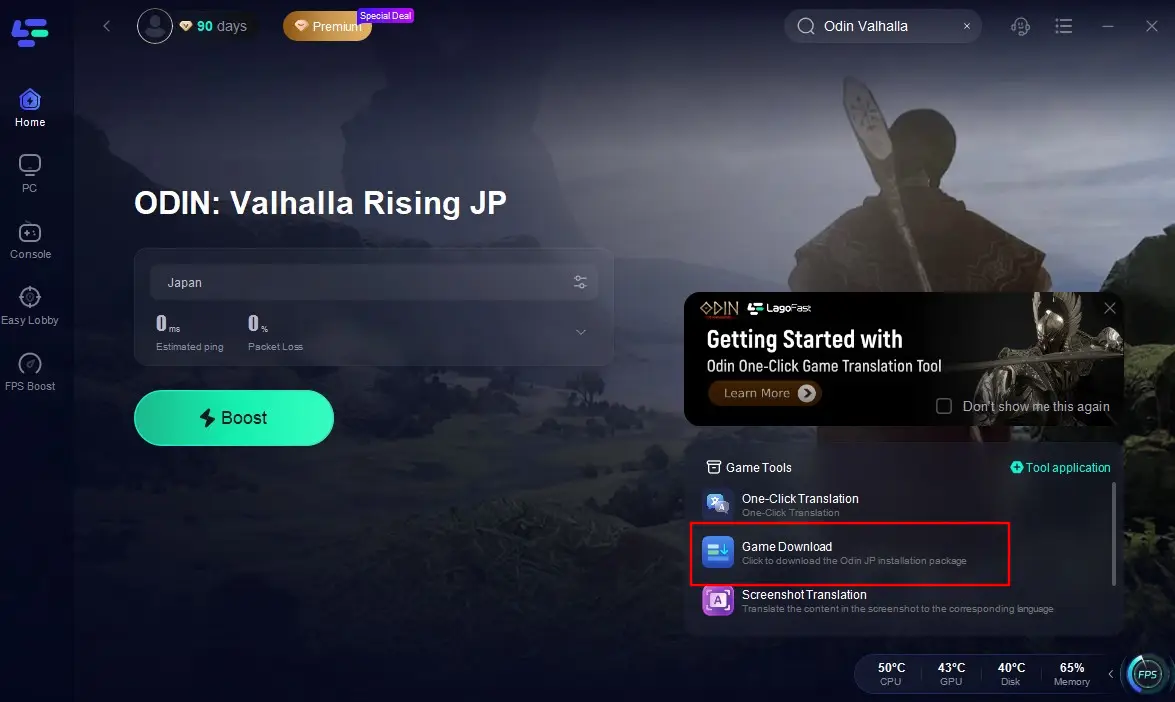
Step 4: Click on the Game Download Tool on the right side of the screen to begin the download.
Step 5: Wait patiently for the download to complete, then install it on your device.
How to download the Japanese Version of Odin: Valhalla Rising JP version by other ways
iOS - DOwnload Odin: Valhalla Rising JP in App Store after change region to Japan:
Android - Visit APKPure or QooApp using a Japanese VPN.
Part 5: How to translate Odin: Valhalla Rising JP version with LagoFast?
LagoFast's built-in translation tool provides gamers worldwide with fast, accurate, and convenient in-game translations, breaking down language barriers to unite players globally in shared gaming joy. Currently, LagoFast supports translations from Japanese to English, German, French, Spanish, Filipino, Indonesian, Thai, Russian, and Brazilian Portuguese. Players using these languages can instantly access precise, professionally translated interfaces for Odin: Valhalla Rising in their target language with just one click. Below is a step-by-step guide to using LagoFast's translation tool:
Step 1: Click the "Free Trial" button to install LagoFast on your device.
Step 2: Change Japanese time zone and region and get Japanese font package with LagoFast's one-click region switching tool.
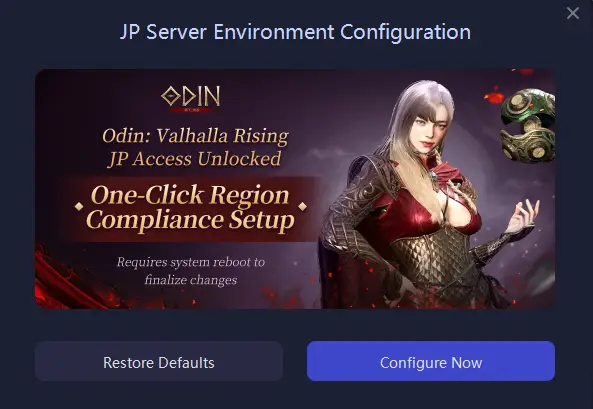
Step 3: Search for "Odin: Valhalla Rising JP" in LagoFast's search bar and click it once it appears.
Step 4: Click the "Game Tools" icon at the bottom-right corner of the screen and select "One-Click Translation".
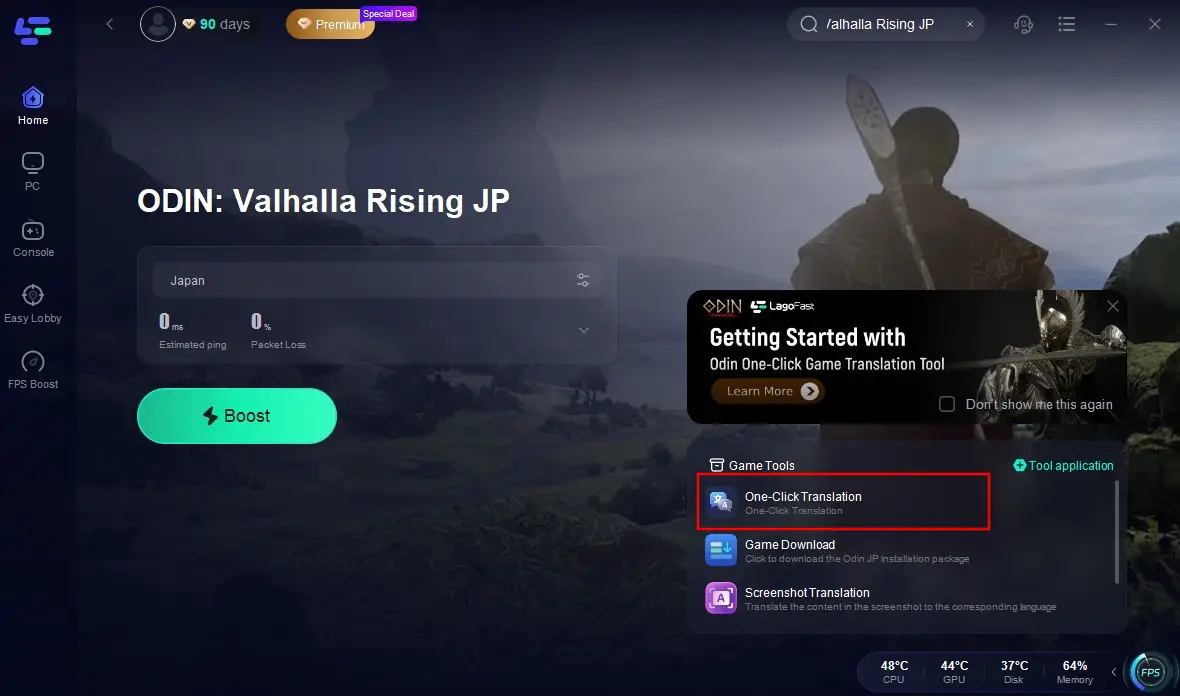
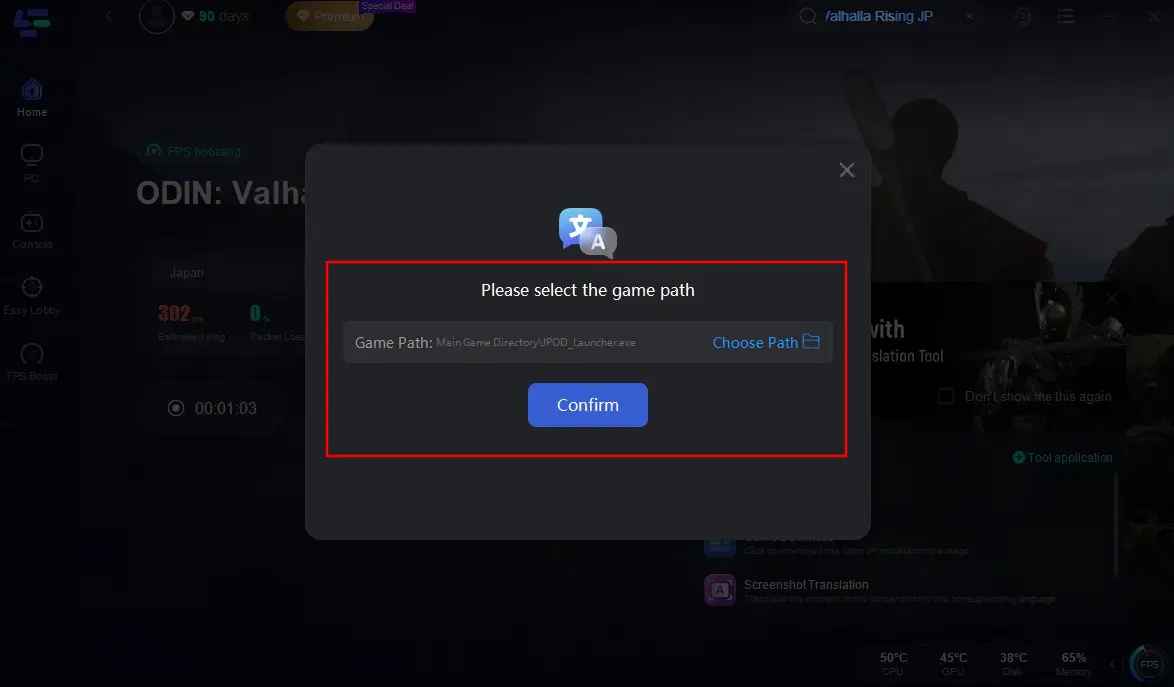
Step 5: Add the installation package for Odin: Valhalla Rising JP.
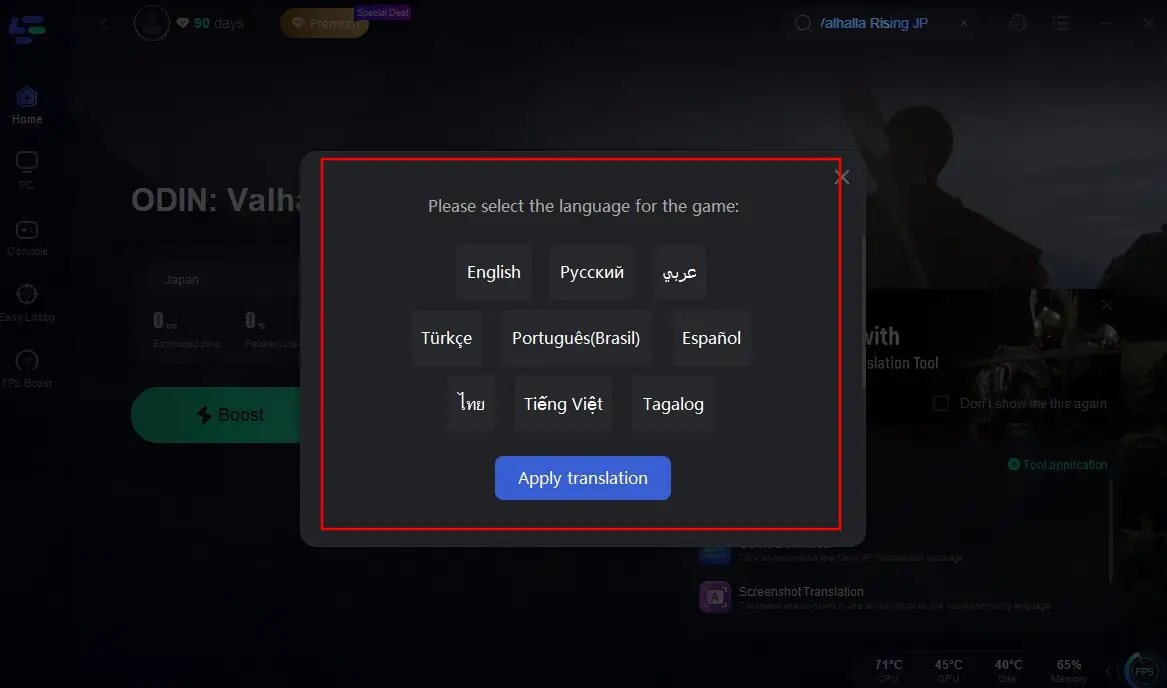
Step 6: Configure your target language, click "Apply Translation", and wait a moment to go back to the game with translated game interface!

Part 6: Enhance Odin: Valhalla Rising JP gaming experience with LagoFast
If you are tired of laggy battles, rubber-banding enemies, or sudden disconnects mid-raid in Odin: Valhalla Rising, then LagoFast must be your unsung hero in gamplay. It is a cutting-edge toolkit engineered to transform your gaming chaos into buttery, whether you're a competitive esports warrior or a casual explorer, LagoFast can turbocharge your connection, demolishe latency, and unlock gaming nirvana.
Key Features of LagoFast:
- Global Server Matrix: Tap into nodes worldwide, from Tokyo to Texas. Allow you to play Odin: Valhalla Rising on Japanese servers with <20ms ping or dominate NA-ranked matches from Asia.
- Packet Loss Shield: LagoFast's error-correction tech slashes packet loss to near-zero, ensuring every move lands flawlessly.
- Dynamic Path Optimization: LagoFast's AI-powered algorithm scouts the fastest possible route to game servers, bypassing ISP throttling and traffic jams in real time.
- User-Friendly: With its simple interface and one-click optimization feature, LagoFast is easy to use, even for those who aren't tech-savvy.
Follow the steps below to improve your game experience in Odin: Valhalla Rising JP:
Step 1: Download LagoFast for free and install on your advice.
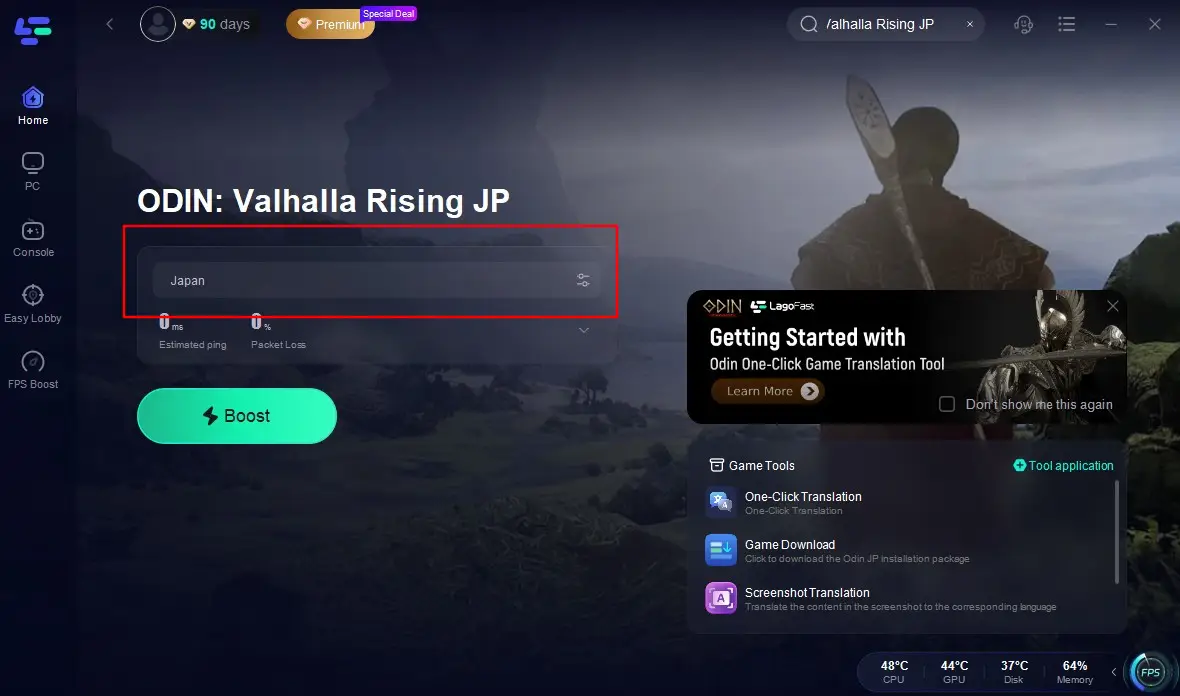
Step 2: Keep the changed Japanese time zone and IP. Search "Odin: Valhalla Rising JP" in the search bar, then click it.
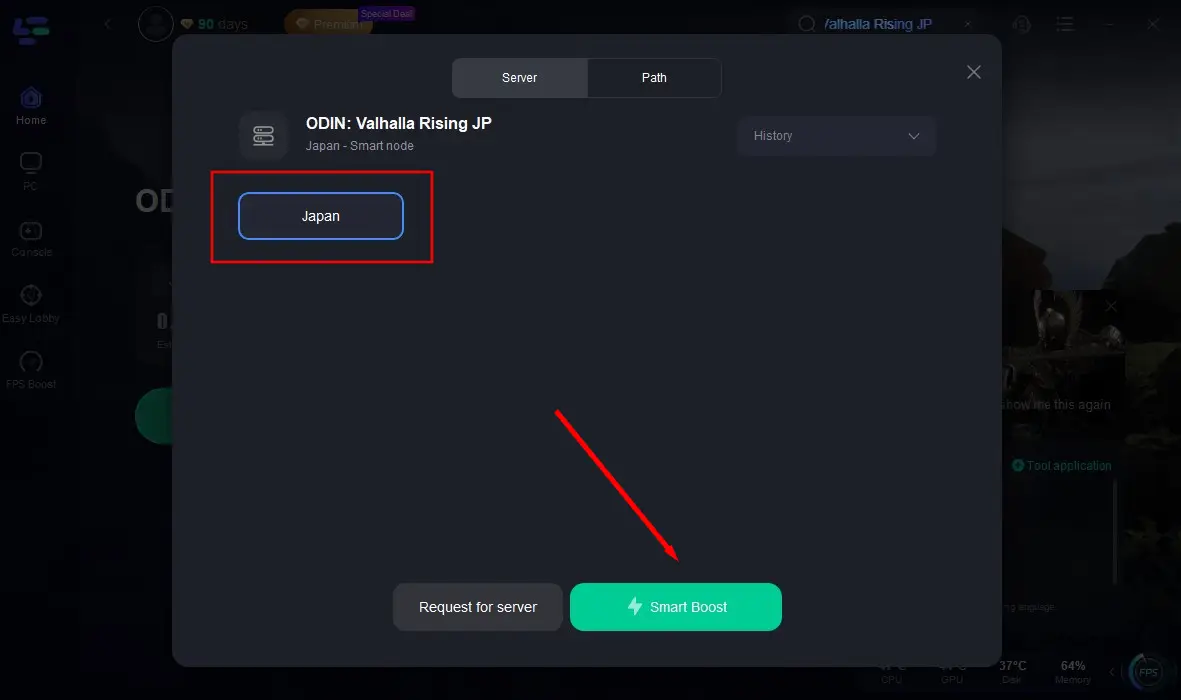
Step 3: Choose the JP server and node. Then click "Smart Boost". Then click "Smart Boost".
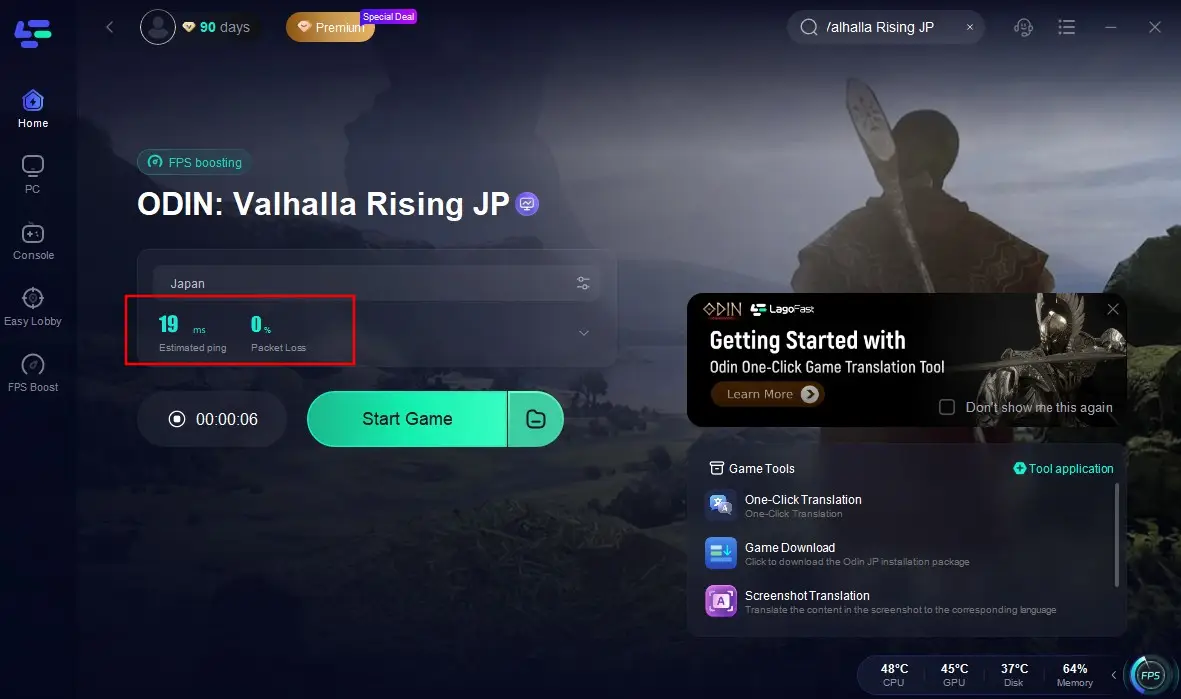
Step 4: Make sure the real-time ping and packet loss before you jump into the game world.
Conclusion
The Odin: Valhalla Rising Japan version exemplifies create a bridge between Nordic epicness and Japanese gaming culture. With its robust multilingual support, technical refinements, and cultural nods, it's a blueprint for global MMORPG success. Using LagoFast to dive in its legend world without any obstacle!

Boost Your Game with LagoFast for Epic Speed
Play harder, faster. LagoFast game booster eliminates stutter and lags on PC, mobile, or Mac—win every match!
Quickly Reduce Game Lag and Ping!
Boost FPS for Smoother Gameplay!